1. Киришүү
This manual provides instructions for the installation, operation, and maintenance of your RAM Mounts RAM-B-400-A-HOL-UN7BU. This product is a versatile mounting solution designed to securely hold smartphones and other handheld devices. It consists of a Tough-Claw rail clamp base, a short double socket arm, and a universal spring-loaded X-Grip cradle.
2. Пакеттин мазмуну
Төмөндө тизмеленген бардык компоненттер пакетиңизде бар экенин текшериңиз:
- RAM Tough-Claw Rail Clamp База
- RAM Short Double Socket Arm
- RAM X-Grip Universal Phone Cradle
- Device Tether (for outdoor applications)

Image: All components of the RAM-B-400-A-HOL-UN7BU mount, including the Tough-Claw base, short double socket arm, X-Grip cradle, and a safety tether.
3. Продукт бүтүп калдыview
The RAM-B-400-A-HOL-UN7BU is engineered for secure device retention in various environments. Key features include:
- Tough-Claw Base: Мыкты clamp designed for quick, tool-less installation and removal on round, square, or odd-shaped rails and bars. It accommodates diameters from 0.625" to 1.14".
- Double Socket Arm: Connects the Tough-Claw base to the X-Grip cradle, allowing for flexible positioning and angle adjustment. This model includes a short length arm.
- X-Grip Cradle: A spring-loaded, universal cradle that expands and contracts to provide a custom fit for your smartphone. It features rubber-coated tips for secure grip and easy access grip knobs for quick device insertion and release.

Image: A smartphone held firmly within the RAM X-Grip cradle, showcasing the rubber-coated gripping arms.
4. Орнотуу нускамалары
Follow these steps to assemble and install your RAM Mount:
- Attach X-Grip to Arm: Loosen the knob on the double socket arm. Insert one of the 1-inch rubber balls (from the X-Grip cradle) into one end of the double socket arm. Tighten the knob to secure.
- Attach Tough-Claw to Arm: Insert the 1-inch rubber ball of the Tough-Claw base into the other end of the double socket arm. Tighten the knob to secure.
- Mount the Tough-Claw: Identify a suitable mounting surface (e.g., handlebar, rail) with a diameter between 0.625" and 1.14". Open the jaws of the Tough-Claw by rotating the large knob. Position the Tough-Claw around the chosen surface and tighten the knob until the clamp бекем бекитилген жана кыймылдабайт.
- Позицияны тууралоо: Loosen the knob on the double socket arm to adjust the angle and orientation of the X-Grip cradle for optimal viewing. Once positioned, tighten the knob firmly.
- Install Device Tether: For added security, especially in outdoor or high-vibration environments, stretch the included device tether over the corners of your device once it is placed in the X-Grip.
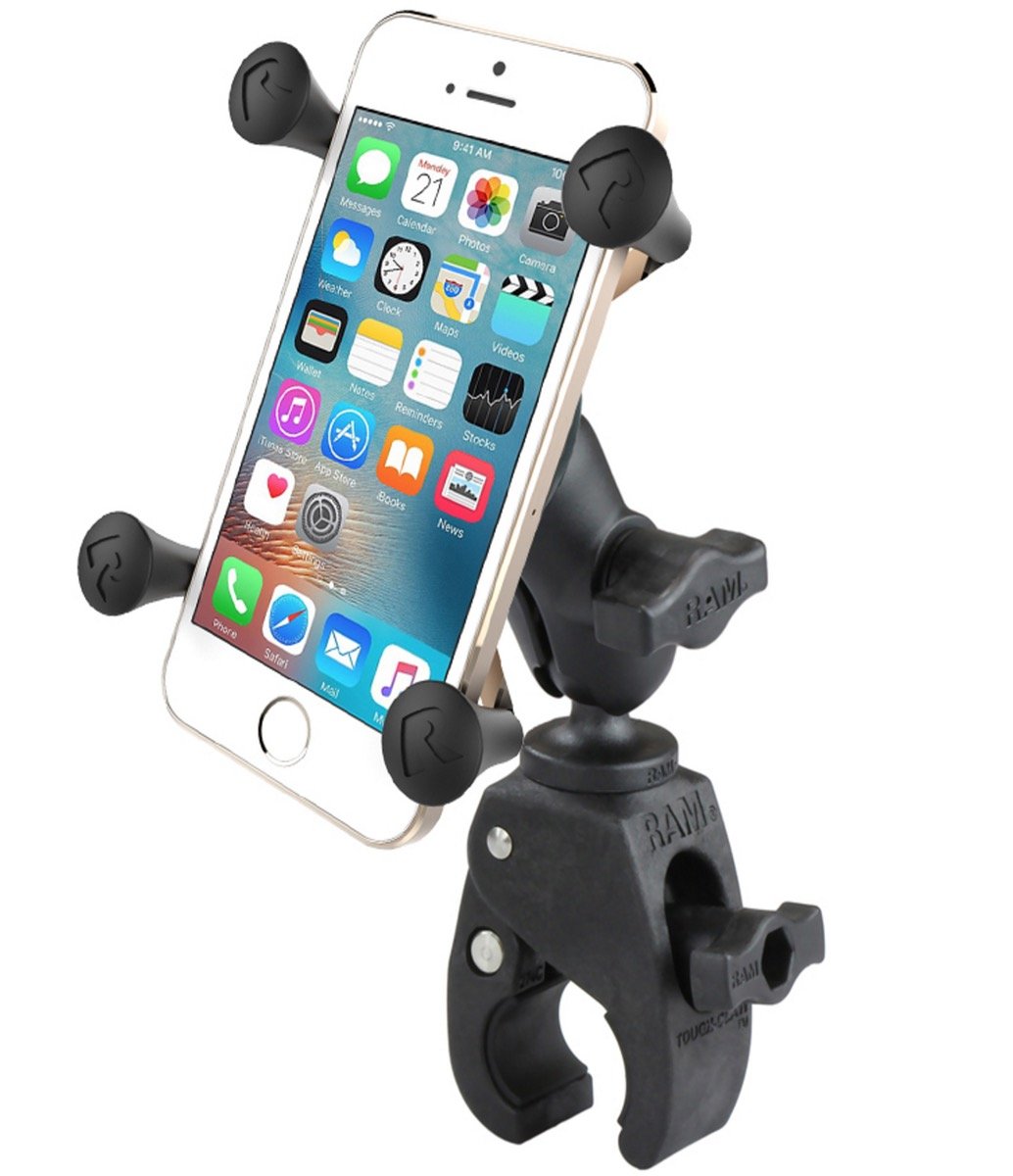
Image: The RAM X-Grip mount securely installed on a motorcycle handlebar, holding a smartphone in place.
5. Иштөө нускамалары
To use your RAM X-Grip mount:
- Inserting a Device: Gently pull back one of the spring-loaded arms of the X-Grip cradle. Carefully slide your smartphone or device into the cradle, ensuring all four rubber-coated tips securely grip the device. The spring mechanism will hold the device firmly.
- Түзмөктү алып салуу: Grasp your device firmly. Gently pull back one of the spring-loaded arms of the X-Grip cradle and lift the device out.
- Using the Safety Tether: If using the tether, stretch it over the corners of your device after it is placed in the X-Grip. This provides an additional layer of security against accidental dislodgement, particularly during vigorous activity or on rough terrain.

Image: A smartphone being inserted into the RAM X-Grip cradle, demonstrating the spring-loaded mechanism.
6. Техникалык тейлөө
Regular maintenance ensures the longevity and optimal performance of your RAM Mount:
- Тазалоо: Wipe down the mount components with a damp cloth to remove dirt and grime. Avoid harsh chemicals that may damage the rubber or plastic parts.
- Текшерүү: Periodically check all connections and knobs to ensure they are tight. Inspect the rubber tips of the X-Grip and the Tough-Claw for wear or damage. Replace any worn components as necessary.
- Майлоо: The moving parts of the Tough-Claw and the X-Grip are designed for maintenance-free operation. Do not apply lubricants unless specifically instructed by RAM Mounts support.
7. Кыйынчылыктарды
If you encounter issues with your RAM Mount, refer to the following:
- Түзмөк коопсуз эмес: Ensure the X-Grip arms are fully gripping your device. Verify that the device dimensions are within the compatible range for the X-Grip. Always use the safety tether for outdoor applications.
- Тайгаланып түшүү: Check that the Tough-Claw knob is tightened sufficiently. Ensure the mounting surface diameter is within the specified range (0.625" - 1.14"). Clean the mounting surface and the inside of the Tough-Claw jaws to remove any slippery residue.
- Arm Not Holding Position: Ensure the knob on the double socket arm is fully tightened. If the arm continues to slip, inspect the rubber ball ends and the socket for wear.
8. Техникалык шарттар
| Өзгөчөлүк | Спецификация |
|---|---|
| Модель номери | RAM-B-400-A-HOL-UN7BU |
| Элемент Салмагы | 9.2 унция |
| Tough-Claw Rail Diameter Range | 0.625" - 1.14" (1.59 см - 2.9 см) |
| Колдун узундугу | Short Double Socket Arm |
| Шайкеш түзмөктөр | Smartphones (e.g., Xperia L1) |
| Монтаж түрү | Handlebar, Rail, Bar |
| Өзгөчөлүктөр | Heat Resistant, Rust Resistant |
9. Кепилдик жана колдоо
RAM Mounts products are known for their durability and quality. For specific warranty information and customer support, please refer to the official RAM Mounts webсайтка же түздөн-түз кардарларды тейлөөгө кайрылыңыз. Сатып алганыңыздын далили катары сатып алуу дүмүрчөгүңүздү сактаңыз.