1. Продукт бүтүп калдыview
The Monoprice USB-C 3-Port USB 3.0 Hub and Gigabit Ethernet Adapter (Model 114503) is designed to expand the connectivity options for your USB-C enabled devices. This compact adapter integrates three high-speed USB 3.0 Type-A ports and one Gigabit Ethernet port, providing both data transfer capabilities and a stable wired network connection. It is compatible with a wide range of operating systems, including MacOS, Windows, and Chrome OS, offering a plug-and-play experience without the need for additional driver installations on most modern systems.
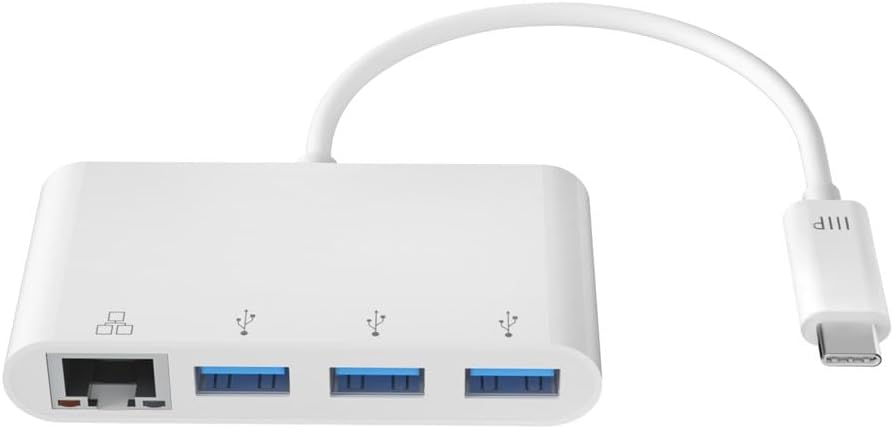
Image: Monoprice USB-C 3-Port USB 3.0 Hub and Gigabit Ethernet Adapter, showcasing the device with its integrated USB-C connector.
2. Кутуда эмне бар
- 1x Monoprice USB-C 3-Port USB 3.0 Hub and Gigabit Ethernet Adapter
3. Орнотуу
The Monoprice USB-C 3-Port USB 3.0 Hub and Gigabit Ethernet Adapter is designed for simple plug-and-play functionality. No drivers or software installations are typically required for Windows, MacOS, or Chrome OS.
- Хост түзмөккө туташуу: Адаптердин USB-C туташтыргычын ноутбук, планшет же смартфонуңуздагы жеткиликтүү USB-C портуна сайыңыз.
- Күч көрсөткүчү: A small LED indicator on the adapter will illuminate to confirm it is powered and ready for use.
- Перифериялык түзүлүштөрдү туташтыруу: You can now connect your USB devices (e.g., mouse, keyboard, flash drives, external hard drives) to the USB 3.0 Type-A ports.
- Тармакка туташуу: For a wired internet connection, plug an Ethernet cable from your router or modem into the Gigabit Ethernet port on the adapter.

Image: The adapter connected to a laptop, demonstrating simultaneous use of a USB flash drive and a wired Ethernet connection.
4. Иштөө нускамалары
USB 3.0 хабын колдонуу
The adapter features three USB 3.0 Type-A ports. These ports support data transfer speeds up to 5Gbps, making them suitable for connecting high-speed external peripherals such as external hard drives, SSDs, and high-resolution webcams. They can also be used for charging mobile devices, though charging speeds may vary depending on the device and power requirements.

Сүрөт: деталдуу view of the three USB 3.0 Type-A ports on the Monoprice adapter.
Using the Gigabit Ethernet Adapter
The integrated Gigabit Ethernet adapter provides a stable and high-speed wired network connection, supporting speeds up to 1000Mbps. This is ideal for activities requiring consistent bandwidth, such as online gaming, video conferencing, and large file transfers, offering superior security and speed compared to wireless connections.

Image: A close-up of the Gigabit Ethernet port on the Monoprice adapter.
5. Өзгөчөлүктөрү
- 3-порттук USB хабы: Adds three USB 3.0 Type-A ports, each capable of delivering data speeds up to 5Gbps, for connecting high-speed external peripherals and charging mobile devices.
- Wired Gigabit Ethernet: Enjoy the superior security and increased speeds of a wired Ethernet connection using the built-in Gigabit Ethernet Adapter.
- Plug & Play: A true Plug & Play device, no drivers or software installations are required to use the Gigabit adapter on a Windows or Mac OS X machine.
- Портативдик дизайн: Small and portable, you can easily slip this adapter into your laptop case and have it ready for use wherever and whenever the need arises.
- Кеңири шайкештик: Compatible with USB-C equipped laptops, such as the Apple MacBook and Google Chromebook, as well as the latest tablets, flash drives, and other smart devices.

Image: A diagram illustrating the various connections and devices that can be used with the Monoprice USB-C hub.
6. Техникалык шарттар
| Бренд | Моноприя |
| Модель номери | 114503 |
| Продукциянын өлчөмдөрү | 6 x 5 x 5 дюйм |
| Элемент Салмагы | 1.44 унция |
| Түс | Ак |
| Аппараттык интерфейс | USB 3.0 |
| Шайкеш түзмөктөр | Ноутбуктар, смартфондор, планшеттер |
| Маалыматтарды өткөрүү ылдамдыгы (USB) | 5 Гбит/сек чейин |
| Ethernet ылдамдыгы | Гигабит (1000Мбит/сек) |
7. Кыйынчылыктарды
- Ethernet аркылуу Интернет байланышы жок:
- Ethernet кабелинин адаптерге да, роутерге/модемге да бекем туташтырылганын текшериңиз.
- Verify that your host device's network settings recognize the wired connection.
- Компьютериңизди жана тармак жабдууларыңызды өчүрүп күйгүзүңүз.
- USB түзмөктөрү таанылбайт:
- Ensure the USB device is properly inserted into the adapter's USB 3.0 port.
- Try connecting the USB device directly to your computer's USB port to confirm it is functional.
- Some high-power USB devices may require an external power source, which this adapter does not provide.
- Wi-Fi Issues When Adapter is Connected:
- In some rare cases, particularly with certain MacOS versions, connecting an Ethernet adapter might disable Wi-Fi. Check your network preferences to ensure Wi-Fi is still enabled and prioritized correctly.
- Жай берилиштерди өткөрүү ылдамдыгы:
- Ensure you are using USB 3.0 compatible devices and cables to achieve maximum speeds.
- Verify your Ethernet cable is rated for Gigabit speeds (Cat5e or higher).
8. Техникалык тейлөө
- Тазалоо: Адаптерди тазалоо үчүн жумшак, кургак чүпүрөктү колдонуңуз. Суюк тазалоочу каражаттарды же эриткичтерди колдонбоңуз.
- Сактагыч: Адаптерди салкын, кургак жерде күндүн тике тийген нурунан жана экстремалдык температурадан алыс сактаңыз.
- Колдонуу: Avoid dropping the adapter or subjecting it to strong impacts. Do not bend the integrated cable excessively.

Image: The compact size of the adapter, emphasizing its portability for easy storage and travel.
9. Кепилдик жана колдоо
For detailed warranty information and technical support, please refer to the official Monoprice webсайтка же түздөн-түз кардарларды тейлөөгө кайрылыңыз. Кепилдик дооматтар үчүн сатып алуу дүмүрчөгүңүздү сактаңыз.


