Introduction
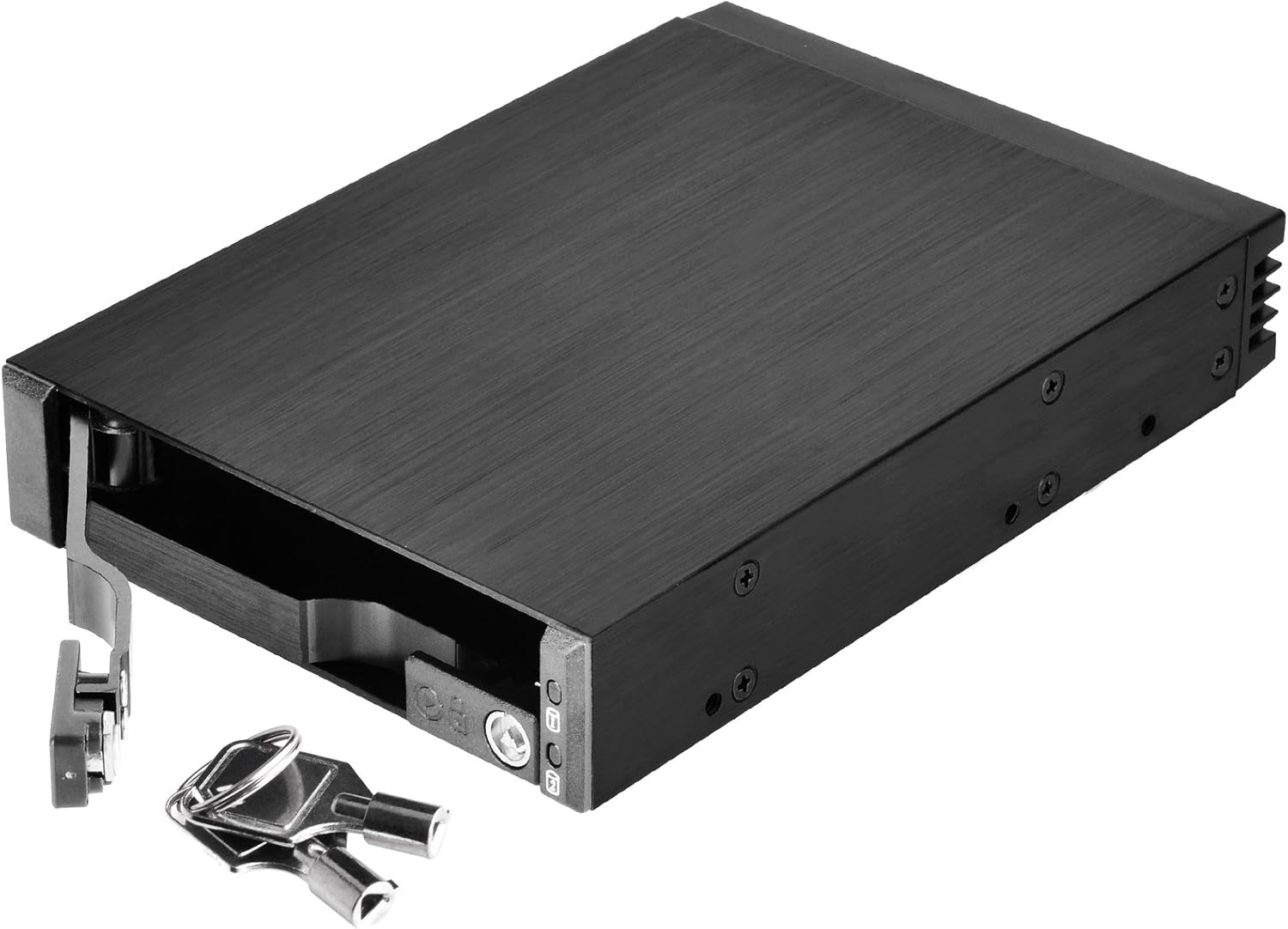
The SilverStone SST-FS202 is a versatile removable case designed to optimize space and convenience for computer users. This 3.5" device bay solution allows for the installation of two 2.5" SAS/SATA hard disk drives or solid-state drives. Featuring a durable aluminum construction and a hot-swap design, it provides easy drive management and enhanced data security with individual key locks for each drive.
Продукт өзгөчөлүктөрү
- Dual Drive Support: Accommodates two 2.5" SAS/SATA drives (HDD or SSD) within a single 3.5" device bay.
- Өркүндөтүлгөн коопсуздук: Features individual metal key locks for each drive bay, providing extra security for your data.
- Премиум курулуш: Constructed with an all-aluminum body and a refined hairline brushed finish for durability and aesthetics.
- Ыстык алмаштыруу функциясы: Fully supports SATA hot-swap, allowing drives to be inserted or removed without system shutdown.
- Trayless & Screwless Design: Simplifies drive installation and removal, eliminating the need for trays or screws.
- Independent Drive Status LED: Each drive bay includes an independent LED indicator to show power and access status.
- Жогорку маалымат берүү ылдамдыгы: Supports data transfer rates up to 6 Gbit/s (dependent on drive speed).
Пакеттин мазмуну
- 1x SilverStone SST-FS202 Removable Case
- 2x Keys for drive locks
- Монтаждоо бурамалар
- User Manual
Орнотуу & Орнотуу
1. Physical Installation into PC Case
- Identify an available 3.5" device bay in your computer case.
- Slide the SST-FS202 into the 3.5" bay until it is flush with the front panel.
- Secure the case using the provided mounting screws through the side screw holes into the drive bay.



2. Drive Installation (2.5" SAS/SATA HDD/SSD)
- Unlock the drive bay lever using the provided key and pull the lever outwards to open the bay.
- Gently slide your 2.5" SAS or SATA HDD/SSD into the open bay. Ensure the drive is oriented correctly so the connectors align with the backplane.
- Push the drive firmly until it seats completely into the connectors.
- Close the drive bay lever and lock it with the key for security.


3. Кабелдик байланыштар
- Connect the SATA data cables from the SST-FS202's rear ports to your motherboard's SATA ports.
- Connect the SATA power cable from your power supply unit (PSU) to the SST-FS202's rear power port.

Video 1: Demonstrates how to install and connect the SilverStone SST-FS202, including power and data cables.
Операция
- Күйгүзүү: Once connected, power on your computer. The drive status LEDs on the front panel will illuminate (blue for power, blinking blue for access).
- Hot-Swap: The SST-FS202 supports hot-swapping. To remove a drive, ensure it is safely ejected or unmounted from your operating system first. Then, unlock the bay with the key, pull the lever, and carefully slide the drive out.
- Inserting Drives: To insert a new drive, follow the drive installation steps outlined above. The system should detect the new drive automatically.

Техникалык тейлөө
- Keep the unit clean and free from dust to ensure optimal airflow and prevent overheating.
- Кабелдик байланыштарды дайыма текшерип туруңуз, алар коопсуз.
- Аппаратты экстремалдык температурага же нымдуулукка дуушар кылуудан алыс болуңуз.
Проблемаларды чечүү
| Көйгөй | Мүмкүн себеп | Чечим |
|---|---|---|
| Диск табылган жок. | Loose SATA data/power cables, drive not fully seated, BIOS/OS settings. | Ensure all cables are securely connected. Re-insert the drive firmly. Check your motherboard's BIOS settings for SATA port enablement and hot-swap support. Verify drive functionality in another system if possible. |
| LED индикаторлору күйбөй жатат. | No power to the unit, faulty drive. | Check the SATA power connection from the PSU. Ensure the drive is properly inserted and functional. |
| Drive not securely locked. | Lever not fully closed, key not turned. | Ensure the drive lever is pushed all the way in and the key is turned to the locked position. |
Техникалык шарттар
| Өзгөчөлүк | Деталь |
|---|---|
| Модель номери | SST-FS202 |
| Материал | Aluminum body, plastic front bezel |
| Drive колдоо | 2 x 2.5" SAS/SATA HDD or SSD |
| Device Bay | 1 x 3.5" device bay |
| Host Interface | 7-Pin SATA connector x 2 (for data) |
| Power Connector | SATA 15-Pin x 1 |
| Маалыматтарды өткөрүү ылдамдыгы | Up to 6 Gbit/s (dependent on drive speed) |
| Drive Door Security | Individual metal key lock design |
| LED көрсөткүч | Power On: Blue, Accessing: Blinking Blue |
| Таза Салмак | 0.22 кг (7.7 унция) |
| Өлчөмдөрү (LxWxH) | 146mm (D) x 101.5mm (W) x 25.4mm (H) / 5.75" x 4" x 1" |
| UPC | 04710007222492 |
For more detailed information, please visit the official product page: SilverStone SST-FS202 Product Page
Кепилдик жана колдоо
SilverStone products are designed for reliability and performance. For warranty information, technical support, or to register your product, please visit the official SilverStone webсайтка же кардарларды тейлөө бөлүмүнө кайрылыңыз.
You can also find more products and information at the SilverStone Amazon Store.


