1. Киришүү
Сатып алганыңыз үчүн рахматasing the PXN 6603 Bluetooth Gamepad. This MFi certified wireless game controller is designed to enhance your gaming experience on iOS devices, including iPhone, iPad, iPod, and Apple TV. Please read this manual carefully before use to ensure proper operation and to maximize the lifespan of your device.
2. Пакеттин мазмуну
Пакеттин мазмунун ачканда текшериңиз. Эгерде кандайдыр бир буюмдар жок же бузулуп калса, сатуучуга кайрылыңыз.
- PXN 6603 Bluetooth Gamepad
- Жөнгө салынуучу Clamp Кармоочу
- USB заряддоо кабели
- User Manual
3. Продукт бүтүп калдыview
Familiarize yourself with the various components of your PXN 6603 Gamepad.
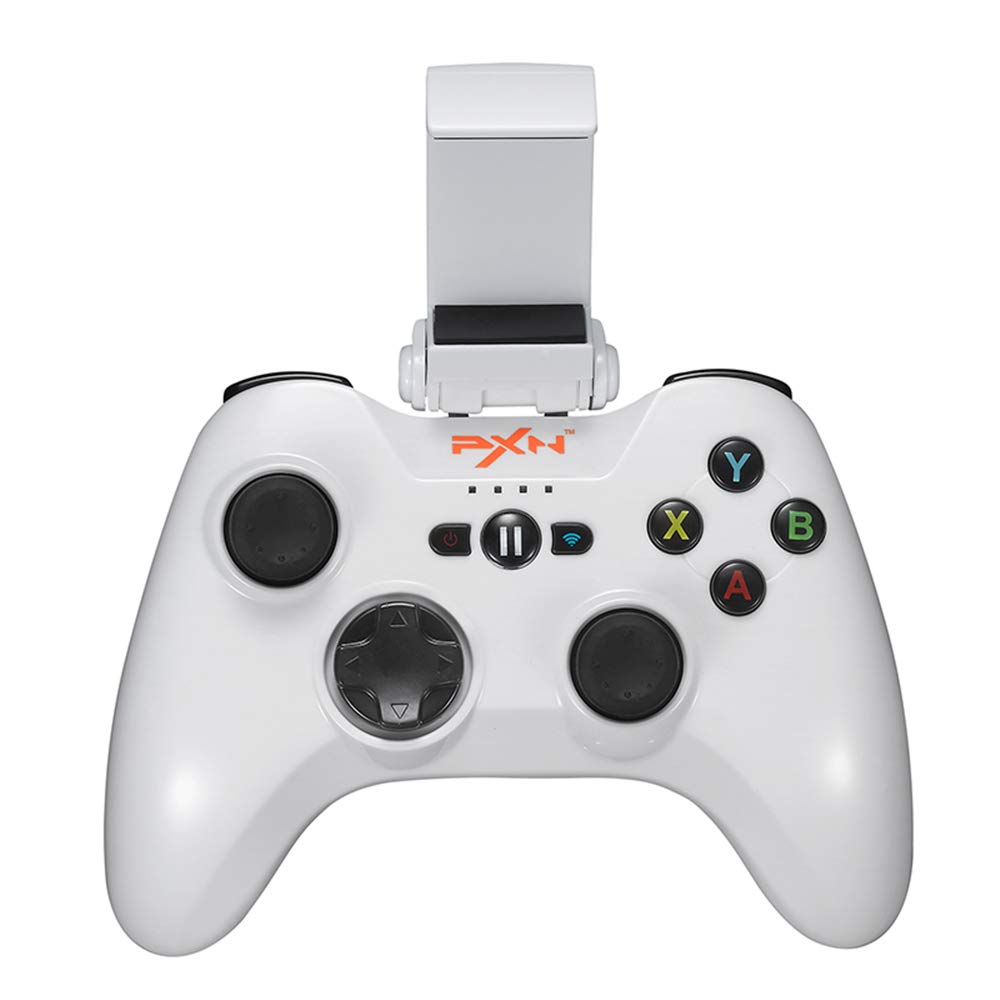
Сүрөт 1: PXN 6603 Bluetooth Gamepad. This image shows the front view of the orange gamepad with its dual analog sticks, D-pad, action buttons (A, B, X, Y), shoulder buttons (L1, R1, L2, R2), and the adjustable phone clamp holder attached.
3.1 Controller Layout
- Сол аналогдук таякча: багыт башкаруу үчүн.
- Оң аналогдук таякча: For camera or additional directional control.
- D-Pad (багыттоочу такта): Так багыт киргизүү үчүн.
- Аракет баскычтары (A, B, X, Y): Оюндагы аракеттер үчүн.
- Ийин баскычтары (L1, R1): Top triggers.
- Триггер баскычтары (L2, R2): Bottom triggers.
- Үй баскычы: Powers on/off the controller and returns to iOS home screen.
- ТЫНЫКТЫРУУ баскычы: Pauses gameplay.
- Батарея индикатор жарыктары: Shows battery status and connection.
- Заряддоо порту: Заряддоо үчүн микро USB порту.
4. Орнотуу
4.1 Контроллерди заряддоо
- Connect the small end of the USB charging cable to the charging port on the controller.
- USB кубаттоочу кабелдин чоң учун USB кубат булагына туташтырыңыз (мисалы, компьютердин USB порту, USB дубал адаптери).
- The battery indicator lights will show charging status. Once fully charged, the lights will indicate a full battery or turn off.
- Толук кубаттоо адатта болжол менен 2-3 саатты талап кылат.
4.2 Attaching the Adjustable Clamp Кармоочу
- Locate the slot on the top of the PXN 6603 Gamepad.
- Жөнгө салынуучу клди жылдырыңызamp holder onto the slot until it clicks securely into place.
- Adjust the angle of the holder as needed.
- Carefully place your iOS device into the clamp, ensuring it is held firmly without obstructing any buttons or ports.
4.3 Bluetooth Pairing with iOS Devices
- Контроллер заряддалганын текшериңиз.
- iOS түзмөгүңүздө төмөнкүгө өтүңүз: Орнотуулар > Bluetooth жана Bluetooth'ту күйгүзүңүз.
- басып, кармап туруңуз ҮЙ button on the PXN 6603 Gamepad for 3 seconds to power it on. The indicator lights will flash, indicating it is in pairing mode.
- On your iOS device, look for "PXN 6603" or a similar name in the list of available devices.
- Tap on "PXN 6603" to pair. The indicator lights on the controller will become solid, indicating a successful connection.
- Once paired, the controller will automatically connect to your iOS device when powered on and Bluetooth is enabled on the device.
5. Иштөө нускамалары
5.1 Күйгүзүү/өчүрүү
- Күйгүзүү: басып, кармап туруңуз ҮЙ баскычын 3 секунда басыңыз.
- Өчүрүү: басып, кармап туруңуз ҮЙ button for 5 seconds until the indicator lights turn off. The controller will also automatically power off after 10 minutes of inactivity to conserve battery.
5.2 Оюндарды ойноо
The PXN 6603 is an MFi certified controller, meaning it is designed to work seamlessly with games that support MFi controllers on iOS. Many games in the App Store will automatically detect and utilize the controller once connected.
- Launch a compatible game on your iOS device.
- The game should recognize the controller automatically. Refer to the game's settings for controller mapping or customization options.
5.3 Battery Status Indication
The LED indicator lights on the controller provide information about the battery status:
- Жаркылдаган LED'лер: Low battery or pairing mode.
- Solid LEDs: Connected and sufficient battery.
- Заряддоо: LEDs will cycle or show progress.
- Толугу менен заряддалган: LEDs will turn off or show a steady full indicator.
6. Техникалык тейлөө
6.1 Тазалоо
- Контроллердин бетин сүртүү үчүн жумшак, кургак чүпүрөктү колдонуңуз.
- өжөр кир үчүн, бир аз гampчүпүрөктү суу менен. Катуу химиялык заттарды же абразивдүү тазалагычтарды колдонбоңуз.
- Avoid getting liquid into the buttons, joysticks, or charging port.
6.2 Сактоо
- Контроллерди түз күн нурунан жана экстремалдык температурадан алыс салкын, кургак жерде сактаңыз.
- Башкаргычтын үстүнө оор буюмдарды коюудан алыс болуңуз.
- If storing for an extended period, charge the controller periodically (e.g., every 3 months) to maintain battery health.
6.3 Батареяга кам көрүү
- Ички батареяны өз алдынча алмаштырууга аракет кылбаңыз. Эгерде батарея менен көйгөйлөр жаралса, колдоо кызматына кайрылыңыз.
- Батареяны бат-баттан толук кубаттап коюудан качыңыз, анткени бул анын иштөө мөөнөтүн кыскартат.
- Берилген USB кубаттоо кабелин же тастыкталган эквивалентти гана колдонуңуз.
7. Кыйынчылыктарды
If you encounter issues with your PXN 6603 Gamepad, please refer to the following common solutions:
7.1 Контроллер туташуу эмес/жупташуу
- Батареяны текшерүү: Ensure the controller is sufficiently charged. Connect it to a power source.
- Bluetooth күйүк: iOS түзмөгүңүздө Bluetooth иштетилгенин текшериңиз.
- Кайра жупташтыруу: Go to your iOS device's Bluetooth settings, forget "PXN 6603" if it's listed, then attempt to pair again as described in Section 4.3.
- Түзмөктөрдү кайра иштетүү: Try restarting both your iOS device and the PXN 6603 controller.
- Интерференция: Тоскоолдукка алып келиши мүмкүн болгон башка зымсыз түзмөктөрдөн алыс болуңуз.
7.2 Баскычтар/Джойстиктер жооп бербейт
- Оюндун шайкештиги: Ensure the game you are playing supports MFi controllers. Not all games do.
- Кайра туташуу: Disconnect and reconnect the controller via Bluetooth.
- Кайра баштоо: Power off and on the controller, then restart the game.
- Физикалык тоскоолдук: Check for any debris or physical obstruction around the buttons or joysticks.
7.3 Заряддоо маселелери
- Кабель текшерүү: Ensure the USB charging cable is securely connected to both the controller and the power source. Try a different USB cable if available.
- Кубат булагы: Try a different USB power source (e.g., a different USB port on your computer or a different wall adapter).
- Порттун тазалыгы: Check the controller's charging port for any dust or debris.
8. Техникалык шарттар
| Модель номери | PXN-6603 |
| Байланыш | Bluetooth |
| Шайкештик | iOS (iPhone, iPad, iPod, Apple TV) |
| Өлчөмдөр | 7.09 x 5.79 x 3.11 дюйм |
| Салмагы | 1.1 фунт |
| Сертификация | MFi тастыктаган |
| Power Source | Rechargeable Battery (via USB) |
9. Кепилдик жана колдоо
PXN products are designed for reliability and performance. For specific warranty information, please refer to the warranty card included with your product or visit the official PXN webсайт. Сатып алуу квитанциясын кепилдик дооматтары үчүн сатып алуунун далили катары сактаңыз.
If you require technical support or have questions not covered in this manual, please contact PXN customer service through their official webсайт же продукт таңгагында көрсөтүлгөн байланыш маалыматы.


