1. Киришүү
The AJA V2Analog is a compact, high-quality mini-converter designed to convert HD/SD-SDI signals to analog component or composite video. This device is engineered for professional video workflows, providing reliable signal conversion for various applications.
Its versatility allows for complete integration into any workflow, making it a valuable asset in any video production environment.

1-сүрөт: алдыңкы жана каптал view of the AJA V2Analog Mini-Converter, highlighting input and output ports.
2. Коопсуздук маалыматы
Please read all safety instructions carefully before operating the device. Keep this manual for future reference.
- Аппаратты жамгырга, нымдуулукка же экстремалдык температурага дуушар кылбаңыз.
- Ашыкча ысып кетүүнүн алдын алуу үчүн туура желдетүүнү камсыз кылыңыз.
- Use only the specified power supply (5-20 VDC).
- Avoid dropping or subjecting the unit to severe impacts.
- Бардык тейлөөлөрдү квалификациялуу тейлөө кызматкерлерине тапшырыңыз.
3. Орнотуу жана байланыштар
Follow these steps to set up your AJA V2Analog converter:
- Кубат туташуу: Connect the appropriate power supply (5-20 VDC) to the "POWER" input on the converter.
- SDI киргизүү: Connect your HD/SD-SDI source to the "SDI IN" BNC connector.
- Аналогдук Чыгуу: Connect the Y/G, Pb/B, and Pr/R BNC outputs to your analog component or composite display/device. Ensure correct color component matching (Y/G for Luminance/Green, Pb/B for Blue Difference, Pr/R for Red Difference).
- USB туташуу (кошумча): For firmware updates or configuration, connect a USB cable from the "USB" port on the converter to your computer.
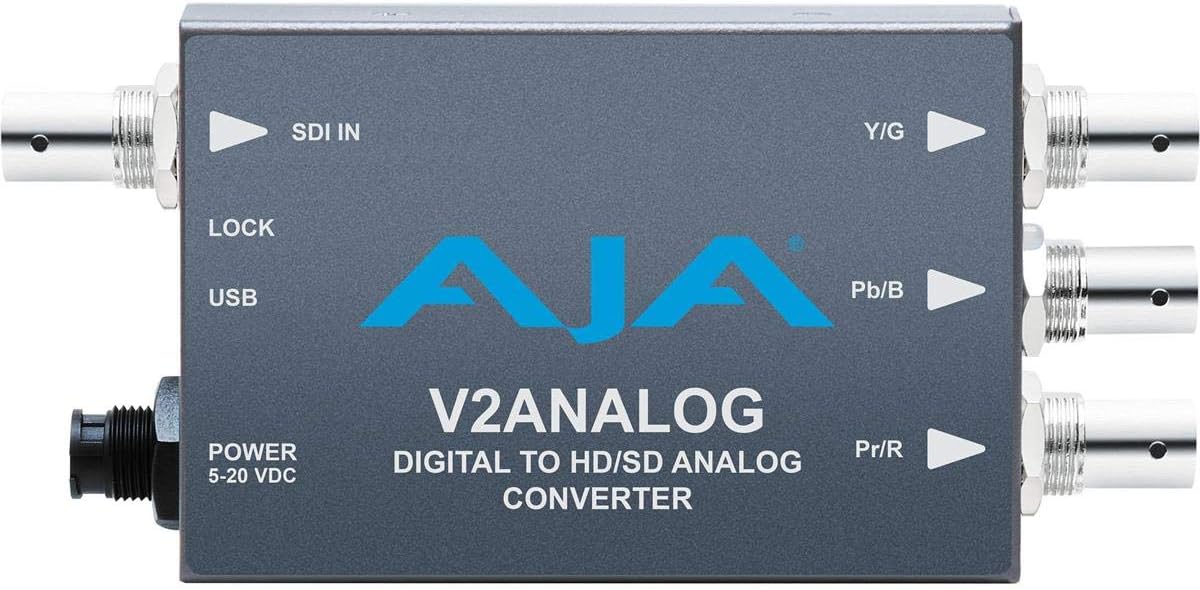
2-сүрөт: Жогорку view of the AJA V2Analog Mini-Converter, illustrating port labels for connection.
4. Иштөө нускамалары
Once all connections are made, power on the device. The V2Analog will automatically detect the incoming SDI signal format and convert it to the appropriate analog output. The "LOCK" LED indicator will illuminate when a stable SDI signal is detected and locked.
4.1. Signal Compatibility
The V2Analog supports various HD and SD SDI formats. It is designed to convert these digital signals to standard analog component (YPbPr) or composite (CVBS) outputs.
4.2. Configuration (Advanced)
Advanced configuration options, such as output format selection or color space adjustments, may be available via AJA's Mini-Config software, accessible through the USB port. Refer to the AJA webакыркы программалык камсыздоо жана толук конфигурациялоо көрсөтмөлөрү үчүн сайт.
5. Техникалык тейлөө
The AJA V2Analog is designed for reliable operation with minimal maintenance. Follow these guidelines:
- Тазалоо: Агрегаттын сыртын тазалоо үчүн жумшак, кургак чүпүрөктү колдонуңуз. Суюктук же аэрозолдук тазалоочу каражаттарды колдонбоңуз.
- Программалык камсыздоонун жаңыртуулары: Periodically check the AJA website for firmware updates. Keeping the firmware current ensures optimal performance and compatibility.
- Сактагыч: Узак мөөнөткө колдонулбаганда, аппаратты салкын, кургак жерде, тике күн нурунан жана өтө температурадан алыс сактаңыз.
6. Кыйынчылыктарды
If you encounter issues with your V2Analog, refer to the following common problems and solutions:
| Көйгөй | Мүмкүн себеп | Чечим |
|---|---|---|
| Видео чыгаруу жок | No power; Incorrect SDI input; Incorrect analog output connection; No signal lock. | Check power supply; Verify SDI source is active and connected to "SDI IN"; Ensure Y/G, Pb/B, Pr/R are connected correctly to display; Check "LOCK" LED. |
| Distorted or colored video | Incorrect analog output format; Loose connections. | Ensure display is set to correct input type (component/composite); Tighten all BNC connections. |
| "LOCK" LED not illuminated | No valid SDI input signal. | Verify SDI source is active and sending a compatible signal. Check SDI cable integrity. |
If the problem persists, contact AJA Technical Support for further assistance.
7. Техникалык шарттар
| Өзгөчөлүк | Деталь |
|---|---|
| Модел | V2ANALOG |
| Бренд | AJA |
| Киргизүү | HD/SD-SDI (BNC) |
| Чыгуу | Component (Y/G, Pb/B, Pr/R BNC), Composite (selectable) |
| Interface Type | USB, SDI, Component |
| Күч | 5-20 VDC |
| Өлчөмдөрү (L x W x Y) | 7.2 x 5.7 x 4.2 дюйм |
| Салмагы | 1.35 фунт |
| UPC | 091131246023 |
8. Колдоо жана кепилдик
For technical support, product registration, or warranty information, please visit the official AJA webсайтына кириңиз же алардын кардарларды тейлөө бөлүмүнө кайрылыңыз. Кепилдиктин конкреттүү шарттары жана шарттары аймакка жана сатып алуу күнүнө жараша өзгөрүшү мүмкүн.
AJA Webсайт: www.aja.com


