1. Introduction and Overview
The Vgate VS890 is a professional OBDII scan tool designed to diagnose engine system issues in vehicles. It provides comprehensive diagnostic functions, allowing users to read and clear diagnostic trouble codes (DTCs), view live data streams, and perform various system tests. This manual provides detailed instructions for the proper use and maintenance of your VS890 scan tool.

Figure 1.1: The Vgate VS890 OBDII Scan Tool, including the main unit, OBDII cable, USB cable, user manual, and carrying case.
2. Негизги өзгөчөлүктөрү
- LCD дисплей: 3-inch black mask LCD with wide visible area and high contrast, ensuring readability even in strong sunlight.
- Туруктуу турак-жай: Constructed from ABS+PC Engineer Plastic, designed to withstand a 6-meter free fall test. Features a rubber oil sprayed housing for resistance against slides, dirt, and vibrations.
- Сертификаттар: CE, FCC, RoHs Certified, ensuring compliance with international standards.
- Колдонуучу интерфейси: High-quality PET 6-key film keypad for intuitive navigation.
- DTC издөө: Supports manual input for Diagnostic Trouble Code lookup.
- Диагностикалык функциялар:
- Диагностикалык көйгөйлөрдүн коддорун (DTC) окуу
- DTCлерди тазалоо
- Data Stream display
- Freeze Frame data viewing
- I/M Даярдык абалын текшерүү
- O2 Monitor Test
- On-Board Mon Test
- Компоненттик тест
- Vehicle Information retrieval
- Modules Present identification
- Unit of Measure selection
- State Emission information
- Read All DTCs, Stored DTCs, and Pending DTCs
- Help Information: Provides detailed help information and is capable of showing probable causes for DTCs. Includes online help for up to 161 data items.
- MIL баштапкы абалга келтирүү: Ability to reset the engine Malfunction Indicator Lamp (MIL), which also erases all DTCs, freeze frame data, oxygen sensor data, and resets IM Monitors.
3. Колдоого алынган протоколдор
The Vgate VS890 supports a wide range of OBDII protocols, ensuring compatibility with most modern vehicles:
- SAE J1850 PWM
- SAE J1850 VPW
- ISO9141
- KWP FAST INIT
- KWP 5BAUD INIT
- CAN 11BIT 500K
- CAN 29BIT 500K
- CAN 11BIT 250K
- CAN 29BIT 250K
- CAN_USER1 11B 125K
- CAN_USER1 29B 125K
- CAN_USER2 11B 50K
- CAN_USER2 29B 50K
- Жаңы унаалар үчүн толук CAN BUS колдоосу (11 биттик жана 29 биттик CAN)
- Capable of communicating with multi-ECU Systems.
4. Пакеттин мазмуну
Пакетти ачкандан кийин, төмөндө көрсөтүлгөн нерселердин бардыгы бар экенин жана жакшы абалда экендигин текшериңиз:
- 1x Vgate VS890 OBDII Scan Tool (Main Unit)
- 1x J1962 OBDII Cable (120cm)
- 1x USB кабели
- 1x Колдонуучунун колдонмосу
- 1x Ташуу кутусу

Figure 4.1: Contents of the Vgate VS890 package, showing the scan tool, cables, manual, and case.
5. Орнотуу жана туташуу
Follow these steps to set up and connect your Vgate VS890 scan tool to your vehicle:
- OBDII портун табыңыз: The OBDII (On-Board Diagnostics II) port is typically located under the dashboard on the driver's side of the vehicle. Refer to your vehicle's owner's manual if you cannot locate it.
- OBDII кабелин туташтырыңыз: Plug the 16-pin connector of the J1962 OBDII cable into the vehicle's OBDII port. Ensure a secure connection.
- Connect to Scan Tool: Connect the other end of the OBDII cable (DB15 connector) to the corresponding port on the Vgate VS890 scan tool.
- Күйгүзүү: Turn the vehicle's ignition to the "ON" position (do not start the engine). The scan tool will automatically power on and display the main menu.

Figure 5.1: The Vgate VS890 connected to a vehicle's OBDII port, ready for diagnostic operations.

5.2-сүрөт: Детальдуу view of the OBDII connector, which plugs into the vehicle's diagnostic port.
6. Иштөө нускамалары
The VS890 features a user-friendly interface navigated via its 6-key keypad. The main menu provides access to all diagnostic functions.
6.1. Негизги меню навигациясы
колдонуу UP жана ылдый arrow keys to scroll through menu options. Press the ООБА button to select an option or confirm an action. Press the ЖОК мурунку экранга кайтуу же аракетти жокко чыгаруу үчүн баскычты басыңыз.
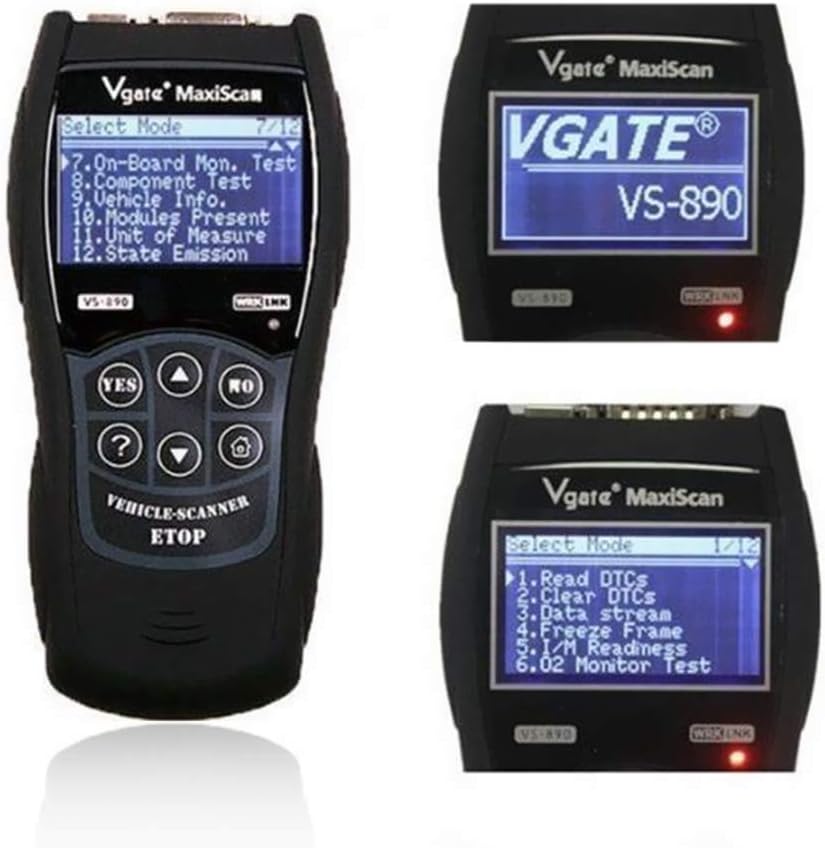
Figure 6.1: Various screen displays of the Vgate VS890, showing main menu, system setup, and language selection options.
6.2. Диагностикалык функциялар
- DTCлерди окуңуз: Select "Diagnostics" from the main menu, then "Read DTCs" to retrieve current, pending, and permanent diagnostic trouble codes from the vehicle's ECU. The tool will display the code and a brief description.
- DTCлерди тазалоо: After addressing the underlying issue, select "Clear DTCs" to erase all diagnostic trouble codes, freeze frame data, and reset the Malfunction Indicator Lamp (МИЛ). Эскертүү: Do not clear DTCs without resolving the underlying problem, as this may mask issues.
- Маалымат агымы: View live data parameters from the vehicle's sensors and modules in real-time. This can help in diagnosing intermittent issues.
- Фреймди тоңдуруу: Чыгарууларга байланыштуу ката кеткенде, ЭБУ ката болгон учурда унаанын белгилүү бир иштөө шарттарын жазып алат. Бул маалыматтар "Тоңдуруу кадрынын маалыматтары" деп аталат.
- I/M даярдыгы: Check the readiness status of various emission-related monitors. This is useful for preparing for emission tests.
- O2 монитор тести: Retrieve O2 sensor monitor test results for the most recently completed tests.
- On-Board Mon Test: Retrieve test results for emission-related powertrain components and systems that are not continuously monitored.
- Компоненттик тест: Allows initiation of a leak test for the vehicle's EVAP system. (Note: Availability may vary by vehicle model).
- Унаа маалыматы: Retrieve the Vehicle Identification Number (VIN), Calibration ID (CALID), and Calibration Verification Number (CVN) of the test vehicle.
- Бар болгон модулдар: Displays the communication protocols and modules detected by the scan tool.
6.3. Системаны орнотуу
From the main menu, select "System Setup" to configure tool settings:
- Артыкчылык: Adjust general settings.
- Adjust Contrast: Modify the display contrast for better visibility.
- Ченөө бирдиги: Switch between Metric and Imperial units.
- Өзүн-өзү сыноо: Perform a self-test of the scan tool.
- Тил: Select the desired operating language for the tool.
7. Техникалык тейлөө
Proper maintenance ensures the longevity and reliable operation of your Vgate VS890 scan tool.
- Тазалоо: жумшак колдонуу, damp cloth to clean the exterior of the tool. Do not use abrasive cleaners or solvents.
- Сактагыч: Store the tool in its original carrying case in a dry, cool environment when not in use. Avoid extreme temperatures and direct sunlight.
- Кабельге кам көрүү: Handle the OBDII and USB cables carefully. Do not bend or crimp them excessively, as this can damage internal wiring.
- Программалык камсыздоо жаңыртуулары: Please note that this model (VS890) does not support software updates. The manufacturer's website may contain outdated or non-functional update links.
- Колдонуучу тейлей турган бөлүктөр жок: The VS890 contains no user-serviceable parts. Do not attempt to open or repair the device yourself, as this will void the warranty.
8. Кыйынчылыктарды
If you encounter issues while using your Vgate VS890, refer to the following common troubleshooting tips:
| Көйгөй | Мүмкүн болгон себеп / Чечим |
|---|---|
| Курал күйбөйт. |
|
| "Шилтеме катасы" же "Байланыш катасы" билдирүүсү. |
|
| DTCлерди тазалоо мүмкүн эмес. |
|
| Tool does not work on my specific car model (e.g., Audi TT, Nissan 350Z). |
|
| Incorrect or misleading diagnostic results (e.g., "ECU malfunction" when it's a coil pack). |
|
9. Техникалык шарттар
| Спецификация | Деталь |
|---|---|
| Модел | VS890 |
| Өндүрүүчү | Vgate |
| Продукциянын өлчөмдөрү (Негизги бирдик) | 190mm × 93mm × 30mm (approx. 15 x 12 x 10 cm as per product data) |
| LCD дисплей | 128 × 64 Black Mask LCD |
| Көрүнүүчү View Area (LCD) | 67мм × 40мм |
| OBDII Cable Length | 120см |
| Бирдик Салмагы | 198g (Tool only) |
| Кабель Салмагы | 116г |
| Gross Weight (with package) | 490г |
| Турак жай материалы | ABS+PC Engineer Plastic with rubber oil spray |
| Сертификаттар | CE, FCC, RoHs |
| Колдоого алынган протоколдор | SAE J1850 PWM, SAE J1850 VPW, ISO9141, KWP FAST INIT, KWP 5BAUD INIT, CAN (11BIT/29BIT, 500K/250K/125K/50K) |
10. Кепилдик жана колдоо
Vgate products are manufactured to high-quality standards. For specific warranty information, please refer to the warranty card included with your product or contact the retailer from whom you purchased the device. For technical support or inquiries, please contact Vgate customer service through their official channels or the seller's support contact information.
Кепилдик дооматтары үчүн сатып алуунун далили катары сатып алуу дүмүрчөгүңүздү сактап коюңуз.


