Introduction
The Power Acoustik PL-51B is a single-DIN in-dash digital audio receiver designed to enhance your in-vehicle audio experience. This unit features Bluetooth connectivity for hands-free calling and wireless audio streaming, along with multiple media playback options including USB, SD card, and AUX input. Its mechless design ensures durability by eliminating moving parts associated with CD players.
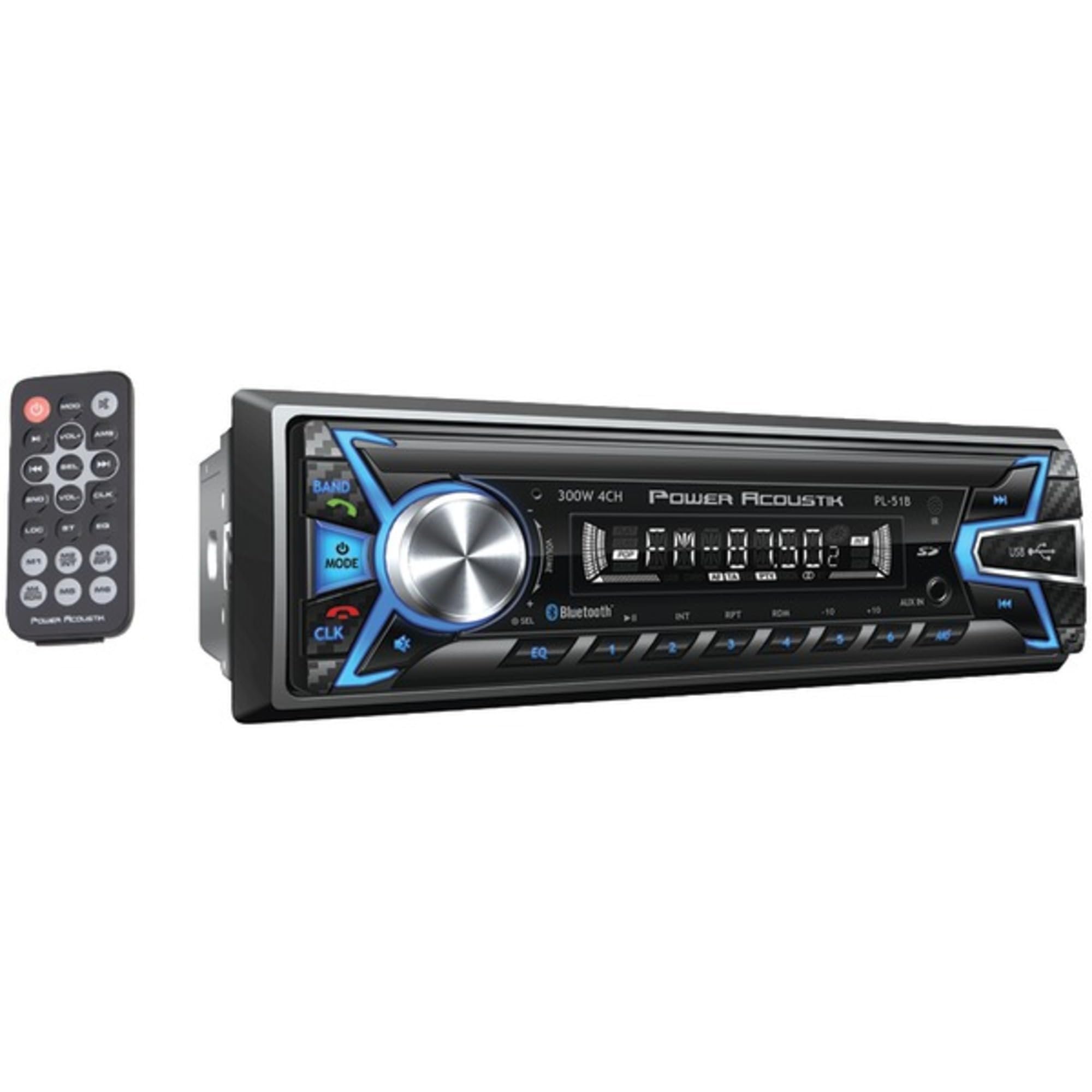
Figure 1: Power Acoustik PL-51B Digital Audio Head Unit and included remote control.
Негизги өзгөчөлүктөрү
- Single-DIN In-Dash Design: Standard size for easy integration into most vehicle dashboards.
- Mechless Receiver: No moving parts for increased durability and reliability.
- Bluetooth v3.0: Supports hands-free calling and A2DP wireless MP3 audio playback.
- Бир нече медиа киргизүү: MP3 & MP4 playback from 32GB SD Card/USB.
- ID3 MP3 Tag Окуу: Displays track and artist information for compatible MP3 files.
- Theft-Deterrent: Detachable faceplate for added security.
- AM/FM тюнер: Integrated radio tuner for broadcast reception.
Орнотуу жана орнотуу
Installation of the PL-51B unit requires basic automotive electrical knowledge. It is recommended to have the unit professionally installed if you are unfamiliar with car audio wiring.
1. Зымдарды туташтыруу
Refer to the wiring diagram provided in the included installation guide for specific connections. Key connections typically include:
- Күч: Туруктуу 12V (Сары), Кошумча 12V (Кызыл), Жерге туташтыруу (Кара).
- Баяндамачылар: Connect speaker wires to the corresponding positive (+) and negative (-) terminals for each speaker (Front Left, Front Right, Rear Left, Rear Right).
- Антенна: Унаанын антенна кабелин блоктун антенна киришине туташтырыңыз.
- Алыстан күйгүзүү: (Blue) for external ampкөтөргүчтөр же электр антенналары.
2. Агрегатты монтаждоо
The PL-51B is a single-DIN chassis size. Secure the unit into the vehicle's dashboard using the provided mounting sleeve and hardware. Ensure all connections are made before fully securing the unit.
3. Detachable Faceplate
The faceplate is detachable for theft deterrence. To attach, align the faceplate with the main unit and gently push until it clicks into place. To detach, press the release button (usually labeled "REL" or similar) and pull the faceplate away.
Иштөө нускамалары
1. Негизги башкаруу элементтери
- Күйгүзүү/өчүрүү: басыңыз РЕЖИМ button briefly to turn the unit on. Press and hold to turn off.
- Үндү көзөмөлдөө: Үн деңгээлин тууралоо үчүн чоң борбордук баскычты айландырыңыз.
- Режим тандоо: басыңыз РЕЖИМ button repeatedly to cycle through available audio sources (FM, AM, Bluetooth, USB, SD, AUX).
- Band/AMS: Радио режиминде, басыңыз BAND/AMS to switch between FM1, FM2, FM3, and AM bands. Press and hold for Automatic Memory Store (AMS) to scan and save strong stations.
- Track Skip/Search: колдонуу >> | жана |< buttons to skip tracks in media playback or tune radio frequencies.
2. Bluetooth операциясы
The PL-51B supports Bluetooth v3.0 for hands-free calling and wireless audio streaming.
- Жупташтыруу:
- Мобилдик түзмөгүңүздө Bluetooth иштетилгенин текшериңиз.
- Select "Bluetooth" mode on the head unit. The unit will typically display "BT PAIRING" or similar.
- On your mobile device, search for available Bluetooth devices and select "PL-51B" (or similar name).
- If prompted, enter the pairing code (usually "0000").
- Once paired, the unit will display "BT CONNECTED".
- Hands Free Чалуу:
- When a call comes in, the unit will display the caller ID (if supported).
- басыңыз Жооп button (often a green phone icon) on the unit or remote to accept the call.
- басыңыз Чакырууну аяктоо button (often a red phone icon) to end the call.
- Аудио агымы (A2DP):
- Once paired, select "Bluetooth" mode.
- Start playing audio on your mobile device. The audio will stream wirelessly to the head unit.
- Use the unit's controls or your phone to play/pause and skip tracks.
3. USB/SD картаны ойнотуу
The unit supports MP3 and MP4 playback from USB drives and SD cards up to 32GB.
- Insert a USB drive into the USB port or an SD card into the SD card slot.
- The unit will automatically switch to USB or SD mode and begin playback.
- колдонуу >> | жана |< тректерди өтүү үчүн баскычтар.
- The unit supports ID3 MP3 tag reading, displaying track and artist information on the LCD.
4. AUX киргизүү
Connect external audio devices (e.g., MP3 players, smartphones without Bluetooth) using a 3.5mm audio cable to the AUX input jack on the front panel.
- Connect your device to the AUX input.
- Select "AUX" mode on the head unit.
- Control playback directly from your connected device.
5. FM/AM радиосу
- Select "FM" or "AM" mode using the РЕЖИМ баскычы.
- колдонуу >> | жана |< buttons for manual tuning or seek.
- Басыңыз BAND/AMS to cycle through FM1, FM2, FM3, and AM bands. Press and hold to automatically scan and store strong stations.
Видео 1: Продукт бүттүview - Demonstrates the unit's features and interface.
Техникалык тейлөө
- Тазалоо: Use a soft, dry cloth to clean the unit's faceplate and display. Avoid abrasive cleaners or solvents.
- Алынып турган бет: Regularly detach and reattach the faceplate to ensure proper contact and functionality. Store the faceplate in a protective case when removed from the vehicle.
- Программалык камсыздоонун жаңыртуулары: Check the Power Acoustik webСиздин моделиңиз үчүн жеткиликтүү микропрограмма жаңыртуулары үчүн сайтка мезгил-мезгили менен кириңиз.
Проблемаларды чечүү
| Көйгөй | Мүмкүн себеп | Чечим |
|---|---|---|
| Күч жок | туура эмес зымдар; күйгөн сактагыч; Унаанын аккумулятору маселеси. | Check all power connections (Yellow, Red, Black). Inspect the unit's fuse and replace if necessary. Verify vehicle battery voltage. |
| Үн жок | Incorrect speaker wiring; Volume too low; Mute activated; Incorrect audio source. | Динамиктин туташууларын текшериңиз. Үнүн катуулатыңыз. Үнсүз режимди өчүрүңүз. Туура аудио булагын тандаңыз. |
| Bluetooth туташпай жатат | Түзмөк жупташтыруу режиминде эмес; Туура эмес жупташтыруу коду; Тоскоолдук. | Ensure Bluetooth is enabled on both devices and in pairing mode. Re-enter pairing code. Move closer to the unit. Reset Bluetooth settings on both devices. |
| USB/SD Card Not Reading | Колдоого алынбайт file format; Corrupted media; Incompatible storage size. | камсыз кылуу files are MP3/MP4 format. Reformat media or try a different USB/SD card. Max capacity is 32GB. |
| Radio Static/Poor Reception | Weak signal; Antenna not connected properly; Interference. | Антенна байланышын текшериңиз. Күчтүү станцияга күүлөнүп көрүңүз. Электрдик кийлигишүү булактарынан алыс болуңуз. |
Техникалык шарттар
- Модел: PL-51B
- Бренд: Power Acoustik
- Шасси өлчөмү: Single-DIN
- Дисплей түрү: LCD
- Элемент Салмагы: 1.1 фунт
- Продукциянын өлчөмдөрү: 4.5 x 7.25 x 2 дюйм
- Байланыш технологиясы: Көмөкчү, Bluetooth
- Өзгөчөлүктөр: Built-In Bluetooth, FM Tuner, Detachable Face
- Эстутум картасынын слоту: SD карта (32 ГБ чейин)
- Колдоого алынган медиа ойнотуу: MP3, MP4
- Туташтыргыч түрү: 3.5 мм уяча, USB
- Аудио чыгаруу режими: Стерео
- Көлөмдүү үн каналынын конфигурациясы: 4.0
- Түсү: Кара
Кепилдик жана колдоо
The Power Acoustik PL-51B comes with a 1 жылдык өндүрүүчүнүн кепилдиги. For warranty claims, technical support, or additional product information, please refer to the contact details provided in your product packaging or visit the official Power Acoustik webсайт.


