1. Киришүү
The Brydge 7.9 Keyboard is designed to enhance the functionality of your iPad Mini (2019) or iPad Mini 4, transforming it into a versatile laptop-like device. This keyboard features a full QWERTY layout with backlit keys and dedicated iOS function keys, providing a comfortable and efficient typing experience. Constructed from 100% high-grade aluminum, it offers durability and a premium aesthetic that complements your iPad.
The patented hinges allow for a 180-degree viewing angle, securing your iPad in various positions. The keyboard connects wirelessly via Bluetooth and can be easily detached when not needed. Its slim and lightweight design ensures portability without compromising on build quality.

This manual provides detailed instructions for setting up, operating, and maintaining your Brydge 7.9 Keyboard.
2. Коопсуздук маалыматы
- Баскычтопту суюктуктарга же экстремалдык температурага тийгизбеңиз.
- Avoid dropping or subjecting the keyboard to severe impacts.
- Балдар жетпеген жерде сактаңыз.
- Берилген заряддоо кабелин же тастыкталган эквивалентти гана колдонуңуз.
- Do not attempt to disassemble or repair the keyboard yourself. This may void the warranty.
3. Кутуда эмне бар
- Brydge 7.9 Keyboard
- USB заряддоо кабели
- Колдонуучунун Колдонмосу (бул документ)
4. Орнотуу
4.1 iPad тиркеңиз
- Ensure your iPad Mini (2019) or iPad Mini 4 is clean and free of debris.
- Gently align the iPad with the hinges of the Brydge keyboard.
- Carefully slide the iPad into the hinges until it is securely seated. The hinges are designed to hold the iPad firmly.

4.2 Баскычтопту заряддоо
Before initial use, fully charge your Brydge keyboard. Connect the provided USB charging cable to the charging port on the keyboard and the other end to a USB power adapter (not included) or a computer's USB port. The charging indicator light will show the charging status.
4.3 Bluetooth жупташтыруу
- Кубат баскычын басып, Brydge клавиатурасын күйгүзүңүз.
- iPad'иңизден төмөнкүгө өтүңүз Орнотуулар > Bluetooth.
- iPad'иңизде Bluetooth иштетилгенин текшериңиз.
- On the Brydge keyboard, press and hold the Bluetooth key (often indicated by a Bluetooth symbol) for a few seconds until the Bluetooth indicator light flashes.
- On your iPad, select 'Brydge Keyboard' from the list of available devices.
- Follow any on-screen prompts to complete the pairing process. The indicator light on the keyboard will turn solid to confirm a successful connection.
5. Баскычтопту иштетүү
5.1 General Typing
The Brydge 7.9 Keyboard provides a full QWERTY layout for comfortable and efficient typing. Keys offer a responsive tactile feedback.
5.2 Арткы жарыктандырылган баскычтар
The keyboard features backlit keys with three adjustable brightness levels. To adjust the backlight, press the dedicated backlight key (often indicated by a sun or light bulb icon) repeatedly to cycle through the brightness settings or turn the backlight off.
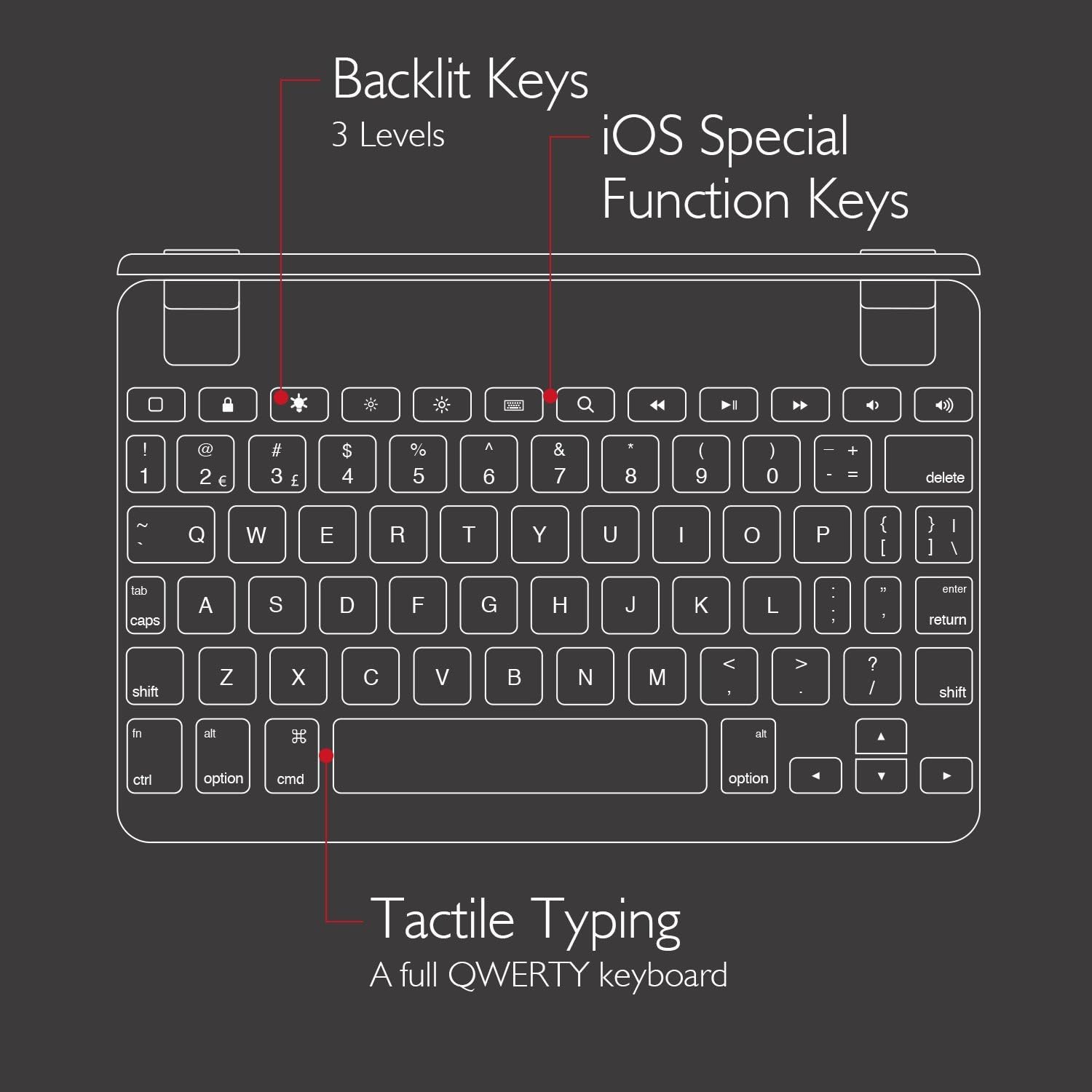
5.3 iOS Special Function Keys
The top row of the keyboard includes dedicated iOS special function keys for quick access to common iPad features, such as:
- Башкы экран
- Экрандын жарыктыгын жөндөө
- издөө
- Медиа ойнотууну башкаруу элементтери (ойнотуу/тындыруу, кийинки/мурунку трек)
- Үндү көзөмөлдөө
- Кулпу экраны

5.4 180-Degree Viewing and Detachable Design
The keyboard's patented hinges allow the iPad to rotate up to 180 degrees, offering various viewing angles for typing, watching media, or presenting. The iPad can also be easily removed from the hinges if you prefer to use it as a standalone tablet.

6. Техникалык тейлөө
6.1 Тазалоо
- Клавиатураны тазалоо үчүн жумшак, мамыксыз чүпүрөктү колдонуңуз.
- өжөр белгилери үчүн, бир аз гampчүпүрөктү суу же жумшак, абразивдүү тазалагыч менен жууп салыңыз.
- Тазалоочу каражаттарды түздөн-түз клавиатурага чачуудан алыс болуңуз.
- Ensure the keyboard is completely dry before use or charging.
6.2 Сактоо
When not in use, store the keyboard in a cool, dry place away from direct sunlight and extreme temperatures. If storing for an extended period, ensure the keyboard has a partial charge (around 50%) to preserve battery health.
7. Кыйынчылыктарды
7.1 Баскычтоп Bluetooth аркылуу туташпай жатат
- Баскычтоптун күйгүзүлгөнүн жана толук заряддалганын текшериңиз.
- iPad'иңизде Bluetooth иштетилгенин текшериңиз.
- iPad'иңиздин Bluetooth жөндөөлөрүнөн клавиатураны ажыратып, кайра жупташып көрүңүз.
- iPad'ыңызды да, Brydge клавиатураңызды да өчүрүп-күйгүзүңүз.
- Move the keyboard closer to your iPad to rule out interference.
7.2 Ачкычтар жооп бербейт
- Баскычтоп туура Bluetooth аркылуу туташтырылганын текшериңиз.
- Баскычтоп кубатталганын текшериңиз.
- If specific keys are not working, try cleaning around the keys to remove any debris.
- Perform a hard reset on the keyboard (refer to manufacturer's website for specific instructions if needed, as this model may not have a dedicated reset button).
7.3 Арткы жарык иштебейт
- Ensure the keyboard is sufficiently charged, as low battery can disable backlighting.
- Жарыктык деңгээлдерин өзгөртүү үчүн арткы жарык баскычын басыңыз.
8. Техникалык шарттар
| Бренд | Бридж |
| Модель номери | BRY5103 |
| Шайкеш түзмөктөр | iPad Mini (2019), iPad Mini 4 |
| Байланыш технологиясы | Bluetooth |
| Keyboard Description | Зымсыз |
| Өзгөчөлүктөр | Backlit, Rechargeable, 180-degree rotating hinges, Detachable |
| Материал | 100% High-Grade Aluminum |
| Түс | Gold (as per product listing, other colors may vary) |
| Элемент Салмагы | Болжол менен 11 унция (312 грамм) |
| Продукциянын өлчөмдөрү (LxWxH) | 7.9 x 5.3 x 0.3 дюйм (20.07 x 13.46 x 0.76 см) |
| Power Source | Батарея менен иштейт (1 литий-иондук батарейка камтылган) |

9. Кепилдик жана колдоо
9.1 Кепилдик маалыматы
Specific warranty details for your Brydge 7.9 Keyboard may vary by region and retailer. Please refer to the warranty card included with your product or visit the official Brydge webакыркы кепилдик маалымат үчүн сайт.
9.2 Кардарларды колдоо
For technical assistance, troubleshooting, or general inquiries, please contact Brydge customer support through their official website. You may also find additional resources, FAQs, and support articles online.


