1. Киришүү
This manual provides essential instructions for the proper setup, operation, and maintenance of your Mitel Aastra 612D Handset with Charger Base. Please read this manual thoroughly before using the device to ensure optimal performance and safety.
2. Продукт бүтүп калдыview
The Mitel Aastra 612D is a robust cordless DECT handset designed for professional communication environments. It features a clear display, intuitive keypad, and comes with a dedicated charger base for convenient power management.
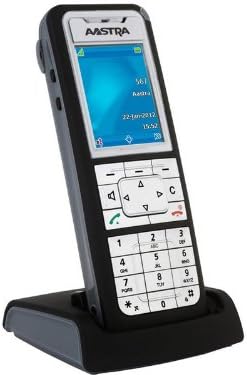
Figure 1: Mitel Aastra 612D Handset and Charger Base. The image displays the Aastra 612D cordless handset docked in its black charger base. The handset features a monochrome display showing 'AASTRA', '567', 'Aara', '22-Jan-2012', and '15:52'. Below the screen is a navigation cluster, function keys, and a standard numeric keypad with '0' through '9', '*', and '#' keys. The handset is primarily dark gray with a silver faceplate.
3. Орнотуу
3.1 Пакеттен чыгаруу
- Бардык компоненттерди таңгактан кылдаттык менен алып салыңыз.
- Verify that all items listed in the package contents are present.
- Таңгакты келечекте ташуу же сактоо үчүн сактаңыз.
3.2 Телефонду заряддоо
- Connect the power adapter to the charger base and plug it into a power outlet.
- Place the handset firmly into the charger base. Ensure the charging contacts align.
- The handset display or an indicator light will confirm charging status.
- Allow the handset to charge for at least 8-12 hours before initial use to ensure full battery capacity.
3.3 Баштапкы күйгүзүү
- After charging, remove the handset from the base.
- Press and hold the power button (if applicable) or a designated key to turn on the handset.
- Тил тандоо же дата/убакыт жөндөөлөрү сыяктуу баштапкы орнотуу үчүн экрандагы бардык сунуштарды аткарыңыз.
4. Иштөө нускамалары
4.1 Чалуу
- Ensure the handset is powered on and registered to your system.
- Ариптакта аркылуу каалаган телефон номерин териңиз.
- Press the green call key (often marked with a phone icon) to initiate the call.
- Чакырууну аяктоо үчүн, кызыл чакыруу баскычын басыңыз.
4.2 Чакырууга жооп берүү
- When the handset rings, press the green call key to answer.
- Alternatively, if the auto-answer feature is enabled, simply lifting the handset from the charger base may answer the call.
4.3 Меню Навигациясы
- Use the navigation keys (up, down, left, right) to scroll through menu options on the display.
- Press the 'OK' or 'Select' key (often the center key of the navigation cluster) to confirm a selection.
- Press the 'Back' or 'Cancel' key to return to the previous menu or exit a function.
5. Техникалык тейлөө
5.1 Тазалоо
To clean the handset and charger base, use a soft, dry, lint-free cloth. For stubborn dirt, slightly dampen the cloth with water. Do not use harsh chemicals, cleaning solvents, or abrasive materials, as these can damage the device. Ensure no moisture enters openings.
5.2 Батареяга кам көрүү
To prolong battery life, avoid exposing the handset to extreme temperatures. If the handset will not be used for an extended period, store it in a cool, dry place. Replace the battery when its performance significantly degrades.
6. Кыйынчылыктарды
This section addresses common issues you might encounter with your Mitel Aastra 612D Handset.
| Көйгөй | Чечим |
|---|---|
| Телефон күйгүзүлбөйт. | Ensure the battery is correctly inserted and fully charged. Place the handset on the charger base for several minutes. |
| Терүү үнү жок. | Verify the handset is registered to the base station. Check the connection of the charger base to the power outlet and the telephone system. |
| Чалуу сапаты начар же статикалык. | Move closer to the base station to improve signal strength. Check for sources of interference (e.g., other electronic devices). |
| Телефон заряддалбай жатат. | Ensure the charger base power adapter is securely connected. Clean the charging contacts on both the handset and the base with a dry cloth. |
7. Техникалык шарттар
| Өзгөчөлүк | Деталь |
|---|---|
| Модель номери | 80E00011AAA-A |
| Продукциянын өлчөмдөрү | 10 x 10 x 6 дюйм |
| Элемент Салмагы | 4 фунт |
| ASIN | B01DJT69CG |
| Өндүрүүчү | Aastra |
| Дата биринчи жеткиликтүү | 1-ноябрь, 2013-жыл |
8. Кепилдик маалыматы
This product is covered by a standard manufacturer's warranty. Please refer to the warranty card included with your purchase or contact your vendor for specific terms and conditions. Keep your proof of purchase for warranty claims.
9. Колдоо
For technical assistance, further information, or if you encounter issues not covered in this manual, please contact your product supplier or Mitel customer support. You may find additional resources, FAQs, and software updates on the official Mitel webсайт.


