1. Киришүү
This manual provides detailed instructions for the setup, operation, and maintenance of your Enover TS18 7-Day Programmable Digital Timer. This device is designed to automate the control of electrical appliances by setting specific ON/OFF times throughout the week, offering convenience and energy management.
2. Продукциянын өзгөчөлүктөрү
- Ийкемдүү график: Program up to 10 distinct ON/OFF cycles within a 7-day period. Each program repeats weekly.
- Энергияны башкаруу: Automatically controls lamps, holiday lights, humidifiers, and other electrical devices. Includes a feature to protect devices from overcharge.
- Security Function: Features a random ON/OFF option to vary lighting times, simulating occupancy when away from home.
- Колдонуучуга ыңгайлуу интерфейс: Equipped with a large LCD display for clear visibility and a manual override switch for immediate control adjustments.
- Батареянын камдык көчүрмөсү: An integrated battery retains programmed settings during power outages, eliminating the need for reprogramming.

Image: Enover TS18 Digital Timer highlighting key features for easy home automation.
3. Пакеттин мазмуну
Пакет төмөнкү нерселерди камтыйт:
- 1 x Enover Digital Timer Switch (Model TS18)
- 1 x User Manual

Image: Contents of the Enover TS18 Digital Timer package, including the timer and manual.
4. Продукт бүтүп калдыview
The Enover TS18 Digital Timer features a clear LCD display and intuitive buttons for easy programming. It plugs directly into a standard electrical outlet.

Сүрөт: алдыңкы view of the Enover TS18 Digital Timer, displaying the time and control buttons.
Баскыч функциялары:
- ЖУМА: Sets the day(s) for programs.
- HOUR: Adjusts the hour for time and program settings.
- МИНУТ: Adjusts the minute for time and program settings.
- RES/RCL: Resets or recalls settings.
- СААТ: Саатты орнотуу режимине кирет же чыгат.
- ТАЙМЕР: Cycles through program settings (P1 ON, P1 OFF, P2 ON, etc.).
- КҮЙГҮЗҮҮ/АВТО/ӨЧҮРҮҮ: Иштөө режимин тандайт (Ар дайым КҮЙҮК, Автоматтык, Ар дайым ӨЧҮК).
- КОКУС: Activates or deactivates the random ON/OFF function.
- КАЛТЫРУУ: Small button (requires a pointed object) to clear all settings and reset the device.
Video: A brief demonstration of the Enover Digital Timer's basic functions and display.
5. Орнотуу
5.1 Баштапкы төлөм
Before first use, plug the timer into an electrical outlet for approximately 5-10 minutes to charge the internal battery. This ensures the display is active and settings can be retained.
5.2 Учурдагы убакытты жана күндү орнотуу
- басып, кармап туруңуз СААТ баскычы.
- Кармап жатканда СААТ, басыңыз ЖУМА button repeatedly to set the current day of the week.
- Кармап жатканда СААТ, басыңыз HOUR button repeatedly to set the current hour (AM/PM will display).
- Кармап жатканда СААТ, басыңыз MINUTE Учурдагы мүнөттү коюу үчүн баскычын кайра-кайра басыңыз.
- бошотуңуз СААТ орнотууларды сактоо үчүн баскыч.
6. Иштөө нускамалары
6.1 КҮЙГҮЗҮҮ/ӨЧҮРҮҮ ЦИКЛДЕРИН ПРОГРАММАЛОО
The timer allows for up to 10 ON/OFF programs. Follow these steps to set a program:
- басыңыз ТАЙМЕР баскычын бир жолу басыңыз. Дисплейде "1 ON" көрсөтүлөт.
- Басыңыз ЖУМА to select the day(s) for this program (e.g., MO, TU, WE, TH, FR, SA, SU, MO TU WE TH FR, SA SU, MO TU WE TH FR SA SU, etc.).
- Басыңыз HOUR каалаган КҮЙГҮЗҮҮ саатын коюу үчүн.
- Басыңыз MINUTE каалаган КҮЙГҮЗҮҮ МҮНӨТҮН коюу үчүн.
- басыңыз ТАЙМЕР баскычын кайра басыңыз. Дисплейде "1 OFF" көрсөтүлөт.
- Repeat steps 2-4 to set the desired OFF time for Program 1. Ensure the correct day(s) are selected for the OFF time.
- Басууну улантыңыз ТАЙМЕР to cycle through and set additional programs (2 ON, 2 OFF, up to 10 ON, 10 OFF).
- Бардык керектүү программаларды орноткондон кийин, баскычын басыңыз СААТ Учурдагы убакытты көрсөтүүгө кайтуу үчүн баскычты басыңыз.
- Таймердин күйүп турганын текшериңиз АВТО mode for programs to execute. Press ON/AUTO/OFF велосипед тебүү АВТО.
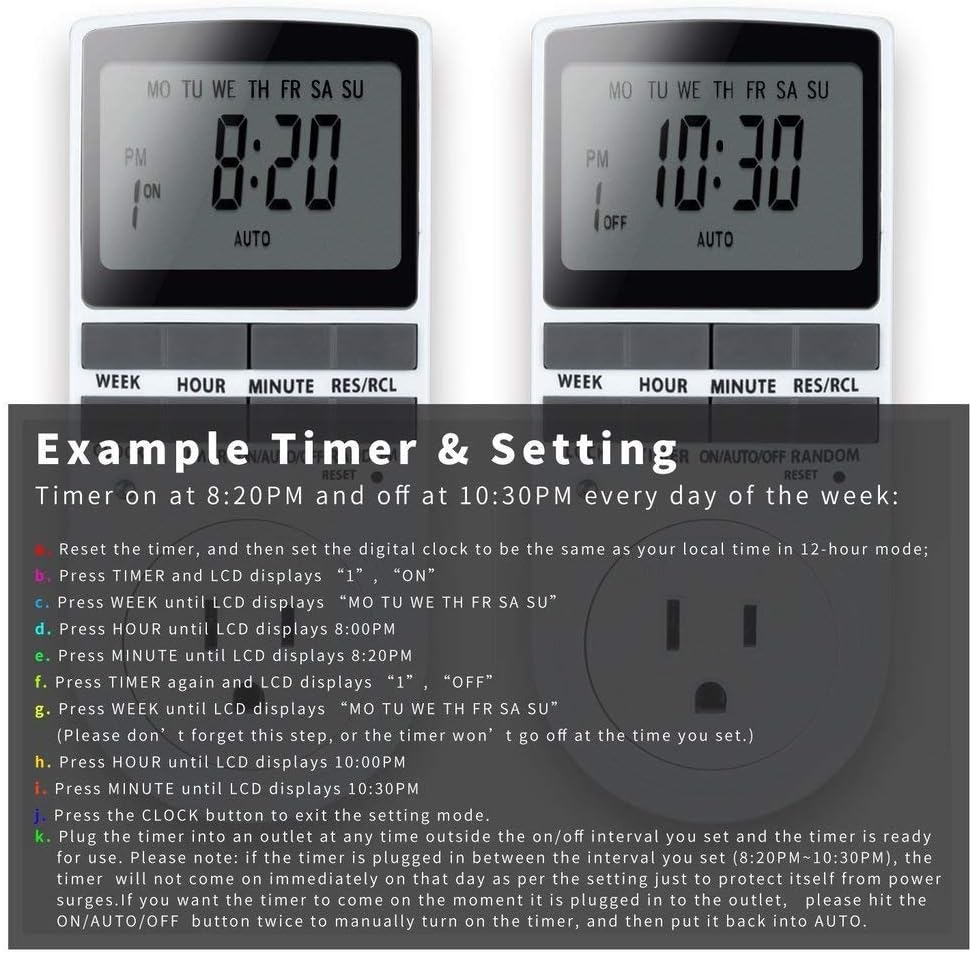
Image: Visual guide for setting an example timer program (ON at 8:20 PM, OFF at 10:30 PM daily).
6.2 Random Function (Anti-theft)
To activate the random ON/OFF feature:
- басыңыз RANDOM button. The word "RANDOM" will appear on the display.
- In random mode, the timer will turn ON and OFF at varying times within a set period, typically around the programmed ON/OFF times, to simulate occupancy.
- Өчүрүү үчүн басыңыз RANDOM кайра баскычын.

Image: The anti-theft random feature of the Enover TS18 Digital Timer, designed to deter intruders.
6.3 Кол менен жокко чыгаруу
To manually switch the timer's output without affecting programmed settings:
- басыңыз ON/AUTO/OFF режимдер арасында айлануу үчүн баскыч: ON (ар дайым күйүк), АВТО (follows programs), ӨЧҮРҮҮ (always off).
- Select the desired temporary mode. The timer will revert to АВТО mode at the next programmed ON/OFF event.
Video: A detailed demonstration of setting programs and using the manual override function on the Enover Digital Timer.
7. Тиркемелер
The Enover TS18 Digital Timer can be used to automate various household devices, enhancing convenience and energy efficiency.
- Coffee Makers: Program your coffee maker to start brewing before you wake up.
- Aquarium Lights/Pumps: Automate the lighting and filtration cycles for your aquarium.
- Indoor Grow Lights: Maintain consistent light schedules for plants.
- Майрамдык жасалгалар: Set festive lights to turn on and off automatically.
- Fans/Humidifiers: Control environmental devices to operate only when needed.

Сүрөт: Мисamples of automating daily routines with the Enover TS18 Digital Timer, such as a coffee maker and aquarium.
8. Техникалык шарттар
| Модель номери | TS18 |
| Бренд | Enover |
| Түс | Ак |
| Материал | Пластик |
| Орнотуулардын саны | 10 (КҮЙГҮЗҮҮ/ӨЧҮРҮҮ программалары) |
| Тtage | 120 вольт |
| Ватtage | 1800 ватт |
| AmpErac Capacity | 15 Amps |
| Орнотуу ыкмасы | Плагин |
| Монтаж түрү | Plug In Mount |
| Plug Format | B - жерге туташтыргычы бар АКШ стили |
| Өзгөчөлүктөр | 3-wire grounded plug and 3-prong grounded outlet |
| Колдонуу | Үй ичинде гана колдонуу |
| Элемент Салмагы | 6.4 унция |
| Пакеттин өлчөмдөрү | 5.67 x 3.31 x 2.6 дюйм |
| Батарея клеткасынын түрү | NiMH |
| Батареянын иштөө мөөнөтү | 100 days (backup) |
9. Кыйынчылыктарды
- Таймер программалангандай күйбөй/өчпөй жатат:
- Таймердин күйүп турганын текшериңиз АВТО режими.
- Учурдагы убакыт жана күн туура коюлганын текшериңиз.
- Check that the ON and OFF times for the specific program are correctly entered and assigned to the desired days.
- Confirm the appliance connected to the timer is switched ON.
- Дисплей бош же күңүрт:
- Plug the timer into an active electrical outlet for 5-10 minutes to charge the internal battery.
- All settings lost after power outage:
- The internal battery may not be sufficiently charged. Ensure the timer is regularly plugged in to maintain battery charge.
- To clear all settings:
- Use a pointed object (like a pen tip) to press the RESET button. This will clear all programs and reset the clock. You will need to re-enter all settings.
10. Кепилдик жана колдоо
For warranty information or technical support, please refer to the contact details provided on the product packaging or the official Enover webсайт. Кепилдик дооматтары үчүн сатып алуу дүмүрчөгүңүздү сактаңыз.


