1. Киришүү
This manual provides comprehensive instructions for the Xerox Color C60 Press Digital Laser Production Printer. It covers essential information regarding the setup, operation, maintenance, and technical specifications of this high-volume digital press, which offers print, copy, and scan functionalities. Designed for commercial printing, in-house printing, and publishing environments, the Xerox Color C60 is engineered to enhance output capabilities, color quality, and overall efficiency.
Please read this manual thoroughly to ensure proper use and to maximize the performance and longevity of your device.
2. Продукт бүтүп калдыview

1-сүрөт: Фронт view of the Xerox Color C60 Press Digital Laser Production Printer. This image displays the main unit with its integrated control panel on the left, multiple paper input trays at the bottom, and the output tray at the top.
The Xerox Color C60 is a versatile digital production printer designed for demanding print environments. It integrates multiple functions including printing, copying, and scanning, and comes standard with a 5PB Integrated Fiery Color Server for advanced color management.
Негизги өзгөчөлүктөрү:
- Print, Copy, Scan functionality
- Up to 65 pages per minute (ppm) print speed
- High print resolution of up to 2400 x 2400 dpi
- Multiple paper trays for a total standard capacity of 3,260 sheets
- Supports various paper sizes up to 13" x 19" (SRA3+)
- Integrated Fiery Color Server for professional color output
- Автоматтык дуплекс басып чыгаруу
3. Орнотуу нускамалары
3.1 Пакеттен чыгаруу жана жайгаштыруу
- Ensure the printer is placed on a stable, level surface capable of supporting its weight (approximately 604 pounds).
- Remove all packaging materials, including any internal shipping restraints. Refer to the packing list for all included components: the Xerox Color C60 unit, power cord, and any initial consumables.
- Агрегаттын айланасында жетиштүү желдетүүнү камсыз кылыңыз.
3.2 Кубат туташтыруу
- Connect the provided power cord to the printer's power inlet.
- Plug the other end of the power cord into a grounded electrical outlet. The printer requires 110-127 VAC, 50/60 Hz.
- Принтердин кубаттуулук талаптарына ылайык келбесе, узарткыч зымдарды же кубат тилкелерин колдонбоңуз.
3.3 Network and Driver Installation
- Connect the printer to your network using an Ethernet cable. The printer supports Ethernet connectivity.
- For driver installation, visit the official Xerox support website. Drivers are downloadable from the manufacturer's webсайт.
- Follow the on-screen instructions provided by the driver installer for your operating system.
4. Иштөө нускамалары
4.1 Кагазды жүктөө
The Xerox Color C60 features multiple paper trays and a bypass tray.
- Main Trays (2 x 500 sheets): Open the designated tray, fan the paper stack, and load it with the print side facing down (or as indicated by the tray guide). Adjust the paper guides to fit the paper size.
- Tandem Tray (840 sheets + 1140 sheets): For higher capacity, load paper into the tandem trays following the same procedure as the main trays.
- Bypass Tray (250 sheets): Use for special media, envelopes, or smaller quantities of paper. Load paper face up, adjusting guides.
The printer supports paper sizes from 5.5" x 7.2" up to 13" x 19" (A3+/SRA3/A3/A4/A5).
4.2 Негизги басып чыгаруу
- Компьютериңизден басып чыгаргыңыз келген документти ачыңыз.
- Тандоо Басып чыгаруу колдонмонун менюсунан.
- Choose the "Xerox Color C60" printer from the list of available printers.
- Мүмкүнчүлүк Принтердин касиеттери or Preferences to configure print settings such as:
- Paper Size and Type
- Color or Black & White
- Single-sided or Duplex (two-sided) printing
- Көчүрмөлөрдүн саны
- Output tray selection
- Click Басып чыгаруу тапшырманы принтерге жөнөтүү үчүн.
4.3 Документтерди көчүрүү
- Place your original document face down on the scanner glass or face up in the automatic document feeder (ADF).
- Принтердин башкаруу панелинен тандаңыз Көчүрүү функция.
- Adjust settings such as:
- Көчүрмөлөрдүн саны
- Color or Black & White
- Кеңейтүү/кичирейтүү
- Two-sided copying
- Сүрөттүн сапаты жөндөөлөрү
- басыңыз Баштоо көчүрүүнү баштоо үчүн баскычты басыңыз.
4.4 Документтерди сканерлөө
The Xerox Color C60 features a flatbed scanner.
- Түпнуска документиңизди сканер айнегине же ADFке коюңуз.
- Принтердин башкаруу панелинен тандаңыз Скандоо функция.
- Каалаган сканерлөө көздөгөн жериңизди тандаңыз (мисалы, Электрондук почтага сканерлөө, Папкага сканерлөө, USBге сканерлөө).
- Configure scan settings such as:
- Резолюция
- Color Mode (Color, Grayscale, Black & White)
- File Format (e.g., PDF, JPEG, TIFF)
- Two-sided scanning
- басыңыз Баштоо скандоону баштоо үчүн баскыч.
5. Техникалык тейлөө
5.1 Сарпталуучу материалдар
The Xerox Color C60 uses four toner cartridges: Black, Cyan, Magenta, and Yellow. Monitor toner levels through the control panel or printer software. Replace cartridges when indicated by the printer.
Note: This pre-owned unit typically includes consumables at an average of 30% capacity.
5.2 Тазалоо
- Сырткы: Сырткы беттерин жумшак менен сүртүңүз, гamp, түксүз кездеме. Абразивдүү тазалагычтарды же эриткичтерди колдонбоңуз.
- Сканер айнек: Сканердин айнегин айнек тазалагычка нымдалган жумшак чүпүрөк менен акырын тазалаңыз. Эч кандай калдык калбаганын текшериңиз.
- Automatic Document Feeder (ADF) Rollers: Periodically clean the ADF rollers to prevent paper feed issues. Refer to the printer's on-screen instructions or the full service manual for detailed steps.
5.3 Микропрограмма жаңыртуулары
Periodically check the Xerox support website for firmware updates. Keeping the printer's firmware up-to-date ensures optimal performance and access to the latest features and security enhancements.
6. Кыйынчылыктарды
This section provides solutions to common issues. For more complex problems, refer to the comprehensive service manual or contact technical support.
- Кагаз тыгылыштары: Follow the on-screen instructions displayed on the printer's control panel to locate and clear paper jams. Always power off the printer before attempting to clear jams in hard-to-reach areas.
- Басма сапаты маселелери:
- Тонердин деңгээлин текшерип, азыраак картридждерди алмаштырыңыз.
- Perform a print head cleaning or calibration from the printer's maintenance menu.
- Ensure you are using appropriate paper types for your print job.
- Туташуу көйгөйлөрү:
- Verify that the Ethernet cable is securely connected to both the printer and the network port.
- Restart the printer and your network router/switch.
- Check network settings on the printer's control panel.
- Ката коддору: If an error code appears on the control panel, note the code and consult the Xerox support website or the full service manual for specific troubleshooting steps.
7. Техникалык шарттар
| Өзгөчөлүк | Деталь |
|---|---|
| Модель аты | Xerox Color C60 |
| Функциялар | Printer, Copier, Scanner |
| Басып чыгаруу ылдамдыгы (түстүү/моно) | 65 промиллеге чейин |
| Print Resolution | 2400 x 2400 dpi чейин |
| Айлык милдет цикл | 300,000 XNUMX бетке чейин |
| Average Monthly Print Volume | 10,000-50,000 барак |
| Колдоого алынган кагаз өлчөмдөрү | 13" x 19", 12" x 18", 11" x 17", 8.5" x 11", 8.5" x 14", 5.5" x 7.2" (A3+/SRA3/A3/A4/A5) |
| Стандарттык кагаз сыйымдуулугу | 3,260 sheets (2 x 500-sheet main trays, 840-sheet + 1140-sheet tandem tray, 250-sheet bypass tray) |
| Кагаздын максималдуу сыйымдуулугу | 7,260 барак (кошумча лотоктор менен) |
| Дуплекстүү басып чыгаруу | Автоматтык |
| Сканер түрү | Планшет |
| Байланыш | Ethernet, USB (for local connection/Fiery server) |
| Электрдик талаптар | 110-127 VAC, 50/60 Гц |
| Өлчөмдөрү (W x D x H) | 31 x 55 x 62 дюйм |
| Элемент Салмагы | 604 фунт |
| Камтылган компоненттер | Xerox Color C60 unit, Power cord, Average 30% consumables |
Кошумча аксессуарлар:
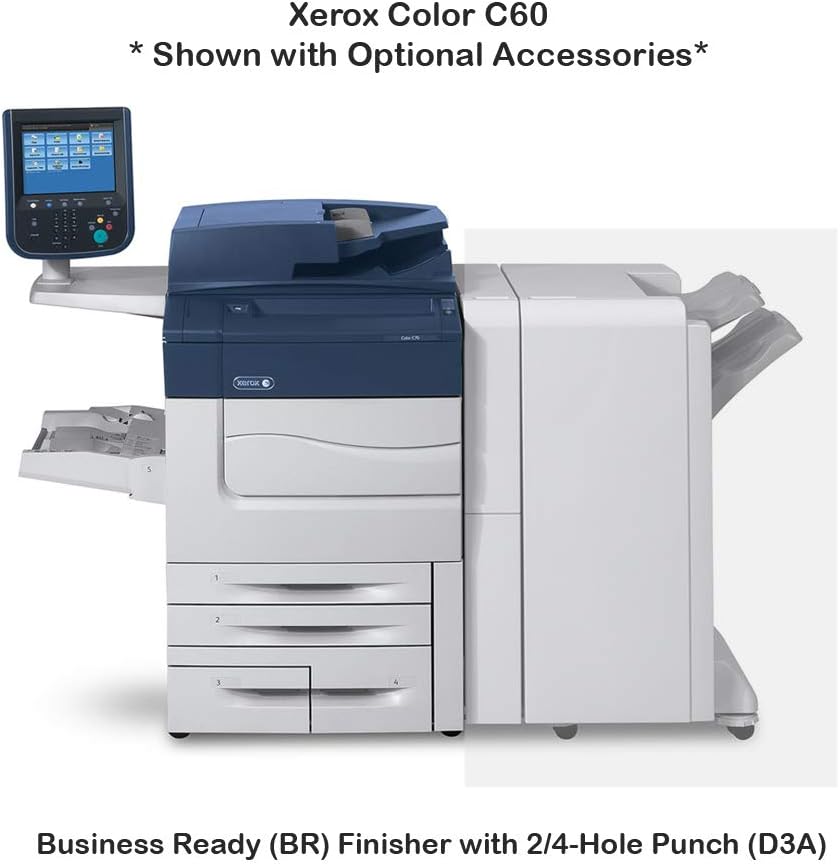
2-сүрөт: Xerox Color C60 with optional Business Ready (BR) Finisher with 2/4-Hole Punch (D3A). This image illustrates how the finisher unit integrates with the main printer, providing stapling and hole-punching capabilities.

3-сүрөт: Xerox Color C60 with optional One Tray Oversize High Capacity Feeder with Cabinet (XY9) and Booklet Maker Finisher with 2/4-Hole Punch (D4A). This configuration shows additional paper input capacity and advanced finishing options for booklet creation.
The Xerox Color C60 supports various optional accessories, including feeders and finishers, to expand its capabilities. These options can increase paper capacity and provide advanced finishing functions like stapling, hole-punching, and booklet making.
8. Кепилдик жана колдоо
8.1 Кепилдик маалыматы
This Xerox Color C60 unit comes with a 30 күндүк тетиктерге кепилдик. Please retain your purchase documentation for warranty claims.
8.2 Техникалык колдоо
For technical assistance, driver downloads, or further documentation, please visit the official Xerox support website. For support related to your purchase, contact ABD Office Solutions.


