1. Киришүү
The MikroTik RB3011UiAS-RM is a high-performance multi-port router designed for advanced networking environments. It features an ARM architecture CPU, ten Gigabit Ethernet ports (divided into two switch groups), an SFP cage, and a SuperSpeed USB 3.0 port. This device is housed in a 1U rackmount enclosure and includes a touchscreen LCD panel, a serial console port, and Power over Ethernet (PoE) output functionality on the last Ethernet port. This manual provides detailed instructions for the installation, configuration, and operation of your RB3011UiAS-RM RouterBOARD.
2. Пакеттин мазмуну
Verify that all items are present in your package before proceeding with installation.
- MikroTik RB3011UiAS-RM RouterBOARD Unit
- Кубаттуу адаптер
- Тирөөчтөргө орнотулуучу кулактар (2)
- Монтаждоо бурамалар жана аксессуарлар

Сүрөт 2.1: Алдыңкы view of the MikroTik RB3011UiAS-RM RouterBOARD, showing the 10 Gigabit Ethernet ports, SFP cage, USB 3.0 port, and LCD panel.

Figure 2.2: Included power adapter for the RB3011UiAS-RM RouterBOARD.

Figure 2.3: Various mounting screws and accessories for the RouterBOARD.
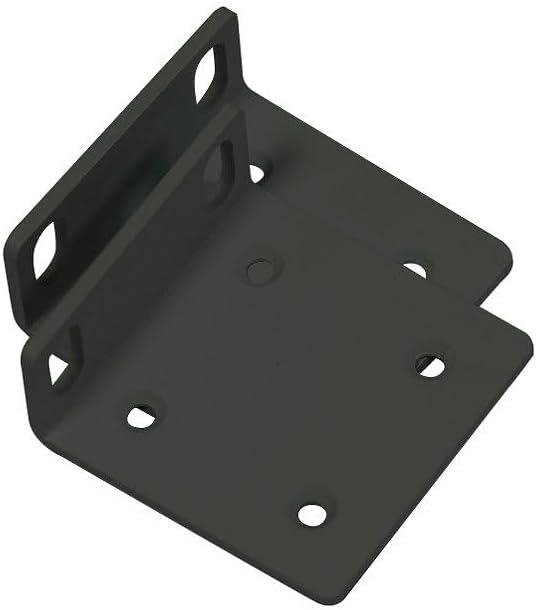
Figure 2.4: Rackmount ears for installing the RB3011UiAS-RM into a standard 1U rack.
3. Техникалык жабдыктар бүттүview
The RB3011UiAS-RM is equipped with a range of ports and indicators for versatile networking applications.
3.1 алдыңкы панели
- Ethernet порттору (1-10): Ten 10/100/1000 Gigabit Ethernet ports. Ports 1-5 form one switch group, and ports 6-10 form another. Port 10 supports PoE output.
- SFP капас: Оптикалык була туташуулары үчүн бир SFP порту.
- USB 3.0 порт: One SuperSpeed USB 3.0 Type A port for external storage or 3G/4G modems.
- LCD панели: A touchscreen LCD for device status monitoring and basic configuration.
- Калыбына келтирүү баскычы: Used for resetting the device to factory defaults or entering RouterBOOT mode.
- Power LED: Кубаттын абалын көрсөтөт.
- Колдонуучунун LED: Ыңгайлаштырылган көрсөткүчтөр үчүн программалануучу LED.
3.2 Арткы панель
- Power Jack: Берилген кубат адаптерин туташтыруу үчүн.
- Serial Console Port: RJ45 serial port for console access.
- Жерге туташтыруу бурагы: For connecting a grounding wire.
4. Орнотуу
4.1 Физикалык орнотуу
- Rackmount орнотуу:
- Attach the two rackmount ears to the sides of the device using the provided screws.
- Secure the device into a standard 1U rack using appropriate rack screws.
- Иш такта орнотуу:
- Place the device on a flat, stable surface. Ensure adequate ventilation around the unit.
4.2 Кубат туташтыруу
- Connect the included power adapter to the power jack on the rear panel of the RB3011UiAS-RM.
- Күч адаптерин ылайыктуу розеткага сайыңыз.
- The Power LED on the front panel should illuminate, indicating the device is receiving power.
4.3 Баштапкы конфигурация
- Компьютерге туташуу: Connect an Ethernet cable from your computer to any of the Gigabit Ethernet ports (e.g., Ether2) on the RB3011UiAS-RM.
- Access RouterOS:
- ачуу а web браузерди иштетип, демейки IP дарекке өтүңүз (адатта http://192.168.88.1).
- Alternatively, use the MikroTik WinBox utility for a graphical interface.
- Демейки колдонуучу аты админ with no password. It is highly recommended to set a strong password immediately after initial login.
- Негизги конфигурация: Follow the on-screen prompts or refer to the RouterOS documentation for initial network setup, including WAN and LAN configurations.
5. Operating the RouterBOARD
5.1 Тармактын конфигурациясы
The RB3011UiAS-RM runs MikroTik's RouterOS, offering extensive configuration options. Access RouterOS via WinBox or web браузер (WebFig) to manage network settings.
- WAN Setup: Configure your internet connection on the designated WAN port (e.g., Ether1). This typically involves setting up DHCP client, static IP, or PPPoE.
- LAN орнотуу: Configure IP addresses, DHCP server, and other local network settings for the LAN ports.
- Firewall: Implement firewall rules to secure your network.
- Маршруттук: Configure static or dynamic routing protocols as needed.
5.2 USB 3.0 портунун колдонулушу
The USB 3.0 port can be used for:
- Тышкы сактагыч: Connect a USB drive for network storage (NAS functionality) or for storing RouterOS backups and logs.
- 3G/4G Modem: Connect a compatible USB 3G/4G modem to provide cellular internet connectivity.
5.3 SFP Port Usage
The SFP cage supports various SFP modules for fiber optic connections, allowing for high-speed uplinks or connections to other fiber-enabled devices.
5.4 PoE Output
Ethernet port 10 supports Passive PoE output, which can power other PoE-compatible devices such as IP cameras or wireless access points, provided they operate within the supported voltage диапазону.
5.5 ЖК панели
The touchscreen LCD panel displays real-time device status, including CPU load, memory usage, and port activity. It also allows for basic configuration adjustments directly from the device.
6. Техникалык тейлөө
6.1 Микропрограмма жаңыртуулары
Regularly update RouterOS firmware to ensure optimal performance, security, and access to new features. Download the latest firmware from the official MikroTik website and follow the update instructions provided in RouterOS documentation.
6.2 Конфигурациянын камдык көчүрмөсүн сактоо жана калыбына келтирүү
It is recommended to regularly back up your device configuration. This can be done through WinBox or WebFig. Backups can be saved to your computer or an attached USB storage device. In case of configuration loss or device replacement, you can restore your settings from a saved backup file.
6.3 Тазалоо
Keep the device clean and free from dust to ensure proper ventilation and prevent overheating. Use a soft, dry cloth for cleaning. Do not use liquid cleaners or aerosols.
7. Кыйынчылыктарды
This section addresses common issues you might encounter with your RB3011UiAS-RM.
- Кубат жок:
- Кубат адаптери аспапка да, иштеген электр розеткасына да бекем туташып турганын текшериңиз.
- Кубат адаптери туура иштеп жатканын текшериңиз.
- Тармакка туташуу жок:
- Check Ethernet cable connections to ensure they are secure and functional.
- Verify IP address settings on your computer and the router.
- Check firewall rules in RouterOS that might be blocking traffic.
- Ensure the WAN connection is active and configured correctly.
- Жай тармак ылдамдыгы:
- Check for high CPU or memory usage on the router via RouterOS.
- Ensure all connected devices are operating at their expected speeds (e.g., Gigabit connections).
- Inspect for network loops or misconfigurations.
- Түзмөк жооп бербейт:
- Try restarting the device by disconnecting and reconnecting power.
- If the device remains unresponsive, consider performing a factory reset (see below).
7.1 Заводдук абалга кайтаруу
Аппаратты баштапкы абалга келтирүү үчүн:
- Аппараттын өчүрүлгөнүн текшериңиз.
- Калыбына келтирүү баскычын басып, кармап туруңуз.
- While holding the reset button, power on the device.
- Continue holding the button until the user LED starts flashing.
- Release the button. The device will now boot with factory default settings.
Эскертүү: Performing a factory reset will erase all custom configurations.
8. Техникалык шарттар
| Өзгөчөлүк | Деталь |
|---|---|
| Модел | RB3011UiAS-RM |
| CPU архитектурасы | ARM |
| Ethernet порттору | 10 x 10/100/1000 Гигабиттик Ethernet |
| SFP порттору | 1 |
| USB порттору | 1 x USB 3.0 түрү А |
| RAM | 1 ГБ |
| Сактагычтын көлөмү | 128 MB |
| PoE In | Пассивдүү PoE |
| PoE Out Ports | Ether10 (Passive PoE) |
| Операция системасы | RouterOS |
| Өлчөмдөр | 443 x 92 x 44 мм (17.44 x 3.62 x 1.73 дюйм) |
| Салмагы | 850 грамм (1.87 фунт) |
| Корпу | 1U Rackmount |
| Өзгөчөлүктөр | Touchscreen LCD, Serial Console Port |
9. Кепилдик жана колдоо
Кепилдик жөнүндө маалымат жана техникалык колдоо алуу үчүн, расмий MikroTik компаниясына кайрылыңыз. webсайтына кириңиз же ыйгарым укуктуу MikroTik дилериңизге кайрылыңыз. Кепилдик талаптары үчүн сатып алганыңызды тастыктаган документти сактап коюңуз.


