1. Маанилүү коопсуздук нускамалары
Please read all instructions carefully before operating this product. Retain these instructions for future reference.
- Кубат булагы: Connect the unit only to an AC 120V, 60 Hz power supply.
- Вентиляция: Ensure adequate ventilation. Do not block ventilation openings. Maintain a minimum distance of 20 cm (8 inches) from the rear and sides of the unit for proper airflow.
- Суу жана ным: Бул шайманды жамгырга же нымга тийгизбеңиз. Ваза сыяктуу суюктуктар толтурулган нерселерди аппараттын үстүнө койбоңуз.
- Тазалоо: Тазалоодон мурун түзмөктү розеткадан сууруп алыңыз. Кургак чүпүрөктү гана колдонуңуз. Суюк же аэрозоль тазалоочу каражаттарды колдонбоңуз.
- Жылуулук: Радиаторлор, жылуулук регистрлери, мештер же башка аппараттар (анын ичинде) сыяктуу жылуулук булактарынын жанына орнотпоңуз ampкөтөргүчтөр) жылуулукту пайда кылуучу.
- Тейлөө: Бул продуктту өзүңүз тейлөөгө аракет кылбаңыз. Бардык тейлөөнү квалификациялуу тейлөө кызматкерлерине тапшырыңыз.
- Кабелдер: Электр зымдарын басуудан же кысып калуудан сактаңыз, өзгөчө сайгычтарда, розеткаларда жана алар аппараттан чыга турган жеринде.
2. Кутуда эмне бар
Төмөндө тизмеленген нерселердин баары пакетиңизге камтылганын текшериңиз:
- Алуучу
- Speakers (Front x2, Center x1, Surround x2, Subwoofer x1)
- Алыстан башкаргыч
- AAA (R03) батарейкалар x 2
- Ички FM антеннасы
- AM цикл антеннасы
- Динамик микрофонду орнотуу
- Color-coded speaker cables
- Колдонмо (бул документ)
3. Продукт бүтүп калдыview
The Onkyo HT-S7800 is a 5.1.2 channel Dolby Atmos home theater package designed to deliver immersive audio and high-quality video. It features a powerful AV receiver with advanced connectivity and streaming capabilities, paired with a comprehensive speaker system.
Негизги өзгөчөлүктөрү
- Powered Zone 2 and Zone 2 line out for distributed analog/digital audio playback.
- 8 HDMI inputs (1 front/7 rear) and 2 outputs supporting 4K/60 Hz, 3D, ARC, Deep Color, x.V.Color, lip-sync, Dolby Atmos, Dolby TrueHD, DTS:X, DTS-HD Master Audio, DVD-Audio, multichannel PCM, and CEC.
- Chromecast built-in, AirPlay, Wi-Fi, and Bluetooth for app-based audio streaming (requires firmware update).
- Access to streaming services like TuneIn Radio, Pandora, Spotify, TIDAL, and Deezer.
- AccuEQ with AccuReflex room calibration for optimized sound.
Системалык компоненттер
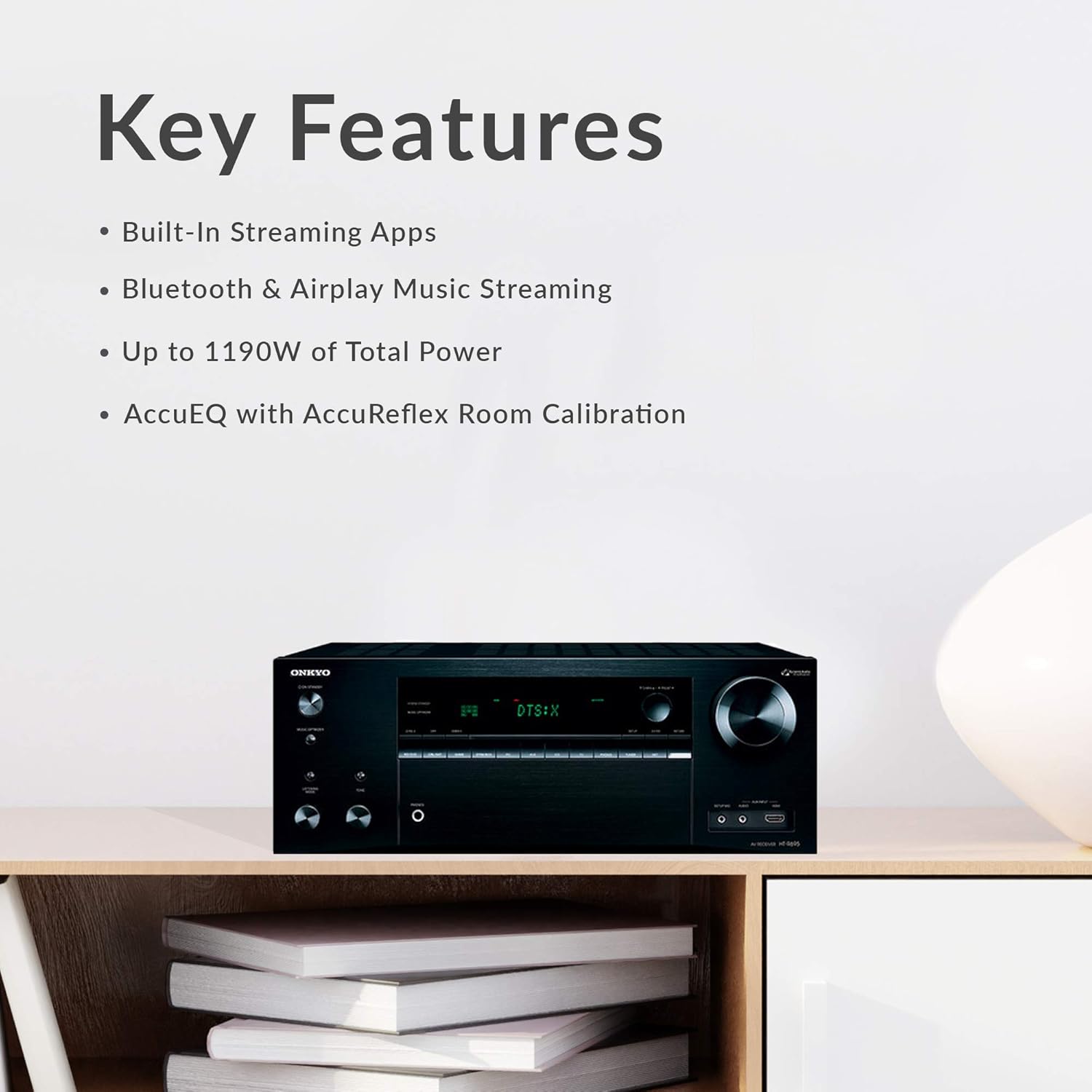
- AV Receiver: Central unit for audio/video processing and ampжашоо.
- Front Speakers (x2): Full-range, acoustic-suspension speakers with integrated Dolby Atmos-enabled modules.
- Center Speaker (x1): Designed for clear dialogue reproduction.
- Surround Speakers (x2): For immersive surround sound effects.
- Powered Subwoofer (x1): 10-inch subwoofer for deep bass frequencies.

4. Орнотуу
4.1 Пакеттен чыгаруу
Carefully remove all components from their packaging. Keep the packaging materials for future transport or storage.
4.2 Спикерди жайгаштыруу
Optimal speaker placement is crucial for the best audio experience, especially with Dolby Atmos. For a 5.1.2 setup:
- Алдыңкы спикерлер: Place them equidistant from your main listening position, forming an equilateral triangle.
- Борбордук спикер: Position directly above or below your TV, centered with the screen.
- Көлөмдүү динамиктер: Place to the sides or slightly behind the main listening position, at ear level.
- ЛГурченко: Experiment with placement, typically in a corner or along a wall, to find the best bass response for your room.
- Dolby Atmos-enabled Speakers: The front speakers in this package include upward-firing drivers. Ensure they have a clear path to the ceiling for sound reflection.
4.3 Динамиктерди бириктирүү
Use the provided color-coded speaker cables to connect the speakers to the receiver. Match the colors on the cables to the corresponding terminals on both the speakers and the receiver. Ensure positive (+) terminals connect to positive and negative (-) to negative.

For a more secure connection, consider using banana plugs for the speaker wires, especially at the receiver terminals.
4.4 Түзмөктөрдү туташтыруу
Connect your source devices (e.g., Blu-ray player, game console, cable box) to the HDMI IN ports on the receiver. Connect the HDMI OUT (MAIN) port on the receiver to your TV's HDMI input. Ensure you use HDMI 2.0 compliant cables for 4K/60 Hz and HDR content.
4.5 Кубат туташтыруу
Once all audio and video connections are made, connect the receiver's power cord to a wall outlet. Insert the batteries into the remote control.
4.6 Initial Setup & AccuEQ Calibration
After powering on the receiver and TV, follow the on-screen setup guide. Use the included speaker setup microphone and the AccuEQ room calibration system to automatically optimize the sound settings for your specific room acoustics and speaker placement. This process measures speaker distances, levels, and crossover frequencies.
5. Иштөө нускамалары
5.1 Негизги операция
- Күйгүзүү/өчүрүү: Press the POWER button on the receiver or remote control.
- Үндү көзөмөлдөө: Use the VOLUME knob on the receiver or the VOL +/- buttons on the remote control to adjust the sound level.
5.2 Киргизүүнү тандоо
Use the input selector buttons on the receiver's front panel or the remote control (e.g., BD/DVD, CBL/SAT, GAME, STRMBOX, CD, TV, TUNER, NET) to switch between connected source devices.

5.3 Аудио режимдери
The receiver supports various audio formats, including Dolby Atmos and DTS:X. The system will automatically detect and process the appropriate audio format from your source. You can also manually select listening modes via the remote control.
5.4 Тармактын өзгөчөлүктөрү
Connect the receiver to your home network via Wi-Fi or Ethernet to access network features. A firmware update may be required to enable all streaming functionalities.
- Chromecast камтылган: Stream audio from compatible apps on your smartphone or tablet.
- AirPlay: Apple түзмөктөрүнөн музыка агылтыңыз.
- Bluetooth: Pair your Bluetooth-enabled devices to stream audio wirelessly.
- Агым кызматтары: Access integrated services like Pandora, Spotify, TIDAL, and Deezer.
5.5 Алыстан башкаруу
The included remote control provides full command over the receiver's functions.

Familiarize yourself with the layout for easy navigation and control of your home theater system.
6. Техникалык тейлөө
Тазалоо
Системаңыздын көрүнүшүн жана иштешин сактоо үчүн:
- Wipe the receiver and speakers with a soft, dry cloth.
- Do not use abrasive cloths, waxes, or chemical cleaning agents.
- Суюктуктарды түз эле компоненттерге чачуудан алыс болуңуз.
Орнотулган программаны жаңыртуу
Periodically check the Onkyo website for available firmware updates. Updates can improve performance, add new features, or resolve issues. Follow the instructions provided with the firmware update carefully.
7. Кыйынчылыктарды
If you encounter issues with your Onkyo HT-S7800 system, refer to the following common solutions:
- Кубат жок: Ensure the power cord is securely plugged into both the receiver and a working wall outlet. Check the power switch on the receiver.
- Үн жок: Verify that the correct input source is selected. Check all speaker connections, ensuring they are secure and correctly wired (positive to positive, negative to negative). Confirm the volume is not muted or set too low. Run AccuEQ calibration again.
- Сүрөт жок: Ensure HDMI cables are securely connected between the source device, receiver, and TV. Confirm the correct HDMI input is selected on both the receiver and the TV. Try bypassing the receiver and connecting the source directly to the TV to isolate the issue.
- Сабвуфер иштебей жатат: Check the subwoofer's power connection and ensure it is turned on. Verify the subwoofer cable is securely connected to the receiver's SUBWOOFER PRE OUT. Adjust subwoofer settings in the receiver's menu. Note that the subwoofer may only activate when bass signals are present.
- Тармакка туташуу маселелери: Ensure your Wi-Fi router is on and functioning. Re-enter Wi-Fi credentials if necessary. Try connecting via an Ethernet cable if Wi-Fi is unstable. Perform a firmware update if available.
- Алыстан башкаруу иштебейт: Check and replace the batteries. Ensure there are no obstructions between the remote and the receiver's IR sensor.
If the problem persists, consult the detailed troubleshooting section in the full user manual or contact Onkyo customer support.
8. Техникалык шарттар
| Өзгөчөлүк | Спецификация |
|---|---|
| Модель аты | HT-S7800 |
| Көлөмдүү үн каналынын конфигурациясы | 5.1.2 |
| Киргизүү көлөмүtage | 120 вольт (AC) |
| Энергияны керектөө | 580 Вт |
| Динамиктин максималдуу чыгаруу күчү | 200 Ватт |
| Frequency Response | 10 Hz–100 kHz/+1 dB, -3 dB (Direct/Pure Audio) |
| Байланыш технологиясы | Bluetooth, HDMI, Wi-Fi |
| Зымсыз байланыш технологиясы | Bluetooth, WiFi |
| Bluetooth диапазону | 10 метр |
| Продукциянын өлчөмдөрү (алуучу) | 20"D x 30"W x 33"H (Overall System) |
| Элемент Салмагы | 81.6 Pounds (Overall System) |
| Вуфердин диаметри | 12 дюйм (сабвуфер) |
| Камтылган компоненттер | Receiver, Speakers, Remote, Batteries, Antennas, Microphone, Cables, Manual |
| Түс | Кара |
9. Кепилдик жана колдоо
Кепилдик маалымат
This Onkyo product comes with a Limited Warranty. Please refer to the warranty card included in your package or visit the official Onkyo webкамтуу мөөнөтү, кызмат көрсөтүү жол-жоболору жана шарттары боюнча толук маалымат алуу үчүн сайтты караңыз.
Кардарларды колдоо
For technical assistance, product inquiries, or service requests, please contact Onkyo customer support through their official website or the contact information provided in your product documentation. Have your model number (HT-S7800) and purchase date ready when contacting support.


