1. Киришүү
This user manual provides comprehensive instructions for the safe and efficient operation of the Showtec Compact Par 7 Q4 7 x 3W RGBW LED Floor PAR Spot. Please read this manual thoroughly before installation, operation, or maintenance to ensure proper use and to prevent damage to the unit or injury to personnel.
The Showtec Compact Par 7 Q4 is a compact RGBW PAR can designed for various lighting applications, offering versatile color mixing and robust performance.
2. Коопсуздук нускамалары
Электр шок, өрт же жаракат алуу коркунучун азайтуу үчүн ар дайым төмөнкү коопсуздук чараларын сактаңыз:
- электр менен жабдууну камсыз кылуу voltage томуна дал келетtagбирдикте көрсөтүлгөн.
- Ар дайым түзмөктү жерге туташтырылган розеткага туташтырыңыз.
- Электр шнуру бузулган болсо, аппаратты иштетпеңиз.
- Disconnect from mains power before cleaning or servicing.
- Агрегатты жамгырга же нымдуулукка дуушар кылбаңыз.
- Ашыкча ысып кетүүнүн алдын алуу үчүн, түзмөктүн айланасында жетиштүү желдетүүнү камсыз кылыңыз.
- Жарык булагына түздөн-түз көз тийбеңиз.
- Бул бирдик гана ички колдонуу үчүн.
3. Продукт бүтүп калдыview
The Showtec Compact Par 7 Q4 features seven 3W RGBW LEDs, providing a wide spectrum of colors. Its compact design makes it suitable for floor standing or truss mounting.

Сүрөт 3.1: Алдыңкы view of the Showtec Compact Par 7 Q4 with red light output, showcasing its seven powerful RGBW LEDs.

Figure 3.2: The PAR spot emitting a bright white light, demonstrating its full spectrum capabilities.

Figure 3.3: The PAR spot displaying a vibrant blue light, highlighting its color mixing versatility.

Сүрөт 3.4: Жакын пландан view of the LED array when the unit is off, showing the individual lenses.
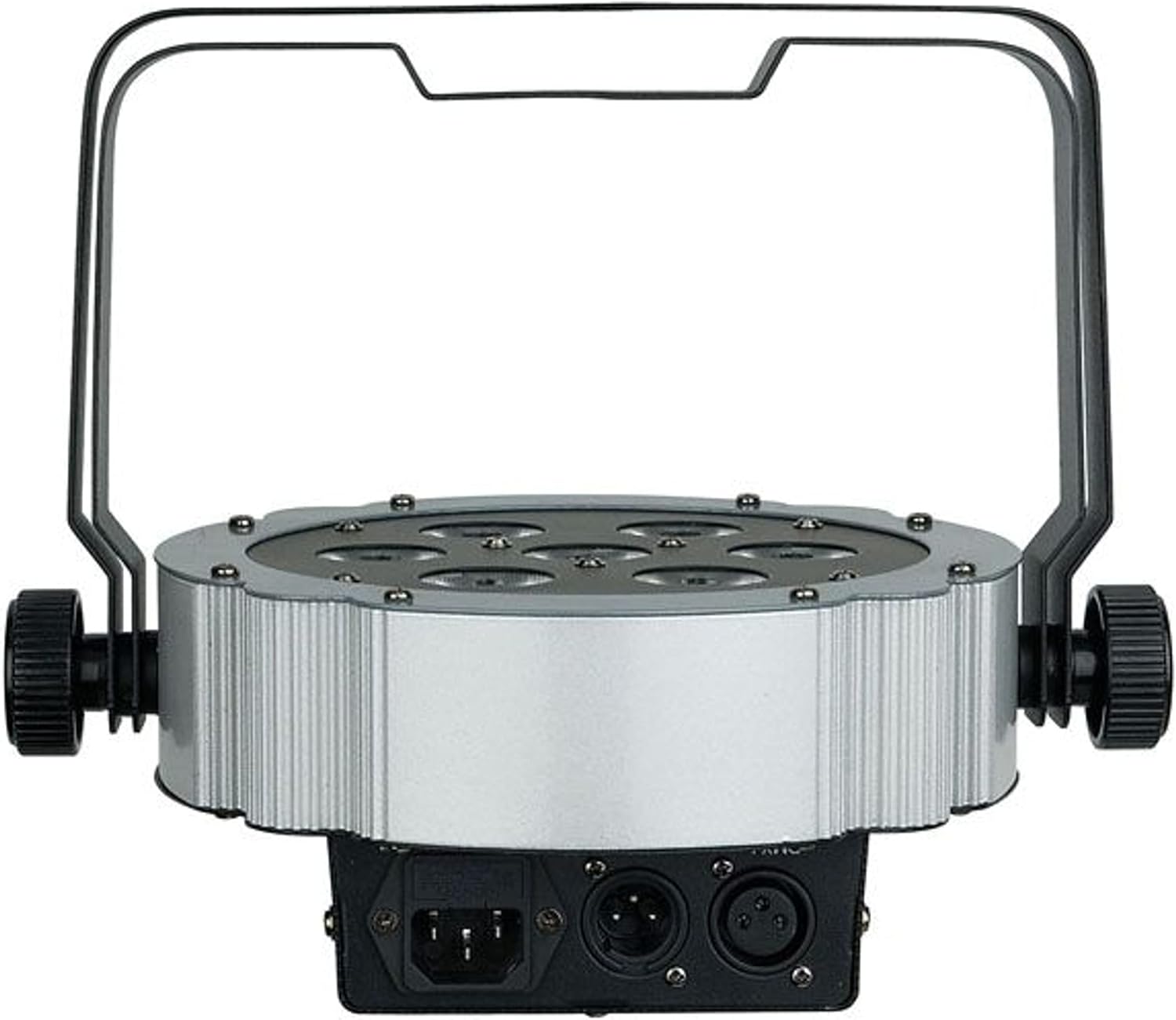
3.5-сүрөт: Арткы view of the unit, showing the power input and DMX connections (XLR 3-pin).

3.6-сүрөт: Бурчтуу view of the PAR spot, demonstrating the adjustable mounting bracket for floor or truss applications.
4. Орнотуу
4.1 Пакеттен чыгаруу
Carefully unpack the unit and check for any damage during transit. Retain the packaging material for future transport or storage.
4.2 Монтаждоо
The Compact Par 7 Q4 can be used as a floor spot or mounted to a truss using the integrated bracket. Ensure the mounting surface or truss can support the weight of the fixture. Use appropriate clamps and safety cables when mounting overhead.
4.3 Кубат туташтыруу
Connect the power cable to the unit's power input and then to a grounded electrical outlet. Verify that the local voltage блоктун талаптарына дал келет (240 Вольт).
4.4 DMX туташуу (кошумча)
For DMX control, connect a DMX cable from your DMX controller to the DMX IN port of the fixture. If connecting multiple units, daisy-chain them by connecting the DMX OUT of the first unit to the DMX IN of the next.
5. Иштөө
5.1 Башкаруу панели
The unit features a digital display and control buttons (Menu, Up, Down, Enter) on the rear for setting modes and DMX addresses.
5.2 Иштөө режимдери
The Showtec Compact Par 7 Q4 typically offers several operating modes:
- DMX режими: Allows control via an external DMX controller. Set the DMX address using the control panel.
- Авто режим: Алдын ала программаланган жарык автоматтык түрдө иштейт.
- Үн активдүү режими: The light reacts to sound via a built-in microphone.
- Master/Slave режими: Link multiple units where one acts as the master and others as slaves, synchronizing their operation.
- Статикалык түс режими: Бир статикалык түстү тандап, көрсөтүңүз.
5.3 DMX канал диаграммасы
Refer to the specific DMX channel chart in the full product manual for detailed information on controlling each function via DMX. Common channels include Dimmer, Red, Green, Blue, White, Strobe, and Program selection.
6. Техникалык тейлөө
6.1 Тазалоо
Regular cleaning of the lenses and housing is recommended to maintain optimal light output and extend the unit's lifespan. Use a soft, lint-free cloth and a mild glass cleaner. Do not use abrasive materials.
6.2 Сактагычты алмаштыруу
If the unit does not power on, check the fuse located near the power input. Replace it with a fuse of the same type and rating only.
6.3 Сактоо
When not in use, store the unit in its original packaging or a suitable flight case in a dry, dust-free environment.
7. Кыйынчылыктарды
| Көйгөй | Мүмкүн себеп | Чечим |
|---|---|---|
| Түзмөк күйбөйт | No power supply; Blown fuse; Damaged power cable | Check power connection; Replace fuse; Replace cable |
| DMX көзөмөлү жок | Incorrect DMX address; Faulty DMX cable; DMX controller issue | Verify DMX address; Check/replace DMX cable; Test controller |
| Жарыктар жымыңдайт же туруксуз иштейт | Poor DMX signal; Overheating; Internal fault | Check DMX connections; Ensure proper ventilation; Contact support |
| Түстөр туура эмес | Incorrect DMX channel values; Internal calibration issue | Adjust DMX values; Perform factory reset if available; Contact support |
8. Техникалык шарттар
| Өзгөчөлүк | Деталь |
|---|---|
| Бренд | Showtec |
| Модел | Q4 |
| Маалымдама номери | LIG0013729-000 |
| Жарык булагы | 7 x 3W RGBW LED |
| Күч | 3 Watts (per LED) |
| Тtage | 240 вольт |
| Power Source | Электр кабели |
| Өлчөмдөрү (L x W x Y) | 31.5 x 31 x 15.5 см |
| Салмагы | 2.73 килограмм |
| ASIN | B01F04U758 |
9. Кепилдик жана колдоо
Information regarding specific warranty terms and conditions for the Showtec Compact Par 7 Q4 is not available in the provided product details. Please refer to the retailer or manufacturer's official webакыркы кепилдик маалымат үчүн сайт.
For technical support, service, or spare parts inquiries, please contact your authorized Showtec dealer or the manufacturer directly. Always provide the model number (Q4) and reference number (LIG0013729-000) when seeking support.


