1. Киришүү
This manual provides essential information for the installation, operation, and maintenance of your BOSS Audio Systems Elite Series BV960NV GPS Car Audio Stereo System. Please read this manual thoroughly before using the product to ensure proper functionality and safety. Keep this manual for future reference.
2. Коопсуздук маалыматы
Always prioritize safety when operating your vehicle. Distracted driving can lead to accidents. Ensure all connections are secure and properly insulated to prevent electrical shorts or damage. Professional installation is strongly recommended for optimal performance and safety.
3. Пакеттин мазмуну
Төмөндө саналып өткөн нерселердин баары сиздин продукт таңгагыңызда камтылганын текшериңиз:
- BV960NV Receiver Unit
- Зымсыз алыстан башкаруу
- Монтаждоочу жабдык
- Электр жабдыктары
- Колдонуучунун Колдонмосу (бул документ)
- GPS антеннасы
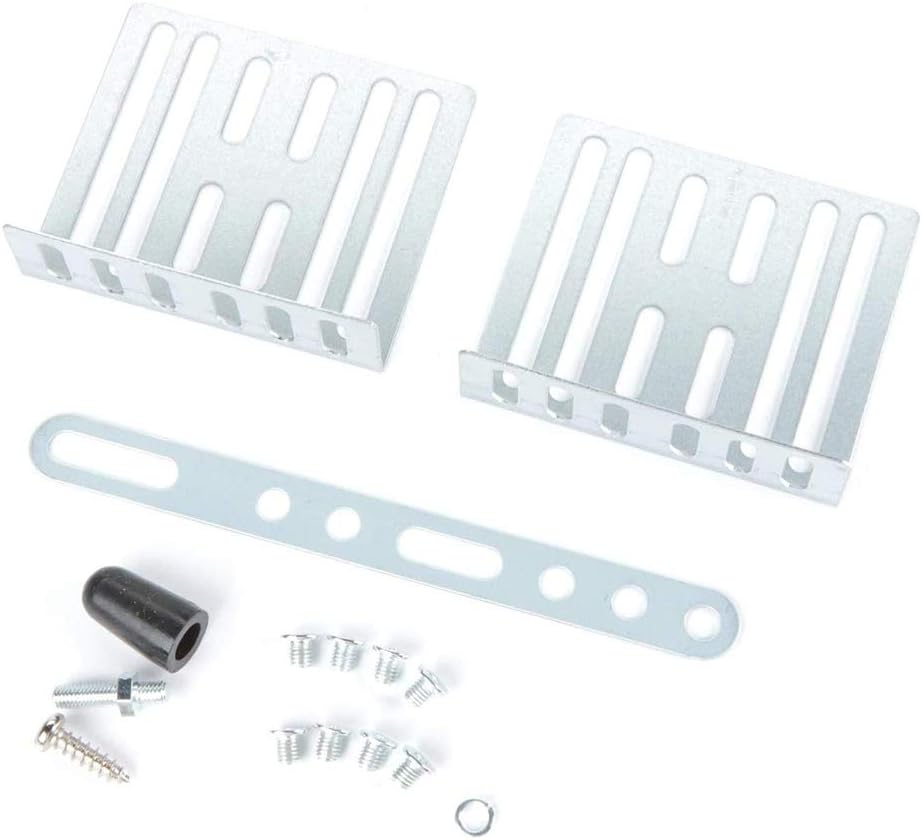
Figure 1: Mounting Hardware. This image illustrates the metal mounting brackets, screws, and a rubber cap for the GPS antenna, which are provided for secure installation of the BV960NV unit in a vehicle's dashboard.

Figure 2: Wiring Harnesses. Two main wiring harnesses are shown: one with various RCA connectors for audio/video inputs and outputs, and another with labeled power and speaker wires for connecting the BV960NV to the vehicle's electrical system and speakers.
4. Продукт бүтүп калдыview
The BOSS Audio Systems BV960NV is a 6.2-inch double-DIN touchscreen car stereo system featuring built-in GPS navigation, Bluetooth audio and calling, AM/FM radio, CD/DVD player, and USB/SD card inputs. It is designed to enhance your in-car entertainment and navigation experience.

Сүрөт 3: Алдыңкы View of BV960NV. This image shows the front of the BOSS Audio Systems BV960NV unit, featuring its 6.2-inch touchscreen display with an active GPS navigation map. Control buttons and a volume knob are visible on the left side.

4-сүрөт: Арткы View of BV960NV. The rear panel of the BV960NV unit is displayed, highlighting the power harness connector, antenna input, and multiple RCA pre-amp outputs for front, rear, and subwoofer connections, along with video input/output ports.
5. Орнотуу жана орнотуу
Due to the complexity of car audio systems and vehicle electrical wiring, professional installation is highly recommended. Incorrect installation can lead to damage to the unit, vehicle, or personal injury. If you choose to install the unit yourself, ensure the vehicle's battery is disconnected before beginning any wiring.
5.1 Зымдарды туташтыруу
Refer to the wiring diagram provided in the separate installation guide for detailed connection instructions. Key connections include:
- Күч: Connect the yellow wire to constant 12V, red to accessory 12V, and black to ground.
- Баяндамачылар: Connect speaker wires to the corresponding vehicle speaker wires.
- GPS антеннасы: GPS антеннасын туташтырып, аны тунук жерге орнотуңуз view асмандын.
- Арткыview Камера: Арткы жагын туташтырыңызview camera input (if applicable) to the camera's video output and the reverse trigger wire to the vehicle's reverse light circuit.
- Рулдун башкаруу элементтери: An interface module (e.g., Metra ASWC-1, sold separately) is required to retain existing steering wheel control functions.
5.2 Агрегатты монтаждоо
Use the provided mounting hardware to secure the BV960NV unit into your vehicle's double-DIN dashboard opening. Ensure the unit is firmly seated and does not obstruct any vehicle controls or airbags.
6. Иштөө нускамалары
6.1 Күйгүзүү/өчүрүү
басыңыз РЕЖИМ button or the volume knob to turn the unit on. Press and hold the РЕЖИМ аппаратты өчүрүү үчүн баскыч.
6.2 Сенсордук экран интерфейси
The 6.2-inch touchscreen allows for intuitive control of all system functions. Tap icons to select modes or adjust settings. The interface is designed for ease of use while driving.

Figure 5: Touchscreen Icon. This icon illustrates a finger interacting with a screen, highlighting the unit's responsive touchscreen interface.
6.3 GPS навигациясы
The BV960NV features built-in GPS navigation with pre-loaded maps of all 50 states and Puerto Rico, including points of interest. Text-to-speech guidance provides audible directions to your destination.
- To access navigation, tap the NAV негизги менюдагы сөлөкөтү.
- Экрандагы баскычтоп аркылуу көздөгөн жериңизди киргизиңиз.
- Follow the voice prompts and on-screen map for directions.

Figure 6: GPS Icon. An icon depicting a location pin, symbolizing the built-in GPS navigation feature of the BV960NV system.
6.4 Bluetooth байланышы
Колсуз чалуулар жана аудио агымы үчүн смартфонуңузду Bluetooth аркылуу зымсыз туташтырыңыз.
- Смартфонуңузда Bluetooth'ду иштетип, жеткиликтүү түзмөктөрдү издеңиз.
- Select "BOSS AUDIO" from the list and pair the devices.
- Use the built-in microphone for calls and stream music from your phone or apps like Spotify/Pandora.
Video 1: BOSS Audio Systems Car Stereo System Demo (BV755B). This video demonstrates key features of a similar BOSS Audio Systems car stereo (BV755B), including AM/FM radio tuning, rear camera input, various media playback modes (DVD, Aux-in, Bluetooth streaming), pre-amp outputs, equalizer settings, and remote control options. While not the exact BV960NV model, it showcases comparable functionalities.
6.5 Media Playback (CD/DVD/USB/SD/Aux)
The BV960NV supports various media formats for your entertainment:
- CD/DVD ойноткуч: Insert discs into the slot for audio or video playback.
- USB/SD порттору: Connect USB drives or SD cards for playing music and videos.
- Көмөкчү киргизүү: Use the 3.5mm auxiliary input to connect external audio devices like smartphones or MP3 players.

Figure 7: Auxiliary Input Icon. An icon showing a 3.5mm auxiliary input jack, indicating the system's compatibility with external audio devices.
6.6 AM/FM радиосу
Tune into your favorite AM/FM radio stations for news, music, and sports updates. Use the touchscreen controls to scan for stations or manually tune.
6.7 Арткыview Камера киргизүү
Арткы жагын туташтырыңызview camera (sold separately) to the unit for enhanced safety when reversing. The display automatically switches to the camera view унаа артка берки берүүдө болгондо.

Figure 8: Camera Input Icon. An icon depicting a camera, signifying the unit's capability to connect to a rearview or front-view камера.
Video 2: BOSS Audio Systems Rearview Backup Camera Demo (BV755BLC). This video highlights the rearview backup camera functionality of a similar BOSS Audio Systems car stereo (BV755BLC), showing the on-screen display with distance guides and the camera unit itself. It also briefly touches upon the unit's double-DIN fit. While not the exact BV960NV model, it illustrates relevant camera features.
6.8 Audio Settings (Equalizer)
Customize your audio experience using the built-in equalizer. Adjust bass, treble, balance, and fader settings to suit your preferences.
6.9 Алыстан башкаруу
The included wireless remote control allows convenient operation of the system from various positions within the vehicle.

Figure 9: Wireless Remote Control Icon. An icon showing a remote control, indicating the inclusion and functionality of a wireless remote for the system.
7. Техникалык тейлөө
To ensure the longevity and optimal performance of your BV960NV system, follow these maintenance guidelines:
- Тазалоо: Сенсордук экранды жана блоктун сыртын тазалоо үчүн жумшак, кургак чүпүрөктү колдонуңуз. Абразивдүү тазалагычтардан же эриткичтерден качыңыз.
- Дискке кам көрүү: Handle CDs and DVDs by their edges to prevent scratches. Keep discs clean and store them in their cases when not in use.
- Программалык камсыздоо жаңыртуулары: Check the BOSS Audio Systems website periodically for any available software or map updates.
8. Кыйынчылыктарды
If you encounter issues with your BV960NV, refer to the following common troubleshooting steps:
- Кубат жок: Бардык кубат туташууларын (туруктуу 12V, кошумча 12V, жерге туташтыруу) текшерип, унаанын сактагычынын бүтүндүгүн текшериңиз.
- Үн жок: Verify speaker connections, amplifier connections (if applicable), and audio settings (volume, balance, fader, mute).
- GPS сигналын жоготуу: GPS антеннасы туура туташтырылганын жана тоскоолдуксуз экенин текшериңиз view асмандын.
- Bluetooth жупташтыруу маселелери: Delete previous pairings from your phone and the unit, then attempt to re-pair. Ensure both devices are in pairing mode.
- Сенсордук экран жооп бербейт: Perform a soft reset (refer to the full user manual for specific instructions). If the issue persists, contact customer support.
9. Техникалык шарттар
| Өзгөчөлүк | Спецификация |
|---|---|
| Продукциянын өлчөмдөрү | 6.3 x 7 x 4 дюйм |
| Элемент Салмагы | 5.43 фунт |
| Элемент моделинин номери | BV960NV |
| Дисплей түрү | 6.2 Inch Touchscreen Digital TFT LCD Monitor |
| Connectivity Technologies | Bluetooth, USB |
| Өзгөчөлүктөр | Equalizer, GPS Navigation, Touchscreen |
| Адам интерфейсинин киргизүү | Микрофон, сенсордук экран |
| Сканер резолюциясы | 800 x 480 |
| Аудио чыгаруу режими | Стерео |
| Көлөмдүү үн каналынын конфигурациясы | 4.0 |
| Камтылган компоненттер | Receiver, remote, mounting hardware, power harness, user manual |
10. Кепилдик маалыматы
BOSS Audio Systems provides a powerful 3-year platinum online dealer warranty for this product, provided the purchase is made through Amazon.com. Please retain your proof of purchase for warranty claims. For detailed terms and conditions, refer to the official BOSS Audio Systems warranty policy.
11. Колдоо
For further assistance, technical support, or service inquiries, please visit the official BOSS Audio Systems website or contact their customer service department. You can find contact information on their webсайтында же баштапкы продукт таңгагында.


