Introduction
This manual provides detailed instructions for the setup, operation, and maintenance of your BIOS Weather Indoor/Outdoor Wireless Thermometer & Hygrometer. Please read this manual thoroughly before using the device to ensure proper function and longevity.
The BIOS Weather Indoor/Outdoor Wireless Thermometer & Hygrometer is designed to provide accurate readings of indoor temperature and humidity, as well as outdoor temperature. It features wireless connectivity for the outdoor sensor, a moon phase display, and the capability to connect with up to three sensors (additional sensors sold separately).
- Wireless range up to 30 meters (100 feet) from the outdoor sensor.
- Indoor monitor includes a hygrometer sensor for RH percentage readings (20% to 95%).
- Displays temperature from up to 3 sensors (Model No. 312TX, sold separately).
- Tracks relative indoor humidity and moon phase.
Пакеттин мазмуну
Пакетти ачканда, бардык компоненттер бар экенин жана жакшы абалда экендигин текшериңиз:
- 1 x Main Display Unit (Indoor Monitor)
- 1 x Зымсыз сырткы сенсор
- 1 х Инструкция (бул документ)

Image: The main display unit (left) and the wireless outdoor sensor (right). The main unit shows indoor temperature, humidity, moon phase, time, and outdoor temperature. The outdoor sensor displays its current temperature.
Орнотуу колдонмосу
1. Батареяны орнотуу
Both the main display unit and the wireless outdoor sensor require batteries (not included).
- Open the battery compartment on the back of both the main display unit and the outdoor sensor.
- Insert the required batteries (e.g., AA or AAA, refer to the battery compartment markings for correct type and polarity).
- Батарея бөлүкчөлөрүн коопсуз жабыңыз.
Эскертүү:
- It is recommended to insert batteries into the outdoor sensor first, then the main display unit, to facilitate immediate pairing.
- Use high-quality alkaline batteries for optimal performance, especially in cold weather for the outdoor sensor.
2. Сенсордун жайгашуусу
Proper placement of both units is crucial for accurate readings and reliable wireless communication.
- Негизги дисплей блогу: Place indoors, away from direct sunlight, heat sources, or drafts that could affect temperature and humidity readings. Ensure it is within 30 meters (100 feet) of the outdoor sensor.
- Зымсыз тышкы сенсор:
- Mount in a shaded area to avoid direct sunlight, which can cause artificially high temperature readings.
- Protect from direct rain and snow. An overhang or a weather-resistant enclosure is ideal.
- Avoid placing near large metal objects, electrical appliances, or thick walls that could interfere with the wireless signal.
- Ensure it is within the 30-meter (100-foot) wireless range of the main unit.
3. Баштапкы жупташтыруу
The main display unit and outdoor sensor should automatically pair upon battery installation. If pairing does not occur:
- Эки түзмөктүн тең жаңы батареялары бар экенин текшериңиз.
- Bring the outdoor sensor closer to the main display unit.
- Press the "CH" (Channel) button on the main display unit to cycle through channels or initiate a search for the sensor.
- If issues persist, remove batteries from both units, wait a few minutes, and reinsert them, starting with the outdoor sensor.
Иштөө нускамалары
1. Display Overview
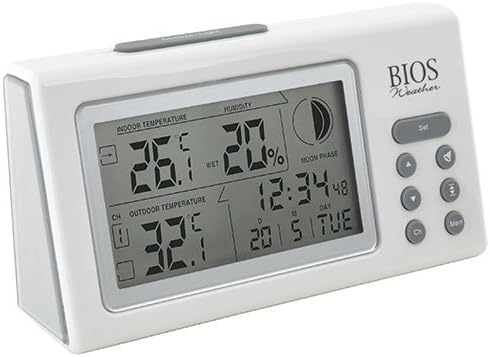
Сүрөт: бурчтуу view of the main display unit, highlighting the various segments for indoor temperature, humidity, moon phase, time, and outdoor temperature.
The main display unit provides the following information:
- Ички температура: Displays the current temperature inside the room where the main unit is located.
- Нымдуулук: Shows the relative indoor humidity percentage.
- Тышкы температура: Displays the temperature from the connected wireless outdoor sensor.
- Убакыт жана дата: Учурдагы убакыт жана күн.
- Ай фазасы: An icon indicating the current moon phase.
- Канал көрсөткүчү: Shows which outdoor sensor channel is currently displayed (if multiple sensors are used).
2. Баскыч функциялары
The main display unit features several buttons for configuration and viewмаалыматтар:
| баскыч | Функция |
|---|---|
| SET | Enters setup mode for time, date, and other settings. Press to confirm settings. |
| ▲ / ▼ (Up/Down) | Adjusts values during setup. Cycles through channels for outdoor sensors. |
| CH (канал) | Switches between outdoor sensor channels (1, 2, 3) or initiates a search for sensors. |
| MEM (эс тутум) | Displays maximum and minimum temperature/humidity readings. Press again to clear. |
3. Убакыт жана дата орнотуу
- басып, кармап туруңуз SET убакыт дисплейси жаркылдаганга чейин баскычты басыңыз.
- колдонуу ▲ or ▼ саатты тууралоо үчүн баскычтар.
- Басыңыз SET to confirm and move to the next setting (minutes, year, month, day).
- Бардык орнотуулар конфигурацияланганга чейин 2 жана 3-кадамдарды кайталаңыз.
- Басыңыз SET one last time to exit setup mode.
4. Viewing Max/Min Readings
басыңыз MEM баскычына view the maximum recorded indoor temperature, humidity, and outdoor temperature. Press MEM кайра view the minimum readings. To clear the memory, press and hold the MEM button while the max/min readings are displayed.
Техникалык тейлөө
1. Тазалоо
To clean the display unit and outdoor sensor, use a soft, damp cloth. Do not use abrasive cleaners, solvents, or harsh chemicals, as these may damage the plastic casing же электрондук компоненттер.
2. Батареяны алмаштыруу
When the battery indicator appears on the display, it is time to replace the batteries in the respective unit (main unit or outdoor sensor). Always replace all batteries in a unit at the same time with new, high-quality batteries of the correct type.
Маанилүү:
- Эски батареяларды жергиликтүү эрежелерге ылайык таштаңыз.
- Эгерде түзмөк көпкө чейин колдонулбаса, агып кетүүсүн жана бузулушун алдын алуу үчүн батарейкаларды алып салыңыз.
Проблемаларды чечүү
If you experience issues with your BIOS Weather Thermometer & Hygrometer, please refer to the following common problems and solutions:
| Көйгөй | Мүмкүн болгон себеп / Чечим |
|---|---|
| No outdoor temperature reading or "---" displayed. |
|
| Температура/нымдуулуктун көрсөткүчтөрү так эмес. |
|
| Дисплей күңүрт же бош. |
|
| Убакыт/дата туура эмес. |
|
Продукт спецификациялары

Image: The main display unit with indicated dimensions: 21.59 cm (length), 7.62 cm (width), and 19.05 cm (height).
| Өзгөчөлүк | Деталь |
|---|---|
| Модель номери | BBYCA10300783 (312BC) |
| Type | Indoor/Outdoor Thermometer and Hygrometer |
| Материал | Пластик |
| Түс | Ак |
| Өлчөмдөрү (Негизги бирдик) | Бийиктиги: 19.05 см, туурасы: 7.62 см, тереңдиги: 21.59 см |
| Салмагы | 0.30 кг |
| Зымсыз диапазон | 30 метрге чейин (100 фут) |
| Үй ичиндеги нымдуулук диапазону | 20% - 95% RH |
| Sensor Capability | Supports up to 3 outdoor sensors (additional sensors Model No. 312TX, sold separately) |
| Өзгөчөлүктөр | Wireless connectivity, Multi-Sensor support, Humidity Tracking, Moon Phase Display |
| Power Source | Батарея менен иштейт |
Кепилдик маалымат
This BIOS Weather product comes with a Тетиктерге 1 жылдык кепилдик from the date of purchase. This warranty covers defects in materials and workmanship under normal use. It does not cover damage resulting from misuse, accident, unauthorized modification, or improper installation.
Кепилдик дооматтары үчүн сатып алганыңыздын далилин сактап коюңуз.
Кардарларды колдоо
If you have any questions, require technical assistance, or need to make a warranty claim, please contact Bios customer support. For more information and resources, you may also visit the official Bios store on Amazon:
Visit the Bios Store on Amazon
Please have your product model number (BBYCA10300783) and purchase date ready when contacting support.


