Introduction
This manual provides comprehensive instructions for the installation, operation, and maintenance of your InLine 32305P PoE+ Gigabit 5-Port Network Switch. Please read this manual thoroughly before using the device to ensure proper functionality and safety. The InLine 32305P is designed to provide high-speed network connectivity and Power over Ethernet Plus (PoE+) capabilities for compatible devices.
Коопсуздук маалыматы
This product complies with recognized technical rules and relevant safety standards or harmonization legislation. Please observe the following safety guidelines:
- The product and its packaging are not toys.
- Keep all packaging material, such as plastic bags or cable ties, out of reach of children and dispose of them properly to prevent suffocation or choking hazards.
- Аппаратты ачпаңыз casinг. Ичинде колдонуучу тейлей турган бөлүктөр жок.
- Ensure the device is placed in a well-ventilated area, away from heat sources and direct sunlight.
- Use only the provided power adapter or a compatible power source with the correct voltage жана учурдагы рейтингдер.

Image: Safety warning indicating a choking hazard from packaging materials. This product is not a toy.

Image: Safety warning indicating a risk of suffocation from packaging materials. This product is not a toy.
For further information, consult the webсайт www.inline-info.com/downloadcenter же электрондук почта аркылуу колдоо менен байланышыңыз service@inline-info.com.
Пакеттин мазмуну
Пакетиңизде төмөнкү заттар бар экенин текшериңиз:
- InLine 32305P PoE+ Gigabit 5-Port Network Switch
- Power Adapter (100-240V AC, 50/60Hz, 1.5A max)
- Rackmount Brackets (19-inch angle included)
- Резина буттар (үстөлдөргө жайгаштыруу үчүн)
- Колдонуучунун Колдонмосу (бул документ)

Image: The InLine 32305P switch displayed with its accompanying rackmount brackets and rubber feet, illustrating the complete package contents.
Продукт бүттүview
Familiarize yourself with the physical features of the InLine 32305P switch.
Front Panel
The front panel features the network ports and LED indicators.

Сүрөт: алдыңкы view of the InLine 32305P switch, highlighting the five 10/100/1000Mbps RJ45 ports and the Power, Link/Act, and PoE LED indicators.
- RJ45 порттору (1-5): Five 10/100/1000 Mbps auto-negotiating ports. Ports 1-4 support PoE+.
- LED көрсөткүчтөрү: Provide status information for power, link/activity, and PoE status.
Арткы панель
The rear panel contains the power input connector.
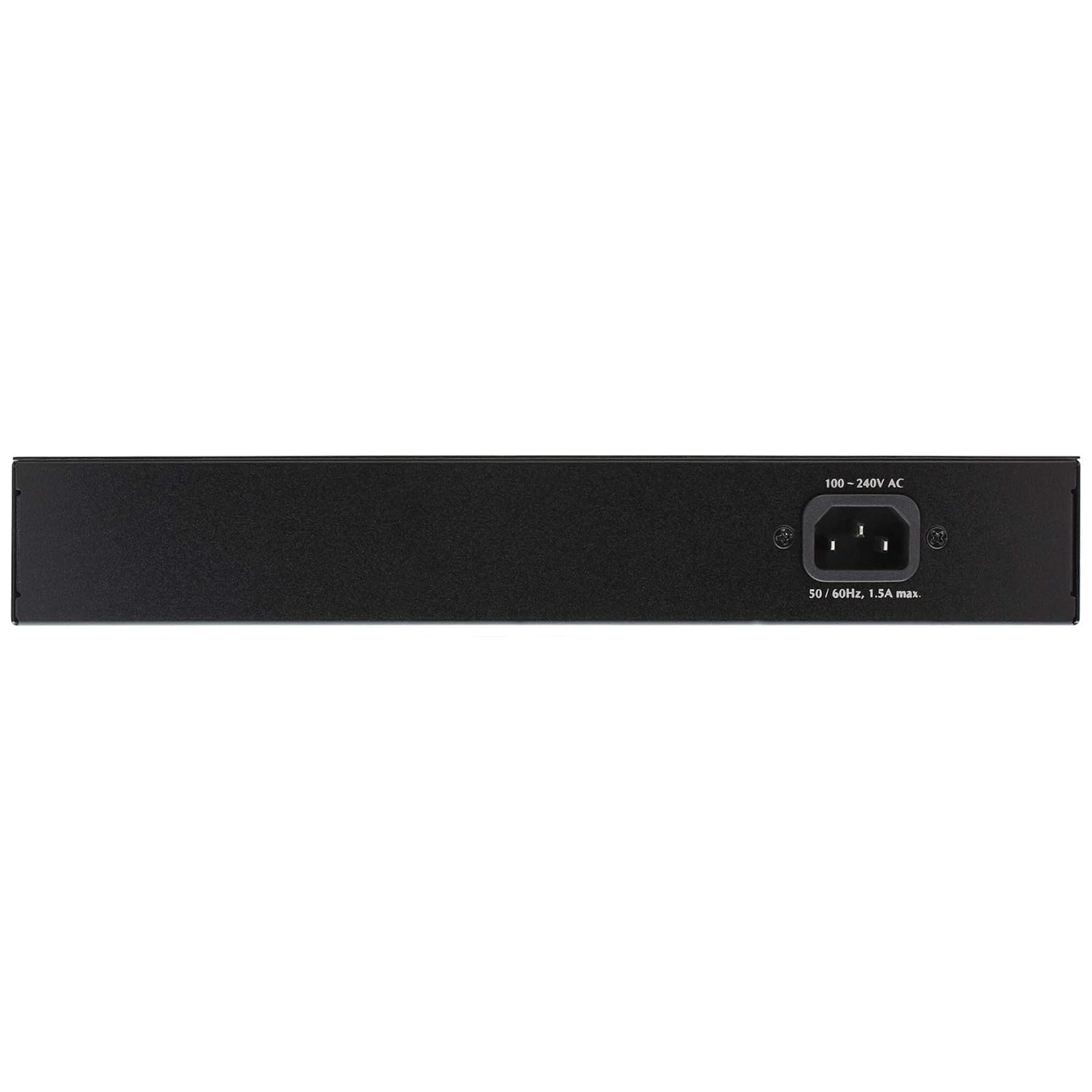
Сүрөт: Арткы view of the InLine 32305P switch, showing the 100-240V AC power input connector.
- Кубат киргизүү: Тышкы кубат адаптери үчүн туташтыргыч.
Жайгашуу
Монтаждоо параметрлери
The InLine 32305P switch can be deployed in two ways:
- Иш тактада жайгаштыруу: Attach the included rubber feet to the bottom of the switch to prevent slipping and protect surfaces. Place the switch on a flat, stable surface.
- Rackmount орнотуу: Use the provided 19-inch rackmount brackets to install the switch into a standard 19-inch equipment rack. Secure the brackets to the sides of the switch using the supplied screws, then mount the switch into the rack.
Туташуу кубаты
- Ensure the switch is powered off and all network cables are disconnected.
- Кубат адаптерин өчүргүчтүн арткы панелиндеги кубат киргизүү портуна туташтырыңыз.
- Plug the power adapter into a suitable electrical outlet. The Power LED on the front panel should illuminate, indicating the switch is receiving power.
Network Connections
- Connect your network devices (e.g., computers, servers, network printers) to any of the five RJ45 ports using standard Ethernet cables (Cat5e or Cat6 recommended for Gigabit speeds).
- For PoE-compatible devices (e.g., IP cameras, VoIP phones, wireless access points), connect them to ports 1-4. The switch will automatically detect and provide power to these devices if they are PoE-compliant (IEEE802.3af/at).
- Observe the Link/Act LEDs for each connected port. A solid green light indicates a successful link, and a blinking light indicates data activity.
Которгучту иштетүү
LED көрсөткүчтөрү
The front panel LEDs provide real-time status information:
| LED | Статус | Description |
|---|---|---|
| Күч | Жашыл (Катуу) | Коммутатор күйгүзүлдү. |
| Link/Act (per port) | Жашыл (Катуу) | A network device is connected and a link is established. |
| Link/Act (per port) | Жашыл (Жаркылдаган) | Берилиштер портто өткөрүлүп же кабыл алынууда. |
| PoE (1-4 портуна) | Жашыл (Катуу) | Туташкан түзмөккө PoE кубаты берилип жатат. |
| PoE MAX | Кызыл (Катуу) | Total PoE power budget is exceeded or nearing its limit. |
PoE+ Functionality
Ports 1-4 of the InLine 32305P support Power over Ethernet Plus (PoE+), compliant with IEEE802.3af and IEEE802.3at standards. This allows the switch to deliver both data and electrical power to compatible devices over a single Ethernet cable. Each PoE+ port can supply up to 25.5W, with a total power budget of up to 75W across all PoE ports.
- The switch automatically detects PoE-compatible devices and supplies the necessary power.
- Non-PoE devices can also be connected to ports 1-4 without damage, as the switch will not supply power to them.
- Monitor the PoE MAX LED. If it illuminates, the total power consumption of connected PoE devices is high. Consider reducing the number of high-power PoE devices or using an external power source for some devices if stability issues occur.
Техникалык тейлөө
Үзгүлтүксүз техникалык тейлөө коммутаторуңуздун узак мөөнөттүү иштешин жана оптималдуу иштешин камсыз кылууга жардам берет.
- Тазалоо: Use a soft, dry cloth to clean the exterior of the switch. Do not use liquid or aerosol cleaners. Ensure the ventilation openings are free from dust and obstructions.
- Вентиляция: Ensure adequate airflow around the switch. Do not block the ventilation holes.
- Кабелдик башкаруу: Сигналдын начарлашына жол бербөө үчүн тармак кабелдерин иреттүү жана ийилип кетпеген же ашыкча ийилген абалда кармаңыз.
- Микропрограмма: While this switch is plug-and-play and typically does not require firmware updates, check the InLine website for any potential updates or advisories for your model.
Проблемаларды чечүү
If you encounter issues with your InLine 32305P switch, refer to the following common problems and solutions:
- Кубат жок:
- Кубат адаптери өчүргүчкө да, иштеп жаткан электр розеткасына да бекем туташтырылганын текшериңиз.
- Башка аспапка сайып, розетка иштеп жатканын текшериңиз.
- Шилтеме жок/Аракет LED:
- Ethernet кабели коммутатор портуна жана тармак түзмөгүнө бекем туташкандыгын текшериңиз.
- Башка Ethernet кабелин колдонуп көрүңүз.
- Туташкан тармак түзмөгү күйгүзүлгөнүн жана туура иштегенин текшериңиз.
- Verify the cable length does not exceed 100 meters.
- PoE түзмөгү электр кубатын албай жатат:
- Ensure the PoE device is connected to one of ports 1-4.
- Verify the device is PoE-compatible (IEEE802.3af/at).
- Check the PoE LED for the specific port. If it's off, power is not being supplied.
- If the PoE MAX LED is illuminated, the total power budget might be exceeded. Disconnect some PoE devices or use an external power source for them.
- Башка Ethernet кабелин колдонуп көрүңүз.
- Жай тармак ылдамдыгы:
- Ensure all connected devices and cables support Gigabit Ethernet (Cat5e or Cat6).
- Check for excessive network traffic or bottlenecks on other network devices.
If the problem persists after trying these steps, please contact InLine technical support.
Техникалык шарттар
The following are the technical specifications for the InLine 32305P PoE+ Gigabit 5-Port Network Switch:
- Модель номери: 32305P
- Стандарттар: IEEE802.3, IEEE802.3u, IEEE802.3x, IEEE802.3ab, IEEE802.3af, IEEE802.3at
- Порттор: 5 x 10/100/1000 Mbps RJ45 Auto-Negotiation ports (Ports 1-4 support PoE+)
- PoE кубаттуулугу: Up to 25.5W per port (Ports 1-4), up to 75W total across all PoE ports
- MAC дарек таблицасы: 1K MAC даректерине чейин
- Агымды башкаруу: IEEE802.3x for full-duplex, Backpressure for half-duplex
- LED көрсөткүчтөрү: Power, Link/Act (per port), PoE (per port), PoE MAX
- Кабель түрлөрү:
- 10Base-T: Cat3, 4, 5 UTP cable (max. 100m)
- 100Base-TX: Cat5, 5e UTP cable (max. 100m)
- 1000Base-T: Cat5e, 6 UTP cable (max. 100m)
- Өлчөмдөрү (L x W x Y): Болжол менен 18 x 4.5 x 28.1 см
- Салмагы: Болжол менен 1.68 кг
- Турак жай: Metal, Fanless design
- Кубат киргизүү: 100-240V AC, 50/60Hz, 1.5A max
Кепилдик жана колдоо
InLine products are designed for reliability and performance. For information regarding warranty terms and conditions, please refer to the documentation included with your purchase or visit the official InLine website. For technical support, product inquiries, or to report issues, please contact InLine customer service:
- Webсайт: www.inline-info.com
- Электрондук почта: service@inline-info.com
Please have your product model number (32305P) and purchase information ready when contacting support.


