1. Киришүү
This manual provides essential information for the safe and effective use of the Allen-Bradley PowerFlex 700S Variable Frequency Drive (VFD), Model 20DC140A3NYNAENNN. It covers installation, operation, maintenance, and troubleshooting procedures. Users should read this manual thoroughly before attempting to install, operate, or service the VFD.
The PowerFlex 700S is designed to control the speed and torque of AC motors, offering precise control and energy efficiency in various industrial applications. This specific model is rated for 75 kW at 400 V.
2. Коопсуздук маалыматы
ЭСКЕРТҮҮ: Electrical shock hazard. Only qualified personnel should install, operate, or service this equipment. Failure to observe safety precautions can result in severe injury or death.
- Always disconnect and lock out power before working on the drive or motor.
- Ensure proper grounding of the VFD and motor.
- Электр кубаты колдонулганда электр компоненттерине тийбеңиз.
- Тиешелүү жеке коргонуу шаймандарын (ЖКК) кийиңиз.
- Бардык жергиликтүү жана улуттук электр эрежелерин сактаңыз.
The VFD contains capacitors that can retain a hazardous voltage even after power is removed. Allow sufficient discharge time before touching any components.
3. Продукт бүтүп калдыview
The Allen-Bradley PowerFlex 700S is a high-performance variable frequency drive designed for demanding applications. It features advanced control algorithms, flexible I/O, and robust construction for reliable operation.
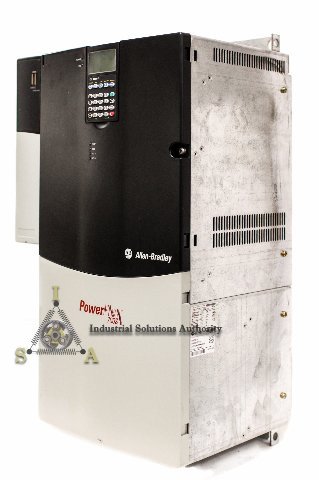
3.1-сүрөт: Бурчтуу view of the Allen-Bradley PowerFlex 700S Variable Frequency Drive, showing its robust enclosure and control panel.
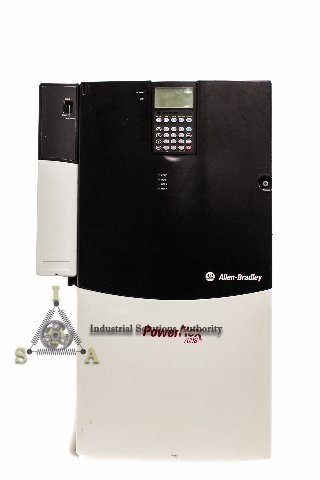
3.2-сүрөт: Фронт view of the PowerFlex 700S VFD, highlighting the integrated control panel with display and buttons.
Негизги өзгөчөлүктөр төмөнкүлөрдү камтыйт:
- Integrated control panel for local operation and programming.
- Robust design suitable for industrial environments.
- Advanced motor control capabilities.
3.3-сүрөт: A close-up image of the Allen-Bradley and PowerFlex 700S branding on the front panel of the Variable Frequency Drive.
4. Орнотуу
4.1. Механикалык монтаж
Mount the VFD vertically on a flat, rigid surface, ensuring adequate clearance for cooling and maintenance. Refer to the full installation guide for specific mounting dimensions and environmental considerations.
4.2. Электр зымдары
All wiring must be performed by a qualified electrician in accordance with local and national electrical codes. Ensure proper sizing of input power cables, motor cables, and control wiring.
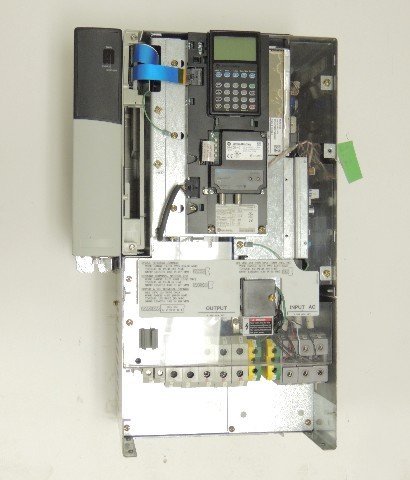
4.1-сүрөт: Ички view of the PowerFlex 700S VFD, showing the wiring terminals for input AC and output to the motor, along with internal components. Ensure all connections are secure.
- Connect incoming AC power to the designated input terminals (R, S, T).
- Мотордун зымдарын чыгуучу терминалдарга (U, V, W) туташтырыңыз.
- Ensure all ground connections are properly made.
- Connect control wiring as required for your application (e.g., start/stop signals, speed reference).
4.3. Баштапкы күйгүзүү жана конфигурация
After verifying all wiring, apply power to the VFD. The integrated control panel will typically display a startup sequence. Follow the on-screen prompts or refer to the programming manual for initial parameter setup, including motor data and application-specific settings.
5. Иштөө нускамалары
5.1. Негизги операция
The PowerFlex 700S can be operated via its local control panel, remote I/O, or a communication network. For local operation:
- Баштоо: басыңыз START башкаруу панелиндеги баскыч.
- Токтотуу: басыңыз ТОКТОТ баскычы.
- Ылдамдыкты көзөмөлдөө: Use the arrow keys or a potentiometer (if configured) to adjust the motor speed.
5.2. Programming and Parameters
The VFD's behavior is determined by its parameter settings. Access the programming menu via the control panel to view and modify parameters. Common parameters include motor nominal voltage, current, frequency, acceleration/deceleration times, and control modes. Refer to the PowerFlex 700S Programming Manual for a complete list and detailed descriptions of all parameters.
6. Техникалык тейлөө
Regular maintenance ensures optimal performance and extends the lifespan of the VFD. Always disconnect and lock out power before performing any maintenance.
- Тазалоо: Periodically clean the VFD's exterior and cooling fins to prevent dust accumulation, which can impede heat dissipation. Use compressed air or a soft brush.
- желдеткич текшерүү: Check cooling fans for proper operation, excessive noise, or obstructions. Replace fans if they are faulty.
- Терминал байланыштары: Periodically inspect all electrical connections for tightness. Loose connections can cause overheating and damage.
- Экологиялык текшерүү: Иштөө чөйрөсү белгиленген температуранын жана нымдуулуктун чегинде болушун камсыз кылыңыз.
7. Кыйынчылыктарды
The VFD's control panel displays fault codes to indicate operational issues. Refer to the PowerFlex 700S User Manual or Programming Manual for a comprehensive list of fault codes and their corresponding corrective actions.
7.1. Жалпы маселелер жана чечүү жолдору
- Дисплей жок/кубат жок: Киргизүү кубат туташууларын, сактагычтарды жана автоматтык өчүргүчтөрдү текшериңиз.
- Мотор иштебей жатат: Verify start command, speed reference, and ensure no active fault codes. Check motor wiring.
- Ашыкча токтун катасы: Check motor load, motor wiring, and VFD output current limits.
- Overvoltage/Undervoltage Ката: Check input power supply voltage.
If a fault persists after attempting basic troubleshooting, contact Allen-Bradley technical support.
8. Техникалык шарттар
| Спецификация | Нарк |
|---|---|
| Модель номери | 20DC140A3NYNAENNN |
| Өндүрүүчү | Аллен-Брэдли |
| Power Rating | 75 кВт |
| Киргизүү көлөмүtage | 400 V |
| ASIN | B01FKCPRVE |
| Дата биринчи жеткиликтүү | 12-май, 2016-жыл |
For detailed electrical and environmental specifications, refer to the official Allen-Bradley PowerFlex 700S data sheet.
9. Кепилдик жана колдоо
This Allen-Bradley PowerFlex 700S VFD is typically covered by the manufacturer's standard warranty. For specific warranty terms and conditions, please refer to the documentation provided with your purchase or visit the official Allen-Bradley webсайт.
For technical assistance, service, or to report issues, please contact Allen-Bradley customer support or your authorized distributor. Provide the model number (20DC140A3NYNAENNN) and any relevant fault codes when seeking support.


