1. Киришүү
This user manual provides comprehensive instructions for the operation, maintenance, and troubleshooting of your PRO 12 Pro12 2-in-1 Touchscreen Tablet PC. The Pro12 is designed to offer a versatile computing experience, combining the portability of a tablet with the functionality of a laptop through its detachable keyboard. Featuring a 12.2-inch Full HD IPS display and powered by Android 6.0 (Marshmallow), this device is equipped with a quad-core processor and 64GB of expandable flash storage. Please read this manual thoroughly to ensure proper use and to maximize the lifespan of your device.
2. Продукт бүтүп калдыview жана өзгөчөлүктөрү
The PRO 12 Pro12 offers a range of features designed for productivity and entertainment:
- Дисплей: 12.2-inch Full HD IPS touchscreen with a resolution of 1920 x 1200 pixels.
- Процессор: 1.3 GHz Quad Core CPU for efficient performance.
- Эстутум жана сактоо: 2GB RAM and 64GB internal flash storage, expandable via microSD card up to 128GB (card not included).
- Операция системасы: Android 6.0 (Marshmallow).
- Камералар: Front-facing 2MP webcam and rear-facing 8MP webкамера
- Байланыш: Wi-Fi, Bluetooth 4.0, USB 2.0 port, miniHDMI output, and 3.5mm headphone jack.
- Баскычтоп: Full-width detachable keyboard with a proprietary Magnalink connection for secure docking and an enhanced typing experience.
- Батареянын иштөө мөөнөтү: Батареянын иштөө мөөнөтү 8 XNUMX саатка чейин.
- Салмагы: Approximately 2.78 lbs (tablet with keyboard).

Figure 2.1: Key features of the PRO 12 Pro12 Tablet PC.
3. Компоненттер жана порттор
Familiarize yourself with the physical components and connection ports of your Pro12 tablet.

Figure 3.1: PRO 12 Pro12 Tablet PC with Keyboard.

Figure 3.2: PRO 12 Pro12 Tablet (without keyboard).
3.1. Port Layout
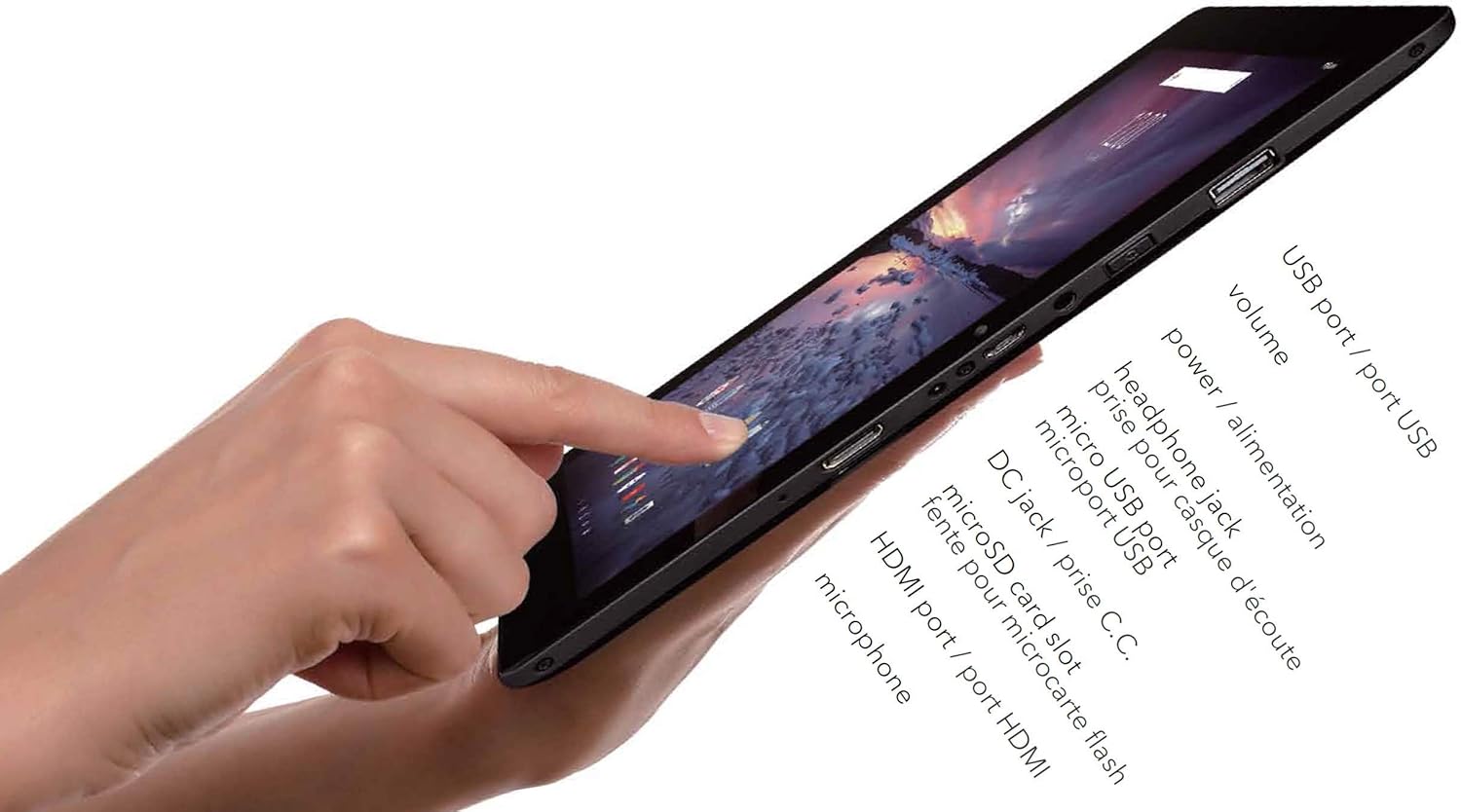
3.3-сүрөт: Каптал view of the Pro12 Tablet showing ports.
- USB порту (USB 2.0): Тышкы USB түзмөктөрүн туташтыруу үчүн.
- Үн баскычтары: Аудио чыгаруу деңгээлин тууралаңыз.
- Кубат баскычы: Turns the device on/off or puts it to sleep/wakes it up.
- Наушник уячасы (3.5 мм): Наушниктерди же тышкы динамиктерди туташтыруу үчүн.
- Микро USB порту: Alternative charging port and for data transfer.
- DC заряддоо порту: Primary charging port for faster charging.
- MicroSD картасынын уячасы: Сактоо көлөмүн кеңейтүү үчүн.
- MiniHDMI Out: Тышкы дисплейлерге туташуу үчүн.
- Микрофон: Аудио киргизүү үчүн.
4. Орнотуу
4.1. Баштапкы заряддоо
Before first use, fully charge your Pro12 tablet. Connect the provided power adapter to the DC Charging Port on the tablet and plug it into a wall outlet. The charging indicator light will illuminate. A full charge may take several hours. You can also use the Micro USB port for charging, though it may be slower.
4.2. Баскычтопту бекитүү жана ажыратуу
The Pro12 features a proprietary Magnalink connection for its detachable keyboard.
- Тиркөө: Align the tablet's bottom edge with the keyboard's docking connector. The magnetic connection will guide the tablet into place, securing it firmly.
- Ажыратуу: Gently pull the tablet upwards from the keyboard. Avoid excessive force to prevent damage to the connectors.

Figure 4.1: Pro12 Tablet with keyboard attached.
4.3. Күйгүзүү / Өчүрүү
- Күйгүзүү үчүн: Экран жарыктанганга чейин Кубат баскычын басып, кармап туруңуз.
- Өчүрүү үчүн: Press and hold the Power Button until a power-off menu appears on the screen. Select "Power off" and confirm.
- Уйку/Ойгонуу: Briefly press the Power Button to put the tablet to sleep or wake it up.
4.4. Алгачкы Android орнотуу
Upon first power-on, you will be guided through the Android 6.0 (Marshmallow) setup wizard. Follow the on-screen prompts to:
- Тилиңизди тандаңыз.
- Wi-Fi тармагына туташыңыз.
- Sign in with your Google Account or create a new one. This is essential for accessing the Google Play Store and other Google services.
- Set up screen lock options (PIN, pattern, password).
- Review жана шарттарды кабыл алуу.
5. Иштөө нускамалары
5.1. Сенсордук экран навигациясы
The 12.2-inch touchscreen supports standard Android gestures:
- таптаңыз: Бир нерсени тандоо же тиркемени ачуу.
- Басып кармап туруу: Контексттик менюларга же сүрөтчөлөрдү жылдыруу үчүн.
- Серпүү: Тизмелер боюнча жылдыруу же үй экрандарынын ортосунда которулуу үчүн.
- Чымчып-кичирейтүү: Сүрөттөрдү чоңойтуу же кичирейтүү үчүн жана web барактар.
5.2. Wi-Fiга туташуу
Зымсыз тармакка туташуу үчүн:
- барыңыз Орнотуулар > Wi-Fi.
- Wi-Fi күйгүзүлгөнүн текшериңиз On.
- Тизмеден каалаган тармакты тандаңыз.
- Эгер суралса, тармактын сырсөзүн киргизип, таптаңыз Туташуу.
5.3. Камераны колдонуу
The Pro12 is equipped with a 2MP front camera and an 8MP rear camera. Open the Camera application to take photos or record videos. You can switch between front and rear cameras within the app interface.
5.4. Сактагычты башкаруу
Your tablet has 64GB of internal storage. To expand storage:
- Insert a microSD card (up to 128GB, not included) into the microSD card slot.
- The tablet will recognize the card, and you can use it for storing photos, videos, and other files.
- Manage storage by going to Орнотуулар > Сактагыч жана USB.
5.5. Перифериялык түзүлүштөрдү туташтыруу
- USB түзмөктөрү: Connect USB flash drives, external hard drives, or other USB peripherals to the full-size USB 2.0 port.
- Bluetooth түзмөктөрү: Pair Bluetooth headphones, speakers, or other accessories via Орнотуулар > Bluetooth.
- External Display (miniHDMI): Use a miniHDMI to HDMI cable (not included) to connect your tablet to a TV or monitor. The tablet screen content will be mirrored on the external display.
6. Техникалык тейлөө
6.1. Тазалоо
Планшеттин экранын жана корпусун тазалоо үчүн жумшак, түксүз чүпүрөктү колдонуңуз. өжөр тактар үчүн, бир аз гampкездемени суу же экран тазалагыч эритме менен сүртүңүз. Катуу химиялык заттарды же абразивдүү материалдарды колдонуудан алыс болуңуз.
6.2. Батареяга кам көрүү
- Батареяны бат-баттан толук кубаттап калуудан алыс болуңуз.
- Планшетти экстремалдык температурага тийгизбеңиз.
- Use only the provided charger or a compatible micro USB charger.
6.3. Программалык камсыздоону жаңыртуу
Оптималдуу иштөөнү жана коопсуздукту камсыз кылуу үчүн системанын жаңыртууларын мезгил-мезгили менен текшерип туруңуз. Орнотуулар > Планшет жөнүндө > Системанын жаңыртуулары.
7. Кыйынчылыктарды
This section addresses common issues you might encounter with your Pro12 tablet.
| Көйгөй | Мүмкүн болгон себеп / Чечим |
|---|---|
| Планшет күйбөйт. | Battery may be completely drained. Connect to charger and wait a few minutes before attempting to power on. |
| Slow performance or apps freezing. | Too many applications running in the background. Close unused apps. Clear cache from Орнотуулар > Сактагыч жана USB. Restart the tablet. |
| Wi-Fi'га туташпай жатат. | Ensure Wi-Fi is enabled. Check Wi-Fi password. Restart your router. Move closer to the Wi-Fi router as the tablet's Wi-Fi antenna may have limited range. |
| Батарея бат эле түгөнөт. | Screen brightness too high. Too many apps running. Background sync enabled. Adjust settings to conserve battery. Note that charging time can be long, and battery life may vary with usage. |
| Сенсордук экран жооп бербейт же так эмес. | Clean the screen. Restart the tablet. If issues persist, a mouse can be connected via the USB port for navigation. |
| Keyboard not recognized. | Ensure the Magnalink connection is clean and securely docked. Detach and reattach the keyboard. Restart the tablet. |
7.1. Заводдук абалга кайтаруу
If you experience persistent software issues, a factory reset can resolve them by restoring the tablet to its original settings. Warning: This will erase all data on your tablet. Back up important fileулантуудан мурун.
- барыңыз Орнотуулар > Камдык көчүрмөнү сактоо жана баштапкы абалга келтирүү.
- таптаңыз Заводдук дайындар баштапкы абалга келтирилди.
- таптаңыз Планшетти баштапкы абалга келтирүү, анда Баарын өчүр ырастоо үчүн.
8. Техникалык шарттар
| Өзгөчөлүк | Деталь |
|---|---|
| Модель аты | Pro12 (CT9223W97 DK) |
| Бренд | PRO 12 |
| Операция системасы | Android 6.0 (Marshmallow) |
| Screen Size | 12.2 дюйм |
| Screen Resolution | 1920 x 1200 (Full HD IPS) |
| Процессор | 1.3 GHz Quad Core (VIA Chipset) |
| RAM | 2 ГБ (DDR3 SDRAM) |
| Ички сактагыч | 64 ГБ Flash эстутум |
| Кеңейтүүчү сактагыч | MicroSD карта слоту (128 ГБ чейин) |
| Алдыңкы камера | 2 депутат |
| Арткы камера | 8 депутат |
| Зымсыз байланыш | Wi-Fi, Bluetooth 4.0 |
| Порттар | USB 2.0, Micro USB, 3.5mm Headphone Jack, MiniHDMI Out, DC Charging Port |
| Батареянын иштөө мөөнөтү | 8 саатка чейин (орточо) |
| Элемент Салмагы | 3.08 фунт |
| Продукциянын өлчөмдөрү | 17 x 3 x 11 дюйм |
| Түс | Кара |
9. Коопсуздук маалыматы
- Аппаратты экстремалдык температурага, түз күндүн нуруна же жогорку нымдуулукка дуушар кылбаңыз.
- Аппаратты түшүрүүдөн же катуу таасирлерден сактаныңыз.
- Аппаратты суудан жана башка суюктуктардан алыс кармаңыз.
- Аппаратты өз алдынча бөлүүгө же оңдоого аракет кылбаңыз. Квалификациялуу тейлөө кызматкерлерине кайрылыңыз.
- Өндүрүүчү тарабынан бекитилген аксессуарларды гана колдонуңуз.
- Аппаратты жана анын батареясын жергиликтүү эрежелерге ылайык таштаңыз.
10. Кепилдик жана колдоо
Specific warranty details are not provided in the product information. For warranty claims or technical support, please refer to the documentation included with your purchase or contact the PRO 12 customer service directly. You may also visit the official PRO 12 webколдоо булактары үчүн сайт.


