Introduction
Thank you for choosing the Kaiser MSA-6515BT Amplified Speaker System. This manual provides essential information for the safe and efficient operation of your device. Please read it thoroughly before use and retain it for future reference.
Коопсуздук нускамалары
Коопсуз иштөөнү камсыз кылуу жана зыян келтирбөө үчүн төмөнкү сактык чараларын сактаңыз:
- Do not expose the speaker to rain or moisture to prevent electric shock or fire.
- Вентиляция тешиктерин жаап албаңыз. Агрегаттын айланасында адекваттуу аба агымын камсыз кылыңыз.
- Динамик кулап калбашы үчүн аны туруктуу, жалпак бетке коюңуз.
- Чагылгандуу жаан учурунда же көпкө чейин колдонулбаган учурда электр шнурун сууруп коюңуз.
- Агрегатты өзүңүз тейлөөгө аракет кылбаңыз. Бардык тейлөөлөрдү квалификациялуу кызматкерлерге тапшырыңыз.
- Динамикти радиаторлор, жылуулук регистрлери, мештер же жылуулук чыгарган башка аппараттар сыяктуу жылуулук булактарынан алыс кармаңыз.
- Өндүрүүчү белгилеген тиркемелерди/аксессуарларды гана колдонуңуз.
- Avoid placing heavy objects on the power cord or speaker.
Пакеттин мазмуну
Пакетте бардык буюмдар бар экенин текшериңиз:
- Kaiser MSA-6515BT Ampөмүр баяндамачы
- Жөнгө салынуучу динамик стенди
- Зымдуу микрофон
- Алыстан башкаруу
- Электр кабели
- Батареяны заряддоо кабели
Продукт бүттүview
Фронт View

Сүрөт 1: Алдыңкы view of the Kaiser MSA-6515BT amplified speaker, featuring the main speaker grille and the KSR brand logo at the bottom.
Side View and Portability Features

2-сүрөт: Каптал view of the speaker, illustrating the robust side handle and the wheels located at the bottom for convenient portability.
Арткы панель жана башкаруу элементтери
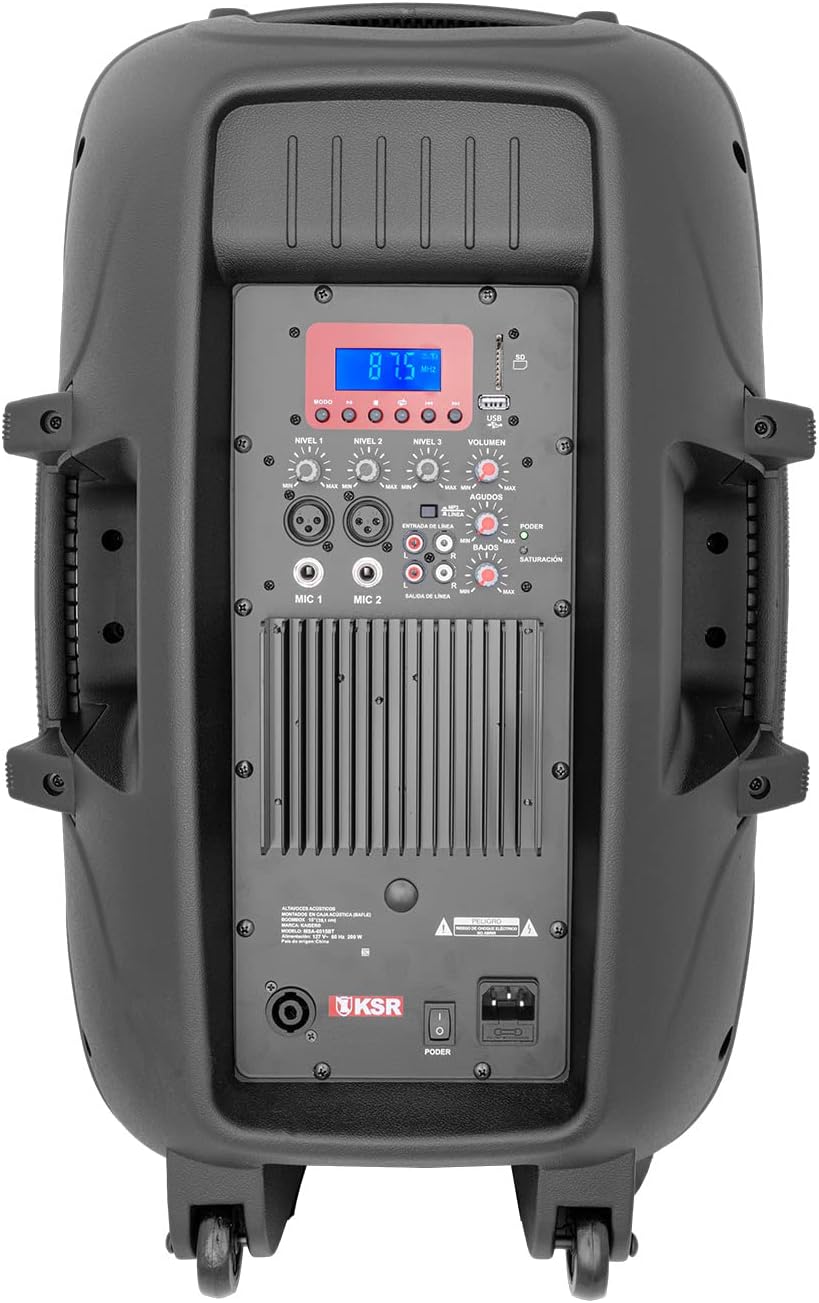
3-сүрөт: Детальдуу view of the rear control panel, including the digital display, various input/output jacks, and independent volume and tone controls.
The rear panel houses all essential controls and connection ports. Familiarize yourself with these components:
- Санариптик дисплей: Учурдагы режимди, трек маалыматын же FM жыштыгын көрсөтөт.
- USB/SD карта уячалары: Аудио ойнотуу үчүн files from memory devices.
- Ойнотуу башкаруулары: Play/Pause, Skip Forward/Backward, Mode selection.
- Микрофон киргизүүлөрү (MIC 1, MIC 2): XLR (Cannon) and 6.3mm (1/4 inch) jacks for connecting microphones.
- Линдик киргизүү (RCA): For connecting external audio devices like CD players or mixers.
- Line Output (RCA): For connecting to another ampкөтөргүч же спикер.
- Speakon Output: For connecting to a passive speaker.
- Көлөмдү көзөмөлдөө: Independent knobs for Master Volume, Microphone Volume, Line Input Volume, Bass, and Treble.
- Power Switch and AC Input: For connecting the power cable and turning the unit on/off.
Жайгашуу
Пакеттен чыгаруу жана жайгаштыруу
- Динамикти жана бардык аксессуарларды таңгактан этияттык менен алып салыңыз.
- Place the speaker on a stable, level surface. For optimal sound projection, use the included adjustable speaker stand.
- Ensure there is adequate space around the speaker for ventilation.
Туташуу кубаты
- Динамиктин кубат которгучу ӨЧҮРҮҮ абалында экенин текшериңиз.
- Connect the included power cable to the AC input on the rear panel of the speaker.
- Электр кабелинин экинчи учун стандарттуу электр розеткасына сайыңыз.
Иштөө нускамалары
Күйгүзүү/өчүрүү
- To turn on the speaker, flip the power switch on the rear panel to the ON position. The digital display will illuminate.
- To turn off the speaker, flip the power switch to the OFF position.
Bluetooth байланышы
- Динамикти күйгүзүңүз.
- Press the "Mode" button on the rear panel or remote control until "Bluetooth" appears on the display.
- Bluetooth иштетилген түзмөгүңүздө (смартфон, планшет, ноутбук) Bluetooth иштетиңиз жана жеткиликтүү түзмөктөрдү издеңиз.
- Select "MSA-6515BT" from the list of devices. Once paired, a confirmation sound will be heard.
- You can now play audio from your device through the speaker. Optimal range is up to 2 meters.
FM радиосунун иштеши
- Press the "Mode" button until "FM" appears on the display.
- Press the Play/Pause button to initiate an automatic scan for FM stations. The speaker will save all found stations.
- Use the Skip Forward/Backward buttons to navigate between saved stations.
USB/SD карта ойнотуу
- Insert a USB flash drive or SD card (with audio fileс) арткы панелдеги тиешелүү уячага.
- The speaker should automatically switch to USB/SD mode and begin playback. If not, press the "Mode" button to select USB/SD.
- Use the playback controls (Play/Pause, Skip Forward/Backward) to manage your audio.
Microphone and Line Inputs
- Микрофон: Connect the wired microphone to either the XLR (Cannon) or 6.3mm (1/4 inch) MIC input. Adjust the "MIC Volume" knob to control the microphone's level.
- Сап киргизүү: Connect external audio sources (e.g., mixer, CD player) to the RCA Line Input. Adjust the "Line Volume" knob.
- Тон көзөмөлү: Use the "Bass" and "Treble" knobs to adjust the overall sound characteristics.
- Негизги том: Adjust the "Master Volume" knob for the overall output level of the speaker.
Connecting Additional Speakers
- RCA чыгаруу: Use the RCA Line Output to send the audio signal to another amplified speaker or an external ampөмүрлүү.
- Speakon Output: Connect a passive speaker to the Speakon output for expanded sound coverage. Ensure the passive speaker's impedance matches the MSA-6515BT's output requirements (8 ohms).
Техникалык тейлөө
- Тазалоо: Динамиктин сыртын тазалоо үчүн жумшак, кургак чүпүрөктү колдонуңуз. Абразивдүү тазалагычтарды же эриткичтерди колдонбоңуз.
- Сактагыч: Колдонулбаган учурда динамикти салкын, кургак жерде, тике күндүн нурунан жана өтө температурадан алыс сактаңыз.
- Вентиляция: Regularly check that the ventilation grilles are free from dust and debris.
Проблемаларды чечүү
| Көйгөй | Мүмкүн себеп | Чечим |
|---|---|---|
| Күч жок | Электр кабели туташкан эмес; Электр өчүрүү; Розетка туура эмес иштеши. | Электр кабелинин бекем туташтырылганын текшериңиз. Кубат которгучун КҮЙГҮЗҮҢҮЗ. Розетканы башка түзмөк менен текшериңиз. |
| Үн чыгышы жок | Үнү өтө төмөн; Туура эмес киргизүү режими тандалды; Түзмөк туура эмес туташтырылган. | Increase Master Volume. Select correct input mode (Bluetooth, USB, FM, Line). Check all cable connections. |
| Bluetooth жупташуу катасы | Device too far; Bluetooth not enabled on source device; Speaker not in pairing mode. | Move device closer to speaker. Ensure Bluetooth is enabled on your device. Select Bluetooth mode on speaker. |
| Микрофон иштебей жатат | Microphone volume low; Microphone not connected; Faulty microphone. | Increase MIC Volume. Ensure microphone is securely connected. Test with another microphone if available. |
| USB/SD ойнотуу көйгөйлөрү | Колдоого алынбайт file format; Corrupt fileс; USB/SD карта туура эмес салынган. | аудиону камсыз кылуу files are in a supported format (e.g., MP3). Reinsert USB/SD card. Try a different USB/SD card. |
Техникалык шарттар
| Модель аты | MSA-6515BT |
| Динамик түрү | Кесипкөй Ampөмүр баяндамачы |
| Динамик өлчөмү | 15 дюйм |
| Аудио Power Output | 33W PMPO / 2W RMS |
| Импеданс | 8 Ом |
| Байланыш технологиясы | Bluetooth, RCA, USB, SD |
| Bluetooth диапазону | Up to 2 meters (optimal link) |
| Киргизүүлөр | RCA (audio), 6.3mm (microphone), Cannon (microphone), USB, SD |
| Чыгуулар | RCA (amplifier), Speakon (passive speaker) |
| Power Source | Электр кабели |
| Батареянын орточо узактыгы | 5 саат |
| Өлчөмдөр (D x W x H) | 40 см х 49 см х 75.5 см |
| Салмагы | 21 килограмм |
| Камтылган компоненттер | Amplified speaker, wired microphone, remote control, adjustable stand, power cable, battery charging cable. |

Figure 4: Dimensions of the Kaiser MSA-6515BT speaker.
Кепилдик жана колдоо
This Kaiser MSA-6515BT Amplified Speaker System comes with a limited warranty. Please refer to the warranty card included in your package for specific terms and conditions.
For technical support, service, or warranty claims, please contact Kaiser customer service through their official channels. Keep your purchase receipt as proof of purchase.


