1. Киришүү
This manual provides instructions for the proper setup, operation, and maintenance of your HCDZ replacement remote control. This remote is designed to function as a direct replacement for specific Onkyo A/V AV receiver models without requiring any programming.
2. Продукт бүтүп калдыview
The HCDZ replacement remote control is an infrared (IR) device compatible with Onkyo TX-SA605, TX-SA8560, and HT-R340 A/V AV receivers. It is designed for immediate use upon battery installation, requiring no additional setup or code entry.

1-сүрөт: Артка view of the HCDZ replacement remote control with the battery cover securely in place.
3. Орнотуу
3.1 Батареяны орнотуу
To begin using your remote control, install two AA batteries (not included) into the battery compartment.
- Пульттун артындагы батарея отсегин табыңыз.
- Батарея бөлүмүнүн капкагын ылдый жылдырып, көтөрүп алыңыз.
- Insert two new AA batteries, ensuring the positive (+) and negative (-) terminals align correctly with the markings inside the compartment.
- Батарея бөлүмүнүн капкагын бекем чыкылдаган үн чыкканга чейин кайра ордуна жылдырып, кайра ордуна коюңуз.
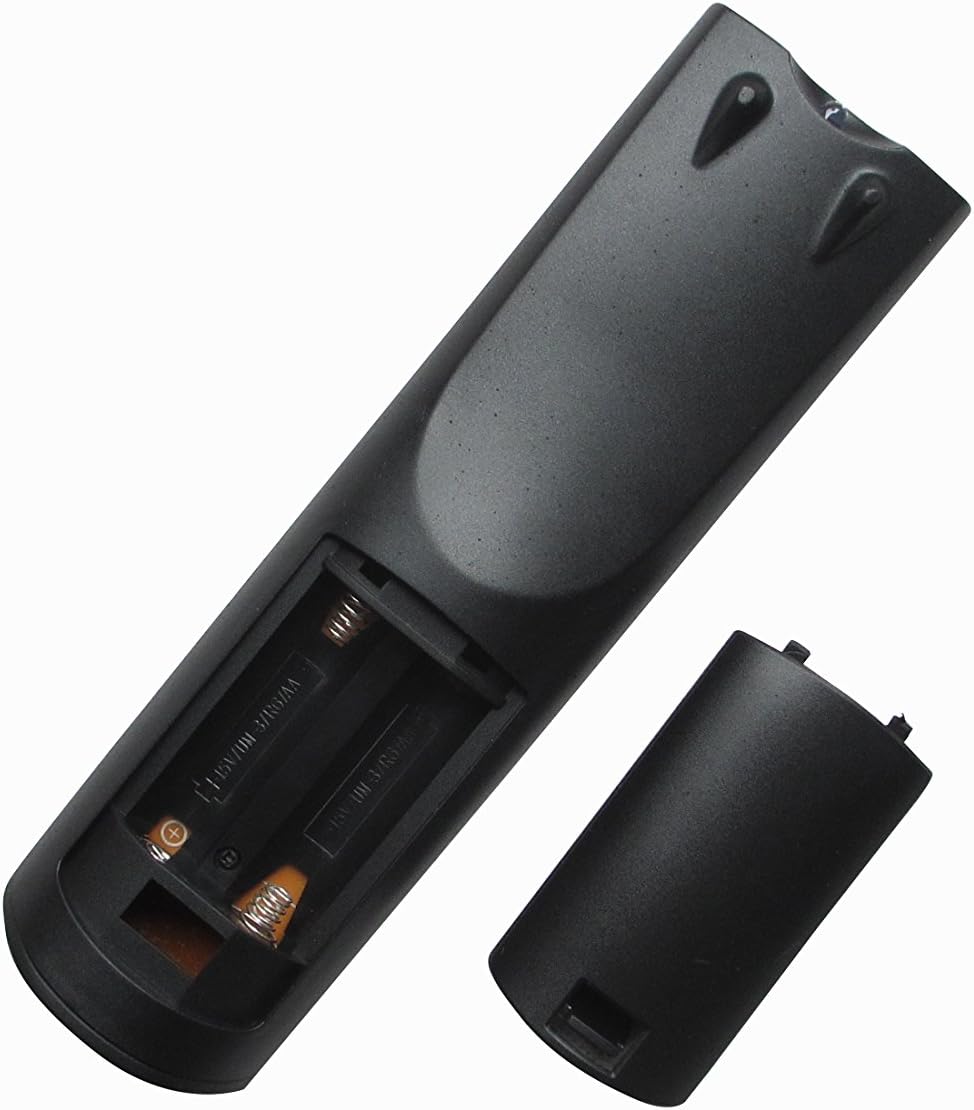
2-сүрөт: Артка view of the remote control with the battery compartment open for battery installation.
Once batteries are installed, the remote control is ready for use with your compatible Onkyo A/V AV receiver. No programming is required.
4. Иштөө нускамалары
To operate your Onkyo A/V AV receiver with the HCDZ replacement remote control:
- Point the remote control directly towards the infrared sensor on your Onkyo A/V AV receiver.
- Press the desired function button (e.g., Power, Volume Up/Down, Input Select).
- Ensure there are no obstructions between the remote control and the receiver.
The maximum effective range for operation is approximately 10 meters (33 feet).
5. Техникалык тейлөө
5.1 Тазалоо
Пультту жумшак, кургак чүпүрөк менен сүртүңүз. Суюк тазалагычтарды же абразивдик материалдарды колдонбоңуз, анткени алар бетке же ички тетиктерге зыян келтириши мүмкүн.
5.2 Батареяны алмаштыруу
Replace batteries when the remote control's response becomes inconsistent or stops working. Always replace both batteries simultaneously with new AA batteries. Do not mix old and new batteries or different types of batteries.
5.3 Сактоо
Эгерде алыстан башкаруу пульту көпкө чейин колдонулбаса, агып кетүүнүн жана мүмкүн болгон зыяндын алдын алуу үчүн батарейкаларды алып салыңыз.
6. Кыйынчылыктарды
6.1 Алыстан башкаруучу жооп бербейт
- Батареяларды текшерүү: Батареялар туура полярдуулукта (+/-) туура салынганын жана заряды түгөнүп калбаганын текшериңиз. Зарыл болсо, жаңы AA батареялары менен алмаштырыңыз.
- Көрүү сызыгы: Verify that there is a clear, unobstructed path between the remote control's IR emitter and the receiver's IR sensor.
- Аралык: Натыйжалуу иштөө диапазонунда экениңизди текшериңиз (10 метрге чейин).
- Алуучу күчү: Confirm that your Onkyo A/V AV receiver is powered on.
7. Техникалык шарттар
| Бренд | HCDZ |
| Модель номери | HCDZ-9560 |
| Байланыш технологиясы | Инфракызыл (IR) |
| Controller Type | Алыстан башкаруу |
| Колдоого алынган түзмөктөрдүн максималдуу саны | 1 (Onkyo A/V AV Receiver) |
| Максималдуу диапазон | 10 метр |
| Керектүү батарейкалардын саны | 2 АА батарейка |
| Өзгөчө өзгөчөлүк | Эргономикалык |
8. Колдоо
For any questions or further assistance regarding your HCDZ replacement remote control, please contact the seller or manufacturer directly. Specific warranty information is not provided in this manual; please refer to your purchase documentation for details.


