Introduction
This manual provides detailed instructions for the proper use and maintenance of your ELECTRA RC7 Air Conditioner Remote Control. Please read this manual thoroughly before operating the device to ensure optimal performance and longevity. The RC7 remote control is designed for specific Airwell, Emailair, and Electra air conditioning units.
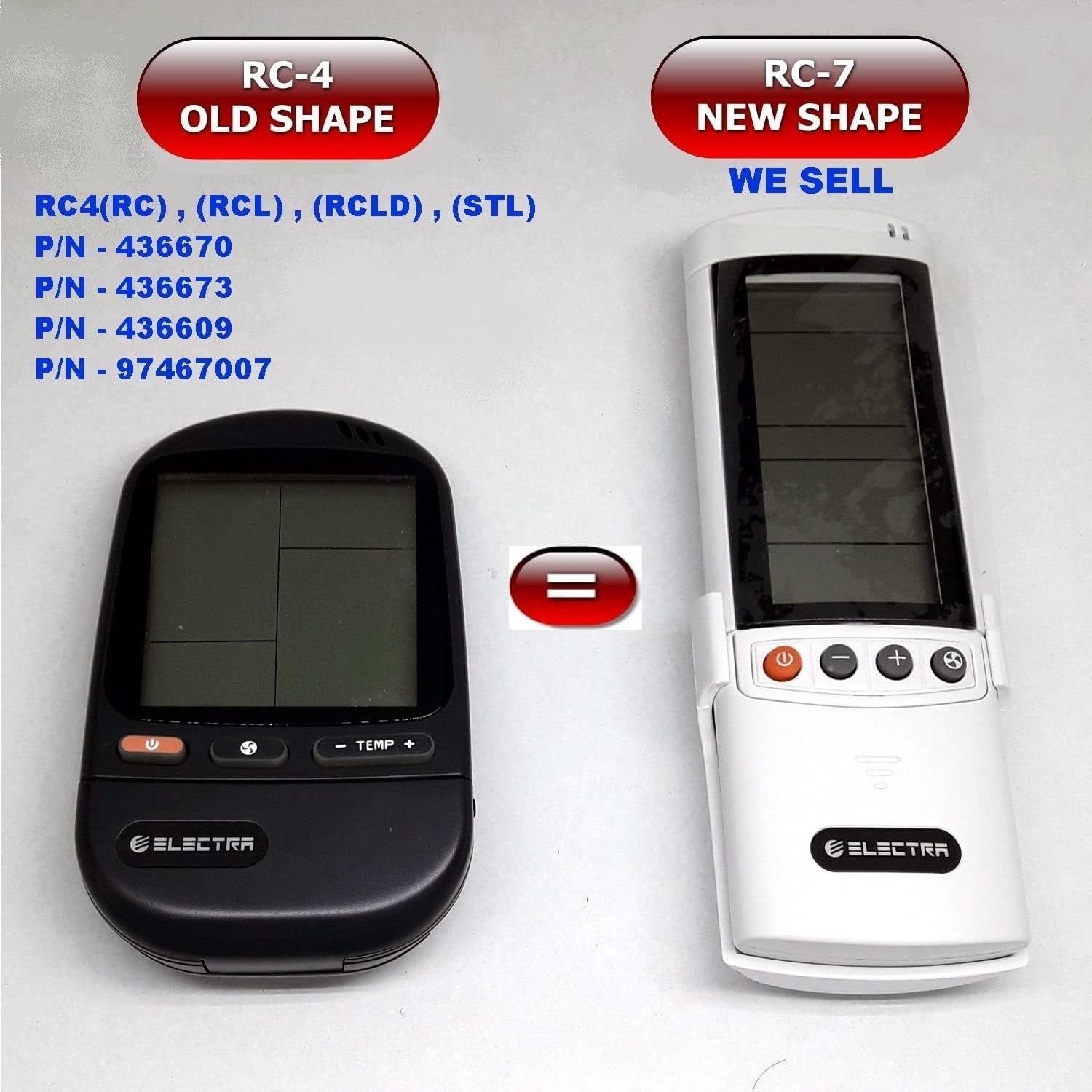
Image: Comparison of the older RC-4 model and the newer RC-7 model. This image helps users identify the correct remote control for their air conditioning unit.
Пакеттин мазмуну
- 1 x ELECTRA RC7 Air Conditioner Remote Control
- 1 x Wall Mount Holder (optional, may vary by package)

Image: The ELECTRA RC7 remote control shown alongside its accompanying wall mount holder, illustrating the complete package contents.
Продукт бүттүview
The ELECTRA RC7 remote control features an ergonomic design with clearly labeled buttons and a digital display for easy operation. Familiarize yourself with the layout below.
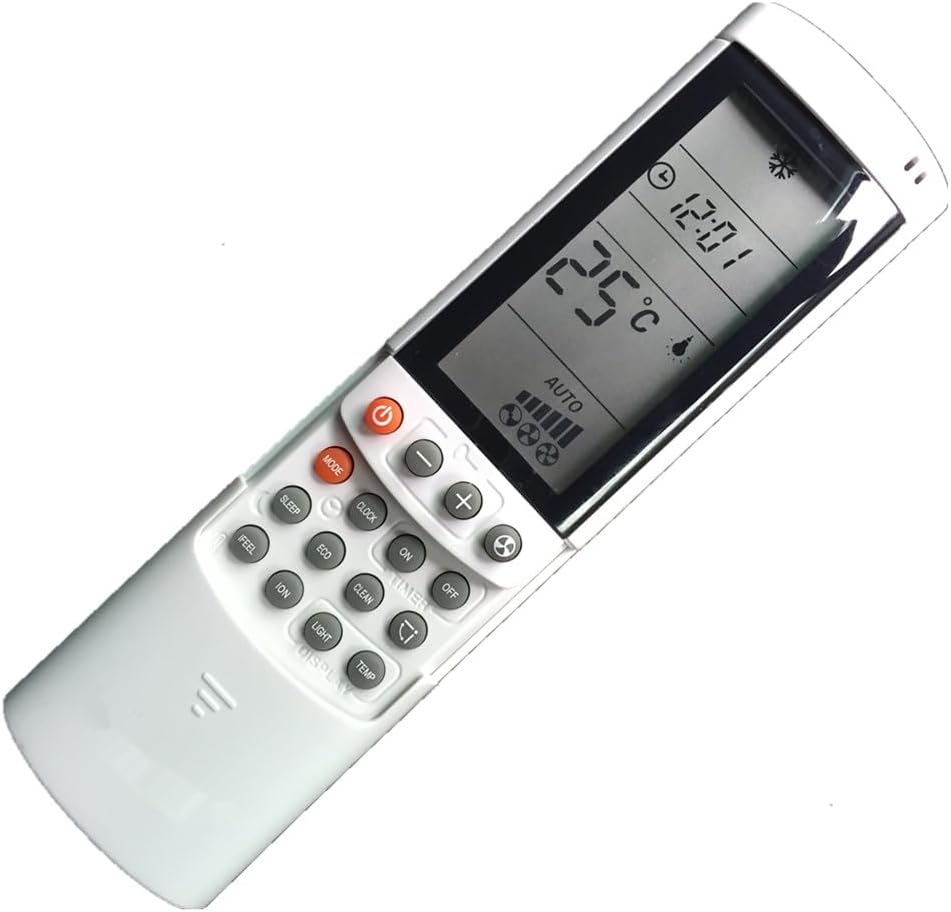
Сүрөт: деталдуу view of the ELECTRA RC7 remote control, highlighting the digital display and various function buttons for air conditioner operation.
Баскыч функциялары:
- Күч (⏻): Turns the air conditioner unit On or Off.
- РЕЖИМИштөө режимдери боюнча циклдик режимдерди иштетет (мисалы, Муздатуу, Жылуулук, Вентилятор, Кургатуу, Автоматтык).
- SET: Used for confirming settings or entering specific menus.
- Температуранын жогорулашы (+) / Төмөн (-): Каалаган температураны жөнгө салат.
- Вентилятордун ылдамдыгы (☁): Желдеткичтин ылдамдыгын жөндөйт (мисалы, Төмөн, Орто, Жогорку, Авто).
- ТАЙМЕР: Sets the timer for automatic On/Off operation.
- УЙКУ: Activates or deactivates sleep mode for comfortable night operation.
- CLEAR: Clears current settings or cancels a function.
- SEEL: Activates a specific comfort mode based on ambient conditions.
- БӨЛМӨ: Displays or sets the room temperature.
- ЖАРЫК: Ички блоктогу дисплей жарыгын башкарат.
- ДИСПЛЕЙ: Toggles the remote's display backlight or unit's display.
- ЭКО: Activates energy-saving mode.
- ТАЗА: Initiates a self-cleaning function for the indoor unit.
- IO: Activates the ionizer function (if available on the AC unit).
- Селкинчек (⇄): Controls the louver swing direction.
Жайгашуу
Батарея орнотуу:
- Пульттун артындагы батарея бөлүкчөсүнүн капкагын табыңыз.
- Капкакты ылдый жылдырыңыз же аны ачуу үчүн бекиткичти басыңыз.
- Insert two (2) AAA batteries, ensuring the positive (+) and negative (-) terminals match the markings inside the compartment.
- Батарея уясынын капкагын ордуна коюңуз, анын ордуна бекем чыкылдатыңыз.
Эскертүү: Ар дайым жаңы батарейкаларды колдонуңуз жана эки батарейканы бир убакта алмаштырыңыз. Эски жана жаңы батареяларды же батарейкалардын ар кандай түрлөрүн аралаштырбаңыз.
Иштөө нускамалары
Ensure the remote control is pointed directly at the air conditioner's receiver when sending commands.
Негизги операция:
- Күйгүзүү/өчүрүү: басыңыз Күч Түзмөктү күйгүзүү үчүн баскычын бир жолу басыңыз. Түзмөктү өчүрүү үчүн аны кайра басыңыз.
- Тандоо режими: басыңыз РЕЖИМ button repeatedly to cycle through available operating modes (e.g., Auto, Cool, Dry, Fan, Heat). The selected mode will be displayed on the remote's screen.
- Температураны жөндөө: колдонуу Температуранын жогорулашы (+) or Төмөн (-) каалаган температураны коюу үчүн баскычтар.
- Желдетүүчү ылдамдыкты жөндөө: басыңыз Fan Speed button to cycle through different fan speed settings (e.g., Auto, Low, Medium, High).
Өркүндөтүлгөн функциялар:
- Таймер функциясы: басыңыз ТАЙМЕР button to set a specific time for the unit to turn on or off. Follow the on-screen prompts to adjust the time using the temperature buttons and confirm with SET.
- Уйку режими: басыңыз УЙКУ button to activate sleep mode, which typically adjusts temperature and fan speed for quiet, comfortable sleep.
- ЭКО режими: басыңыз ЭКО button to engage energy-saving operation, which optimizes settings to reduce power consumption.
- Свинг функциясы: басыңыз Свинг button to activate or adjust the automatic louver swing, distributing air evenly.
Техникалык тейлөө
Алыстан башкарууну тазалоо:
- Алыстан башкаруу пультунун бетин жумшак, кургак чүпүрөк менен сүртүңүз.
- өжөр кир үчүн, жеңил гampчүпүрөктү суу жана жумшак жуугуч менен жууп, анан дароо кургатып сүртүңүз.
- Do not use abrasive cleaners, alcohol, or chemical solvents, as these can damage the remote's surface or internal components.
Батареяны алмаштыруу:
Replace batteries when the remote's display becomes dim or the remote fails to operate the air conditioner from a normal distance. Refer to the "Battery Installation" section under Setup for detailed instructions.
Маанилүү: Эгерде алыстан башкаруу пульту көпкө чейин колдонулбаса, агып кетүүнүн жана бузулуунун алдын алуу үчүн батарейкаларды алып салыңыз.
Проблемаларды чечүү
- Пульт жооп бербей жатат:
- Батареялар туура полярдуулук менен туура салынганын текшериңиз.
- Эски батарейкаларды жаңысына алмаштырыңыз.
- Пульт менен кондиционердин ресиверинин ортосунда эч кандай тоскоолдук жок экенин текшериңиз.
- Пульттун түз эле кондиционерге багытталганын текшериңиз.
- Дисплей күңүрт же бош:
- Батареялар аз болушу мүмкүн. Аларды алмаштырыңыз.
- Чектелген иш диапазону:
- Batteries may be weak. Replace them.
- Ensure no strong light sources (e.g., direct sunlight) are interfering with the signal.
Техникалык шарттар
- Модел: RC7
- Бренд: ELECTRA (Compatible with Airwell, Emailair, Electra)
- Контроллердин түрү: Control Button
- Өзгөчө өзгөчөлүгү: Эргономикалык дизайн
- Түсү: Ак
- Колдоого алынган түзмөктөрдүн максималдуу саны: 1 (ар бир алыстан)
- Максималдуу диапазон: Болжол менен 10 метр (33 фут)
- Кубат булагы: 2 x AAA Батареялар (киргизилген эмес)
Кепилдик жана колдоо
For warranty information or technical support, please refer to the documentation provided with your air conditioning unit or contact the original seller or manufacturer of the ELECTRA RC7 remote control. Keep your purchase receipt as proof of purchase.


