1. Киришүү
This manual provides essential information for setting up, operating, maintaining, and troubleshooting your new CYBERPOWERPC Luxe Gaming PC. Please read this guide thoroughly before using your system to ensure optimal performance and longevity.
The CYBERPOWERPC Luxe Gaming PC is a high-performance desktop computer designed for gaming and demanding applications. It features an Intel Core i7-12700KF processor, Nvidia GeForce RTX 4060 Ti graphics, 32GB DDR5 RAM, and a 1TB NVMe SSD, all housed in a CyberpowerPC Prism Mid Tower case with advanced cooling.
2. Системаны орнотуу
2.1 кутудан чыгаруу
Carefully remove the PC from its packaging. Retain all packaging materials for future transport or warranty claims. Ensure all accessories, such as power cables, documentation, and any included peripherals, are present.
2.2 Перифериялык түзүлүштөрдү туташтыруу
Күйгүзүүдөн мурун негизги перифериялык түзүлүштөрдү туташтырыңыз:
- Монитор: Connect your monitor to the graphics card's DisplayPort or HDMI output. Ensure the cable is securely fastened.
- Баскычтоп жана чычкан: Connect your keyboard and mouse to the available USB ports on the rear or top of the PC.
- Аудио: Connect speakers or headphones to the audio output jacks on the rear or front panel.
- Тармак: For a wired connection, connect an Ethernet cable to the RJ45 port. For wireless, ensure the Wi-Fi antenna (if included) is attached.

Сүрөт 2.2.1: Алдыңкы view of the CYBERPOWERPC Luxe Gaming PC. This image displays the tempered glass side panel, internal components with RGB lighting, and the overall design of the PC tower.
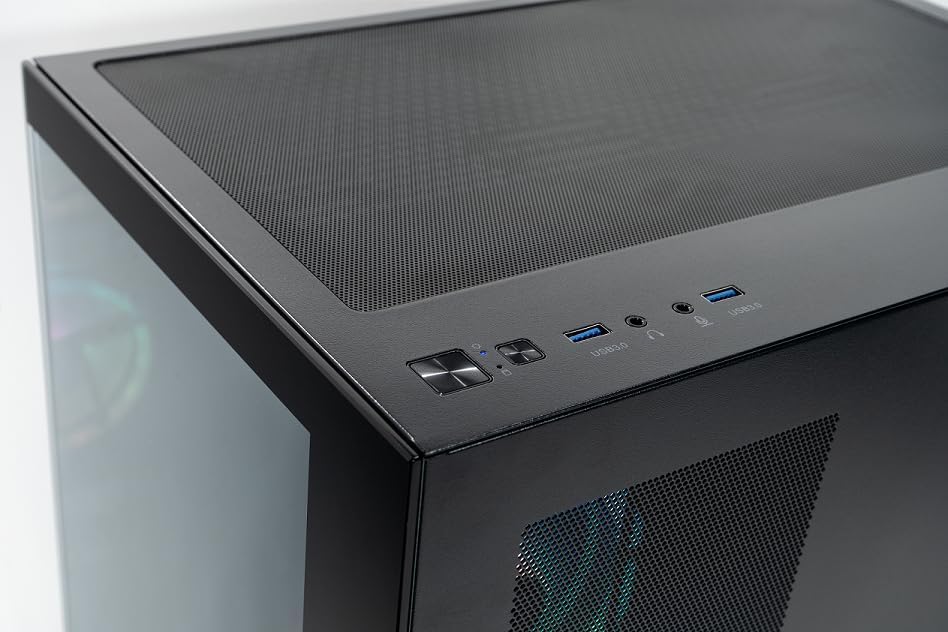
Image 2.2.2: Top panel of the CYBERPOWERPC Luxe Gaming PC. This image highlights the power button, reset button, two USB 3.0 ports, and audio input/output jacks located on the top of the PC case for easy access.
2.3 Кубат туташтыруу
Connect the provided power cable to the power supply unit (PSU) input on the rear of the PC, then plug the other end into a grounded electrical outlet.
3. Иштөө нускамалары
3.1 Күйгүзүү/өчүрүү
- Күйгүзүү үчүн: Press the power button located on the top panel of the PC.
- Өчүрүү үчүн: From the Windows 11 desktop, click the Start button, then select Power > Shut down. Avoid direct power-off unless necessary to prevent data loss.
3.2 Баштапкы жүктөө жана Windows 11 орнотуу
Upon first power-on, the system will guide you through the Windows 11 Home setup process. Follow the on-screen instructions to configure your region, language, network, and user account.
3.3 Тармакка туташуу
- Зымдуу (Ethernet): Once the Ethernet cable is connected, Windows 11 should automatically detect and connect to the network.
- Зымсыз (Wi-Fi): After Windows 11 setup, click the Wi-Fi icon in the taskbar, select your network, and enter the password. The system supports 1200Mbps 802.11ac Wi-Fi.
4. Негизги компоненттер жана функциялар
Your CYBERPOWERPC Luxe Gaming PC is equipped with the following core components:
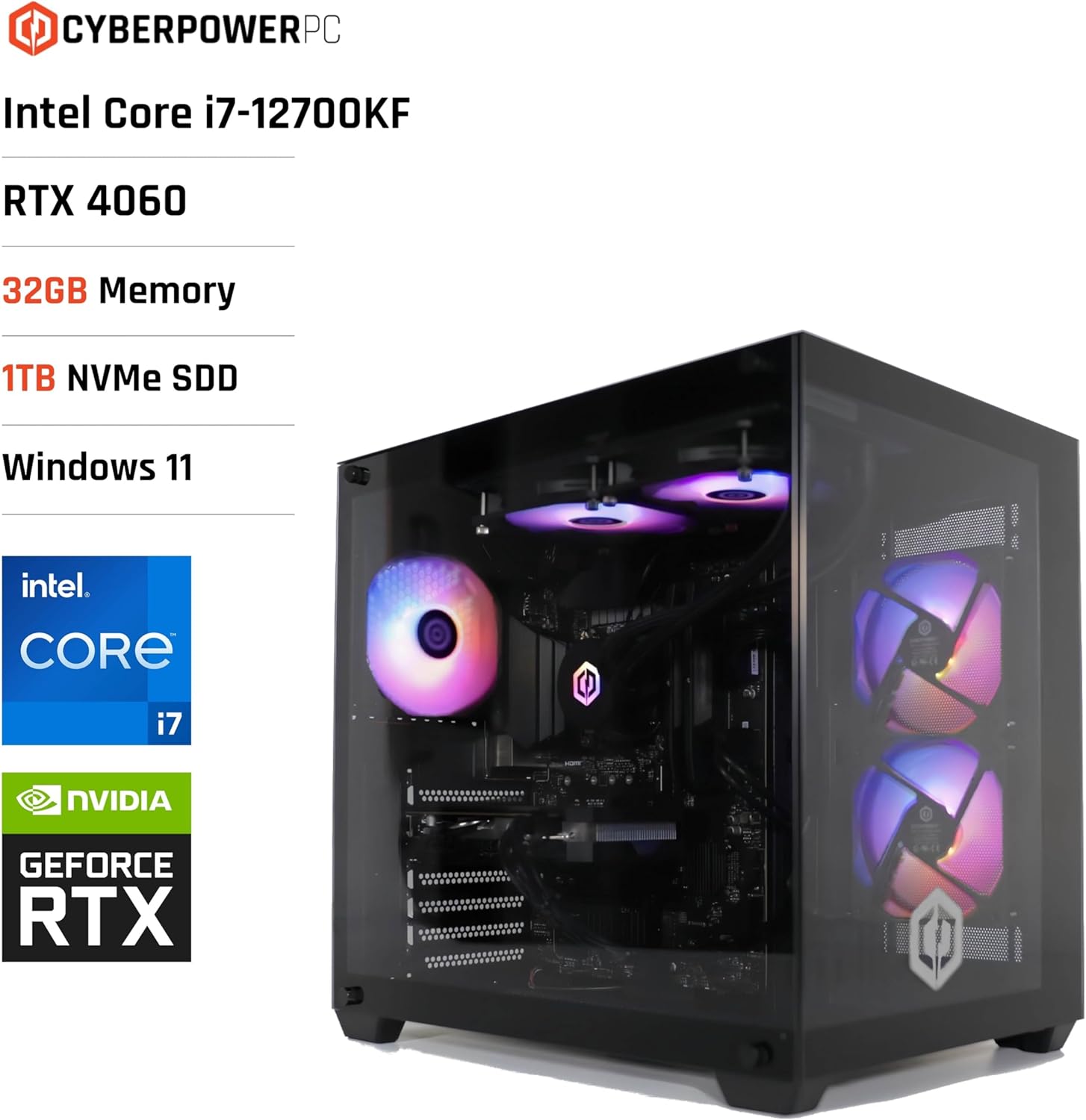
Image 4.1: CYBERPOWERPC Luxe Gaming PC with specifications. This image visually presents the PC alongside text overlays indicating its Intel Core i7-12700KF processor, RTX 4060 graphics, 32GB Memory, 1TB NVMe SSD, and Windows 11 operating system.
- Процессор: Intel Core i7-12700KF (12 cores, 20 threads, up to 5.00GHz boost, 25MB cache).
- Графикалык карта: Nvidia GeForce RTX 4060 Ti with 8GB GDDR6X memory. Supports DisplayPort v1.4a and HDMI 2.1.
- RAM: 32GB 5200MHz DDR5 RAM.
- Сактагыч: 1TB M.2 NVMe Solid State Drive for fast boot times and application loading.
- Motherboard: Intel Z790 chipset motherboard.
- Электр камсыздоо: 650W 80+ certified gaming power supply.
- Муздатуу: 240mm all-in-one CPU water cooler and 6x RGB LED fans for efficient thermal management.
- Операция системасы: Windows 11 Home (64-bit) pre-installed.
- Байланыш:
- 4x USB 3.1 порттору
- 2x USB 2.0 порттору
- 1x PS/2 KB or mouse port
- 1x RJ45 Ethernet LAN (10/100/1000)
- 1200Mbps 802.11ac Wi-Fi / WLAN
- 7.1-канал жогорку тактыктагы аудио

Сүрөт 4.2: Арткы view of the CYBERPOWERPC Luxe Gaming PC. This image details the various input/output ports available on the back panel, including USB ports, Ethernet, audio jacks, and video outputs from the graphics card.

Image 4.3: Nvidia GeForce RTX logo. This image represents the powerful graphics processing unit integrated into the system.
5. Техникалык тейлөө
Regular maintenance helps ensure the longevity and performance of your PC.
- Чаңды тазалоо: Periodically clean dust from the case fans, CPU cooler, and graphics card heatsink using compressed air. Ensure the PC is powered off and unplugged before cleaning.
- Программалык камсыздоо жаңыртуулары: Keep your Windows operating system, drivers (especially graphics drivers), and applications updated to the latest versions for security and performance improvements.
- Вентиляция: Ensure the PC is placed in a well-ventilated area, free from obstructions that could block airflow to the intake and exhaust vents.
- Кабелдик башкаруу: Organize internal and external cables to improve airflow and prevent accidental disconnections.
6. Кыйынчылыктарды
Бул бөлүм сиз кабылышы мүмкүн болгон жалпы көйгөйлөрдү карайт.
6.1 Күч жок
- Кубат кабелинин компьютерге да, розеткага да бекем туташтырылганын текшериңиз.
- Verify the power switch on the PSU (located at the rear of the PC) is in the 'ON' position.
- Розетканын иштеп жатканын текшерүү үчүн башка түзмөк менен текшериңиз.
6.2 Монитордо дисплей жок
- Ensure the monitor is powered on and the video cable (HDMI/DisplayPort) is securely connected to the graphics card outputs, not the motherboard's integrated video ports.
- Башка видео кабелин же бар болсо мониторду колдонуп көрүңүз.
- Confirm the correct input source is selected on your monitor.
6.3 Тармакка туташуу маселелери
- Зымдуу туташуулар үчүн Ethernet кабелинин жана роутердин абалын текшериңиз.
- For Wi-Fi, ensure the Wi-Fi adapter is enabled in Windows settings and you are connected to the correct network with the correct password.
- Роутериңизди/модемиңизди жана компьютериңизди өчүрүп-күйгүзүңүз.
6.4 Системанын иштешинин маселелери
- Бардык драйверлер, айрыкча графикалык драйверлер жаңыртылганын текшериңиз.
- Фондук тиркемелерди ашыкча ресурстарды керектеп жатканын Task Manager (Ctrl+Shift+Esc) аркылуу текшериңиз.
- Verify that the system is not overheating. Monitor CPU and GPU temperatures using appropriate software.
7. Техникалык шарттар
| Компонент | Спецификация |
|---|---|
| Бренд | CyberpowerPC |
| Операция системасы | Windows 11 Home (64-бит) |
| CPU модели | Intel Core i7-12700KF |
| CPU ылдамдыгы | 3.6 GHz (Base), up to 5.0 GHz (Boost) |
| CPU өзөктөрү/жиптери | 12 Cores (8 Performance, 4 Efficient) / 20 Threads |
| Кэш өлчөмү | 25 MB |
| Графикалык карта | Nvidia GeForce RTX 4060 Ti 8GB GDDR6X |
| RAM | 32 ГБ 5200 МГц DDR5 |
| Сактагыч | 1TB M.2 NVMe SSD |
| Motherboard Chipset | Intel Z790 |
| Электр камсыздоо | 650W 80+ Gaming PSU |
| Муздатуу | 240mm All-in-One CPU Water Cooler, 6x RGB LED Fans |
| Wi-Fi | 1200Mbps 802.11ac WLAN |
| Ethernet | 10/100/1000 Gigabit LAN |
| Аудио | 7.1-канал жогорку тактыктагы аудио |
| USB порттору | 4x USB 3.1, 2x USB 2.0 |
| Иштин түрү | CyberpowerPC Prism Mid Tower |
| Өзгөчө колдонуулар | Оюндар |
8. Кепилдик жана колдоо
Your CYBERPOWERPC Luxe Gaming PC comes with the following warranty and support:
- Компоненттик кепилдик: 2 years for components.
- Manufacturing Warranty: 3 years for manufacturing defects.
- Техникалык колдоо: Өмүр бою техникалык колдоо.
- Программалык камсыздоо: Includes 1 Year Norton 360 VPN & Security for Gamers.
For technical assistance or warranty claims, please contact CyberpowerPC customer support through their official webсайт же продукт документациясында көрсөтүлгөн байланыш маалыматы.


