1. Киришүү
The Fluke 123B Industrial ScopeMeter is a rugged, hand-held oscilloscope designed for comprehensive troubleshooting and maintenance of industrial electrical and electro-mechanical equipment. This device combines the functions of a dual-channel digital oscilloscope and a 5,000-count true-RMS digital multimeter, offering a versatile solution for field service technicians and industrial electricians.
Key features include a 20 MHz oscilloscope bandwidth, integrated meter and scope recorder capabilities, and shielded test leads for accurate measurements. This manual provides essential information for the safe and effective operation, setup, maintenance, and troubleshooting of your Fluke 123B ScopeMeter.
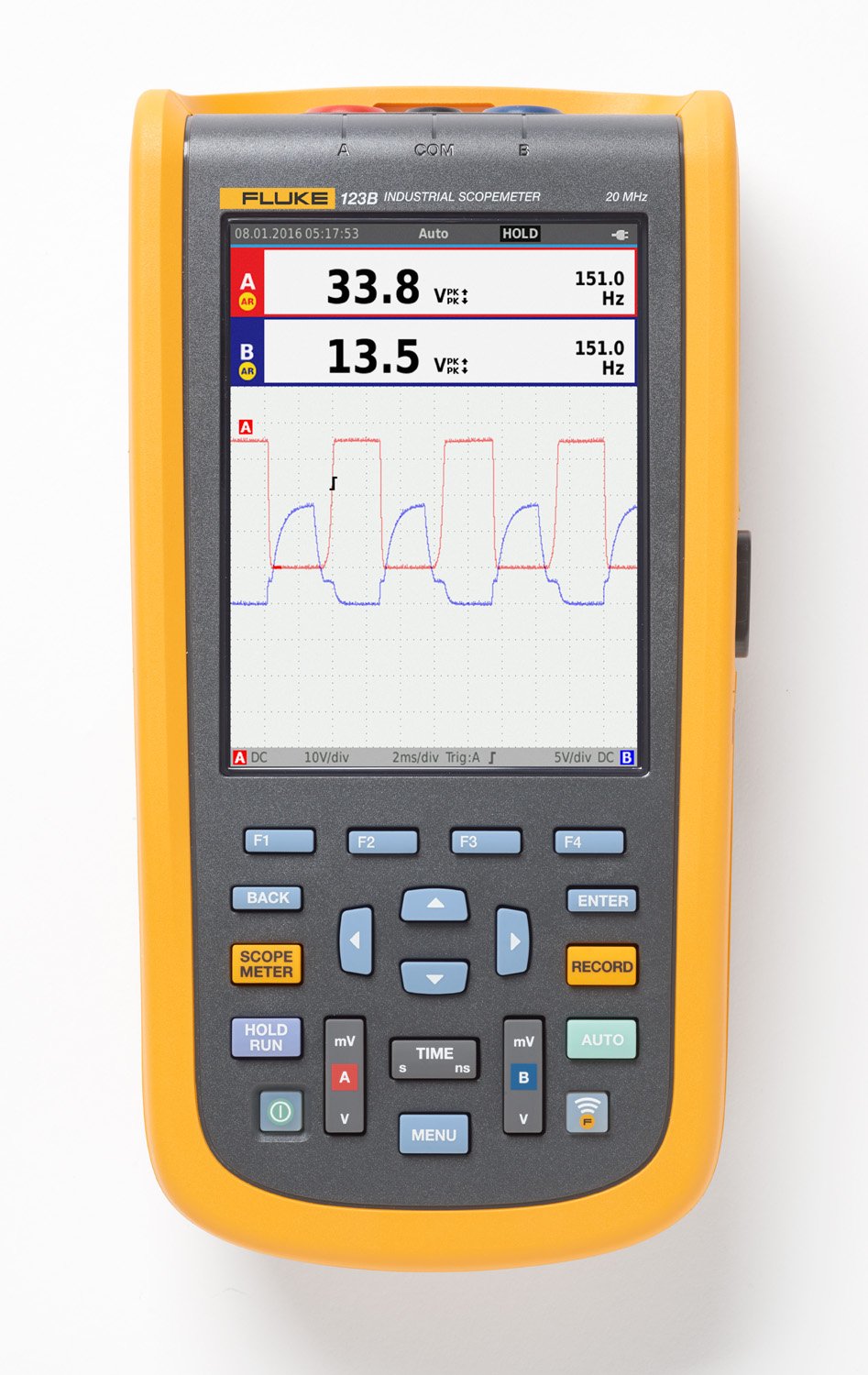
Сүрөт 1.1: Алдыңкы view of the Fluke 123B Industrial ScopeMeter, showing its display and control buttons. The screen displays waveform measurements and digital readings.

Figure 1.2: The Fluke 123B ScopeMeter held in a gloved hand, illustrating its compact and portable design for field use.
2. Коопсуздук маалыматы
Always adhere to the following safety precautions to prevent personal injury and damage to the instrument or equipment under test. This device is intended for use by qualified personnel only.
- Бардык нускамаларды окуңуз: Before using the ScopeMeter, thoroughly read and understand all operating instructions and safety warnings.
- Use proper protective equipment: Always wear appropriate personal protective equipment (PPE), such as safety glasses and insulated gloves, when working with electrical systems.
- Inspect leads and accessories: Before each use, inspect all test leads, probes, and accessories for damage. Do not use if insulation is cracked or if the conductor is exposed.
- Ырды текшерүүtage рейтинги: Ensure the ScopeMeter and its accessories are rated for the voltage and current levels of the circuit being tested.
- нымдуу шарттарды болтурбоо: Do not operate the ScopeMeter in wet or damp чөйрөлөр.
- Do not operate if damaged: If the ScopeMeter appears damaged or is not operating properly, discontinue use immediately and contact authorized service personnel.
- Батарея коопсуздугу: Use only the specified battery type and charger. Do not expose batteries to extreme temperatures or dispose of them in fire.
3. Кутуда эмне бар
Upon unpacking your Fluke 123B Industrial ScopeMeter Kit, verify that all the following components are present:
- Li-Ion батарея топтому
- Charger power adapter
- 2 shielded test leads with ground leads
- Кара сыноо
- Red and blue hook clips
- Banana to BNC adapter
- Safety information plus CD-ROM
- USB angled adapter
- WiFi USB adaptor
- Жумшак алып жүрүүчү куту
- FlukeView™ for Windows® software
- Магниттик илгич
- Экран коргоочу

Figure 3.1: All components included in the Fluke 123B Industrial ScopeMeter Kit, including the device, various test leads, adapters, power supply, and carrying case.
4. Орнотуу
4.1. Батареяны заряддоо
Before initial use, fully charge the Li-Ion battery pack. Connect the charger power adapter to the ScopeMeter's charging port and plug it into a suitable AC power outlet. The charging indicator on the device will show the charging status.
4.2. Баштапкы күйгүзүү
Press and hold the power button (usually marked with a circle and a vertical line) until the display illuminates. The device will perform a self-test and then display the main measurement screen.
4.3. Attaching Test Leads
For oscilloscope measurements, connect the shielded test leads to the input channels (A and B) on the top of the ScopeMeter. Ensure the ground leads are securely attached to the appropriate ground terminals. For multimeter functions, use the black test lead and the red/blue hook clips as needed.

Figure 4.1: The Fluke 123B ScopeMeter shown with its integrated kickstand extended, allowing for hands-free viewing during setup or operation.
5. Иштөө нускамалары
5.1. Интерфейсте навигация
The Fluke 123B features a clear display and intuitive button layout. Use the directional arrows to navigate menus and adjust settings. The ENTER баскычы тандоолорду ырастайт, жана КАЙТ баскычы мурунку экранга кайтарат.
5.2. Oscilloscope Function
басыңыз SCOPE METER button to enter oscilloscope mode. You can adjust vertical sensitivity (V/div) and horizontal time base (s/div) using the dedicated мВ/В жана TIME баскычтар. The АВТО button can automatically set optimal display parameters for the input signal.
5.3. Multimeter Function
The ScopeMeter integrates a 5,000-count true-RMS digital multimeter. Access multimeter functions through the main menu or dedicated buttons, allowing for measurements of voltagд, ток, каршылык жана үзгүлтүксүздүк.
5.4. Recording Measurements
The ЖАЗУУ button initiates data logging for both meter and scope readings. This feature is useful for capturing intermittent events or monitoring trends over time. Data can be reviewed on the device or transferred to a computer using the included FlukeView™ software and USB/WiFi adapters.

Figure 5.1: A technician actively using the Fluke 123B ScopeMeter to perform measurements within an electrical control panel, demonstrating its application in industrial environments.
6. Техникалык тейлөө
6.1. Тазалоо
Clean the ScopeMeter's casing жарнама мененamp cloth and mild detergent. Do not use abrasive cleaners or solvents. Ensure the device is powered off and disconnected from all power sources before cleaning. The screen protector should be replaced if it becomes scratched or damaged to maintain display clarity.
6.2. Батареяга кам көрүү
To maximize battery life, avoid fully discharging the battery frequently. Store the device with a partial charge if it will not be used for extended periods. Replace the battery when its capacity significantly diminishes.
6.3. Калибрлөө
For optimal accuracy, it is recommended to have your Fluke 123B ScopeMeter calibrated periodically by an authorized Fluke service center. Refer to the safety information CD-ROM for recommended calibration intervals.
7. Кыйынчылыктарды
This section provides solutions to common issues you might encounter with your Fluke 123B ScopeMeter. If the problem persists, contact Fluke customer support.
| Көйгөй | Мүмкүн себеп | Чечим |
|---|---|---|
| Түзмөк күйбөйт. | Battery is discharged or faulty; power button not pressed correctly. | Charge the battery. Ensure the power button is pressed firmly for a few seconds. |
| No waveform displayed in oscilloscope mode. | Test leads not connected properly; signal too small or too large; incorrect settings. | Check lead connections. Adjust V/div and s/div settings. Use the AUTO button. |
| Туура эмес окуулар. | Uncalibrated device; damaged test leads; environmental interference. | Perform a self-test. Inspect test leads for damage. Consider professional calibration. |
| Cannot transfer data to PC. | Incorrect USB/WiFi adapter connection; software not installed or outdated. | Ensure adapters are correctly inserted. Install or update FlukeView™ software. Check PC's USB ports. |
8. Техникалык шарттар
| Өзгөчөлүк | Деталь |
|---|---|
| Модель номери | 4755909 |
| Осциллографтын өткөрүү жөндөмдүүлүгү | 20 МГц |
| Каналдарды киргизүү | 2 |
| Мультиметр | Two 5,000-count true-RMS digital multimeters |
| Power Source | 1 литий-иондук батарейка (кошулган) |
| Продукциянын өлчөмдөрү | 15.75 x 12.75 x 9.5 дюйм |
| Салмагы | 3.06 фунт |
| Биринчи жеткиликтүү | 25-февраль, 2016-жыл |
| Өндүрүүчү | Fluke |
9. Кепилдик жана колдоо
Fluke products are known for their quality and reliability. For specific warranty terms and conditions applicable to your Fluke 123B ScopeMeter, please refer to the warranty information provided on the included CD-ROM or visit the official Fluke website. It is recommended to register your product upon purchase.
For technical support, service, or to inquire about authorized service centers, please contact Fluke customer support directly. Contact information can typically be found on the Fluke webсайтында же өнүмүңүздү коштогон документтерде.
Сатып алууasing from authorized distributors ensures you receive a genuine Fluke product with a valid warranty. Always verify the seller's authorization when acquiring Fluke tools and accessories.

Figure 9.1: Fluke's emphasis on purchasing from authorized distributors to ensure product authenticity and valid warranty coverage.


