1. Киришүү
This manual provides detailed instructions for the safe and effective use of your TechCare Massager TENS/EMS Muscle Stimulator. This device is designed for temporary relief of pain associated with sore and aching muscles due to strain from exercise or normal household and work activities. It combines Transcutaneous Electrical Nerve Stimulation (TENS) and Electrical Muscle Stimulation (EMS) technologies. Please read this manual thoroughly before operating the device and retain it for future reference.
2. Коопсуздук боюнча маанилүү маалымат
Эскертүү: Do not use this device if you have a pacemaker, implanted defibrillator, or other implanted metallic or electronic device. Consult your physician before use if you have any medical conditions.
- Do not apply stimulation over the carotid sinus nerves (front of the neck), across the chest, or over the head.
- Ачык жарааттарга же жабыркаган териге колдонбоңуз.
- Кош бойлуу болсоңуз, колдонбоңуз.
- Балдар жетпеген жерде сактаңыз.
- Discontinue use if you experience any adverse reactions and consult a physician.
- This device is not intended for medical diagnosis or treatment.
3. Пакеттин мазмуну
Төмөндө тизмеленген нерселердин баары пакетиңизге камтылганын текшериңиз:
- 1 x Main Device (TENS/EMS Muscle Stimulator)
- 1 Pair (2) x Large Electrode Pads
- 3 Pair (6) x Medium Electrode Pads
- 1 Pair (2) x Small Electrode Pads
- 1 x Type-C кубаттагыч кабели
- 1 x Wall AC Adaptor
- 1 x Belt Clip
- 1 x Төшөк жана зым кармагыч
- 2 x Electrode Leads
- 1 х Колдонуучунун колдонмосу (бул документ)
- 1 x Төшөктү жайгаштыруу боюнча колдонмо
- 1 x Massager Belt

Image 3.1: All components included in the TechCare Massager TENS/EMS Muscle Stimulator package. This includes the main device, various sizes of electrode pads, connection cables, charging accessories, a belt clip, a pad holder, and a massager belt.

Image 3.2: Visual representation of the included accessories, detailing the quantity and type of electrode pads.
4. Түзмөк бүттүview
Familiarize yourself with the main components and controls of your TENS/EMS device.
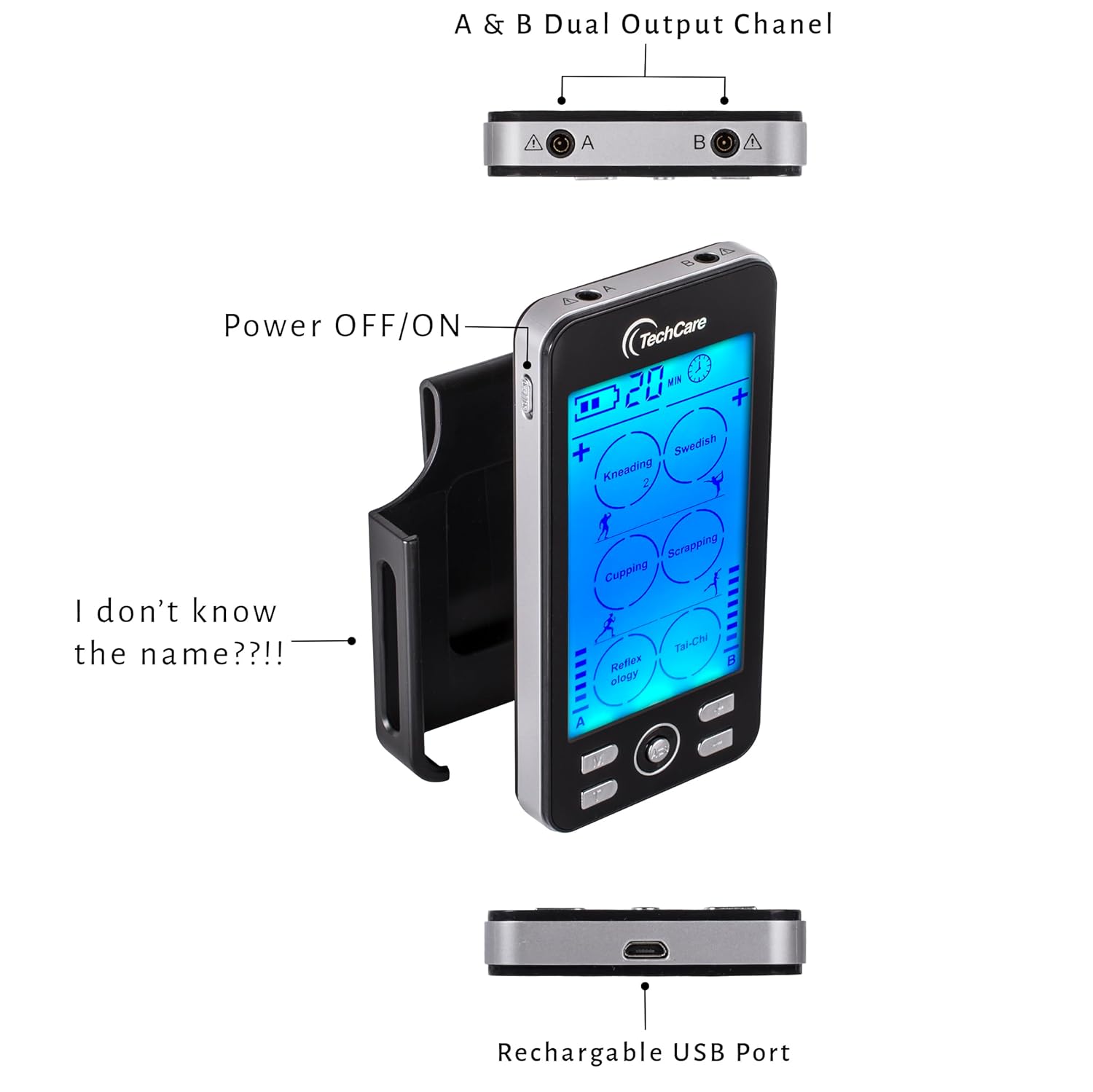
Image 4.1: Top, side, and bottom views of the device highlighting the dual output channels (A & B), the power switch, and the USB charging port.

Сүрөт 4.2: Детальдуу view of the device's control panel and ports, including the Mode button, central selection button, timer button, channel selection buttons, power switch, and Type-C charging port.
Башкаруу жана дисплей:
- Дисплей экраны: Shows current mode, intensity levels for channels A and B, remaining time, and battery status.
- Power Switch (Side): Turns the device ON or OFF.
- M баскычы: Selects from 24 pre-set massage modes.
- Борбордук баскыч: Confirms selections or pauses/resumes stimulation.
- T баскычы: Adjusts the treatment timer (10-60 minutes).
- A/B баскычтары: Selects Channel A or Channel B for intensity adjustment.
- '+' / '-' баскычтары: Adjusts intensity levels (20 levels) for the selected channel.
- Output Ports (Top): Connect electrode leads for Channel A and Channel B.
- USB-C Charging Port (Bottom): Ички батареяны кайра заряддоо үчүн.
5. Орнотуу
5.1 Аппаратты заряддоо
The device contains a rechargeable Lithium-Ion battery. Before first use, fully charge the device.
- Connect the Type-C charger cable to the charging port at the bottom of the device.
- Connect the other end of the cable to the wall AC adaptor, then plug the adaptor into a power outlet.
- Дисплейдеги батареянын индикатору кубаттоо абалын көрсөтөт. Толук кубаттоо, адатта, бир нече саатка созулат.
- Толук заряддалгандан кийин заряддагычты ажыратыңыз.

Image 5.1: The device connected to a charger, illustrating the rechargeable battery feature.

Image 5.2: The device being charged with the included Type-C cable and wall adapter.
5.2 Электрод төшөмөлөрүн туташтыруу
The device supports up to four electrode pads simultaneously using two leads (Channel A and Channel B).
- Ensure the device is OFF.
- Connect the electrode leads to the electrode pads by snapping them onto the metal studs.
- Plug the electrode leads into the output ports (A and/or B) at the top of the device.
- Peel the protective film from the electrode pads. Apply the pads to clean, dry skin in the desired treatment area. Refer to the included Pad Placement Guide for recommended placements.
5.3 Using the Massager Belt
The massager belt provides a convenient way to apply stimulation to larger areas like the back.
- Ensure the device is OFF.
- Connect the electrode leads to the metal snaps inside the massager belt.
- Wrap the massager belt around the desired area (e.g., lower back) and secure it comfortably.
- Plug the electrode leads into the output ports (A and/or B) at the top of the device.

Image 5.3: Detail of the massager belt, showing the internal connection points for electrode leads.

Image 5.4: The TENS/EMS device connected to the massage belt, ready for use.

Сүрөт 5.5: Мисample of the massage belt being worn on the lower back.
6. Иштөө нускамалары
6.1 Күйгүзүү/өчүрүү
Slide the power switch located on the side of the device to the "ON" position to turn it on. The display will illuminate. To turn off, slide the switch to the "OFF" position.
6.2 Режимди тандоо
The device offers 24 pre-set modes, including tapping, acupuncture, cupping, deep tissue, kneading, Swedish, scrapping, reflexology, and Tai-Chi.
- With the device ON, press the M жеткиликтүү режимдер аркылуу айлануу үчүн баскычты басыңыз.
- The selected mode will be displayed on the screen.
- басыңыз Борбор баскычы to confirm your mode selection and begin stimulation.

Image 6.1: The device features 24 distinct massage modes for varied therapeutic experiences.
6.3 Интенсивдүүлүк деңгээлин тууралоо
The device offers 20 adjustable intensity levels for each channel.
- After selecting a mode, press the A/B button to select the channel you wish to adjust (A or B).
- колдонуу '+' интенсивдүүлүктү жогорулатуу үчүн баскычты басыңыз '-' интенсивдүүлүктү азайтуу үчүн баскыч.
- Adjust to a comfortable level. Start with the lowest intensity and gradually increase.

Image 6.2: The device features 20 intensity levels, indicated by bars on the display.
6.4 Таймерди орнотуу
The built-in timer allows you to set treatment durations from 10 to 60 minutes. The device will automatically shut off when the timer expires.
- басыңыз T button to cycle through the available time settings.
- The selected time will be displayed on the screen.
Image 6.3: The device's timer function, allowing sessions from 10 to 60 minutes.
6.5 Dual Channel Operation
The device features dual channels (A and B), allowing you to use different modes or intensity levels on two separate body areas simultaneously, or to use up to four pads with independent intensity control for each pair.
- Connect electrode leads to both Channel A and Channel B output ports.
- басыңыз A/B button to toggle between controlling Channel A and Channel B.
- Adjust the intensity for each channel independently using the '+' жана '-' баскычтар.

Image 6.4: The device's dual channel capability, allowing independent control for two sets of electrodes.
7. Төшөктөрдү жайгаштыруу боюнча колдонмо
Proper electrode pad placement is crucial for effective stimulation. Refer to the included physical Pad Placement Guide for detailed diagrams. General guidelines include:
- Прокладкаларды таза, кургак, бүтүн териге коюңуз.
- Position pads around the area of discomfort, not directly over joints or bony prominences.
- Ensure pads are not touching each other.
- For TENS, place pads to encompass the painful area.
- For EMS, place pads over the muscle belly to stimulate contraction.

Сүрөт 7.1: Мисamples of electrode pad placement for common areas of discomfort.
8. Техникалык тейлөө
8.1 Cleaning Electrode Pads
To prolong the life of your electrode pads:
- Always apply pads to clean, dry skin free of lotions or oils.
- After each use, place the pads back onto their protective film or the included pad holder.
- If pads lose their adhesiveness, gently wipe the adhesive surface with a damp cloth or a small amount of hand sanitizer and let air dry. Do not saturate.
- Replace pads when they no longer adhere well to the skin, as poor adhesion can reduce effectiveness and cause skin irritation.
8.2 Device Care and Storage
- Түзмөктү жумшак, кургак чүпүрөк менен сүртүңүз. Абразивдүү тазалоочу каражаттарды колдонбоңуз же сууга салбаңыз.
- Түзмөктү жана кошумча жабдууларды салкын, кургак жерде, күндүн түз нурунан жана өтө жогорку температурадан алыс сактаңыз.
- Keep the device fully charged if storing for extended periods to maintain battery health.
9. Кыйынчылыктарды
| Көйгөй | Мүмкүн себеп | Чечим |
|---|---|---|
| Түзмөк күйбөй жатат. | Батарея түгөнүп калды. | Charge the device using the provided Type-C cable and AC adaptor. |
| Эч кандай сезим же алсыз сезим. |
|
|
| Прокладкалардын астындагы теринин кыжырдануусу. |
|
|
10. Техникалык шарттар
- Түзмөк түрү: TENS/EMS Muscle Stimulator
- Каналдар: Dual Channel (A & B)
- Режимдер: 24 Pre-set Modes
- Интенсивдүүлүк деңгээлдери: 20 деңгээл
- Таймер: Adjustable, 10-60 minutes with auto shutoff
- Кубат булагы: Кайра заряддалуучу литий-иондук батарея (кошулган)
- Заряддоо порту: USB Type-C
- Продукциянын өлчөмдөрү: Approximately 9 x 7 x 4 inches (packaging dimensions, device is smaller)
- Салмагы: Approximately 2 ounces (device only)
- Өндүрүүчү: Otto Trading
11. Кепилдик жана колдоо
Your TechCare Massager TENS/EMS Muscle Stimulator comes with a ӨМҮР БОЙДУК КЕПИЛДИК. For warranty claims, technical support, or any questions regarding your device, please contact TechCare Massager customer service.
Contact information can typically be found on the product packaging or the official TechCare Massager webсайт.


