1. Киришүү
This manual provides comprehensive instructions for the setup, operation, and maintenance of your Digium D60 SIP Phone. The D60 is an entry-level HD phone designed for efficient communication in a professional environment. It features a 4.3-inch color display, two line keys, and dual 10/100 Mbps network ports, offering a balance of functionality and value.
Сураныч, аппараттын туура иштешин камсыз кылуу жана мүмкүн болуучу көйгөйлөрдү болтурбоо үчүн колдонуудан мурун бул колдонмону кылдат окуп чыгыңыз.
2. Орнотуу
2.1 Пакеттин мазмуну
Пакетте бардык буюмдар бар экенин текшериңиз:
- Digium D60 SIP Phone Unit
- Телефон
- Телефон шнур
- Ethernet кабели
- Үстөл столу
- Note: Power supply is not included and must be purchased separately or provided via Power over Ethernet (PoE).
2.2 Телефонду чогултуу
- Үстөл стенди тиркөө: Align the tabs on the desk stand with the slots on the back of the phone unit. Push firmly until it clicks into place.
- Телефонду туташтыруу: Plug one end of the coiled handset cord into the handset and the other end into the handset jack on the phone unit (typically marked with a phone icon).
- Тармакка/кубатка туташуу:
- For Power over Ethernet (PoE): Connect one end of the Ethernet cable to the LAN port on the phone (marked with a network icon) and the other end to a PoE-enabled network switch or injector.
- For External Power Supply (not included): Connect the external power adapter (5V DC) to the power port on the phone and then plug it into a power outlet. Connect one end of the Ethernet cable to the LAN port on the phone and the other end to your network router or switch.
- Компьютерди туташтыруу (кошумча): If you wish to connect a computer through the phone, connect an Ethernet cable from your computer to the PC port on the phone.
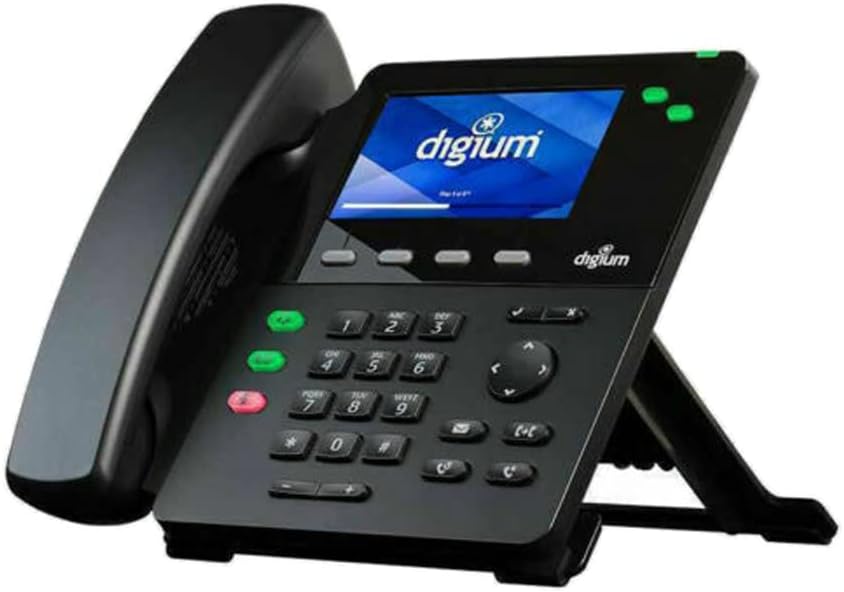
Figure 2.2.1: Assembled Digium D60 SIP Phone. The image shows the black phone unit with its handset resting on the cradle, and the desk stand supporting it at an angle. The color display shows the 'digium' logo. Various buttons, including a numeric keypad and function keys, are visible on the phone's base.
3. Иштөө нускамалары
3.1 Чакыруунун негизги функциялары
- Чакыруу:
- Телефонду алыңыз же баскычты басыңыз Баяндамачы баскычы.
- Ариптакта аркылуу каалаган номерди териңиз.
- басыңыз Терүү жумшак баскычты басыңыз же чалуунун автоматтык түрдө туташуусун күтүңүз.
- Чалууга жооп берүү:
- Телефон шыңгыраганда, телефонду алыңыз же басыңыз Баяндамачы баскычы.
- Же болбосо, басыңыз Жооп жумшак ачкыч.
- Чалууну аяктоо:
- Телефонду коюңуз же басыңыз Баяндамачы динамик колдонулса, кайра баскычын басыңыз.
- Же болбосо, басыңыз Чакырууну аяктоо жумшак ачкыч.
- Чалуунун үнүн өчүрүү: басыңыз Үнсүз Чалуу учурунда микрофонуңуздун үнүн басуу үчүн баскычты басыңыз. Үнүн чыгаруу үчүн кайра басыңыз.
- Үндү тууралоо: колдонуу Көлөм control buttons to adjust the handset, speaker, or headset volume during a call, or the ringer volume when idle.
3.2 Өркүндөтүлгөн функциялар
- Кармап туруу: басыңыз кармап туруңуз soft key during an active call. Press the corresponding line key or Резюме чалууну кайтаруу үчүн жумшак баскыч.
- өткөрүүсү:
- Активдүү чалуу учурунда, басыңыз Transfer жумшак баскыч. Учурдагы чалуу күтүү режимине коюлган.
- Dial the number of the party you wish to transfer to.
- Wait for the second party to answer (consulted transfer) or press Transfer again to complete the transfer (blind transfer).
- Конференция:
- Активдүү чалуу учурунда, басыңыз Conf жумшак баскыч. Учурдагы чалуу күтүү режимине коюлган.
- Үчүнчү тараптын номерин териңиз.
- Үчүнчү тарап жооп бергенден кийин, баскычын басыңыз Conf бардык тараптарга кошулуу үчүн кайрадан жумшак баскычты басыңыз.
- Үн почтасы: басыңыз Кабар button (envelope icon) to access your voicemail. Follow the audio prompts. The Message Waiting Indicator (MWI) LED will flash when new voicemails are present.
4. Техникалык тейлөө
4.1 Телефонду тазалоо
To maintain the appearance and functionality of your Digium D60 phone:
- Телефондун бетин сүртүү үчүн жумшак, кургак, абразивдүү чүпүрөктү колдонуңуз.
- өжөр белгилери үчүн, бир аз гampчүпүрөктү суу менен.
- Avoid using harsh chemicals, cleaning sprays, or abrasive materials, as these can damage the phone's finish and internal components.
- Телефондун тешиктерине суюктук кирбесин.
4.2 Микропрограмма жаңыртуулары
Firmware updates are typically managed by your system administrator. These updates provide new features, performance improvements, and security enhancements. Do not attempt to manually update firmware unless instructed by your administrator or Digium support.
5. Кыйынчылыктарды
This section addresses common issues you might encounter with your Digium D60 phone.
| Көйгөй | Мүмкүн себеп | Чечим |
|---|---|---|
| Телефон күйбөйт. | No power supply connected or PoE issue. |
|
| Терүү үнү жок. | Network connectivity issue or SIP registration failure. |
|
| Үн сапатынын начардыгы (жаңылык, статикалык). | Тармактын тыгыны, ката кабели же айлана-чөйрөнүн кийлигишүүсү. |
|
| Дисплей бош же тоңуп калган. | Программанын катасы же кубат маселеси. |
|
6. Техникалык шарттар
Key technical specifications for the Digium D60 SIP Phone:
- Дисплей: 4.3 inch, 480 x 272 pixel, full-color LCD
- Сап баскычтары: 2 line appearance keys
- Функция ачкычтары: 4 dedicated feature keys
- Жумшак баскычтар: 4 context-sensitive soft keys
- Навигация: 4-way navigation controller
- Аудио өзгөчөлүктөрү: Headset, speaker, and mute keys; Volume control; HD Voice support
- Билдирүү индикатору: 2-color LED Message Waiting Indicator
- Порттор:
- 2P2C handset jack
- 2P2C headset jack
- Electronic Hookswitch (EHS) port
- 2 switched 10/100Mbps Ethernet ports (LAN and PC)
- 5 volt DC power port
- Күч: 802.3at/af Power over Ethernet (PoE) compatible; 5V DC power input
- Өлчөмдөрү (L x W x Y): Болжол менен 12 x 6 x 12 дюйм
- Салмагы: Болжол менен 2.9 фунт
- Бири-бирине шайкеш системасы: Asterisk and Switchvox
7. Кепилдик маалыматы
Digium products typically come with a limited manufacturer's warranty. For specific warranty terms, duration, and conditions, please refer to the warranty card included with your product or visit the official Digium webсайт. Кепилдик дооматтар үчүн сатып алганыңыздын далилин сактаңыз.
8. Колдоо
For technical assistance, troubleshooting beyond this manual, or inquiries regarding your Digium D60 SIP Phone, please contact your system administrator or refer to the official Digium support resources:
- Digium Official Webсайт: www.digium.com
- Колдоо порталы: Check the Digium website for their dedicated support portal, knowledge base, and FAQs.
When contacting support, please have your product model (D60) and serial number ready.


