1. Киришүү
This manual provides essential information for the safe and efficient operation of your PowerWalker VFI 3000 TG Uninterruptible Power Supply (UPS). The PowerWalker VFI TG/TGB series is a professional and versatile online UPS solution designed to provide reliable power protection for various single-phase applications, including critical security systems for kiosks, vending machines, and high-level security environments where strict software restrictions apply, such as banking institutions.
2. Коопсуздук нускамалары
Please read and follow these safety instructions carefully to prevent injury and damage to the unit.
- Үй ичинде гана колдонуу: This UPS is designed for indoor use in a controlled environment. Do not expose it to rain, snow, or direct sunlight.
- Туура Жерге салуу: UPS туура жерге туташтырылган AC электр розеткасына туташтырылганын текшериңиз.
- Вентиляция: Maintain adequate clearance around the UPS for proper airflow. Do not block ventilation openings.
- Суюктуктардан алыс болуңуз: Do not place liquids or objects containing liquids on or near the UPS.
- Ыйгарым укуктуу кызмат: Do not attempt to open or service the UPS yourself. Refer all servicing to qualified service personnel.
- Батареянын коопсуздугу: Батареялар электр шок жана жогорку кыска туташуу ток коркунучун жаратышы мүмкүн. Батареялар менен иштөөдө сактык чараларын сактаңыз.
- Өзгөчө кырдаалдарда өчүрүү (EPO): Familiarize yourself with the EPO port for emergency shutdown if applicable.
3. Продукт бүтүп калдыview
The PowerWalker VFI 3000 TG is a robust tower-type UPS designed for reliable power backup and protection.
3.1 алдыңкы панели
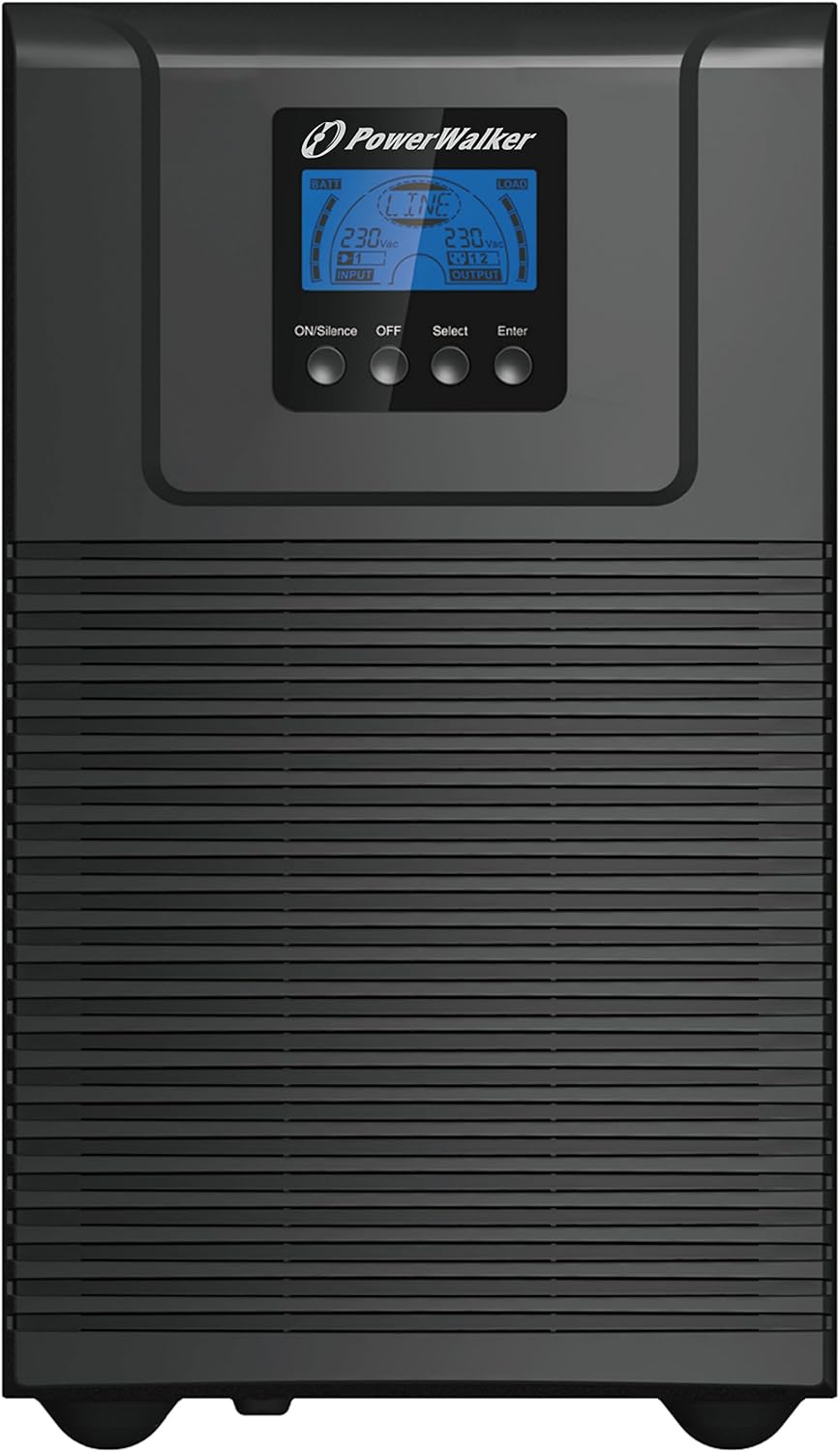
Сүрөт 3.1: Алдыңкы view of the PowerWalker VFI 3000 TG UPS.
The front panel features an intuitive LCD display that provides real-time operational status, including input/output voltage, battery charge level, and connected load. Below the display are four control buttons: ON/Silence (to power on or silence alarms), ӨЧҮРҮҮ (to power off), Тандоо (to navigate menu options), and Кириңиз (to confirm selections).
3.2 Арткы панель

3.2-сүрөт: Арткы view of the PowerWalker VFI 3000 TG UPS.
The rear panel provides essential connectivity for the UPS. It includes an RS232 port and a USB port for communication with a computer, an EPO (Emergency Power Off) terminal for remote shutdown, multiple AC Output sockets (Imax 10A and Imax 16A) for connecting protected equipment, a resettable breaker (250VAC, 20A) for overcurrent protection, and the main AC Input for connecting to utility power.
3.3 Product Family

Figure 3.3: The PowerWalker VFI TG series, showcasing various models.
The PowerWalker VFI TG series encompasses a range of models, offering scalable power protection solutions to meet diverse requirements. The VFI 3000 TG is part of this comprehensive product line, providing robust and reliable uninterruptible power.
4. Орнотуу
Follow these steps to set up your PowerWalker VFI 3000 TG UPS.
- Пакеттен чыгаруу: Carefully remove the UPS from its packaging. Inspect for any shipping damage. Retain the packaging for future transport or storage.
- Жайгашкан жери: Place the UPS on a flat, stable surface in a well-ventilated area. Ensure there is sufficient space around the unit for proper heat dissipation. Avoid placing it near heat sources or in direct sunlight.
- AC кубатына туташуу: Connect the UPS to a grounded AC power outlet using the provided power cord. Ensure the outlet provides the correct voltage (230 вольт).
- Түзмөктөрдү туташтыруу: Connect your critical equipment (computers, servers, network devices, etc.) to the AC Output sockets on the rear panel of the UPS. Do not overload the UPS beyond its maximum power capacity (2700 Watt).
- Алгачкы заряддоо: Allow the UPS to charge for at least 8 hours before initial use to ensure optimal battery performance. The UPS will charge automatically when connected to AC power, even if it is turned off.
5. UPSти иштетүү
5.1 Күйгүзүү/өчүрүү
- Күйгүзүү үчүн: басып, кармап туруңуз ON/Silence button for a few seconds until the UPS powers on and the LCD display illuminates.
- Өчүрүү үчүн: басып, кармап туруңуз ӨЧҮРҮҮ button for a few seconds until the UPS shuts down. Ensure all connected devices are properly shut down before powering off the UPS.
5.2 ЖК дисплей жана башкаруу каражаттары
LCD дисплей UPS абалы жөнүндө маанилүү маалыматты берет. Колдонуңуз Тандоо button to cycle through different display modes (e.g., input voltage, чыгаруу көлөмүtagд, жүк пайызыtage, battery capacity). The Кириңиз button is used to confirm settings or enter sub-menus if available.
5.3 Батареяны башкаруу
The UPS features an internal lead-acid VRLA battery. The battery charges automatically when the UPS is connected to AC power. For optimal battery life, avoid frequent deep discharges and ensure the UPS is kept in a stable temperature environment. The UPS will provide an audible alarm and display a low battery warning when the battery capacity is critical during a power outage.
6. Техникалык тейлөө
Regular maintenance helps ensure the longevity and optimal performance of your UPS.
- Батареяга кам көрүү: While the battery is maintenance-free, it is recommended to perform a full discharge/recharge cycle every 3-6 months if the UPS is not frequently used, to calibrate the battery meter.
- Тазалоо: UPSтин сыртын мезгил-мезгили менен жумшак, кургак чүпүрөк менен тазалап туруңуз. Суюк же аэрозоль тазалагычтарды колдонбоңуз. Желдетүүчү тешиктердин чаң жана таштандылардан тазаланганын текшериңиз.
- Үзгүлтүксүз текшерүүлөр: Periodically check all cable connections to ensure they are secure. Monitor the LCD display for any error messages or warnings.
7. Кыйынчылыктарды
This section provides solutions to common issues you might encounter with your UPS. If the problem persists, contact customer support.
| Көйгөй | Мүмкүн себеп | Чечим |
|---|---|---|
| UPS does not power on | No AC input power; Battery discharged; Power button not held long enough. | Check AC power cord connection and wall outlet; Allow UPS to charge for several hours; Press and hold the ON button for 3-5 seconds. |
| UPS тынымсыз сигнал берет | Ашыкча жүктөө; Аз батарея; Ката абалы. | Reduce connected load; Allow battery to charge; Refer to LCD display for specific error codes and contact support if necessary. |
| Battery runtime is shorter than expected | Батарея толук заряддалган эмес; Батареянын иштөө мөөнөтү аяктап баратат; Ашыкча жүктөлүп жатат. | Ensure UPS is charged for at least 8 hours; Consider battery replacement if old; Reduce connected load. |
| No output from UPS outlets | UPS is off; Circuit breaker tripped. | Turn on the UPS; Reset the circuit breaker on the rear panel. |
8. Техникалык шарттар
Detailed specifications for the PowerWalker VFI 3000 TG.
| Өзгөчөлүк | Спецификация |
|---|---|
| Бренд | PowerWalker |
| Модель номери | 10122043 |
| ASIN | B01JTKDC88 |
| Продукт түрү | Tower UPS |
| Түс | Кара |
| Киргизүү көлөмүtage | 230 вольт |
| Output Voltage | 230 вольт (AC) |
| Жыштык диапазону | 40 Гц - 20 000 Гц |
| Максималдуу күч | 2700 Ватт |
| Батареянын курамы | Lead-acid VRLA Battery |
| Заряддалуучу батарея | No (refers to user-replaceable, internal battery is rechargeable) |
| Батарея Voltage | 12 вольт |
| Батарея Ampөчүрүү | 9 Amps |
| Жалпы USB порттору | 1 |
| AC туташтыргыч түрү | IEC 320 |
| Элемент Салмагы | 22.2 килограмм |
| Өндүрүүчү | BlueWalker GmbH |
| Дата биринчи жеткиликтүү | 2-август, 2022-жыл |
| Запастык бөлүктөрдүн болушу | Маалымат жеткиликсиз |
| Программалык камсыздоонун жаңыртууларына кепилдик берилет | Маалымат жеткиликсиз |
9. Кепилдик жана колдоо
For warranty information and technical support, please refer to the documentation included with your purchase or visit the official PowerWalker website. Keep your proof of purchase for warranty claims. For any issues not covered in this manual, please contact PowerWalker customer service for assistance.


