1. Киришүү
This manual provides essential instructions for the safe and efficient operation, installation, maintenance, and troubleshooting of your Matala Rocking Piston 1/4HP Air Compressor. Please read this manual thoroughly before operating the unit and retain it for future reference.
1.1 Коопсуздук боюнча маанилүү маалымат
Өрт, электр шок жана жеке жаракат алуу коркунучун азайтуу үчүн ар дайым негизги коопсуздук чараларын сактаңыз. Бул нускамаларды аткарбоо олуттуу жаракатка же мүлккө зыян келтириши мүмкүн.
- кубат менен камсыз кылуу Voltage specified on the compressor's label.
- Do not operate the compressor in wet conditions or near water.
- Keep children and unauthorized personnel away from the operating unit.
- Техникалык тейлөө же оңдоо иштерин жүргүзүүдөн мурун ар дайым электр кубатынан ажыратыңыз.
- Бекитилген аксессуарларды жана алмаштыруу бөлүктөрүн гана колдонуңуз.
- Ensure adequate ventilation around the compressor during operation.
2. Продукт бүтүп калдыview
The Matala Rocking Piston 1/4HP Air Compressor is designed for various applications requiring a reliable air source. Its compact and portable design makes it suitable for diverse environments.
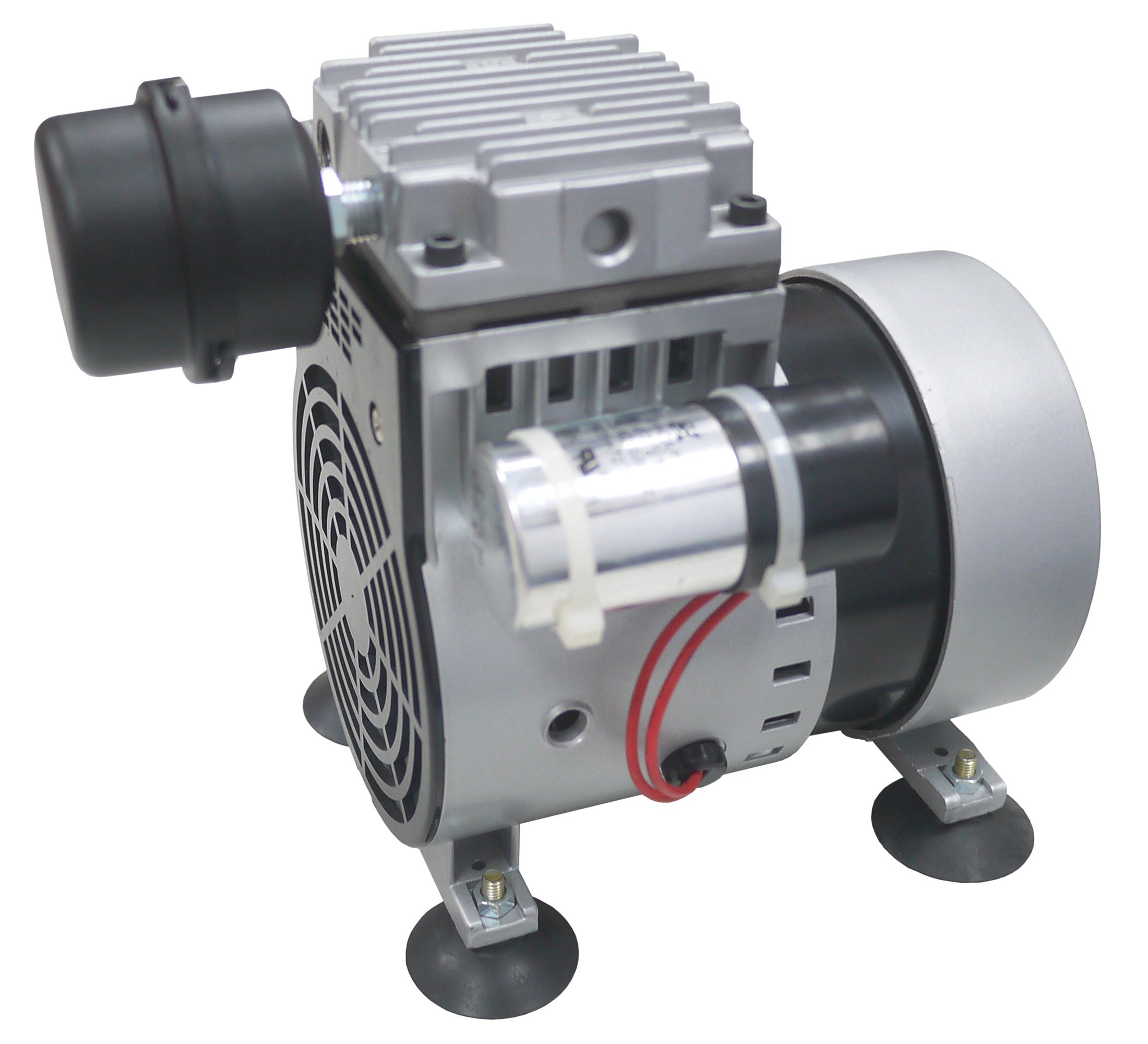
2.1-сүрөт: Matala Rocking Piston 1/4HP Air Compressor. This image displays the compact design of the compressor, highlighting its main body and connection points.
3. Орнотуу
3.1 Пакеттен чыгаруу
Carefully remove the compressor from its packaging. Inspect the unit for any signs of damage that may have occurred during shipping. Report any damage to your supplier immediately.
3.2 Орнотуу
Place the compressor on a stable, level surface. Ensure there is adequate clearance around the unit for proper ventilation. Avoid placing it in direct sunlight or areas with extreme temperatures.
3.3 Электрдик туташуу
Connect the power cord to a grounded electrical outlet. Verify that the outlet's voltage matches the compressor's specified voltage (120 Volts). Do not use extension cords unless absolutely necessary, and ensure any used extension cord is rated for the compressor's power requirements.
3.4 Аба линиясынын туташуусу
Attach your air line or accessory to the compressor's air outlet. Ensure all connections are secure to prevent air leaks.
4. Иштөө нускамалары
4.1 Компрессорду ишке киргизүү
- Ensure all connections are secure and the unit is properly placed.
- Plug the compressor into a suitable electrical outlet.
- Turn the power switch to the "ON" position. The compressor will begin to operate.
4.2 Компрессорду колдонуу
Once running, the compressor will supply air through its outlet. Monitor the pressure gauge (if equipped) and adjust as necessary for your application. Avoid continuous operation beyond recommended duty cycles to prevent overheating.
4.3 Өчүрүү
- Кубат которгучун "OFF" абалына буруңуз.
- Электр шнурын электр розеткасынан ажыратыңыз.
- If applicable, release any remaining air pressure from the system before disconnecting air lines.
5. Техникалык тейлөө
Regular maintenance ensures optimal performance and extends the lifespan of your compressor. Always disconnect power before performing any maintenance.
5.1 Тазалоо
- Periodically wipe down the exterior of the compressor with a damp чаңды жана калдыктарды тазалоо үчүн кездеме.
- Ensure air intake vents are clear of obstructions to maintain proper airflow and cooling.
5.2 Сактоо
When not in use, store the compressor in a clean, dry, and well-ventilated area, away from extreme temperatures and direct sunlight.
6. Кыйынчылыктарды
Бул бөлүм сиз кабылышы мүмкүн болгон жалпы көйгөйлөрдү карайт. Бул жерде көрсөтүлбөгөн көйгөйлөр үчүн кардарларды колдоо бөлүмүнө кайрылыңыз.
| Көйгөй | Мүмкүн себеп | Чечим |
|---|---|---|
| Компрессор иштебейт | Электр менен камсыздоо жок; Кубат өчүргүч өчүрүлгөн; Термикалык ашыкча жүктөм иштетилген. | Check power connection; Turn power switch ON; Allow unit to cool down and reset. |
| Төмөн аба чыгаруу | Air leaks; Clogged air filter (if applicable); Worn components. | Check all connections for leaks; Clean/replace air filter; Contact support for service. |
| Адаттан тыш ызы-чуу же титирөө | Loose components; Unit not on a stable surface; Internal issue. | Check for loose parts and tighten; Ensure stable placement; Discontinue use and contact support. |
7. Техникалык шарттар
| Өзгөчөлүк | Деталь |
|---|---|
| Бренд | Матала |
| Модел | Rocking Piston 1/4HP Air Compressor |
| Тtage | 120 вольт |
| Стиль | Portable |
| Мотор кубаты | 0.25 Ат күчү |
| Максималдуу ат күчү | 0.25 Ат күчү |
| ASIN | B01K8IPJYA |
8. Кепилдик жана колдоо
For warranty information, please refer to the warranty card included with your product or visit the official Matala website. For technical support, replacement parts, or service inquiries, please contact Matala customer service through their official channels.
Эскертүү: Сатып алуу квитанциясын кепилдик дооматтары үчүн сатып алуунун далили катары сактаңыз.


