Introduction
This manual provides essential information for the safe and efficient operation of your Epson Home Cinema 3100 1080p 3LCD Home Theater Projector. Please read it thoroughly before use and retain it for future reference.
Жайгашуу
Пакеттен чыгаруу жана баштапкы орнотуу
Бардык компоненттерди таңгактан кылдаттык менен алып салыңыз. Төмөнкү нерселердин бар экенин текшериңиз:
- Epson үй кинотеатры 3100 проектору
- Электр кабели
- Батареялар менен алыстан башкаруу
- Ыкчам орнотуу көрсөтмөлөрү
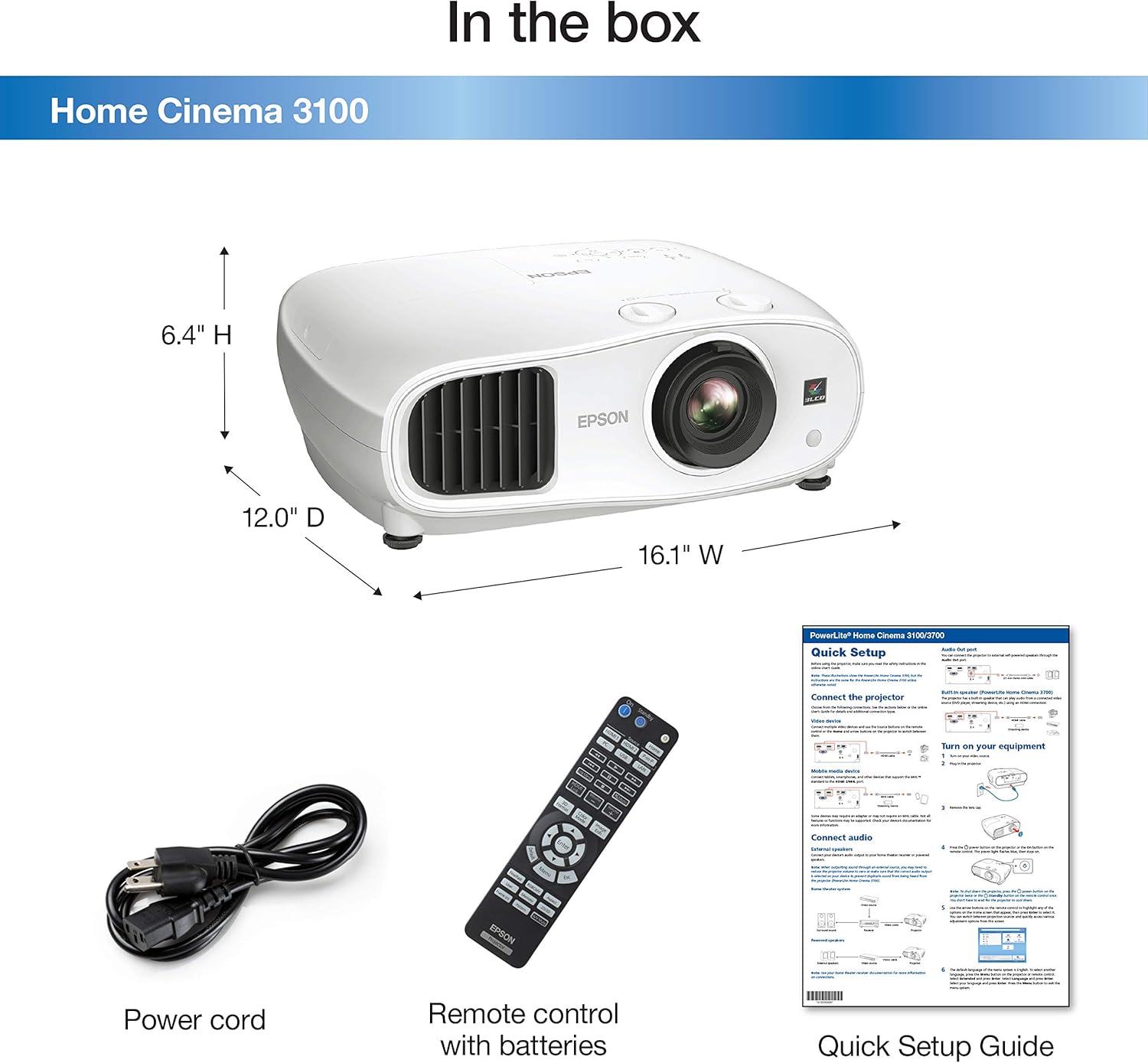
Сүрөттүн сүрөттөлүшү: A white Epson Home Cinema 3100 projector is shown alongside its accessories: a black power cord, a black remote control with various buttons, and a folded quick setup guide. The image also indicates the projector's dimensions: 16.1" W, 12.0" D, 6.4" H.
Place the projector on a stable, level surface. Ensure adequate ventilation around the unit. Connect the power cord to the projector and then to a power outlet.

Сүрөттүн сүрөттөлүшү: A white Epson Home Cinema 3100 projector is displayed from a front-angle perspective, highlighting its lens, ventilation grilles, and control buttons on the top surface.
Операция
Күйгүзүү/өчүрүү
Press the power button on the projector or the remote control to turn the unit on. Press it again to turn off. Allow the projector to cool down completely before unplugging or moving.
Түзмөктөрдү туташтыруу
The Home Cinema 3100 supports various input sources. Connect your devices using the appropriate ports on the rear of the projector.

Сүрөттүн сүрөттөлүшү: An illustration detailing the compatibility and connectivity options for the Epson Home Cinema 3100. It shows icons for various devices like tablets, smartphones, laptops, game consoles, Amazon Fire TV Stick, Chromecast, Blu-ray/DVD players, Sat/Cable boxes, Roku, Apple TV, and digital cameras. Below these, the projector's rear panel is depicted with its input ports: 1x HDMI1, 1x HDMI2/MHL, 1x D-sub 15 pin (Computer), 1x USB connector Type A, 1x Mini USB (service only), and 1x Audio out.
HDMI туташуу: For most modern devices (Blu-ray players, game consoles, streaming sticks), use an HDMI cable to connect to the HDMI1 or HDMI2/MHL port.
Компьютерге туташуу: Use a D-sub 15 pin cable for connecting a computer.
Сүрөттү тууралоо
Adjust the projected image for optimal viewing using the following controls:
- Фокус шакеги: Сүрөттү курчутуу үчүн фокустук шакекти линзага айландырыңыз.
- Чоңойтуу рычагы: Use the zoom lever to adjust the image size without moving the projector.
- Линзаны жылдыруу: The projector features vertical (±60%) and horizontal (±24%) lens shift for flexible positioning. Use the dedicated dials to move the image up, down, left, or right without tilting the projector.

Сүрөттүн сүрөттөлүшү: This diagram shows how the Epson Home Cinema 3100 projector can project different screen sizes (80", 100", 120") from various distances (8', 10', 12'). It visually demonstrates the flexibility in placement and image size adjustment.
Video ойнотуу
The Epson Home Cinema 3100 is designed to deliver a high-quality viewing experience for various content, including movies and games.
Video Description: This video demonstrates the Epson Home Cinema 3100 projector in a home setting, showcasing its use for gaming and general entertainment. It highlights the projector's ability to create a large, immersive viewтажрыйбасы.
Техникалык тейлөө
Проекторду тазалоо
Regular cleaning helps maintain optimal performance. Use a soft, dry cloth to wipe the exterior of the projector. For the lens, use a lens cleaning cloth and solution specifically designed for optical surfaces. Avoid abrasive cleaners or solvents.
Lamp Алмаштыруу
Проектор лamp чектүү өмүрү бар. Качан лamp reaches the end of its life, a warning message will appear. Refer to the Quick Setup Guide or Epson's official support resources for detailed instructions on how to safely replace the lampАр дайым Epsonдун оригиналдуу алмаштыруучу l'ин колдонуңуз.amps.
Проблемаларды чечүү
Жалпы маселелер жана чечимдер
- Сүрөт жок:
- Проектордун күйгүзүлгөнүн жана киргизүү булагы туура тандалганын текшериңиз.
- Check all cable connections (HDMI, D-sub) between the projector and the source device.
- Түзмөктүн күйгүзүлгөнүн жана сигнал чыгарып жатканын текшериңиз.
- бүдөмүк сүрөт:
- Проектор объективиндеги фокус шакегин тууралаңыз.
- Проекциянын бети жалпак жана проектор туруктуу болушун камсыз кылыңыз.
- Үн жок:
- Check the audio settings on your source device and ensure the volume is not muted.
- If using external speakers, verify their connection and power.
- The projector has an audio output port; ensure it's connected to an audio system if you are not using the projector's internal speaker.
- Ашыкча ысып кетүү эскертүүсү:
- Ensure the projector's ventilation vents are not blocked.
- Проекторду жакшы желдетилген жерде иштетиңиз.
- Clean any dust accumulation from the vents.
Техникалык шарттар
| Өзгөчөлүк | Деталь |
|---|---|
| Бренд | Epson |
| Модель номери | HC3100 |
| Display Resolution | 1920 x 1080 (Full HD 1080p) |
| Түс Жарыктыгы | 2,600 люмен |
| White Brightness | 2,600 люмен |
| Динамикалык контраст катышы | 60,000:1ге чейин |
| Байланыш технологиясы | HDMI |
| Өзгөчө өзгөчөлүк | Ready for 3D |
| Сунушталган Колдонуулар | Оюн-зоок, үй кинотеатры |
| Продукциянын өлчөмдөрү | 16.1 x 12 x 6.4 дюйм |
| Элемент Салмагы | 14.6 фунт |
| Fan Noise | 24 дБ – 35 дБ |
Кепилдик жана колдоо
Кепилдик маалымат
Your Epson Home Cinema 3100 projector is covered by a limited warranty. Please refer to the warranty card included with your product or visit the official Epson webтолук шарттары жана шарттары үчүн сайт.
Кардарларды колдоо
For technical assistance, troubleshooting, or service inquiries, please contact Epson customer support. Contact information can be found on the Epson webсайтында же өнүмүңүздүн документтеринде.


