Introduction
This manual provides essential information for the setup, operation, and maintenance of your Pyle Wireless Portable PA System. Please read it thoroughly before using the product to ensure proper function and longevity.
The Pyle PPHP1049KT is a dual 10-inch high-powered loudspeaker PA system designed for versatile audio projection. It includes one active speaker, one passive speaker, two speaker stands, a wired microphone, and a remote control. Key features include Bluetooth wireless streaming, USB flash drive and SD memory card readers, and multiple input options for various audio sources.
Кутуда эмне бар

Сүрөт: бүттүview of the Pyle PPHP1049KT PA system, showing the active and passive speakers mounted on their stands, along with the included wired microphone and remote control. This image illustrates the complete package contents.
- (1) 10'' Active PA Speaker
- (1) 10'' Passive PA Speaker
- (2) Спикер стенддери
- Зымдуу микрофон
- Алыстан башкаруу
- Электр кабели

Image: A visual representation of the items included in the Pyle PPHP1049KT package, highlighting the active and passive speakers, speaker stands, remote control, wired microphone, and power cable with clear labels.
Жайгашуу
Speaker Stand Assembly
The included speaker stands are designed for optimal sound performance and stability. Each stand features reinforced steel support construction and a safety lock-in pin.
- Unfold the tripod feet base of the speaker stand.
- Extend the main pole to the desired height (adjustable from 59.1'' to 82.7'').
- Secure the height adjustment with the safety lock-in pin.
- Carefully mount the PA speaker onto the 35mm speaker stand mount. Ensure the speaker is firmly seated.
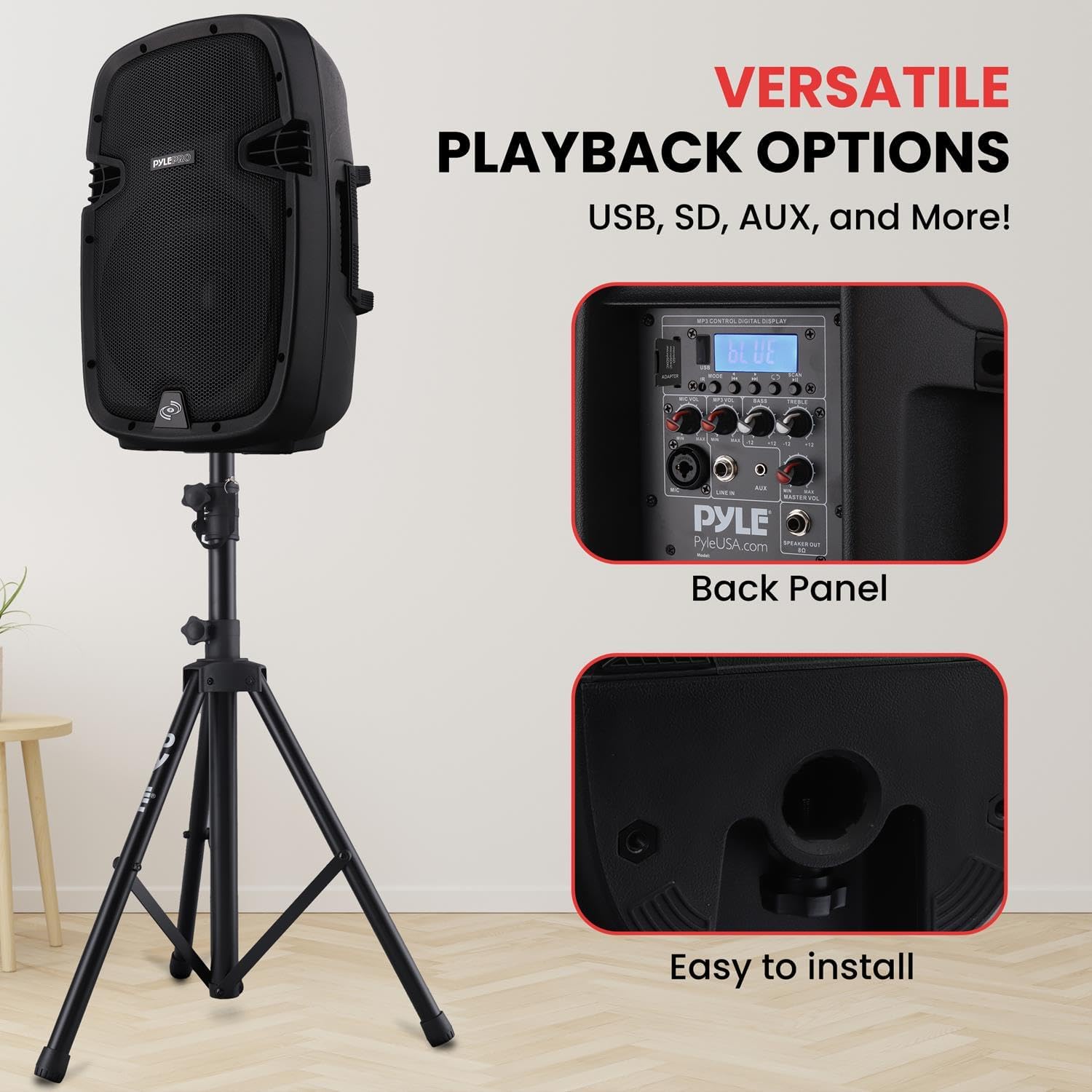
Сүрөт: деталдуу view of the bottom of the Pyle PA speaker, illustrating the circular opening designed for mounting onto a standard 35mm speaker stand. This shows the ease of installation.
Динамиктерди туташтыруу
The system includes one active speaker and one passive speaker. The active speaker contains the amplifier and control panel, while the passive speaker connects to the active unit.
- Place the active speaker and passive speaker on their respective stands in the desired location.
- Connect the passive speaker to the active speaker using a 1/4'' SpeakOn (8 Ohm) speaker cable. The output jack is located on the rear panel of the active speaker.
- Connect the power cable to the active speaker and then to a suitable power outlet (120/240V).

Image: The back panel of the Pyle PA speaker, clearly displaying the various input and output ports such as USB, SD card slot, AUX input, and the 1/4-inch SpeakOn output for connecting the passive speaker. This panel also features the digital LCD display and control knobs.
Иштөө нускамалары
Күйгүзүү жана негизги башкаруу элементтери
Once connected, turn on the power switch located on the rear panel of the active speaker. The digital LCD display will illuminate.
- Негизги том: Системанын жалпы чыгаруу көлөмүн тууралайт.
- Микрофондун үнү: Controls the volume of the connected microphone.
- Жогорку/бас: Adjusts the high and low frequencies for sound equalization.
- Режим баскычы: Cycles through input modes (Bluetooth, USB, SD, AUX, FM Radio).

Сүрөт: деталдуу view of the Pyle PA speaker's control panel, highlighting the digital LCD display and the various adjustable rotary knobs for microphone volume, bass, and treble. This interface allows for precise sound customization.
Bluetooth зымсыз агымы
The system supports Bluetooth 4.0 for wireless audio streaming from compatible devices.
- Press the "Mode" button on the active speaker's control panel until "Bluetooth" is selected on the LCD display.
- On your Bluetooth-enabled device (e.g., smartphone, tablet), search for Bluetooth devices.
- Select "Pyle" from the list of available devices to pair.
- Once paired, you can stream audio wirelessly to the PA system. The Bluetooth wireless range is 100+ feet.

Image: The Pyle PA speaker with graphical icons representing its versatile connectivity options: Bluetooth for wireless streaming, Karaoke for microphone input, MP3 input, and USB input. This highlights the system's "Wireless Freedom" and multiple playback choices.
USB Flash Drive & SD Memory Card Readers
The system can play digital audio files (MP3, WMA) directly from USB flash drives and SD memory cards (up to 32GB).
- Insert your USB flash drive or SD memory card into the corresponding slot on the rear panel.
- The system will automatically switch to USB/SD mode or you can select it using the "Mode" button.
- Use the control buttons on the rear panel or the remote control to navigate tracks and adjust playback.
Microphone and AUX Input
- XLR микрофон киргизүү: Connect the wired microphone (or another compatible microphone) to the XLR input on the rear panel. Adjust the "Mic Volume" knob for desired microphone level.
- Aux (3.5mm) Input Jack: Connect external audio devices (e.g., smartphones, laptops) using a 3.5mm audio cable to the Aux input.
Техникалык тейлөө
- Тазалоо: Use a soft, dry cloth to clean the exterior of the speakers and stands. Avoid using abrasive cleaners or solvents.
- Сактагыч: When not in use, store the PA system in a cool, dry place. Disassemble the speaker stands and store all components securely to prevent damage.
- Кабелдик башкаруу: Ensure all cables are properly coiled and stored to prevent tangling and damage.
- Вентиляция: Ашыкча ысып кетүүнүн алдын алуу үчүн активдүү динамиктин айланасында жетиштүү желдетүүнү камсыз кылыңыз. Желдетүүчү тешиктерди жаппаңыз.
Проблемаларды чечүү
| Көйгөй | Мүмкүн себеп | Чечим |
|---|---|---|
| Күч жок | Электр кабели туташкан эмес; Розетка бузук; Кубат өчүк. | Электр кабелинин туташуусун текшериңиз; Башка розетканы колдонуп көрүңүз; Кубат которгучу күйүк экенин текшериңиз. |
| Үн чыгышы жок | Volume too low; Incorrect input mode selected; Cables not connected properly. | Increase Master Volume; Select correct input mode (Bluetooth, USB, SD, AUX); Check all audio cable connections. |
| Bluetooth жупташуу катасы | Аппарат өтө алыс; түзмөктө Bluetooth иштетилген эмес; Туура эмес жупташтыруу процедурасы. | Ensure device is within 100ft range; Enable Bluetooth on your device; Re-attempt pairing by selecting "Pyle". |
| Микрофон иштебей жатат | Mic volume too low; Microphone not connected; Faulty microphone. | Increase Mic Volume; Ensure microphone is securely connected to XLR input; Test with another microphone if available. |
Техникалык шарттар
- MAX кубаттуулугу: 1000 Ватт
- Ampөмүр берүүчү: Д классы
- Импеданс: 8 Ом
- Сезимталдуулук: 92dB (+/- 2dB)
- Жыштык жообу: 65-18кГц
- Digital Audio File Шайкештик: MP3, WMA
- SD/USB Flash эс тутумунун максималдуу колдоосу: 32 ГБ
- Электр камсыздоо: 120/240V
- Жалгыз динамиктин Салмагы: 18.08 фунт.
- Speaker Height Adjustable (Stands): 59.1'' to 82.7'' MAX.
- Speaker Stand Load Capacity: 100 lbs. (50 kgs.) - Each
- Bluetooth версиясы: 4.0
- Bluetooth зымсыз диапазону: 100 футтан жогору
- Продукциянын өлчөмдөрү (L x W x Y): 30 x 24.5 x 47 inches (assembled with stands, approximate)
- Материал: Акрилонитрил бутадиен стирол (ABS)
Кепилдик жана колдоо
Кепилдик маалыматы жана техникалык колдоо үчүн расмий Pyle кайрылыңыз webсайтка же түздөн-түз кардарларды тейлөөгө кайрылыңыз. Кепилдик дооматтар үчүн сатып алуу дүмүрчөгүңүздү сактаңыз.
Колдонуучунун колдонмосу (PDF): PDF жүктөп алуу
Колдонуучунун колдонмосу (PDF): PDF жүктөп алуу
Pyle дүкөнү: Visit Pyle Store on Amazon
Продукт видеолору
Below are relevant product videos from the seller, demonstrating features or usage.
Учурда бул продукт үчүн расмий сатуучу видеолору жок.
Тектеш документтер - PPHP1049KT
 |
Pyle PDWR58AB/PDWR58AW 5.25" Pro Active дубалга орнотулуучу динамиктер үчүн колдонмо Pyle PDWR58AB жана PDWR58AW 5.25 дюймдук Pro Active дубалга орнотулуучу динамиктери үчүн кеңири колдонуучу колдонмосу, анын өзгөчөлүктөрү, техникалык мүнөздөмөлөрү, орнотуу жана коопсуздук боюнча көрсөтмөлөрү. |
 |
Pyle PLUTV51BK 5.25 "Суу өткөрбөйт жолсуз UTV динамиктери Колдонуучунун колдонмосу Pyle PLUTV51BK 5.25 дюймдук суу өткөрбөйт, жолсуз UTV компакт PowerSport унаасынын динамик системасы үчүн колдонуучунун толук нускамасы, анын ичинде орнотуу нускамалары, өзгөчөлүктөр жана техникалык мүнөздөмөлөр. |
 |
Pyle PLUTV63BTA 6.5" Marine/Off-Road Wireless BT Speakers User Guide Pyle PLUTV63BTA үчүн толук колдонуучу колдонмосу жана техникалык мүнөздөмөлөрү ampATVs, UTVs, 4x4s жана Jeeps үчүн иштелип чыккан деңиз жана жолсуз зымсыз Bluetooth динамик системасы. |
 |
Pyle PBKSR40WT Desktop Wireless BT Bookshelf Speakers User Guide Pyle PBKSR40WT Desktop Wireless BT Bookshelf Speakers үчүн колдонуучу колдонмосу, оптималдуу аудио аткаруу үчүн орнотууларды, байланыштарды, көйгөйлөрдү чечүү жана техникалык мүнөздөмөлөрдү деталдаштырат. |
 |
Pyle PPHP1249KT Active + Passive PA Speaker System Kit User Guide Pyle PPHP1249KT Active + Passive PA Speaker System Kit үчүн колдонуучу колдонмосу, өзгөчөлүктөрү, спецификациялары, башкаруу элементтери жана коопсуздук нускамалары. |
 |
Pyle PDA69BU Stereo Ampкөтөргүч колдонуучунун колдонмосу - Зымсыз BT, MP3, USB, SD, AUX, FM радио Pyle PDA69BU стереосу үчүн кеңири колдонуучу колдонмосу AmpАудио кабыл алгычты көтөргүч. Зымсыз BT агымынын, MP3/USB/SD ойнотуунун, AUX жана FM радиосунун функциялары, орнотуулары, иштеши, туташуусу жана техникалык мүнөздөмөлөрү жөнүндө билип алыңыз. |