Introduction
This manual provides detailed instructions for the setup, operation, maintenance, and troubleshooting of your Instapark PWT-07 Digital Programmable Water Timer. Please read this manual thoroughly before using the device to ensure proper function and longevity.
Коопсуздук маалыматы
- Use only 1.5V AA alkaline batteries. Do not mix old and new batteries, or different battery types.
- Ensure the battery compartment is securely closed to maintain the IP66 waterproof rating.
- Do not expose the timer to extreme temperatures or direct sunlight for prolonged periods, which may affect battery life and device performance.
- Disconnect the timer from the faucet and drain it before freezing temperatures to prevent damage.
- This device is designed for outdoor use with standard ¾” (GHS) threaded faucets.
Пакеттин мазмуну
Пакетте бардык буюмдар бар экенин текшериңиз:
- Instapark PWT-07 Water Timer
- Колдонуучунун Колдонмосу (бул документ)
- Кепилдик картасы
Note: 2 AA alkaline batteries are required and not included.
Продукт өзгөчөлүктөрү
- Single-station digital programmable faucet water timer.
- Impulse solenoid valve for reliable operation.
- Compatible with standard ¾” (GHS) threaded outdoor hose faucets.
- User-friendly interface with a single oversized rotary dial and 4 pushbuttons.
- Large, easy-to-read LCD display (2.1” x 1”).
- Суу өткөрбөйт рейтинги: IP66.
- Built-in rain delay function (24, 48, or 72 hours).
- Manual watering option without interrupting programmed schedules.
- Detachable battery compartment for easy battery replacement.
- Low power consumption, up to 4,000 on/off cycles per battery set.
Жайгашуу
1. Батареяны орнотуу
The Instapark PWT-07 requires two (2) 1.5V AA alkaline batteries (not included).
- Таймердин артындагы батарея бөлүкчөсүн табыңыз.
- Батарея бөлүмүнүн капкагын ачуу үчүн ылдый жылдырыңыз.
- Туура полярдуулукту (+/-) камсыз кылып, эки жаңы AA щелочтуу батарейканы салыңыз.
- Батарея бөлүкчөсүнүн капкагын бекем чыккыча ордуна жылдырыңыз.
- The LCD display should illuminate, indicating successful battery installation. If the display shows a low battery indicator, remove the batteries, wait for the screen to go completely dark, then reinsert them.
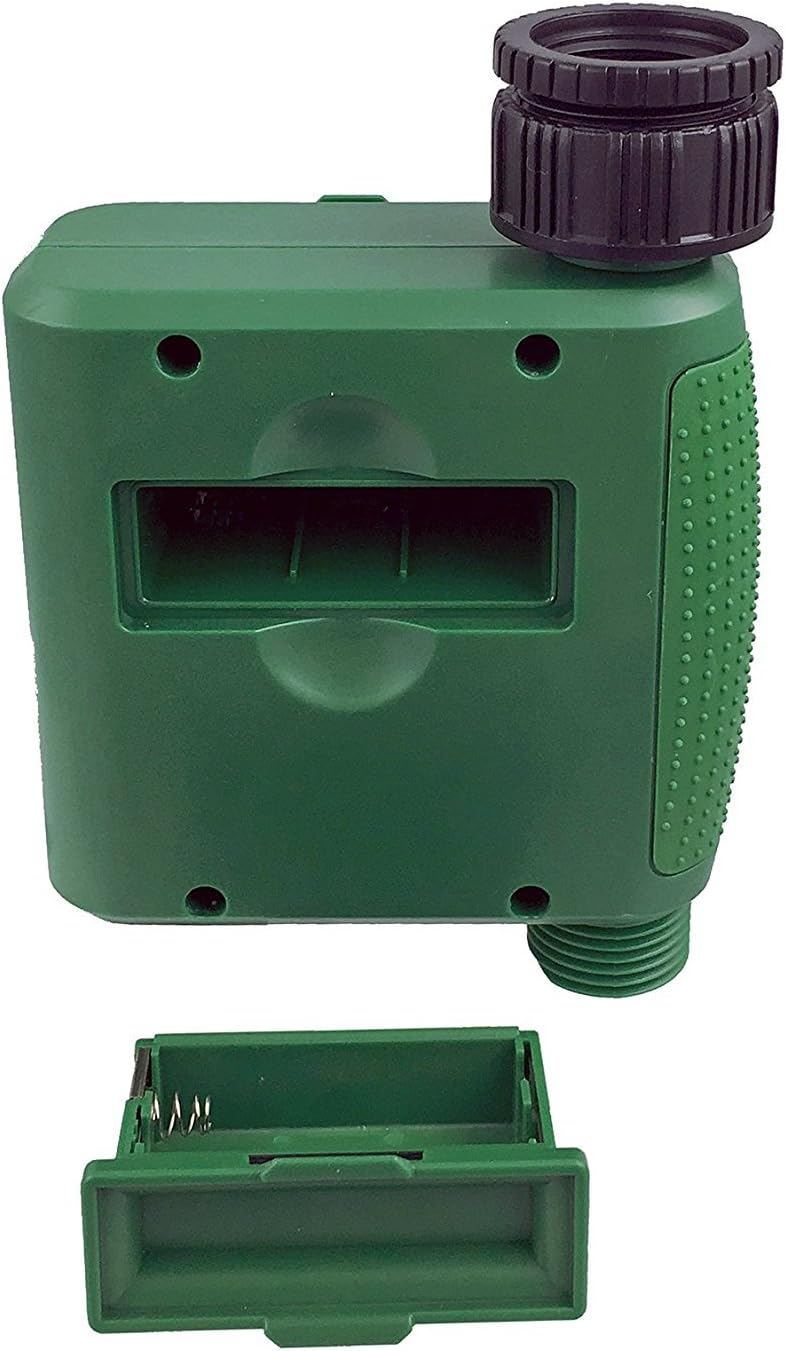
1-сүрөт: Капкагы алынган батарея бөлүмү.
2. Таймерди орнотуу
Attach the timer to your outdoor faucet:
- Крандын таза жана таштандылардан таза экенине ынаныңыз.
- Screw the timer's inlet (top connector) onto a standard ¾” (GHS) outdoor hose faucet. Hand-tighten only to prevent damage. Do not overtighten.
- Connect your garden hose or irrigation system to the timer's outlet (bottom connector). Hand-tighten securely.
- Turn on the faucet fully. The timer is designed to operate under pressure.

Figure 2: Instapark PWT-07 mounted on a faucet.
Иштөө нускамалары
The timer features a large rotary dial and four buttons: SET, +, -, жана КОЛ.

Figure 3: Control panel and LCD display.
1. Учурдагы убакытты коюу
- Айлануучу дискти буруңуз СААТТЫ КОЮ.
- колдонуу + жана - Учурдагы саатты тууралоо үчүн баскычтарды басыңыз. SET ырастоо үчүн.
- колдонуу + жана - Учурдагы мүнөттү тууралоо үчүн баскычтарды басыңыз. SET ырастоо үчүн.
2. Programming Watering Schedule
The timer allows you to set a start time, duration, and frequency for watering.
Баштоо убактысын коюу:
- Айлануучу дискти буруңуз БАШТАЛГАН УБАКЫТ.
- колдонуу + жана - buttons to set the desired watering start hour. Press SET ырастоо үчүн.
- колдонуу + жана - buttons to set the desired watering start minute. Press SET ырастоо үчүн.
Канча убакытка (узактыгын) коюңуз:
- Айлануучу дискти буруңуз КАНЧА УБАКЫТ.
- колдонуу + жана - buttons to set the watering duration (from 5 seconds to 360 minutes). Press SET ырастоо үчүн.
Канчалык көп (жыштык) экенин коюңуз:
- Айлануучу дискти буруңуз КАЧАН.
- колдонуу + жана - buttons to select the watering frequency (e.g., every 10 seconds, 30 seconds, 1 minute, 3 minutes, 5 minutes, 1 hour, 2 hours, 4 hours, 12 hours, 1 day, 2 days, 3 days, 4 days, 5 days, 6 days, 7 days). Press SET ырастоо үчүн.
After setting all parameters, turn the rotary dial to RUN программаланган графикти иштетүү үчүн.
3. Кол менен сугаруу
Программаланган графигиңизге таасир этпестен кол менен сугаруу үчүн:
- Терүү коюлганын текшериңиз RUN or ӨЧҮРҮҮ.
- басыңыз КОЛ button. The display will show a default manual watering duration.
- колдонуу + жана - buttons to adjust the desired manual watering duration.
- Басыңыз SET to start manual watering. The timer will run for the selected duration and then automatically shut off.
- Кол менен сугарууну мөөнөтүнөн мурда токтотуу үчүн, баскычын басыңыз КОЛ кайра баскычын.
4. Жамгырдын кечиктирүү функциясы
The rain delay function allows you to pause your watering schedule for a set period without losing your program settings.
- Терүү коюлганын текшериңиз RUN.
- басып, кармап туруңуз - button for 3 seconds. The display will show "DELAY" and a default delay duration.
- колдонуу + жана - buttons to select a delay duration of 24, 48, or 72 hours.
- Басыңыз SET to activate the rain delay. The timer will resume its programmed schedule after the delay period ends.
- Жамгырдын кечигүүсүн жокко чыгаруу үчүн, баскычын басып кармап туруңуз - баскычын кайра 3 секундага басыңыз.
Техникалык тейлөө
- Батареяны алмаштыруу: Replace batteries when the low battery indicator appears on the LCD. Always use new AA alkaline batteries.
- Тазалоо: Таймерди жарнама менен тазалаңызamp кездеме. Абразивдүү тазалагычтарды же эриткичтерди колдонбоңуз.
- Кыштоо: Before the first frost, disconnect the timer from the faucet. Remove the batteries and store the timer indoors in a dry, frost-free location. Failure to do so may result in damage from freezing water.
- Экранды чыпкалоо: Periodically check the filter screen inside the inlet connector for debris. Clean if necessary to ensure proper water flow.
Проблемаларды чечүү
| Көйгөй | Мүмкүн себеп | Чечим |
|---|---|---|
| Таймер күйбөй жатат / LCD дисплей бош. | Өлүк же туура эмес орнотулган батарейкалар. | Replace with new AA alkaline batteries, ensuring correct polarity. If still blank, remove batteries, wait for screen to fully clear, then reinsert. |
| Water does not turn on at scheduled time. |
|
|
| Water does not turn off. |
|
|
| Байланыштардан суу агып жатат. |
|
|
| Low battery indicator flashes even with new batteries. | Firmware not booting correctly after battery change. | Remove batteries, wait for the LCD screen to go completely dark (may take a few minutes), then reinsert new batteries. |
Техникалык шарттар
| Модел | PWT-07 |
| Power Source | 2 x 1.5V AA щелочтуу батарейкалар (кошулган эмес) |
| Клапан түрү | Импульстук электромагниттик клапан |
| Жумушчу суунун басымы | 14.5ден 116 фунтка чейин |
| Күтүү агымы | <100 мкА |
| Watering Frequency Settings | 10s, 30s, 1m, 3m, 5m, 1h, 2h, 4h, 12h, 1d, 2d, 3d, 4d, 5d, 6d, 7d (16 settings) |
| Watering Duration Settings | 5s, 10s, 15s, 20s, 25s, 30s, 35s, 40s, 45s, 50s, 55s, 1-360m |
| Убакытты көрсөтүү форматы | 24 саат |
| Суу өткөрбөйт рейтинги | IP66 |
| Материал | ABS пластик |
| Продукциянын өлчөмдөрү | 4.25"D x 6"W x 2.6"H |
| Элемент Салмагы | 14.2 унция |
Кепилдик жана колдоо
The Instapark PWT-07 Digital Programmable Water Timer is backed by a standard 1-year manufacturer's warranty from the date of purchase. This warranty covers defects in materials and workmanship under normal use.
For warranty claims, technical support, or any questions regarding your product, please contact Instapark customer service. Please have your purchase receipt and product model number (PWT-07) available when contacting support.
Contact information for Instapark customer service can typically be found on the manufacturer's webсайт же сатып алуу документтери.


