1. Киришүү
This manual provides essential instructions for the safe and efficient operation of your beFree Sound BFS-6445 Projection Party Light Dome Subwoofer Bluetooth Portable Speaker. Please read this manual thoroughly before using the product and retain it for future reference.
The beFree Sound BFS-6445 is a versatile portable speaker system featuring a 10-inch subwoofer, Bluetooth connectivity, USB/SD input, FM radio, and a unique projection light dome. It includes a wireless microphone and a remote control for enhanced functionality.
2. Продукт бүтүп калдыview
2.1 Негизги өзгөчөлүктөрү
- 800 Уоттс эң жогорку кубаттуулугу
- 10-inch Subwoofer for deep bass
- 7" x 4.5" LED Light Projection Dome
- Bluetooth зымсыз туташуусу
- USB and SD Card Input for media playback
- FM радио тюнер
- Microphone and Guitar Inputs with priority switch
- Bass, Treble, Echo, Mic Volume, and Guitar Volume Controls
- Built-in Side Handles, Rolling Handle, and Wheels for portability
- Includes Wireless Microphone and Remote Control
2.2 Динамиктин компоненттери жана башкаруу элементтери
Refer to the image below for a visual guide to the speaker's main components and control panel.

1-сүрөт: Фронт view of the beFree Sound BFS-6445 speaker, showing the projection light dome, control panel, 10-inch subwoofer grille, and included wireless microphone and remote control. The inset images highlight the light dome's color variations (green, blue, red), USB/SD card slots, Bluetooth logo, and FM radio icon.
The control panel, located on the top front of the speaker, provides access to various functions including volume, input selection, equalization, and light dome control.
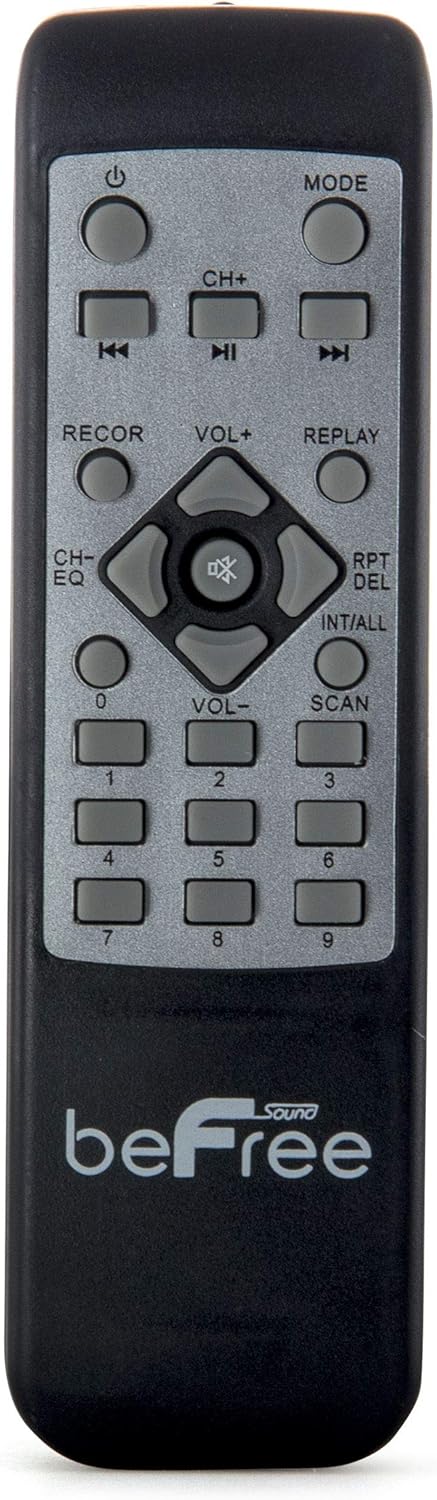
2-сүрөт: Жакын план view of the beFree Sound BFS-6445 remote control. It features buttons for power, mode selection, track navigation, volume adjustment, EQ, record, replay, scan, and numerical input.
The remote control allows for convenient operation of the speaker from a distance.
3. Орнотуу
3.1 Пакеттен чыгаруу жана жайгаштыруу
- Динамикти жана бардык аксессуарларды таңгактан этияттык менен алып салыңыз.
- Динамикти туруктуу, тегиз жерге коюңуз. Түзмөктүн айланасында жетиштүү желдетүүнү камсыз кылыңыз.
- The speaker is equipped with rolling wheels and an extendable handle for easy transport.
3.2 Кубат туташтыруу
- Connect the provided AC power cord to the speaker's AC input port (AC 100-240V, 50/60Hz).
- Электр шнурунун экинчи учун ылайыктуу розеткага сайыңыз.
- The speaker can operate on AC power.
3.3 Battery Installation (Remote Control & Wireless Microphone)
- Алыстан башкаруу: Open the battery compartment on the back of the remote control. Insert 2 x AAA batteries, ensuring correct polarity (+/-). Close the compartment.
- Зымсыз микрофон: Open the battery compartment on the microphone. Insert 2 x AA batteries, ensuring correct polarity (+/-). Close the compartment.
4. Иштөө нускамалары
4.1 Күйгүзүү/өчүрүү
басыңыз КҮЧ Динамикти күйгүзүү же өчүрүү үчүн башкаруу панелиндеги же алыстан башкаруу пультундагы баскычты басыңыз.
4.2 Киргизүү режимин тандоо
басыңыз РЕЖИМ button on the control panel or remote control to cycle through available input modes: Bluetooth, USB, SD, FM Radio, and AUX (if an external device is connected via audio input).
4.3 Bluetooth жупташтыруу
- Динамикти күйгүзүп, тандаңыз Bluetooth mode using the MODE button. The display will indicate Bluetooth mode, and a pairing tone may sound.
- Мобилдик түзмөгүңүздө Bluetooth'ду иштетиңиз (смартфон, планшет ж.б.).
- Издөө available Bluetooth devices. The speaker will appear as "beFree Sound BFS-6445" or similar.
- Select the speaker from the list to pair. Once paired, a confirmation tone will sound.
- Эми сиз түзмөгүңүздөн аудиону динамик аркылуу ойной аласыз.
4.4 USB/SD картаны ойнотуу
- Insert a USB flash drive or SD card into the respective slot on the control panel.
- The speaker will automatically switch to USB or SD mode and begin playing compatible audio fileс. Болбосо, басыңыз РЕЖИМ туура киргизүүнү тандоо үчүн баскыч.
- колдонуу ОЙНОО/ТЫНЫТТЫРУ, МУРУНКУ, жана КИЙИНКИ buttons on the control panel or remote to control playback.
4.5 FM радиосунун иштеши
- Тандоо FM радиосу режимин MODE баскычын колдонуп иштетиңиз.
- басып, кармап туруңуз SCAN button (often the PLAY/PAUSE button) to automatically scan and save available FM stations.
- колдонуу МУРУНКУ жана КИЙИНКИ Сакталган станциялар арасында багыт алуу үчүн баскычтарды басыңыз.
4.6 Микрофон жана гитара киргизүүлөрү
- Зымдуу микрофонду туташтырыңыз MIC КИРИШИ джек.
- гитараны туташтырыңыз ГИТАРА КИРГИЗҮҮ джек.
- тууралаңыз MIC VOUME жана GITARA VOLUME knobs on the control panel to set desired levels.
- колдонуу MIC PRIORITY SWITCH to enable or disable microphone priority. When enabled, the music volume will automatically lower when the microphone is in use.
- тууралаңыз ECHO knob for microphone echo effects.
4.7 Light Projection Dome
The speaker features an integrated LED light projection dome. Use the LIGHT POWER SWITCH on the control panel to turn the light dome on or off. The dome projects various colored patterns to enhance the ambiance.
4.8 Аудио жөндөө
колдонуу БАС жана ҮЧЧҮ knobs on the control panel to adjust the low and high frequencies of the audio output.
негизги VOLUME knob controls the overall output level of the speaker.
4.9 Using as Main or Passive Speaker
This speaker supports dual audio input/output, allowing it to be used in conjunction with another unit. Connect the audio output of one speaker to the audio input of another using an AV cable to amplify sound or create a stereo setup.
5. Техникалык тейлөө
5.1 Тазалоо
- Тазалоодон мурун динамикти ар дайым розеткадан сууруп алыңыз.
- Динамиктин сырткы беттерин сүртүү үчүн жумшак, кургак чүпүрөктү колдонуңуз.
- Абразивдүү тазалагычтарды, момдорду же эриткичтерди колдонбоңуз, анткени алар финишке зыян келтириши мүмкүн.
- Динамиктердин торчолорун чаңдан жана таштандылардан таза кармаңыз.
5.2 Сактоо
When not in use for extended periods, store the speaker in a cool, dry place, away from direct sunlight and extreme temperatures. If possible, use the original packaging for protection.
6. Кыйынчылыктарды
| Көйгөй | Мүмкүн себеп | Чечим |
|---|---|---|
| Күч жок | Электр шнуру туташтырылган эмес; розетка иштебейт; кубат өчүк. | Ensure power cord is securely connected. Check wall outlet with another device. Turn the speaker's power switch on. |
| Үн жок | Volume too low; incorrect input mode; device not paired (Bluetooth); media error (USB/SD). | Increase master volume. Select the correct input mode. Re-pair Bluetooth device. Check USB/SD card for compatible files and proper insertion. |
| Bluetooth туташпай жатат | Speaker not in Bluetooth mode; device too far; interference; speaker already paired to another device. | Динамик Bluetooth режиминде экенин текшериңиз. Түзмөктү динамикке жакындатыңыз. Башка Bluetooth түзмөктөрүн өчүрүңүз. Мурунку түзмөктөн ажыратыңыз. |
| Микрофон иштебей жатат | Microphone not powered; volume too low; incorrect input. | Check microphone batteries (if wireless) or connection (if wired). Increase MIC VOLUME. Ensure MIC PRIORITY switch is set correctly. |
| Light dome not working | Light power switch off. | Ensure the LIGHT POWER SWITCH is in the ON position. |
7. Техникалык шарттар
- Динамик түрү: Сабвуфер
- Динамик өлчөмү: 10 дюйм
- Динамиктин максималдуу чыгаруу күчү: 800 Ватт
- Байланыш технологиясы: Bluetooth, USB
- Өзгөчөлүктөр: Portable, Projection Light Dome, FM Radio, USB/SD Input, Microphone/Guitar Input
- Башкаруу ыкмасы: Алыстан, бирдикти башкаруу
- Кубат булагы: AC 100-240V, 50/60Hz
- Продукциянын өлчөмдөрү (D x W x Y): 13.5" x 12.5" x 29.75"
- Элемент Салмагы: 30.3 фунт
- Алыстан башкаруу батареялары: 2 x AAA (кошулган)
- Wireless Microphone Batteries: 2 x AA (киргизилген)
- Модель номери: BFS-6445
- UPC: 602573151884
8. Кепилдик жана колдоо
beFree Sound products are designed for reliability and performance. For warranty information, technical support, or service inquiries, please refer to the warranty card included with your purchase or contact beFree Sound customer service directly.
Кепилдик дооматтары үчүн сатып алганыңыздын далилин сактап коюңуз.


