1. Киришүү
Amkette Trubeats S50 – бул аудио тажрыйбаңызды жакшыртуу үчүн иштелип чыккан көп функциялуу акылдуу зымсыз Bluetooth колонкасы. Ал Bluetooth, USB, Micro SD карта жана AUX киргизүү сыяктуу бир нече туташуу параметрлерин, ошондой эле интеграцияланган FM радиосун камтыйт. Колонка ошондой эле ойготкуч функциялары бар санарип саатты камтыйт жана аны атайын смартфон тиркемеси аркылуу башкарууга болот. Мындан тышкары, ал мобилдик түзмөктөрүңүздү кубаттоо үчүн кубат банкы катары иштей алат.
2. Пакеттин мазмуну
Сураныч, төмөнкү нерселер үчүн кутучаны белгилеңиз:
- Amkette Trubeats S50 акылдуу зымсыз Bluetooth колонкасы
- USB заряддоо кабели
- AUX кабели
- Колдонуучунун Колдонмосу (бул документ)
3. Продукт бүтүп калдыview
Amkette Trubeats S50 динамигиңиздин ар кандай бөлүктөрүн жана башкаруу элементтерин билип алыңыз.
3.1 Фронт View

Сүрөт 1: Алдыңкы view Amkette Trubeats S50 динамигинин, динамиктин торчосун жана LED дисплейин көрсөтүүдө.
3.2 Жогорку башкаруу панели

2-сүрөт: Amkette Trubeats S50 колонкасынын үстүнкү башкаруу баскычтарынын белгиленген диаграммасы: Режим, Үндү азайтуу/Мурунку, Ойнотуу/Тындыруу/Чалууга жооп берүү, Үндү көбөйтүү/Кийинки, Саат жана Микрофон.
- MODE баскычы: Bluetooth, FM, AUX, USB жана Micro SD режимдеринин ортосунда которулуу үчүн басыңыз.
- K-/ баскычы: Үндү азайтуу үчүн басыңыз; мурунку трек/станция үчүн көпкө басыңыз.
- Ойнотуу/Тындыруу/Чакырга жооп берүү баскычы: Аудиону ойнотуу/тындыруу үчүн басыңыз; чалууларга жооп берүү/аяктоо үчүн басыңыз.
- +/N баскычы: Үндү катуулатуу үчүн басыңыз; кийинки трек/станция үчүн көпкө басыңыз.
- СААТ баскычы: Убакытты жана ойготкучтарды коюу үчүн басыңыз.
- Микрофон: Үнсүз чалуу үчүн.
3.3 Арткы порттор жана коммутатор

3-сүрөт: Amkette Trubeats S50 динамигинин арткы портторунун белгиленген диаграммасы: AUX, Micro SD, USB Host, USB DC жана күйгүзүү/өчүрүү которгучу.
- AUX киргизүү: Тышкы аудио түзмөктөрдү 3.5 мм AUX кабели аркылуу туташтырыңыз.
- Микро SD карта слоту: Аудио ойнотуу үчүн Micro SD картаны салыңыз.
- USB хост порту: Аудио ойнотуу үчүн USB дискти салыңыз же кубат банкы катары колдонуңуз.
- USB DC киргизүүсү: Динамикти кубаттоо үчүн USB кубаттоочу кабелин туташтырыңыз.
- ON/OFF которуу: Динамикти күйгүзүңүз же өчүрүңүз.
4. Орнотуу
4.1 Динамикти заряддоо
- USB кубаттоочу кабелдин кичине учун туташтырыңыз USB DC киргизүүсү динамиктин арткы жагындагы порт.
- USB заряддоо кабелинин чоң учун USB кубат адаптерине (кошумча эмес) же компьютердин USB портуна туташтырыңыз.
- LED индикатору кубаттоо абалын көрсөтөт. Толук кубаттоо, адатта, болжол менен 4 саатка созулат.
Эскертүү: Динамиктин батарея деңгээлинин көрүнгөн индикатору жок. Биринчи жолу колдонуудан мурун жана батареясы аз калганда толук кубаттоо сунушталат.
4.2 Күйгүзүү/өчүрүү
- Күйгүзүү үчүн, баскычын жылдырыңыз КҮЙГҮЗҮҮ/ӨЧҮРҮҮ динамиктин арткы бетиндеги "КҮЙҮК" абалына коюңуз.
- Өчүрүү үчүн, баскычын жылдырыңыз КҮЙГҮЗҮҮ/ӨЧҮРҮҮ "ӨЧҮРҮҮ" абалына коюңуз.
5. Иштөө нускамалары
5.1 Bluetooth жупташтыруу

4-сүрөт: Bluetooth жупташтыруу режиминдеги динамик, дисплейде 'BT' менен белгиленген.
- Динамикти күйгүзүңүз. Ал автоматтык түрдө Bluetooth жупташтыруу режимине өтөт, бул LED дисплейде "BT" күйүп-өчүшү менен көрсөтүлөт.
- Смартфонуңузда же башка түзмөгүңүздө Bluetooth'ду иштетиңиз.
- Издөө жеткиликтүү түзмөктөрдү тандап, тизмеден "Amkette S50" тандаңыз.
- Жупташтырылгандан кийин, динамик ырастоо сигналын чыгарат жана "BT" күйүп-өчүүсүн токтотот.
- Эми сиз түзмөгүңүздөн аудиону динамик аркылуу ойной аласыз.
5.2 AUX киргизүүнү колдонуу

5-сүрөт: Зымдуу аудио ойнотуу үчүн AUX кабели аркылуу смартфонго туташтырылган динамик.
- 3.5 мм AUX кабелинин бир учун туташтырыңыз AUX киргизүү динамиктин арткы жагындагы порт.
- AUX кабелинин экинчи учун тышкы түзмөгүңүздүн (мисалы, смартфон, MP3 ойноткуч, ноутбук) аудио чыгаруу уячасына туташтырыңыз.
- басыңыз MODE баскычы динамик AUX режимине өткөнгө чейин кайра-кайра басыңыз.
- Туташкан түзмөгүңүздөн аудио ойнотуңуз.
5.3 USB/Micro SD картасын колдонуу
- USB дискти салыңыз USB хост порту же Micro SD картаны Микро SD карта уячасы динамиктин арт жагында.
- Сиздин аудиону камсыз кылуу files (MP3 форматы сунушталат) дискте/картада сакталат.
- басыңыз MODE баскычы Динамик USB же Micro SD режимине өткөнгө чейин кайра-кайра басыңыз. Ойнотуу автоматтык түрдө башталат.
- колдонуу K-/ жана +/N трек навигациясы жана үн көлөмүн башкаруу үчүн баскычтар.
5.4 FM радиосунун иштеши

6-сүрөт: Станцияны тандоо үчүн колдонмо башкаруусу менен FM жыштыгын көрсөткөн динамик.
- басыңыз MODE баскычы динамик FM радио режимине өткөнгө чейин кайра-кайра басыңыз.
- Авто сканерлөө: FM режиминде, баскычын көпкө басыңыз Ойнотуу/Тыныгуу Жеткиликтүү FM станцияларын автоматтык түрдө издөөнү баштоо үчүн баскычты басыңыз. Динамик аныкталган станцияларды сактап калат.
- Кол менен жөндөө: колдонуу K-/ жана +/N Сакталган станцияларды аралап чыгуу үчүн баскычтар.
- Так жөндөө жана станцияны башкаруу үчүн Amkette Trubeats Smart Speaker колдонмосун колдонуңуз (5.7-бөлүмдү караңыз).
5.5 Санариптик саатты жана ойготкучту орнотуу

7-сүрөт: LED экранында учурдагы убакытты көрсөткөн динамик.
- Орнотуу убактысы: басып, кармап туруңуз СААТ баскычыСааттын дисплейи күйүп-өчүп турат. Колдонуңуз K-/ жана +/N саатты жөндөө үчүн баскычтарды басыңыз. СААТ баскычы мүнөттөрдү коюу үчүн кайра басыңыз жана тууралаңыз K-/ жана +/N. Басыңыз СААТ баскычы дагы бир жолу ырастоо үчүн.
- Ойготкучтарды орнотуу: баскычын кыскача басыңыз СААТ баскычы 1-ойготкуч жана 2-ойготкучтун жөндөөлөрүн алмаштыруу үчүн. Ойготкучтун убактысы көрсөтүлгөндө, баскычын көпкө басыңыз СААТ баскычы ойготкучту орнотуу режимине кирүү үчүн. Саатты жана мүнөттү колдонуп тууралаңыз K-/ жана +/N, ар бирин кыска басуу менен ырастап турат СААТ баскычыОшондой эле, колдонмо аркылуу ойготкуч булагын (FM/SD карта/USB) орното аласыз.
5.6 Power Bank катары колдонуу
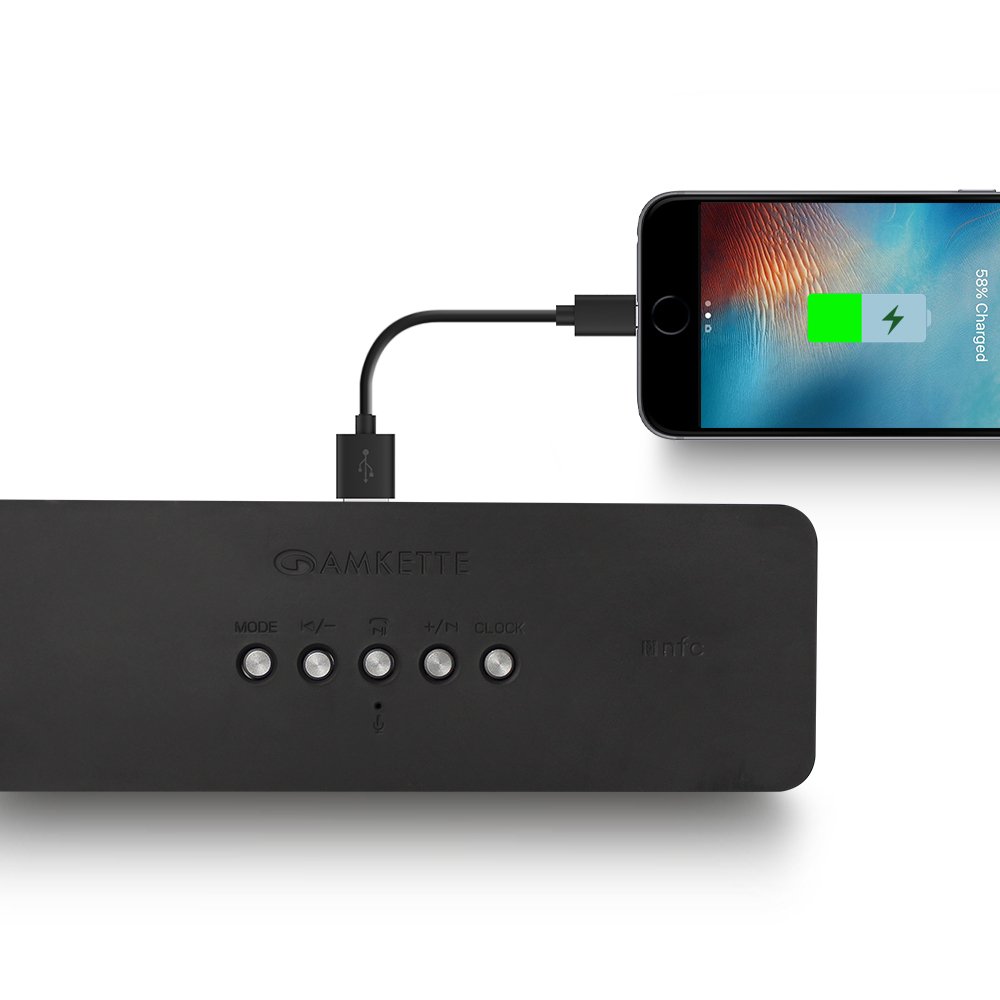
8-сүрөт: USB хост порту аркылуу смартфонго кубат берүүчү динамик.
Amkette Trubeats S50 смартфонуңузду же башка USB аркылуу иштеген түзмөктөрүңүздү кубаттай алат. Түзмөгүңүздүн кубаттоочу кабелин туташтырыңыз USB хост порту динамиктин арткы бетинде. Андан кийин динамиктин ички батареясы түзмөгүңүздү кубат менен камсыз кылат.
5.7 Колдонмону башкаруу (Android үчүн гана)

9-сүрөт: Amkette Trubeats Smart Speaker колдонмосунун интерфейсин көрсөткөн смартфон.
Жакшыртылган башкаруу үчүн, Google Play дүкөнүнөн (Android телефондору үчүн) Amkette Trubeats Smart Speaker колдонмосун жүктөп алыңыз. Колдонмо сизге төмөнкүлөргө мүмкүндүк берет:
- Ар кандай аудио режимдерин которуштуруу.
- Үндү жана тректи ойнотууну башкаруу.
- FM радиостанцияларын башкарыңыз жана так жөндөөнү аткарыңыз.
- Ойготкуч булагын кошо алганда, ойготкучтарды орнотуңуз жана ыңгайлаштырыңыз.
Колдонмонун иштеши үчүн, динамиктин Bluetooth аркылуу смартфонуңузга туташтырылганын текшериңиз.
5.8 Чалууларды башкаруу
Bluetooth аркылуу смартфонго туташканда, колонканы колсуз чалуу үчүн колдонсо болот:
- Чакырууга жооп берүү: басыңыз Ойнотуу/Тындыруу/Чакырга жооп берүү баскычы бир жолу.
- Чакырууну аяктоо: басыңыз Ойнотуу/Тындыруу/Чакырга жооп берүү баскычы чалуу учурунда бир жолу.
- Чакырууну четке кагуу: көпкө басыңыз Ойнотуу/Тындыруу/Чакырга жооп берүү баскычы.
6. Техникалык тейлөө
- Динамикти өтө жогорку температурадан, түз күн нурунан жана нымдуулуктан алыс кармаңыз.
- Динамикти жумшак, кургак чүпүрөк менен тазалаңыз. Абразивдүү тазалагычтарды же эриткичтерди колдонбоңуз.
- Динамикти түшүрүүдөн же катуу таасирлерден сактаныңыз.
- Узак мөөнөткө колдонулбаганда, динамикти салкын, кургак жерде сактаңыз жана батареянын ден соолугун сактоо үчүн аны мезгил-мезгили менен заряддап туруңуз.
7. Кыйынчылыктарды
| Көйгөй | Мүмкүн себеп | Чечим |
|---|---|---|
| Динамик күйбөйт. | Батарея түгөнүп калды. | Динамикти толук заряддаңыз. |
| Динамиктен үн жок. | Үн өтө төмөн; туура эмес режим тандалган; аппарат туура туташкан эмес. | Динамиктин жана баштапкы түзмөктүн үнүн катуулатыңыз. Туура режим (Bluetooth, AUX ж.б.) тандалганын текшериңиз. Түзмөктү кайра туташтырыңыз. |
| Bluetooth жупташуусу болбой жатат. | Динамик жупташтыруу режиминде эмес; түзмөк өтө алыс; тоскоолдук бар. | Динамик жупташтыруу режиминде экенин текшериңиз ("BT" күйүп-өчүп турат). Түзмөктү динамикке жакындатыңыз. Башка Bluetooth түзмөктөрүн өчүрүңүз. |
| FM радиосун кабыл алуу начар. | Алсыз сигнал; экологиялык кийлигишүү. | Динамикти жакшыраак кабыл алуу бар жерге жылдырыңыз. Кайрадан авто-сканерлөөнү аткарыңыз. |
| Колдонмо динамикке туташпай жатат. | Bluetooth туташкан жок; колдонмодо көйгөй бар. | Динамик Bluetooth аркылуу телефонуңузга жупташтырылганын текшериңиз. Колдонмону өчүрүп-күйгүзүп, кайра аракет кылыңыз. |
8. Техникалык шарттар
- Модел: S50
- Бренд: Amkette
- Динамик түрү: Көчмө Bluetooth динамиги (сырткы)
- Байланыш: Bluetooth, USB, Micro SD, AUX, FM радио
- Зымсыз байланыш технологиясы: Bluetooth
- Башкаруу ыкмасы: Баскычтар, Колдонмо (Android)
- Аудио чыгаруу режими: Стерео
- Аудио Wattage: 10 Ватт
- Кубат булагы: Батарея менен иштейт
- Батареянын иштөө мөөнөтү: 12 саатка чейин (орточо)
- Заряддоо убактысы: Болжол менен 4 саат
- Шайкеш түзмөктөр: Ноутбук, мобилдик телефон, планшет
- Өлчөмдөрү (LxWxH): 26.7 x 10.9 x 7.9 см
- Элемент Салмагы: 703 грамм
- Суу өткөрбөйт: Ооба
- Монтаж түрү: Столдун үстү
9. Кепилдик жана колдоо
Amkette Trubeats S50 акылдуу зымсыз Bluetooth динамиги төмөнкүлөр менен келет: 1 жылдык кепилдик сатып алынган күндөн тартып. Бул кепилдик нормалдуу колдонуудагы өндүрүш кемчиликтерин камтыйт.
Кепилдик боюнча дооматтар, техникалык жардам же башка колдоо боюнча суроолоруңуз болсо, Amkette кардарларды колдоо кызматына алардын расмий өкүлү аркылуу кайрылыңыз webсайт же сатып алуу документтери менен камсыз байланыш маалыматы.
Кепилдик максатында сатып алуунун далили катары сатып алуу дүмүрчөгүңүздү сактап коюңуз.


