Biconic Bluetooth Tough Weatherproof Portable Wireless Speaker User Manual
Модель: ABC-AU-BS-103-BK
Бренд: Байтек
1. Продукт бүтүп калдыview
The Biconic Bluetooth Tough Weatherproof Portable Wireless Speaker is designed for robust outdoor and indoor use, providing enhanced bass and clear audio. Its wireless capabilities allow for easy connection to various devices, and its durable, weatherproof construction ensures reliable performance in diverse environments.

Сүрөт 1.1: Алдыңкы view of the Biconic Bluetooth Speaker, showcasing анын бекем дизайны жана динамиктердин торлору.
Негизги өзгөчөлүктөрү:
- Зымсыз туташуу: Seamless Bluetooth pairing with smartphones, tablets, and other compatible devices.
- Аба ырайына чыдамдуу дизайн: IPX6 water resistance protects against strong jets of water, making it suitable for outdoor use.
- Жакшыртылган бас: Delivers rich, deep bass for a superior audio experience.
- Портативдик: Compact design with a durable strap for easy transport.
- Узак ойноо убактысы: Up to 4 hours of continuous audio playback on a single charge.
2. Коопсуздук маалыматы
Коопсуз иштөөнү камсыз кылуу жана зыяндын алдын алуу үчүн, бул продуктуну колдонуудан мурун, бардык коопсуздук эскертүүлөрүн жана көрсөтмөлөрүн кунт коюп окуп чыгыңыз.
- Динамикти өтө жогорку температурага (ысык же муздак) дуушар кылбаңыз.
- Do not immerse the speaker in water. While it is IPX6 water resistant, it is not designed for submersion.
- Keep the speaker away from direct heat sources, open flames, and flammable liquids.
- Use only the provided charging cable and a compatible power adapter (5V/1A recommended) to charge the device.
- Do not attempt to disassemble, repair, or modify the speaker. This will void the warranty and may cause harm.
- Балдар жетпеген жерде сактаңыз.
- Динамикти жумшак, кургак чүпүрөк менен тазалаңыз. Абразивдүү тазалагычтарды же эриткичтерди колдонбоңуз.
3. Пакеттин мазмуну
Кутудан чыгарганда пакетте бардык буюмдар бар экенин текшериңиз:
- Biconic Bluetooth Tough Weatherproof Portable Wireless Speaker
- USB заряддоо кабели
- Колдонуучунун Колдонмосу (бул документ)
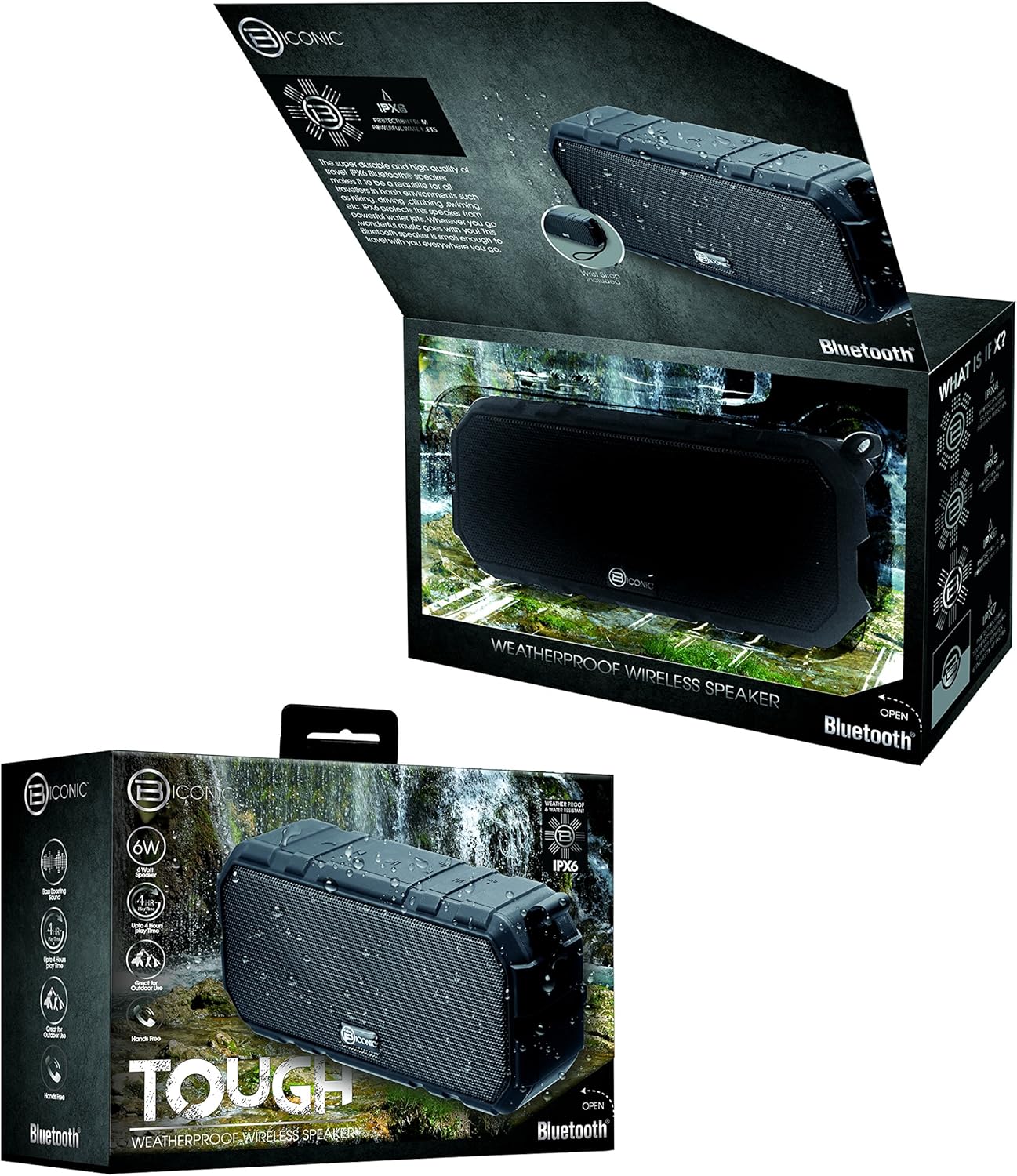
Figure 3.1: The Biconic Bluetooth Speaker shown with its retail packaging, indicating typical package contents.
4. Орнотуу
4.1 Динамикти заряддоо
- Locate the charging port on the side of the speaker. This port is typically protected by a rubber flap to maintain water resistance.
- Резина капкагын ачыңыз.
- Берилген USB кубаттоочу кабелдин кичинекей учун динамиктин кубаттоо портуна туташтырыңыз.
- USB кабелинин чоңураак учун USB кубат булагына туташтырыңыз (мисалы, компьютердин USB порту, USB дубал адаптери).
- Динамиктин кубатталып жатканын көрсөтүү үчүн кубаттоо индикатору, адатта, кызыл түстө күйөт.
- Once fully charged (approximately 2-3 hours), the indicator light will change color (e.g., turn off or turn blue/green). Disconnect the charging cable and close the rubber flap securely to maintain water resistance.
4.2 Күйгүзүү/өчүрүү
- Күйгүзүү үчүн: Press and hold the Power button (usually marked with a power symbol) for a few seconds until you hear an audible tone or see an indicator light illuminate.
- Өчүрүү үчүн: Press and hold the Power button again for a few seconds until you hear an audible tone or the indicator light turns off.
5. Иштөө нускамалары
5.1 Bluetooth жупташтыруу
Before first use, you need to pair the speaker with your Bluetooth-enabled device.
- Ensure the speaker is fully charged and powered on. It will automatically enter pairing mode, indicated by a flashing blue LED light.
- On your smartphone, tablet, or other Bluetooth device, go to the Bluetooth settings menu.
- Bluetooth иштетилбеген болсо, аны иштетиңиз.
- Scan for available devices. You should see "Biconic Speaker" or a similar name appear in the list.
- Select "Biconic Speaker" to connect. Once successfully paired, you will hear a confirmation tone, and the blue LED light on the speaker will stop flashing and remain solid.
- Эгер сырсөз суралса, "0000" киргизиңиз.
- Эгерде түзмөк байланыштын алкагында болсо жана Bluetooth иштетилген болсо, динамик күйүп турганда акыркы жупташтырылган түзмөккө автоматтык түрдө кайра туташат.
5.2 Музыканы ойнотуу
Once paired, you can control music playback directly from your connected device or using the speaker's controls.
- Ойнотуу/тындыруу: Press the Play/Pause button (often marked with a triangle or || symbol) once to play or pause music.
- Көлөмү: Press the Volume Up button (+) to increase the volume.
- Үнүн азайтуу: Press the Volume Down button (-) to decrease the volume.
- Кийинки трек: Press and hold the Volume Up button (+) for a few seconds to skip to the next track.
- Мурунку трек: Press and hold the Volume Down button (-) for a few seconds to go to the previous track.

5.1-сүрөт: Жогорку view of the Biconic Bluetooth Speaker, highlighting the control buttons for power, volume, and playback.
5.3 Answering Calls (Hands-Free Function)
The speaker supports hands-free calling when connected to a smartphone.
- Чакырууга жооп берүү: Чакыруу келгенде, жооп берүү үчүн Ойнотуу/Тынытуу баскычын бир жолу басыңыз.
- Чакырууну аяктоо: Чалуу учурунда, чалууну аяктоо үчүн Ойнотуу/Тындыруу баскычын бир жолу басыңыз.
- Чакырууну четке кагуу: Кирүүчү чалууну четке кагуу үчүн Ойнотуу/Тындыруу баскычын бир нече секунд басып туруңуз.
6. Техникалык тейлөө
Тийиштүү техникалык тейлөө сиздин динамиктин узак мөөнөттүү иштешин жана оптималдуу иштешин камсыз кылат.
- Тазалоо: Динамикти жумшак менен сүртүңүз, гamp cloth. Do not use harsh chemicals, solvents, or abrasive cleaners. Ensure the charging port flap is closed before cleaning with a damp кездеме.
- Сактагыч: Динамикти узак убакыт бою колдонбогондо, түз күн тийбеген, кургак, салкын жерде сактаңыз.
- Батареяга кам көрүү: To preserve battery life, fully charge the speaker before storing it for long periods. Recharge every 3-6 months if not used regularly.
- Суу каршылык: Always ensure the rubber flap covering the charging port is securely closed to maintain the IPX6 water resistance rating.

Figure 6.1: The Biconic Bluetooth Speaker demonstrating its water-resistant capabilities, highlighting the importance of proper sealing for maintenance.
7. Кыйынчылыктарды
| Көйгөй | Мүмкүн себеп | Чечим |
|---|---|---|
| Динамик күйбөйт. | Батарея түгөнүп калды. | Динамикти толук заряддаңыз. |
| Bluetooth түзмөгү менен жупташтыруу мүмкүн эмес. | Bluetooth is off on your device; speaker is not in pairing mode; device is too far. | Ensure Bluetooth is enabled on your device. Power off and on the speaker to re-enter pairing mode. Move device closer to the speaker (within 10 meters). Forget the device on your phone and try pairing again. |
| Үн жок же үнү төмөн. | Динамикте же түзмөктө үн өтө төмөн; динамик туташкан эмес. | Increase volume on both the speaker and your connected device. Ensure the speaker is properly paired and connected. |
| Үндүн бузулушу. | Үн өтө жогору; тоскоолдук; батареянын заряды аз. | Үндү азайтыңыз. Динамикти башка электрондук түзмөктөрдөн алыстатыңыз. Динамикти кубаттаңыз. |
8. Техникалык шарттар
| Өзгөчөлүк | Деталь |
|---|---|
| Модель номери | ABC-AU-BS-103-BK |
| Бренд | Bytech |
| Байланыш технологиясы | Bluetooth |
| Динамиктин максималдуу чыгаруу күчү | 3 Ватт |
| Аудио чыгаруу режими | Стерео |
| Сууга туруктуулук рейтинги | IPX6 (Water resistant, not submersible) |
| Батарея түрү | 1 литий-иондук батарейка (талап кылынат) |
| Ойнотуу убактысы | 4 саатка чейин |
| Продукциянын өлчөмдөрү | 2.54 x 2.54 x 2.54 см |
| Элемент Салмагы | 522 г |
| Монтаж түрү | Стол үстү |
9. Кепилдик жана колдоо
For warranty information and technical support, please contact Bytech customer service. Details are typically provided on the product packaging or the official Bytech webсайт.
Сураныч, кепилдик дооматтар үчүн сатып алуу далилиңизди сактап коюңуз.
Эскертүү: Кепилдик шарттары аймакка жараша өзгөрүшү мүмкүн.


