1. Киришүү
This manual provides comprehensive instructions for the operation and maintenance of your MIDAS DM16 16 Input Analogue Live and Studio Mixer. The DM16 is designed for both live performance and studio recording environments, featuring award-winning MIDAS microphone preamplifiers and robust construction.
Please read this manual thoroughly before operating the device to ensure proper usage and to maximize its lifespan.
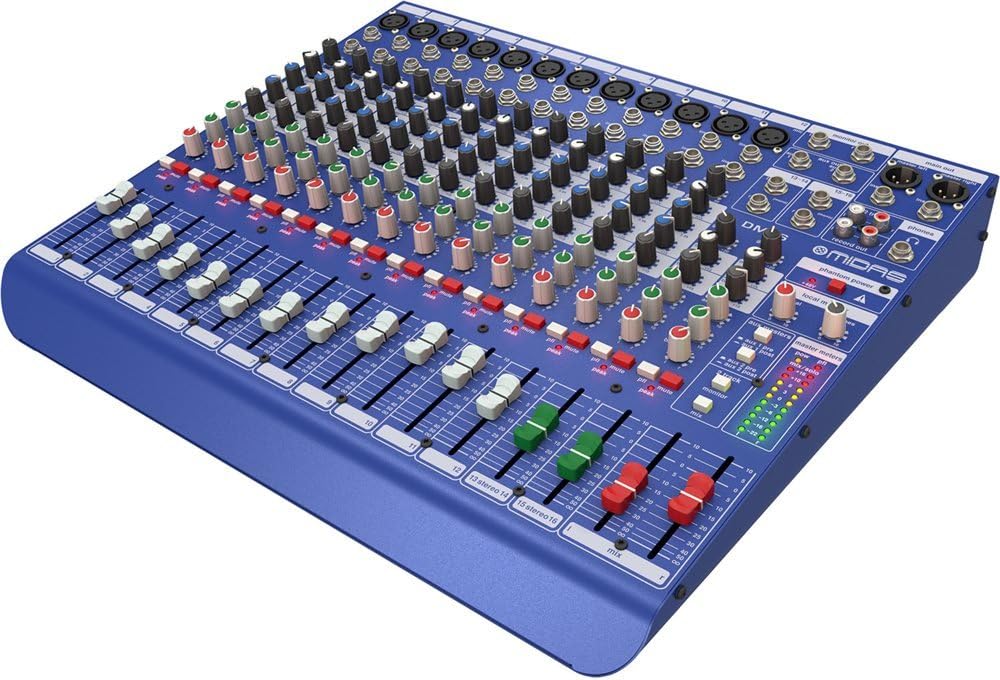
Сүрөт 1.1: Алдыңкы бурчтуу view of the MIDAS DM16 mixer.
2. Орнотуу
2.1 Таңгактан чыгаруу жана текшерүү
Upon receiving your MIDAS DM16, carefully unpack the unit and inspect it for any signs of damage that may have occurred during transit. Retain the original packaging materials for future transport or storage.
Кутуга камтылган:
- MIDAS DM16 16-киргизүү аналогдук жандуу жана студиялык аралаштыргыч
- Электр кабели
- Колдонуучунун Колдонмосу (бул документ)
2.2 Кубат туташтыруу
The DM16 operates on a standard AC power supply. Connect the provided power cord to the AC inlet on the rear panel of the mixer and then to a suitable power outlet. Ensure the power switch is in the 'Off' position before connecting to power.
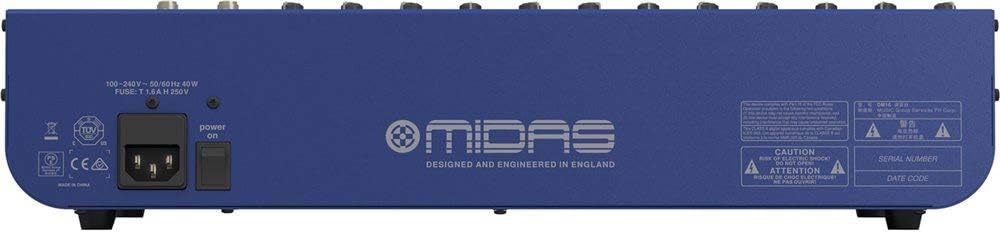
Figure 2.1: Rear panel of the MIDAS DM16 showing power input and warnings.
2.3 Киргизүү жана чыгаруу байланыштары
The DM16 features a variety of input and output options for connecting microphones, instruments, and other audio devices.
- Микрофон кириштери: 12 mono input channels with XLR connectors for microphones. These channels feature MIDAS microphone preampаман калгандар.
- Line Inputs: 2 electronically-balanced stereo line input channels on 1/4" TRS connectors for instruments or line-level devices.
- Негизги жыйынтыктар: Connect to your main PA system or recording interface.
- Aux жөнөтөт: For monitor mixes or effects sends.
- Гарнитуранын чыгышы: Аудиону көзөмөлдөө үчүн.
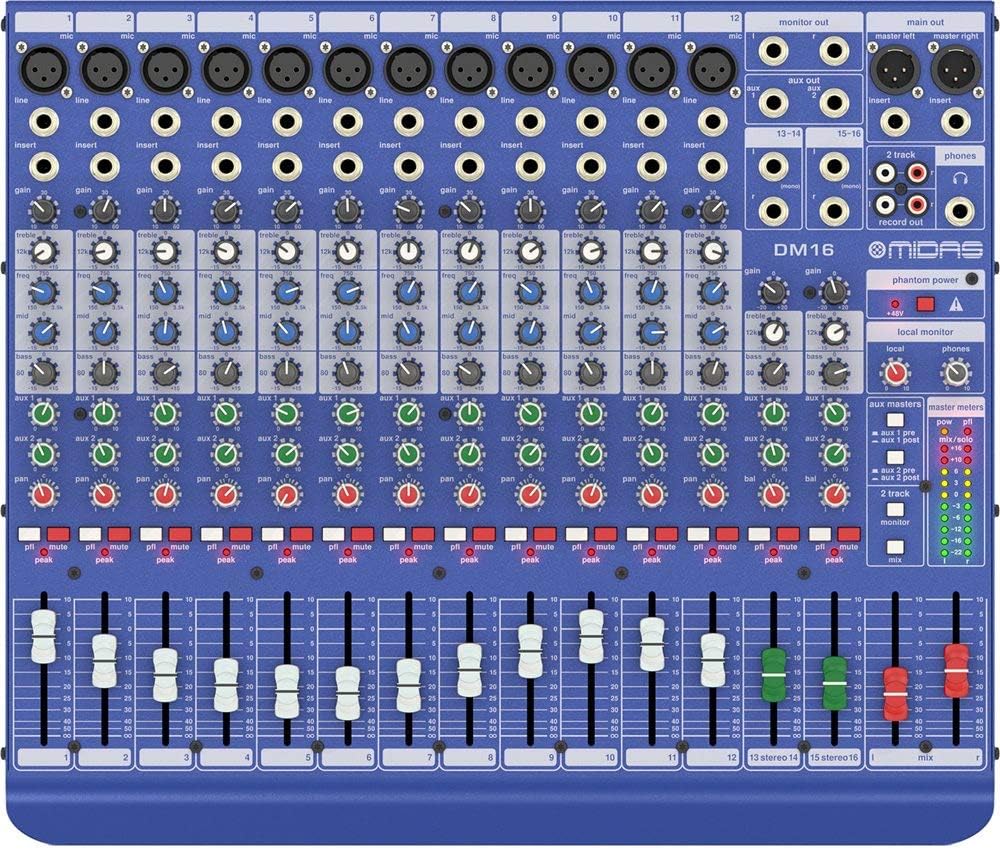
2.2-сүрөт: Жогорку view of the MIDAS DM16 showing all input/output connections and controls.
3. Иштөө нускамалары
3.1 Каналды башкаруу
Each mono input channel on the DM16 features the following controls:
- УТУШ: Adjusts the input sensitivity for the microphone preampөмүрлүү.
- EQ: A 3-band equalizer with a swept mid-band for precise tone shaping.

3.1-сүрөт: Детальдуу view of the 3-band EQ section on a mono channel.
- AUX 1/2: Controls the level sent to the auxiliary outputs. These can be switched pre/post fader.

Figure 3.2: Aux masters section with pre/post fader switching.
- ПАН: Каналдын стерео абалын тууралайт.
- Үнсүз: Silences the channel.
- PEAK LED: Киргизүү сигналы үзүлүп калганда көрсөтөт.
- FADER: Controls the output level of the channel to the main mix.

Figure 3.3: Channel faders for precise level control.
3.2 Phantom Power
The DM16 provides +48V phantom power for condenser microphones. This is a global switch, meaning it applies to all microphone inputs simultaneously. Ensure all connections are made before activating phantom power to prevent damage to non-phantom powered devices.

Figure 3.4: Phantom power switch.
3.3 Мониторинг
Use the headphone output and monitor controls to listen to the main mix or specific auxiliary sends. The monitor section includes controls for local monitor and phones output levels.

Figure 3.5: Monitor and headphone controls.
4. Техникалык тейлөө
Proper maintenance ensures the longevity and optimal performance of your MIDAS DM16 mixer.
- Тазалоо: Миксердин сыртын тазалоо үчүн жумшак, кургак чүпүрөктү колдонуңуз. Капталына же башкаруу элементтерине зыян келтириши мүмкүн болгон абразивдүү тазалоочу каражаттардан же эриткичтерден алыс болуңуз.
- Чаңдан коргоо: Keep the mixer covered when not in use to prevent dust accumulation, especially around faders and knobs.
- Вентиляция: Ашыкча ысып кетүүнүн алдын алуу үчүн түзмөктүн айланасында жетиштүү аба айланышын камсыз кылыңыз. Желдетүүчү тешиктерди жаппаңыз.
- Сактагыч: Store the mixer in a cool, dry environment away from direct sunlight and extreme temperatures.
5. Кыйынчылыктарды
This section addresses common issues you might encounter with your DM16 mixer.
- Кубат жок:
- Электр шнурунун аралаштыргычка да, розеткага да бекем туташтырылганын текшериңиз.
- Электр розеткасынын иштешин текшериңиз.
- Ensure the power switch on the rear panel is in the 'On' position.
- Үн чыгышы жок:
- Бардык киргизүү жана чыгаруу кабелдик байланыштарды текшериңиз.
- Ensure channel faders and the main mix fader are raised.
- Verify that the MUTE buttons on active channels are not engaged.
- Check the gain settings for each channel.
- Confirm that your connected speakers or monitoring system are powered on and functioning correctly.
- Бурмаланган үн:
- Reduce the GAIN setting on the input channel if the PEAK LED is frequently illuminating.
- Lower the output level of the connected source device.
- Бузук кабелдерди текшериңиз.
- Ум же ызы-чуу:
- Бардык кабелдердин туура корголгонун жана жакшы абалда экенин текшериңиз.
- Check for ground loops; try connecting all audio equipment to the same power strip.
- Аудио кабелдерин электр кабелдеринен алыс кармаңыз.
Бул жерде каралбаган маселелерге туш болсоңуз, колдоо бөлүмүнө кайрылыңыз.
6. Техникалык шарттар
| Өзгөчөлүк | Деталь |
|---|---|
| Продукт түрү | Аналогдук Live жана Studio Mixer |
| Каналдарды киргизүү | 16 (12 моно, 2 стерео) |
| Микрофон Алдын алаampаман калгандар | Award-winning MIDAS preampаман калгандар |
| EQ on Mono Channels | 3-band with swept mid band |
| Aux жөнөтөт | 2 (with pre/post fader switching) |
| Power Source | Электр зымдары |
| Элемент Салмагы | 11.02 фунт (5.0 кг) |
| Продукциянын өлчөмдөрү (L x W x Y) | 17.24 x 14.57 x 3.74 дюйм (438 x 370 x 95 мм) |
| Келип чыккан өлкө | Кытай |
| Модель номери | DM16 |
| Байланыш технологиясы | Көмөкчү |
7. Кепилдик жана колдоо
7.1 Кепилдик маалыматы
Your MIDAS DM16 mixer is covered by a limited warranty against defects in materials and workmanship. Please refer to the warranty card included with your product or visit the official MIDAS webдеталдуу кепилдик шарттары жана шарттары үчүн сайт.
Эскертүү: The warranty may not cover damage caused by improper use, unauthorized modifications, or natural disasters.
7.2 Кардарларды колдоо
For technical assistance, troubleshooting, or service inquiries, please contact MIDAS customer support through their official webсайт же продукт документациясында көрсөтүлгөн байланыш маалыматы.
Онлайн ресурстар:
- Official MIDAS Webсайт: www.midasconsoles.com
- Product Support Page: (Specific link if available, otherwise general webсайт)
When contacting support, please have your product model number (DM16) and serial number ready.


