1. Introduction and Overview
This manual provides detailed instructions for the setup, operation, and maintenance of your Xprinter XP-Q200 80mm Thermal Printer. The XP-Q200 is a high-speed thermal receipt printer designed for various operating systems including Windows, Android, and iOS. It offers versatile connectivity options such as USB, Bluetooth, and Ethernet, making it suitable for a wide range of business environments.

Сүрөт 1.1: Алдыңкы view of the Xprinter XP-Q200 Thermal Printer.
2. Коопсуздук маалыматы
Please read the following safety precautions carefully before using the printer to ensure safe and proper operation:
- Do not touch the thermal print head immediately after printing, as it may be hot.
- Use only the power adapter supplied with the printer. Using an incorrect adapter may damage the printer or cause fire.
- Do not disassemble or modify the printer. Refer all servicing to qualified personnel.
- Keep the printer away from water, moisture, and direct sunlight.
- Принтер туруктуу, түз бетке коюлганын текшериңиз.
3. Пакеттин мазмуну
Төмөндө тизмеленген нерселердин баары принтериңиздин пакетине камтылганын текшериңиз:
- Xprinter XP-Q200 Thermal Printer Unit
- Кубаттуу адаптер
- USB кабели
- Thermal Paper Roll (initial)
- User Manual
4. Продукциянын өзгөчөлүктөрү
The Xprinter XP-Q200 offers a range of features designed for efficient and reliable thermal printing:
- Жогорку ылдамдыктагы басып чыгаруу: Achieves print speeds of up to 260mm/sec with an integrated auto cutter.
- Бир нече интерфейстер: Equipped with USB, Bluetooth, and Ethernet connectivity for flexible integration.
- Кеңири шайкештик: Supports Windows, Linux, and Android operating systems.
- Logo and Barcode Support: Allows for downloading and printing of store logos (BMP file format) and various barcode types on thermal paper.
- Кагаз менен иштөө: Designed to handle thermal paper rolls up to 80x80mm.
- International Language Support: Supports a variety of international languages and scripts.
- Error Alarms: Features print job tips and error alarm functions for operational awareness.
- Black Mark Detection: Includes a black mark detection function for specific printing applications.
- Missing Orders Function: Incorporates a feature to help avoid "missing orders."
- Мониторинг мүмкүнчүлүктөрү: Supports Ethernet and Serial port monitoring functions.
- NV Logo Storage: Provides 256K Bytes of NV Logo download storage.
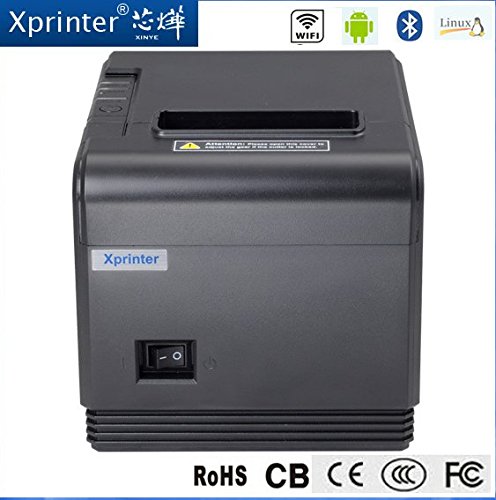
Сүрөт 4.1: Алдыңкы view highlighting connectivity options.
5. Орнотуу
5.1 Физикалык орнотуу
- Unpack the printer and remove all protective packaging materials.
- Place the printer on a stable, flat surface near a power outlet and your host device.
- Connect the power adapter to the printer's power port and then plug it into a wall outlet.
5.2 Термикалык кагазды жүктөө
- Press the cover open button (usually located on the side or front) to open the printer's top cover.
- Insert the thermal paper roll into the paper compartment with the printing side facing the thermal print head. Ensure the roll unwinds from the bottom.
- Кескичтин жанынан бир аз кагазды тартыңыз.
- Close the top cover firmly until it clicks into place. The printer will automatically feed the paper to the correct position.
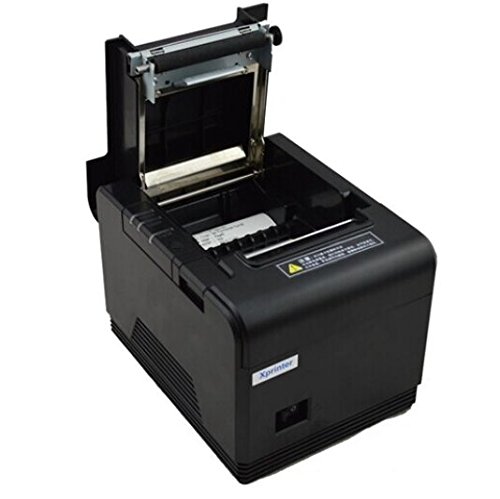
Сүрөт 5.1: Термалдык кагазды принтерге жүктөө.
5.3 Түзмөккө туташуу
The XP-Q200 supports USB, Bluetooth, and Ethernet connections.

5.2-сүрөт: Арткы view of the printer with connectivity ports.
5.3.1 USB туташуу
- Connect one end of the USB cable to the printer's USB port and the other end to your computer's USB port.
- The computer should detect the printer automatically.
5.3.2 Bluetooth Connection (for Android/iOS)
- Принтер күйгүзүлгөнүн текшериңиз.
- On your Android or iOS device, go to Bluetooth settings and enable Bluetooth.
- Издөө available devices. The printer should appear as "XP-Q200" or similar.
- Select the printer to pair. The default PIN is usually "0000" or "1234".
- Once paired, you can select the printer from your application's print settings.
5.3.3 Ethernet туташуусу
- Принтердин Ethernet портунан Ethernet кабелин тармак роутериңизге же коммутаторуңузга туташтырыңыз.
- The printer will obtain an IP address automatically via DHCP. For static IP configuration, refer to the advanced settings utility provided with the printer drivers.
5.4 Драйверди орнотуу
For Windows and Linux systems, you will need to install the appropriate printer drivers. Drivers are typically available on the Xprinter official website or on a CD included with the printer. Follow the on-screen instructions during installation.
6. Иштөө нускамалары
6.1 Негизги басып чыгаруу
Once the printer is connected and drivers are installed (if applicable), you can send print jobs from your application. Ensure the printer is powered on and has paper loaded.
- From your application (e.g., POS software, web browser), select the print option.
- Choose "Xprinter XP-Q200" from the list of available printers.
- Adjust any print settings as needed (e.g., paper size, copies).
- Тапшырманы принтерге жөнөтүү үчүн "Басып чыгаруу" баскычын чыкылдатыңыз.
6.2 Logo and Barcode Printing
The XP-Q200 supports custom logo and barcode printing. Refer to the printer's utility software (usually provided with drivers) for instructions on how to upload logos (BMP format) to the printer's NV memory and configure barcode printing settings.
7. Техникалык тейлөө
7.1 Принтерди тазалоо
Үзгүлтүксүз тазалоо басып чыгаруу сапатын сактоого жардам берет жана принтердин иштөө мөөнөтүн узартат.
- Басма башчысы: Кебезди жеңил колдонуңуз dampened with isopropyl alcohol to gently wipe the thermal print head. Allow it to dry completely before closing the cover. Clean the print head regularly, especially if print quality degrades.
- Тасма ролик: Clean the rubber platen roller with a soft cloth dampизопропил спирти менен жасалган.
- Сырткы: Wipe the exterior of the printer with a soft, dry cloth. Do not use abrasive cleaners or solvents.
7.2 Кагаз тыгындарын тазалоо
Кагаз тыгыны пайда болсо:
- Принтерди өчүрүңүз.
- Жогорку капкакты ачыңыз.
- Carefully remove any jammed paper. Ensure no small pieces of paper remain inside.
- Close the top cover firmly.
- Turn the printer back on.
8. Кыйынчылыктарды
This section addresses common issues you might encounter with your XP-Q200 printer.
| Көйгөй | Мүмкүн себеп | Чечим |
|---|---|---|
| Принтер күйбөйт | Power cable loose; Power outlet faulty; Power adapter faulty | Check power connections; Try a different outlet; Contact support if adapter is faulty. |
| Басып чыгаруу жок | No paper; Paper loaded incorrectly; Printer offline; Driver issue | Load paper correctly; Check printer status; Reinstall drivers. |
| Басып чыгаруу сапаты начар | Print head dirty; Low quality paper; Print head worn out | Clean print head; Use recommended thermal paper; Contact support for service. |
| Кагаз тыгылышы | Paper loaded incorrectly; Foreign object inside | Refer to Section 7.2 for clearing jams. |
| Bluetooth/Ethernet connection fails | Incorrect pairing; Network issue; IP address conflict | Re-pair device; Check network cables/settings; Verify IP address. |
9. Техникалык шарттар
| Өзгөчөлүк | Спецификация |
|---|---|
| Модель аты | XP-Q200 |
| Басма технологиясы | Термикалык |
| Басып чыгаруу ылдамдыгы | 260 мм/сек |
| Принтердин чыгышы | Монохромдуу |
| Байланыш технологиясы | Bluetooth, USB, Ethernet |
| Барактын өлчөмү | Thermal (80mm) |
| Эки тараптуу басып чыгаруу | Ооба |
| Түс | Кара |
| Controller Type | iOS, Android |
| Камтылган компоненттер | Кагаз |
| Өзгөчө өзгөчөлүк | USB |
| Сканер түрү | Portable |


