1. Киришүү
The TSC TE200 is a desktop thermal label printer designed for various labeling applications. It supports both direct thermal and thermal transfer printing methods, making it suitable for a wide range of label types including shipping labels, product tags, receipts, and barcodes. This printer offers a resolution of 203 dots per inch (DPI) and can print at speeds up to 6 inches per second. Its robust ABS shell is designed for durability in various environments.

1.1-сүрөт: Алдыңкы оң жак view of the TSC TE200 Desktop Thermal Label Printer.
2. Эмнелер камтылган
Upon unpacking your TSC TE200 printer, verify that all components listed below are present:
- TSC TE200 термикалык этикетка принтери
- Электр кабели
- USB кабели
- Labeling Software (typically provided via download or included media)
- Орнотуу Орнотуу колдонмосу
- Лента аксессуарлары (шпиндельдер, өзөктөр)

Image 2.1: All items included in the TSC TE200 printer package.
3. Орнотуу
3.1 Физикалык байланыш
- Принтерди туруктуу, тегиз бетке коюңуз.
- Кубат шнурун принтерге, андан кийин розеткага туташтырыңыз.
- USB кабелин принтердин USB портуна жана компьютериңизге туташтырыңыз.
3.2 Драйверди жана программалык камсыздоону орнотуу
Refer to the included Setup Installation Guide for detailed instructions on installing the printer drivers and labeling software on your operating system. Ensure that the correct drivers are installed for proper printer functionality.
3.3 Loading Labels and Ribbons
The TE200 printer supports various label and ribbon configurations.
- Энбелгилер: The printer accommodates 5-inch (127 mm) outer diameter (OD) label rolls on a 1-inch core, with a maximum print width of 4.25 inches (108 mm).
- Тасмалар: It is compatible with 72-meter or 110-meter ribbons on a 0.5-inch core, or 300-meter ribbons on a 1-inch core.
To load labels and ribbons:
- Принтердин үстүнкү капкагын ачыңыз.
- Follow the diagrams in the setup guide to correctly place the label roll and ribbon onto their respective spindles.
- Ensure the labels and ribbon are properly aligned and threaded through the print mechanism.
- Жогорку капкакты жабыңыз.
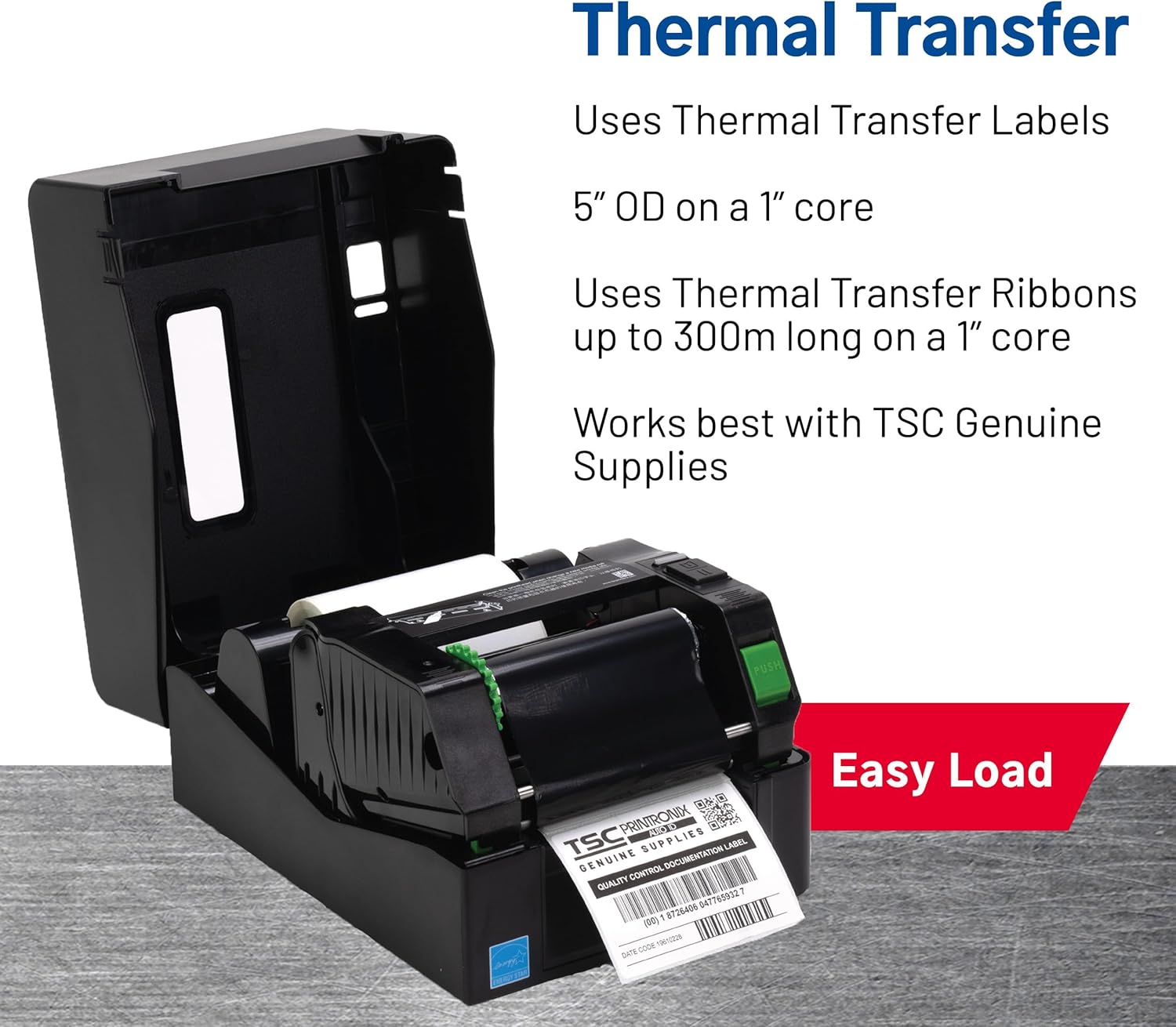
Image 3.1: Easy loading of thermal transfer labels and ribbons.
4. Принтерди иштетүү
4.1 Басып чыгаруу процесси
- Принтер күйгүзүлүп, компьютериңизге туташып турганын текшериңиз.
- Open your labeling software (e.g., the design software included with the printer) or the application from which you intend to print.
- Design your label or select an existing template.
- Verify printer settings within the software, such as label size, print method (direct thermal or thermal transfer), and print quantity.
- Initiate the print command from your software.
- The printer will feed the label media and print the design.

Image 4.1: The TSC TE200 printer in operation, producing a label.
4.2 Тиркемелер
The TSC TE200 is versatile and suitable for various labeling needs, including:
- Shipping and Postage Белгилер
- Продукт идентификациясы Tags
- Retail Labels and Barcodes
- Квитанциялар
- File Folder Labels
- General Office and Home Office Labeling

Сүрөт 4.2: Мисamples of versatile applications for the TE200 printer.
4.3 Direct Thermal vs. Thermal Transfer Printing
The TE200 supports two printing methods:
- Direct Thermal: Uses heat-sensitive paper that darkens when heated. Ideal for short-term labeling applications where labels are not exposed to harsh physical or environmental conditions (e.g., receipts, temporary shipping labels).
- Thermal Transfer: Uses a ribbon that melts ink onto the label material. This method produces more durable and long-lasting labels, suitable for applications exposed to moisture, chemicals, high heat, or direct sunlight (e.g., product labels, asset tracking).
5. Техникалык тейлөө
Regular maintenance ensures optimal performance and extends the lifespan of your TSC TE200 printer.
- Басып чыгаруу башын тазалоо: Periodically clean the print head with an alcohol-based cleaning wipe designed for thermal printers. Ensure the printer is off and cooled down before cleaning.
- Пластина роликтерин тазалоо: Clean the platen roller with a lint-free cloth dampened with isopropyl alcohol to remove any adhesive residue or dust.
- Чаңды тазалоо: Use compressed air to remove dust and debris from the interior of the printer.
- Media Replacement: Replace label rolls and ribbons as needed to prevent printing interruptions and maintain print quality.
Always refer to the detailed cleaning instructions in your Setup Installation Guide for specific procedures.
6. Кыйынчылыктарды
If you encounter issues with your TSC TE200 printer, consider the following common troubleshooting steps:
- Кубат жок: Ensure the power cord is securely connected to both the printer and a working power outlet.
- Принтер жооп бербей жатат:
- Принтер менен компьютердин ортосундагы USB кабелинин туташуусун текшериңиз.
- Verify that the printer drivers are correctly installed and updated on your computer.
- Restart both the printer and the computer.
- Начар басып чыгаруу сапаты:
- Ensure the correct label type (direct thermal or thermal transfer) is selected in your software settings.
- Check if the ribbon is correctly loaded and not depleted (for thermal transfer printing).
- Clean the print head and platen roller as described in the Maintenance section.
- Adjust print darkness settings in your software.
- Туура тамактанбаган энбелгилер:
- Ensure labels are loaded correctly and aligned.
- Check for any obstructions in the label path.
- Perform a media calibration if available in your printer utility software.
For more complex issues, consult the comprehensive troubleshooting section in your Setup Installation Guide or contact TSC customer support.
7. Техникалык шарттар
| Өзгөчөлүк | Спецификация |
|---|---|
| Модел | TE200 |
| Басып чыгаруу ыкмасы | Түз жылуулук / жылуулук өткөрүп берүү |
| Резолюция | 203 DPI (8 чекит/мм) |
| Макс. Басып чыгаруу ылдамдыгы | 6 дюйм/секунда (152.4 мм/сек) |
| Max. Басып чыгаруу туурасы | 4.25 дюйм (108 мм) |
| Байланыш | USB |
| Эс | 16 МБ SDRAM, 8 МБ Flash |
| Ribbon Capacity | 72m/110m (0.5" core), 300m (1" core) |
| Label Roll OD | 1 дюймдук өзөктө 5 дюйм (127 мм). |
| Энергияны керектөө | 60 Ватт |
| Өлчөмдөрү (L x W x Y) | 11.02 x 8.03 x 11.02 дюйм (280 x 204 x 280 мм) |
| Салмагы | 5.3 фунт (2.4 кг) |
8. Кепилдик жана колдоо
8.1 Кепилдик маалыматы
The TSC TE200 printer comes with a full warranty. For specific terms and conditions, please refer to the warranty documentation included with your product or visit the official TSC webсайт.
8.2 Кардарларды колдоо
For technical assistance, troubleshooting, or further inquiries, please contact TSC customer support. With over 30 years of experience, TSC provides dedicated product and engineering support.
You can find more information and support resources on the official TSC webсайт: tscprinters.com.


