1. Киришүү
This user manual provides detailed instructions for the safe and efficient operation of your Xerox VersaLink B405/DN Monochrome Multifunction Printer. It covers initial setup, daily use, routine maintenance, and troubleshooting common issues. Please read this manual thoroughly before using the device to ensure optimal performance and longevity.

Сүрөт 1.1: Алдыңкы view of the Xerox VersaLink B405/DN Multifunction Printer.
2. Коопсуздук маалыматы
Принтерге зыян келтирбөө жана жаракат алуунун алдын алуу үчүн төмөнкү коопсуздук чараларын сактаңыз:
- Принтерди ар дайым жерге туташтырылган розеткага туташтырыңыз.
- Желдетүүчү тешиктерди жаппаңыз.
- Принтерди суудан же ашыкча нымдуулуктан алыс кармаңыз.
- Use only specified power cords and accessories.
- Do not attempt to service the printer yourself; refer all servicing to qualified personnel.
3. Пакеттин мазмуну
Пакетте бардык буюмдар бар экенин текшериңиз:
- Xerox VersaLink B405 Multifunction Printer
- Standard Capacity Toner Cartridge (5900 capacity)
- Программалык камсыздоо жана документтер CD
- Орнотуу боюнча колдонмо
- Тез колдонмо
- Электр зымы
- Факс кабели
4. Орнотуу
4.1 Пакеттен чыгаруу жана жайгаштыруу
Carefully remove the printer from its packaging. Place the printer on a stable, level surface with adequate ventilation. Ensure sufficient space around the device for operation and maintenance.
4.2 Кубат туташтыруу
Connect the provided power cord to the printer's power inlet and then to a grounded electrical outlet.
4.3 Тармактык туташуу
Connect an Ethernet cable from your network router or switch to the Ethernet port on the rear of the printer. This printer uses an Ethernet hardware interface for network connectivity.
4.4 Программалык камсыздоону орнотуу
Insert the software and documentation CD into your computer's CD-ROM drive. Follow the on-screen instructions to install the printer drivers and utility software. Alternatively, visit the official Xerox support webакыркы драйверлерди жүктөп алуу үчүн сайт.
4.5 Кагазды жүктөө
Open the paper tray located at the front of the printer. Adjust the paper guides to fit the size of your paper. Load the paper stack, ensuring it does not exceed the maximum fill line. The printer supports various print media including plain paper, envelopes, and labels, with a maximum media size of 8.5 x 14 inches.

Сүрөт 4.1: Алдыңкы view showing the paper trays for loading media.
4.6 Тонер-картриджди орнотуу
If the toner cartridge is not pre-installed, open the front access panel of the printer. Carefully insert the standard capacity toner cartridge into its designated slot until it clicks into place. Close the access panel.
5. Иштөө нускамалары
The VersaLink B405/DN features an intuitive control panel for managing various functions.
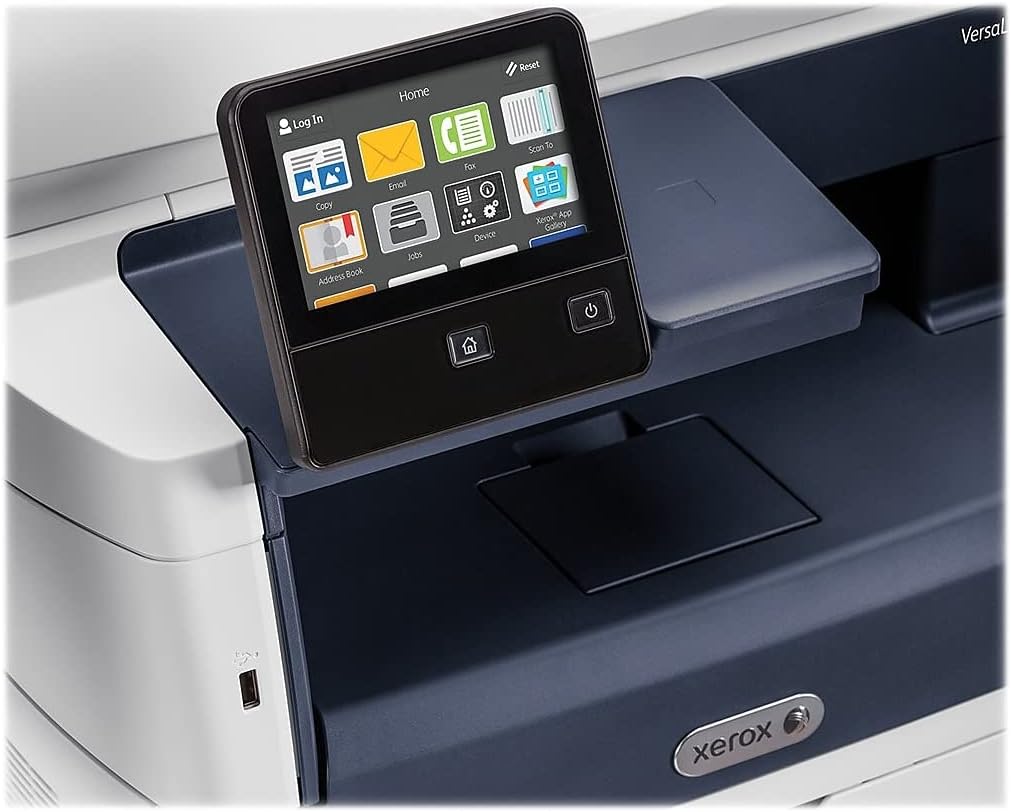
Figure 5.1: The touch-screen control panel for printer operation.
5.1 Басып чыгаруу
To print a document from your computer, select the Xerox VersaLink B405/DN from your printer list. Adjust print settings such as paper size, orientation, and duplex printing (automatic dual-sided printing is supported) as needed. Confirm the print job.
5.2 Көчүрүү
Place your document face-up in the Automatic Document Feeder (ADF) or face-down on the scanner glass. On the control panel, select the 'Copy' function. Adjust settings like number of copies, lightness/darkness, and two-sided copying. Press the 'Start' button to begin copying.

Figure 5.2: Paper loaded in the Automatic Document Feeder for copying or scanning multiple pages.
5.3 Скандоо
Place your document in the ADF or on the scanner glass. On the control panel, select the 'Scan' function. Choose your desired scan destination (e.g., Scan to Email, Scan to Network, Scan to USB). Configure scan settings such as resolution and file format. Press 'Start' to initiate the scan.

Figure 5.3: The scanner lid open, showing the flatbed for scanning single pages or delicate documents.
5.4 Факс
Connect the provided fax cord to the printer's fax port and a telephone wall jack. Place your document in the ADF or on the scanner glass. On the control panel, select the 'Fax' function. Enter the recipient's fax number and press 'Start'.
6. Техникалык тейлөө
6.1 Тонерди алмаштыруу
When the printer indicates low toner, order a replacement Xerox toner cartridge. Open the front access panel, remove the old cartridge by pulling it out, and insert the new cartridge until it locks into place. Close the panel.
6.2 Тазалоо
Принтердин сыртын дайыма жумшак, гamp кездеме. Сканердин айнеги үчүн, мамыксыз чүпүрөктү жана абразивдүү эмес айнек тазалагычты колдонуңуз. Тазалоочу каражатты түз эле айнекке чачпаңыз.
6.3 Кагаз тыгындарын тазалоо
If a paper jam occurs, the control panel will display instructions. Open the indicated access covers and carefully remove any jammed paper, pulling in the direction of the paper path. Ensure all paper fragments are removed before closing the covers.
7. Кыйынчылыктарды
Бул бөлүм сиз кабылышы мүмкүн болгон жалпы көйгөйлөрдү карайт:
- Принтер жооп бербей жатат: Check power connections, network cable, and ensure the printer is online. Restart both the printer and your computer.
- Начар басып чыгаруу сапаты: Check toner levels. Perform a print quality diagnostic from the printer's control panel or software. Clean the print heads if necessary (refer to the printer's internal menu).
- Кагаз тыгылыштары: Follow the instructions on the control panel to locate and clear the jam. Ensure paper is loaded correctly and not creased or damaged.
- Скандоо маселелери: Verify network connectivity. Ensure the scanner glass and ADF are clean. Check scan settings on the control panel.
For more complex issues, consult the full documentation on the provided CD or the Xerox support webсайт.
8. Техникалык шарттар
| Өзгөчөлүк | Спецификация |
|---|---|
| Продукциянын өлчөмдөрү | 19.5"D x 19.5"W x 21.7"H |
| Элемент Салмагы | 48 фунт |
| Максималдуу медиа өлчөмү | 8.5 x 14 дюйм |
| Максималдуу киргизүү барагынын сыйымдуулугу | 2350 барак |
| Максималдуу кара жана ак басып чыгаруу чечими | 1200 x 1200 dpi |
| Макс басып чыгаруу ылдамдыгы монохромдуу | 47 промилле |
| Макс көчүрүү ылдамдыгы (ак-кара) | 6.2 seconds (first copy out) |
| Эки тараптуу басып чыгаруу | Автоматтык |
| Аппараттык интерфейс | Ethernet, USB |
| Эстутум сактоо сыйымдуулугу | 2 ГБ |
| Процессордун саны | 2 |
| Принтердин сыя түрү | Тонер |
| Сканер түрү | Document (ADF and Flatbed) |
9. Кепилдик жана колдоо
The Xerox VersaLink B405/DN Monochrome Multifunction Printer comes with a standard one-year warranty. For warranty claims, technical support, or service inquiries, please contact Xerox customer support directly. Refer to the official Xerox website or the documentation included with your product for contact details and further support resources.


