Introduction
The myTouchSmart Simple Set 7-Day Digital Timer is designed to help you save energy, save money, and enhance security by automating your indoor lighting and appliances. This versatile plug-in timer features blue LED indicators for active programs and a large LCD screen for clear viewing and effortless programming. It is compatible with a wide range of light sources, including CFL, LED, incandescent, and halogen bulbs, and also works with dimmable LED and CFL bulbs.
With its advanced features, including SunSmart technology that automatically adjusts to sunrise/sunset times, and a reliable backup battery, this timer offers convenience and peace of mind.
Продукт бүттүview

1-сүрөт: Бурчтуу view of the myTouchSmart Simple Set Digital Timer.
The timer features a compact design with a single grounded outlet. Its intuitive interface allows for easy setup and programming of daily or weekly schedules.

Figure 2: Product dimensions and key features including backup battery, daily/weekly settings, grounded outlet, SunSmart technology, and 8 custom ON/OFF times.
Негизги өзгөчөлүктөр төмөнкүлөрдү камтыйт:
- Камдык батарея: Saves settings in case of power outage or if unplugged.
- Daily or Weekly Settings: Program schedules for individual days or entire weeks.
- Негизделген розетка: Provides a secure connection for your devices.
- SunSmart Technology: Automatically adjusts ON/OFF times based on local sunrise/sunset.
- Ыңгайлаштырылган КҮЙГҮЗҮҮ/ӨЧҮРҮҮ Убакыттары: Up to 8 programmable ON/OFF events.
Орнотуу нускамалары
Follow these steps for initial setup of your myTouchSmart Digital Timer:
- Таймерди сайыңыз: Insert the timer into a standard 125V grounded wall outlet. Ensure it is firmly seated.
- Set Current Date & Time:
- басыңыз СААТ баскычы.
- колдонуу UP (▲) жана ылдый (▼) buttons to adjust the current time.
- Басыңыз SET ырастоо үчүн.
- Repeat for setting the current day of the week.
- Select Your Region for SunSmart:
The built-in SunSmart technology requires you to select your geographical region for accurate sunrise/sunset adjustments. Refer to the timer's display and instructions for regional code selection.
- Баштапкы төлөм: Allow the timer to charge for at least 30 minutes when first plugged in to ensure the backup battery is sufficiently charged.

Figure 3: Timer plugged into a wall outlet, showing the top view.
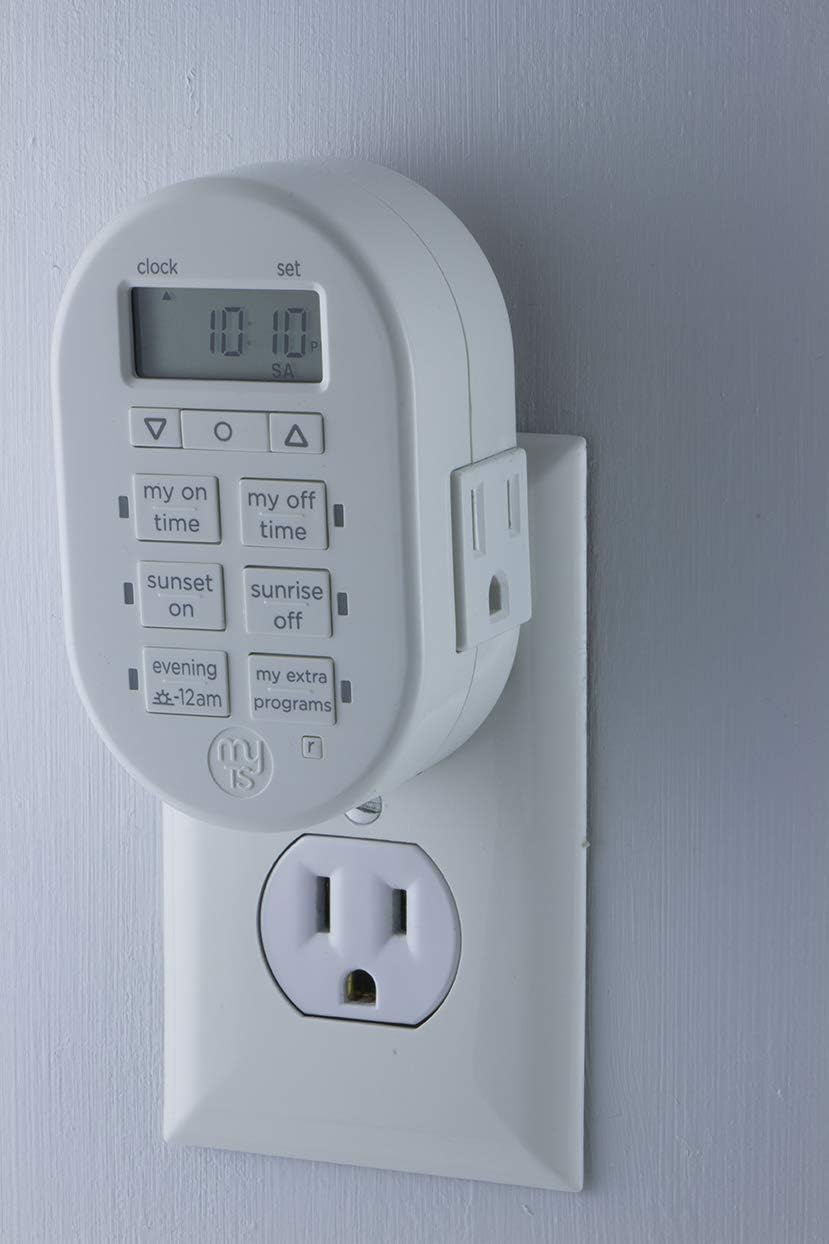
Figure 4: Timer plugged into a wall outlet, showing the side view.

Figure 5: Visual guide for simple setup, showing steps to set time, select region, and choose programs.
Иштөө нускамалары
The myTouchSmart timer offers various programming options to suit your needs. The control panel features a clear LCD display and dedicated buttons for easy navigation.

6-сүрөт: Детальдуу view of the timer's control panel, indicating Clock vs. Set mode, AM/PM indicator, Custom ON/OFF time buttons, Sunset/Sunrise ON/OFF buttons, and Evening presets.
Программалоо параметрлери:
- Ыңгайлаштырылган КҮЙГҮЗҮҮ/ӨЧҮРҮҮ Убакыттары:
колдонуу МЕНИН УБАКТЫСЫМДА жана МЕНИН БОШ УБАКТЫМ buttons to set specific times for your device to turn on and off. You can program up to 8 custom ON/OFF events per day or week.
Орнотуу үчүн: Басыңыз МЕНИН УБАКТЫСЫМДА or МЕНИН БОШ УБАКТЫМ, колдонуу ▲/▼ to adjust time, then SET to confirm. Repeat for desired days.
- SunSmart Technology (Sunrise/Sunset):
Leverage the КҮН БАТЫШЫ КҮЙҮКТҮ жана КҮН ЧЫГУУ ӨЧҮК buttons for automatic adjustments. Once your region is set during initial setup, the timer will automatically turn devices ON at sunset and OFF at sunrise, adapting to seasonal changes.
Жандыруу үчүн: Басыңыз КҮН БАТЫШЫ КҮЙҮКТҮ or КҮН ЧЫГУУ ӨЧҮК. The timer will use its internal calculations based on your set region.
- Evening Presets:
The EVENING -12AM button provides a convenient preset for evening operation, typically turning on at dusk and off at midnight. Consult the full manual for specific timing of this preset.
- My Extra Programs:
The МЕНИН КОШУМЧА ПРОГРАММАЛАРЫМ button allows access to additional pre-programmed or user-defined schedules. Refer to the detailed user guide for instructions on configuring these advanced programs.
Тиркемелер:
This timer is ideal for a variety of indoor applications, helping to automate your home and deter crime by giving the appearance of occupancy.

Figure 7: The timer can be used to schedule indoor lights, lampс, чакан тиричилик техникалары, электроника жана сезондук жарыктандыруу.

Figure 8: The timer helps deter crime by automatically turning lamps or other devices ON/OFF at programmable daily settings, simulating occupancy.
Техникалык тейлөө
The myTouchSmart Digital Timer requires minimal maintenance. Follow these guidelines to ensure optimal performance:
- Тазалоо: Disconnect the timer from the power outlet before cleaning. Wipe the exterior with a soft, dry cloth. Do not use abrasive cleaners or immerse the timer in water.
- Камдык батарея: The timer includes a built-in backup battery that saves your programmed settings in the event of a power outage or if the timer is unplugged. This battery is designed for long-term use and typically does not require replacement.
- Сактагыч: If storing the timer for an extended period, ensure it is unplugged and kept in a cool, dry place.
Проблемаларды чечүү
Эгерде сиз myTouchSmart санарип таймериңиз менен көйгөйлөргө туш болсоңуз, төмөнкү кеңири таралган көйгөйлөрдү жана чечимдерди караңыз:
| Көйгөй | Мүмкүн болгон себеп / Чечим |
|---|---|
| Device does not turn ON/OFF at programmed time. |
|
| Timer display is blank or unresponsive. |
|
| Blue LED indicator lights are not visible during programming. |
|
Техникалык шарттар
| Өзгөчөлүк | Деталь |
|---|---|
| Модель номери | 33860 |
| Бренд | myTouchSmart |
| Түс | Ак |
| Материал | Пластик |
| Продукциянын өлчөмдөрү (D x W x Y) | 2"D x 2.13"W x 2.63"H |
| Элемент Салмагы | 0.01 унция |
| Электрдик рейтинг | 125V, 50/60Hz, 15A 1875W General Purpose/Resistive, 10A 1250W Tungsten, 1/2HP |
| Программалануучу окуялар | Up to 8 custom ON/OFF events |
| Монтаж түрү | Plug In Mount |
| Стилди которуу | Которуу |
| UPC | 030878338608 |
| Өндүрүүчү | Jasco |

Figure 9: Detailed dimensions of the myTouchSmart Digital Timer.
Кепилдик маалымат
This myTouchSmart product is backed by a limited warranty. For specific details regarding warranty coverage, duration, and terms, please refer to the warranty card included with your product or visit the official myTouchSmart webсайт. Сатып алуу квитанциясын кепилдик дооматтары үчүн сатып алуунун далили катары сактаңыз.
Кардарларды колдоо
Кошумча жардам, техникалык колдоо же үчүн view the complete user manual, please visit the official myTouchSmart webсайтка же кардарларды тейлөө бөлүмүнө кайрылыңыз. Байланыш маалыматы, адатта, продуктунун таңгагынан же бренддин расмий өкүлүнөн тапса болот webсайт.
Онлайн ресурстар: www.mytouchsmart.com
Колдонуучунун колдонмосу (PDF): PDF колдонмосун жүктөп алыңыз


