1. Киришүү
Сатып алганыңыз үчүн рахматasing the Candy X-Range CMXG20DS Microwave with Grill. This manual provides essential information for the safe and efficient operation of your appliance. Please read these instructions carefully before using the microwave oven and retain them for future reference.
Маанилүү коопсуздук нускамалары
- Бул мешти эшиги ачык абалда иштетүүгө аракет кылбаңыз, анткени бул микротолкундуу энергиянын зыяндуу таасирине алып келиши мүмкүн.
- Мештин алдыңкы бети менен эшигинин ортосуна эч кандай нерсени койбоңуз же мөөр беттерине топурак же тазалагычтын калдыктары топтолушуна жол бербеңиз.
- Эгерде бузулган болсо, мешти иштетпеңиз. Мештин эшигинин туура жабылышы жана эч кандай зыянга учурабашы өзгөчө маанилүү: (1) эшик (ийилген), (2) топсолор жана илгичтер (сынган же бошоп кеткен), (3) эшик пломбалары жана пломбалоочу беттер.
- Мешти туура квалификациялуу тейлөөчү персоналдан башка эч ким тууралабашы же оңдоого болбойт.
- Шайман туура жерге туташтырылганын текшериңиз.
- Суюктуктарды же башка тамактарды жабык идиштерде ысытпаңыз, анткени алар жарылып кетиши мүмкүн.
- Микротолкундуу мештерде колдонууга ылайыктуу идиштерди гана колдонуңуз.
- Тамак-ашты пластик же кагаз идиштерге ысытканда, тутануу мүмкүндүгүнө байланыштуу мешке көз салып туруңуз.
2. Продукт бүтүп калдыview
The Candy X-Range CMXG20DS is a 20-liter microwave oven with an integrated grill function, designed for versatile cooking. It features a digital display, multiple power levels, and automatic programs.
Компоненттер
- Микротолкундуу мештин бирдиги
- Айнек айланма табак (диаметри 25.5 см)
- Айлануучу шакек
- Grill Rack
- Instruction Manual
Прибор диаграммасы
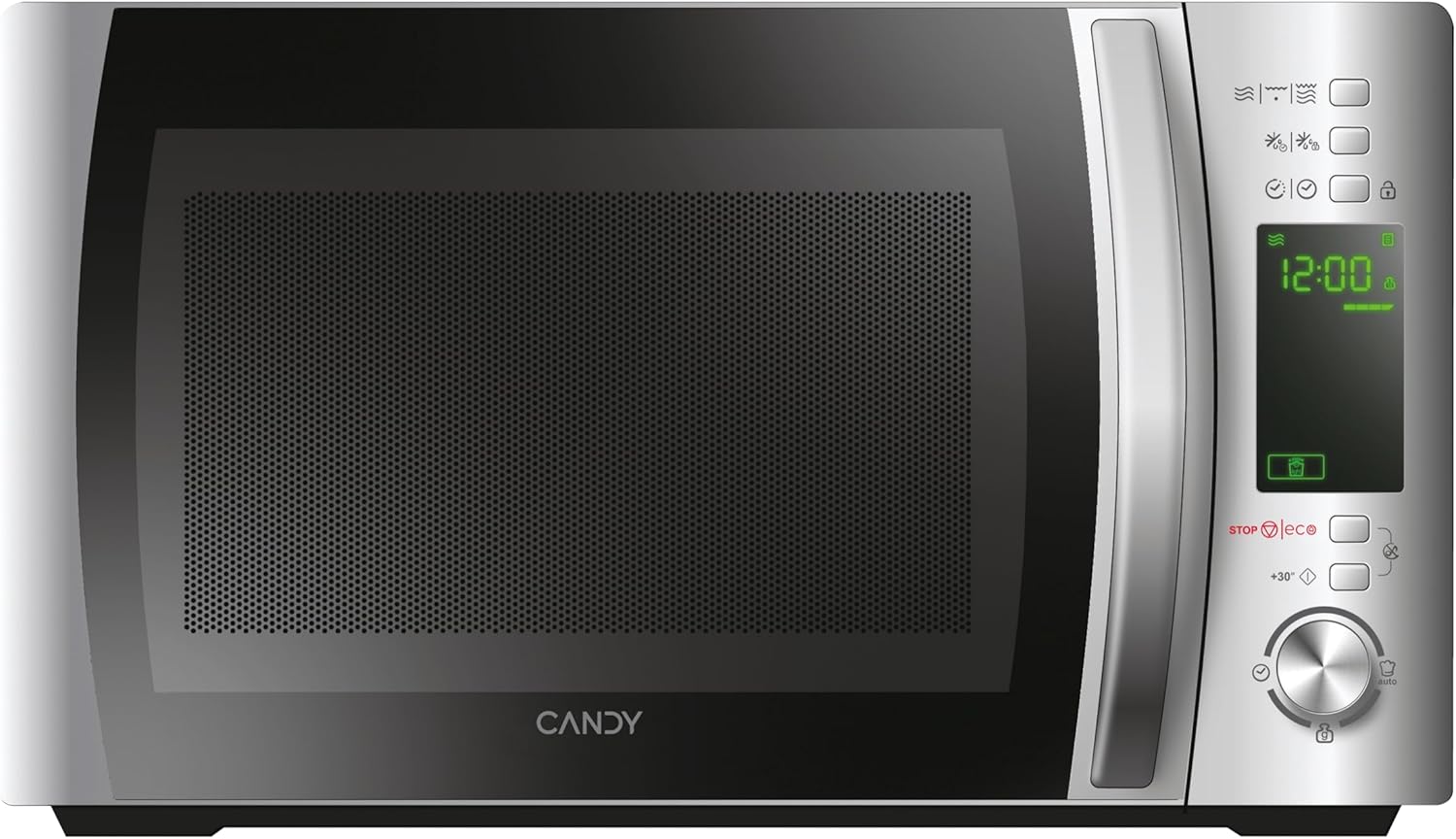

Башкаруу панели
The control panel features a digital display and various buttons and a dial for setting cooking functions, time, and power levels. Specific functions include:
- Санариптик дисплей: Убакытты, кубаттуулук деңгээлин жана программанын көрсөткүчтөрүн көрсөтөт.
- Power Level Buttons: Adjust microwave power.
- Grill Function Button: Activates the grill.
- Эритүү баскычы: Салмагы же убактысы боюнча эритүү үчүн.
- Automatic Programs Button: Алдын ала коюлган тамак бышыруу программаларына кирет.
- Коопсуздук кулпу баскычы: Engages/disengages child lock.
- STOP/ECO Button: Stops cooking or activates Eco mode.
- +30 Seconds Button: Quick start or adds 30 seconds to cooking time.
- Айлануучу терүү: Adjusts time, weight, or program selection.
- Баштоо баскычы: Тамак жасоону баштайт.
3. Орнотуу
Пакеттен чыгаруу жана жайгаштыруу
- Бардык таңгак материалдарын мештин көңдөйүнөн жана аксессуарларынан алып салыңыз.
- Inspect the oven for any damage such as dents or a misaligned door. Do not operate if damaged.
- Place the microwave oven on a stable, level surface strong enough to hold the oven and the food being cooked.
- Ensure adequate ventilation. Maintain a minimum clearance of 20 cm above the oven, 10 cm at the rear, and 5 cm on both sides. Do not block any ventilation openings.
- Духовканы жылуулук булактарынын жанына же жарык берүүчү жайларга койбоңузamp айлана-чөйрө.

Электр байланышы
- Plug the power cord into a properly installed and earthed wall socket.
- Voltage шаймандагы рейтинг белгисине дал келет.
Initial Setup: Setting the Clock
- Микротолкундуу меш биринчи жолу сайылганда, дисплейде "0:00" көрсөтүлөт.
- Press the "Clock" button (if available, otherwise consult specific model instructions for clock setting, often combined with a time setting button).
- Rotate the dial to set the hour. Press the "Clock" button again.
- Rotate the dial to set the minutes. Press the "Clock" button to confirm.
4. Иштөө нускамалары
4.1. Негизги микротолкундар менен бышыруу
- Тамак-ашты микротолкундуу мешке ылайыктуу идишке, айнек айланма табакка салыңыз. Эшикти жабыңыз.
- Press the "Microwave" button (or equivalent power level button) repeatedly to select the desired power level (e.g., 700W, 500W, etc.). The display will show the selected power.
- Rotate the dial to set the cooking time.
- Даярдоону баштоо үчүн "Старт" баскычын басыңыз.
4.2. Гриль функциясы
- Тамак-ашты гриль торчосуна, андан кийин торчону айланма табакка коюңуз.
- Press the "Grill" button. The display will show "G".
- Rotate the dial to set the grilling time.
- "Старт" баскычын басыңыз.
4.3. Комбинацияланган бышыруу (микротолкундуу меш + гриль)
- Тамак-ашты айланма табакка же гриль текчесине ылайыктуу идишке салыңыз.
- Press the "Combi" button (or press Microwave/Grill buttons in sequence to select a combination mode, e.g., C-1, C-2).
- Rotate the dial to set the cooking time.
- "Старт" баскычын басыңыз.
4.4. Эритүү функциясы
The CMXG20DS offers defrosting by weight or by time.
Салмагы боюнча эритүү:
- Тоңдурулган азыктарды айланма табактын үстүнө коюңуз.
- Press the "Defrost" button once. The display will show "dEF1" (or similar for weight defrost).
- Rotate the dial to set the weight of the food.
- "Старт" баскычын басыңыз.
Убакыт боюнча эритүү:
- Тоңдурулган азыктарды айланма табактын үстүнө коюңуз.
- Press the "Defrost" button twice. The display will show "dEF2" (or similar for time defrost).
- Rotate the dial to set the defrosting time.
- "Старт" баскычын басыңыз.

4.5. Express Cooking (+30 Seconds)
For quick heating at full power, simply press the "+30 Seconds" button. Each press adds 30 seconds to the cooking time. This function can also be used to extend cooking time during operation.
4.6. Automatic Programs (40 Programs)
The microwave features 40 pre-set automatic cooking programs for various food types. These programs are designed to simplify cooking by automatically setting the optimal time and power.
- Press the "Auto Program" button. The display will show "A-1" (or similar).
- Rotate the dial to select the desired program (e.g., A-1 for pizza, B-1 for vegetables). A list of programs and their corresponding codes is typically found on the inside of the microwave door or in a separate section of this manual.
- "Старт" баскычын басыңыз.

4.7. Таймер функциясы
The microwave can be used as a kitchen timer without cooking.
- Ensure the oven is not in cooking mode.
- Press the "Timer" button (or a dedicated clock/timer button).
- Rotate the dial to set the desired countdown time.
- Press the "Start" button. The timer will count down without activating the microwave function.
4.8. Safety Lock (Child Lock)
To prevent unintended operation, especially by children:
- Жандыруу үчүн: Press and hold the "Safety Lock" button (often indicated by a lock icon) for 3 seconds. A lock indicator will appear on the display.
- Өчүрүү үчүн: Press and hold the "Safety Lock" button again for 3 seconds. The lock indicator will disappear.
4.9. Эко режими
The Eco mode turns off the display to save energy when the microwave is not in use.
- Жандыруу үчүн: Press the "STOP/ECO" button once when the microwave is idle. The display will turn off.
- Өчүрүү үчүн: Press any button or open the door. The display will reactivate.
4.10. simply-Fi App Integration
The simply-Fi app provides additional functionality, including access to recipes, cooking tips, and product information. Refer to the app's instructions for pairing and usage.

5. Техникалык тейлөө жана тазалоо
Үзгүлтүксүз тазалоо жана тейлөө микротолкундуу мешиңиздин узак иштөөсүн жана оптималдуу иштешин камсыздайт.
Жалпы тазалоо
- Тазалоодон мурун шайманды ар дайым розеткадан сууруп алыңыз.
- Духовканын көңдөйүн ар бир колдонгондон кийин тазалап туруңузamp кездеме. Кежир тактар үчүн жумшак жуугучту колдонсо болот.
- Сырткы беттерин жарнама менен тазалоо керекamp cloth. Prevent water from seeping into the ventilation openings.
- The door and door seals should be cleaned regularly to ensure proper closing and operation.
Тазалоочу аксессуарлар
- Айнек айнекти жана айлануучу шакекти жылуу самындуу сууга же идиш жуугучта жууса болот.
- The grill rack should be cleaned with warm soapy water and a non-abrasive sponge.
- Ensure all parts are completely dry before reassembling and using the microwave.
6. Кыйынчылыктарды
Микротолкундуу мешиңизде көйгөйлөргө туш болсоңуз, жалпы көйгөйлөр жана чечүү жолдору үчүн төмөнкү таблицага кайрылыңыз.
| Көйгөй | Мүмкүн себеп | Чечим |
|---|---|---|
| Меш иштебейт | Электр зымы бекем сайылган эмес. Эшик туура жабылган эмес. Сақтандыргыч күйүп кетти же өчүргүч иштен чыкты. | Ensure power cord is plugged in. Close door securely. Check household fuse or reset circuit breaker. |
| Тамак ысыбайт | Incorrect cooking time or power level set. Microwave-safe dish not used. | Adjust cooking time and power level. Use appropriate microwave-safe cookware. |
| Мештин ичиндеги учкун | Metal or foil in the oven. Food residue on cavity walls. | Remove any metal objects. Clean the oven cavity thoroughly. |
| Бурулма табак айланбайт | Turntable not properly placed on the ring. Obstruction under the turntable. | Ensure turntable and ring are correctly positioned. Remove any obstructions. |
| Дисплей ката кодун көрсөтөт | Ички бузулуу. | Мешти бир нече мүнөткө сууруп, анан кайра сайыңыз. Эгер ката кайталана берсе, кардарларды колдоо бөлүмүнө кайрылыңыз. |
Бул чечимдерди колдонуу аракетинен кийин көйгөй чечилбесе, кардарларды колдоо кызматына кайрылыңыз.
7. Техникалык шарттар
- Бренд:
- Кенди
- Модель номери:
- CMXG20DS
- Түсү:
- Silver
- Продукциянын өлчөмдөрү (D x W x Y):
- 44 x 29.5 x 26 см
- Сыйымдуулугу:
- 20 литр
- Микротолкундардын кубаттуулугу:
- 700 Ватт
- Тtage:
- 230 вольт
- Материал:
- Дат баспаган болот
- Ызы-чуу деңгээли:
- 44 дБ
- Өзгөчөлүктөр:
- Control panel lock, Defrost, Eco mode, Turntable, Programmable, Quick access keys, Timer
- Айлануучу табактын диаметри:
- 25.5 см
- Салмагы:
- 12.2 кг
8. Кепилдик жана колдоо
Кепилдик маалымат
This Candy appliance is covered by a standard manufacturer's warranty. Please refer to the warranty card included with your purchase for specific terms and conditions, including the duration of coverage and what is covered.
Кардарларды колдоо
For technical assistance, spare parts, or service requests, please contact Candy customer support. Contact details can typically be found on the manufacturer's official webсайтында же кепилдик документтеринде.
When contacting support, please have your model number (CMXG20DS) and serial number ready.


