1. Киришүү
Сатып алганыңыз үчүн рахматasing the Auna Dr. Bang LED Portable Boombox. This device is designed to provide a versatile audio experience with its 2.1 channel sound, Bluetooth connectivity, multiple playback options (USB, SD, AUX, MP3), integrated LED light effects, and FM radio. It also features two microphone inputs for karaoke functions. Please read this manual carefully to ensure proper use and to maximize the performance of your device.
2. Коопсуздук нускамалары
Түзмөккө зыян келтирбөө же өзүңүзгө жаракат келтирбөө үчүн төмөнкү коопсуздук чараларын сактаңыз:
- Аппаратты жамгырга же нымга тийгизбеңиз.
- Агрегатты ажыратпаңыз. Бардык тейлөөлөрдү квалификациялуу кызматкерлерге тапшырыңыз.
- Аппаратты түз күндүн нурунан, жылуулук булактарынан жана ачык оттон алыс кармаңыз.
- Агрегаттын айланасын туура желдетүүнү камсыз кылыңыз.
- Кубаттоо үчүн көрсөтүлгөн кубат адаптерин гана колдонуңуз.
- Do not insert objects into the device openings.
- Угуу жөндөмүнө зыян келтирбөө үчүн узак убакыт бою жогорку үн деңгээлинде угуудан качыңыз.
3. Пакеттин мазмуну
Carefully unpack your Auna Dr. Bang LED Portable Boombox and ensure all items are present and in good condition. The package should contain:
- Auna Dr. Bang LED Portable Boombox
- USB заряддоо кабели
- AUX Cable (3.5mm jack)
- Колдонуучунун Колдонмосу (бул документ)
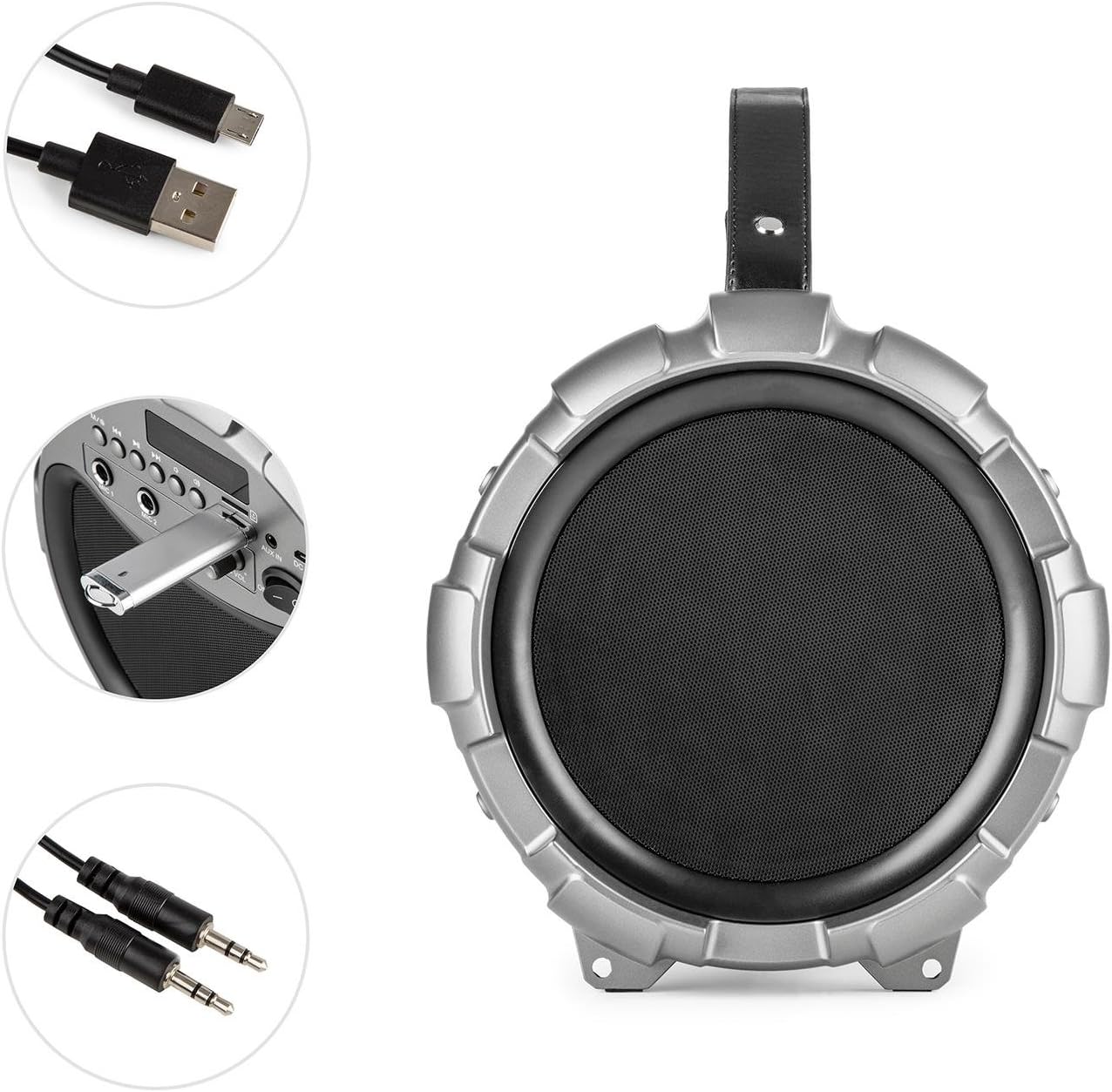
Image: The Auna Dr. Bang LED boombox shown with its included USB charging cable and 3.5mm AUX cable.
4. Продукт бүтүп калдыview
Бумбоксуңуздун ар кандай бөлүктөрүн жана башкаруу элементтерин билип алыңыз.
4.1 Фронт View

Сүрөт: алдыңкы view of the Auna Dr. Bang LED boombox, highlighting the speaker grille and integrated LED lighting effects.
- LED жарык панели: Displays dynamic light effects during playback.
- Динамик тор: Protects the internal speakers.
4.2 Башкаруу панели

Image: Close-up of the control panel on the Auna Dr. Bang LED boombox, showing various buttons, ports, and the display.
- M/Mode Button: Switches between input modes (Bluetooth, USB, SD, AUX, FM Radio).
- Previous Track/Rewind Button: Short press for previous track, long press to rewind.
- Ойнотуу/тындыруу баскычы: Учурдагы аудиону ойнотот же тындырат.
- Next Track/Fast Forward Button: Short press for next track, long press to fast forward.
- LED баскычы: LED жарык эффекттерин өчүрөт/күйгүзөт.
- Дисплей экраны: Учурдагы режимди, трек маалыматын же FM жыштыгын көрсөтөт.
- USB порт: USB флэш-дискти ойнотуу үчүн.
- SD карта уячасы: SD карта ойнотуу үчүн.
- AUX IN: Тышкы түзмөктөр үчүн 3.5 мм аудио киргизүү.
- DC 5V: Кубаттоо үчүн кубат киргизүү.
- MIC 1 киргизүү: 6.3mm microphone input 1.
- MIC 2 киргизүү: 6.3mm microphone input 2.
- MIC ECHO Knob: Микрофондун жаңырык эффектин тууралайт.
- MIC VOL баскычы: Микрофондун үнүн тууралайт.
- ON/OFF которуу: Аппаратты күйгүзөт же өчүрөт.
- Үн баскычы: Adjusts the main playback volume.
5. Орнотуу
5.1 Батареяны заряддоо
The Auna Dr. Bang LED boombox is equipped with a built-in Lithium-Ion battery for portable use. Before first use, it is recommended to fully charge the battery.
- Connect the supplied USB charging cable to the DC 5V port on the boombox.
- USB кабелинин экинчи учун туура келген USB кубат адаптерине (кошумча эмес) же компьютердин USB портуна туташтырыңыз.
- The charging indicator light (if present, usually near the DC 5V port or on the display) will illuminate to indicate charging.
- Толук заряддалгандан кийин, индикатордун түсү өзгөрүшү же өчүшү мүмкүн. Кубаттоочу кабелди сууруп салыңыз.
Эскертүү: The boombox can be operated while charging, but charging time may be longer.
5.2 Баштапкы күйгүзүү
Түзмөктү күйгүзүү үчүн, аны жылдырыңыз КҮЙГҮЗҮҮ/ӨЧҮРҮҮ to the "ON" position. The display will light up, and the unit will enter the default mode (usually Bluetooth).
6. Иштөө нускамалары
6.1 Режимди тандоо
басыңыз M/Mode Button repeatedly to cycle through the available input modes: Bluetooth, USB, SD, AUX, and FM Radio. The current mode will be shown on the display.
6.2 Bluetooth жупташтыруу
- Turn on the boombox and select Bluetooth mode using the M/Mode Button. The display will show "BLUE" and a blinking Bluetooth icon, indicating it's ready for pairing.
- Мобилдик түзмөгүңүздө (смартфон, планшет ж.б.) Bluetooth'ду иштетип, жеткиликтүү түзмөктөрдү издеңиз.
- Select "Auna Dr. Bang LED" from the list of devices.
- Once paired, the boombox will emit a confirmation sound, and the Bluetooth icon on the display will stop blinking.
- You can now play audio from your device through the boombox.
Эскертүү: The boombox will automatically attempt to reconnect to the last paired device when in Bluetooth mode.
6.3 USB/SD ойнотуу
- USB флэш-дискти салыңыз USB порту же SD картаны SD карта уячасы. Ensure the media contains compatible audio files (мисалы, MP3).
- The boombox should automatically switch to USB or SD mode and begin playback. If not, press the M/Mode Button туура режимди тандоо үчүн.
- колдонуу Мурунку трек/артка түрүү, Ойнотуу/Тыныгуу, жана Кийинки трек/Тез алдыга ойнотууну башкаруу үчүн баскычтар.
6.4 AUX киргизүү
- 3.5 мм AUX кабелинин бир учун туташтырыңыз AUX IN port on the boombox.
- Экинчи учун тышкы аудио түзмөгүңүздүн кулакчын уячасына же аудио чыгышына туташтырыңыз.
- басыңыз M/Mode Button AUX режимин тандоо үчүн.
- Control playback from your external device. The boombox's volume knob will control the output volume.
6.5 FM радиосу
- басыңыз M/Mode Button to select FM Radio mode. The display will show the current frequency.
- Жеткиликтүү станцияларды автоматтык түрдө сканерлөө жана сактоо үчүн, баскычын көпкө басыңыз Ойнотуу/тындыруу баскычы. The boombox will scan and store stations automatically.
- To manually tune or select saved stations, use the Мурунку трек/артка түрүү жана Кийинки трек/Тез алдыга баскычтар.
Кеңеш: For better FM reception, try repositioning the boombox or extending any external antenna if available (not explicitly mentioned but common for boomboxes).
6.6 Микрофонду колдонуу (Караоке)
- Connect one or two microphones (not included) to the MIC 1 киргизүү жана/же MIC 2 киргизүү.
- жардамы менен микрофондун үнүн тууралаңыз MIC VOL баскычы.
- Микрофондор үчүн жаңырык эффектин төмөнкүнү колдонуп тууралаңыз: MIC ECHO баскычы.
- You can sing along to music playing from any source (Bluetooth, USB, SD, AUX).
6.7 LED жарык эффекттери
басыңыз LED баскычы to toggle the integrated LED light effects on or off. The lights will synchronize with the music playback.

Сүрөт: бурчтуу view of the Auna Dr. Bang LED boombox, showcasing its dynamic red and green LED light effects.
7. Техникалык тейлөө
7.1 Тазалоо
- Тазалоодон мурун ар дайым түзмөктү өчүрүп, аны каалаган кубат булагынан ажыратыңыз.
- Сырткы беттерди сүртүү үчүн жумшак, кургак чүпүрөктү колдонуңуз.
- Абразивдүү тазалагычтарды, момдорду же эриткичтерди колдонбоңуз, анткени алар финишке зыян келтириши мүмкүн.
- Keep the ports and openings free of dust and debris.
7.2 Сактоо
- When not in use for extended periods, store the boombox in a cool, dry place, away from direct sunlight and extreme temperatures.
- It is recommended to charge the battery periodically (e.g., every 3-6 months) to maintain its lifespan.
8. Кыйынчылыктарды
If you encounter any issues with your Auna Dr. Bang LED boombox, please refer to the following common problems and solutions:
| Көйгөй | Мүмкүн себеп | Чечим |
|---|---|---|
| Кубат жок / Бирдик күйбөйт. | Батарея түгөндү. Кубат өчүргүч өчүк. | Charge the battery. Ensure the ON/OFF switch is in the "ON" position. |
| Үн жок. | Volume is too low. Incorrect mode selected. Device not properly connected (AUX/Bluetooth). | Increase the volume on the boombox and your source device. Select the correct input mode. Re-pair Bluetooth or re-connect AUX cable. |
| Bluetooth жупташуусу болбой жатат. | Boombox not in pairing mode. Device too far. Bluetooth disabled on source. | Ensure boombox is in Bluetooth mode and "BLUE" is blinking. Move source device closer. Enable Bluetooth on your source device. |
| USB/SD ойнотуусу иштебей жатат. | Incorrect mode. Incompatible file format. Corrupted media. | Select USB or SD mode. Ensure files are MP3 format. Try a different USB drive or SD card. |
| FM радиосун кабыл алуу начар. | Алсыз сигнал. Интерференция. | Reposition the boombox. Try auto-scanning again. Avoid placing near other electronic devices. |
| Микрофон иштебей жатат. | Microphone not connected. MIC VOL knob too low. | Ensure microphone is securely plugged into MIC 1 or MIC 2. Increase the MIC VOL knob. |
9. Техникалык шарттар
| Модел: | BTS16-Dr. Bang LED |
| Бренд: | AUNA |
| Өлчөмдөрү (W x Y x D): | 22 x 31.5 x 22 см (болжол менен 8.7 x 12.4 x 8.7 дюйм) |
| Салмагы: | 2.8 кг (болжол менен 6.2 фунт) |
| Динамик чыгаруу күчү: | 40 Ватт (RMS) |
| Динамиктин конфигурациясы: | 2.1 канал |
| Байланыш: | Bluetooth, USB, SD, AUX (3.5mm) |
| Микрофон кириштери: | 2 x 6.3 мм Jack |
| Кубат булагы: | AC (via adapter, not included) & Battery |
| Батарея түрү: | Литий-ион |
| Батарея сыйымдуулугу: | 2600 mAh (nominal) |
| Шайкеш түзмөктөр: | Personal computer, Smartphone |
| Монтаждоо шайкештиги: | Стол үстү |
10. Кепилдик жана колдоо
AUNA products are covered by a manufacturer's warranty. For specific warranty terms and conditions, please refer to the documentation provided at the time of purchase or contact your local retailer. For technical support, troubleshooting assistance beyond this manual, or spare parts, please visit the official AUNA webсайтка же кардарларды тейлөө бөлүмүнө кайрылыңыз.
Көбүрөөк маалымат жана колдоо таба аласыз AUNA Brand Store.


