1. Киришүү
This manual provides detailed instructions for the setup, operation, maintenance, and troubleshooting of your Fanvil X3G Enterprise IP Phone. Please read this manual thoroughly before using the device to ensure proper functionality and to prevent damage.
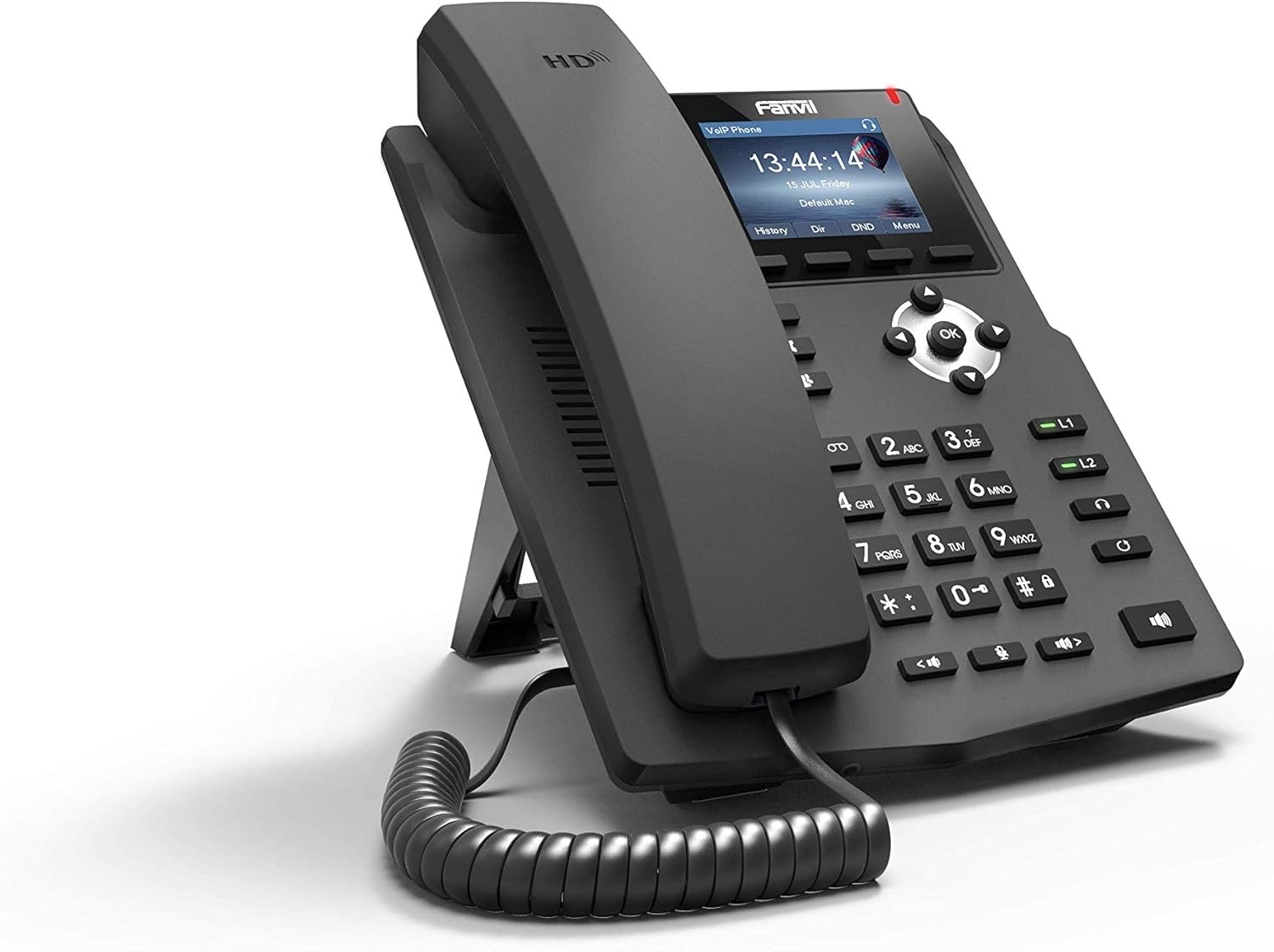
1.1-сүрөт: Алдыңкы бурчтуу view of the Fanvil X3G Enterprise IP Phone.
2. Пакеттин мазмуну
Пакетте бардык буюмдар бар экенин текшериңиз:
- Fanvil X3G IP Phone Unit
- Телефон
- Телефон шнур
- Ethernet кабели
- Тур
- Тез орнотуу боюнча колдонмо (бул документ)
3. Орнотуу
3.1 Телефонду чогултуу
- Attach the stand to the back of the phone unit. The stand allows for desktop placement at an optimal viewing angle or can be configured for wall-mount installation.
- Connect the coiled handset cord to the handset and the designated handset port on the phone unit.
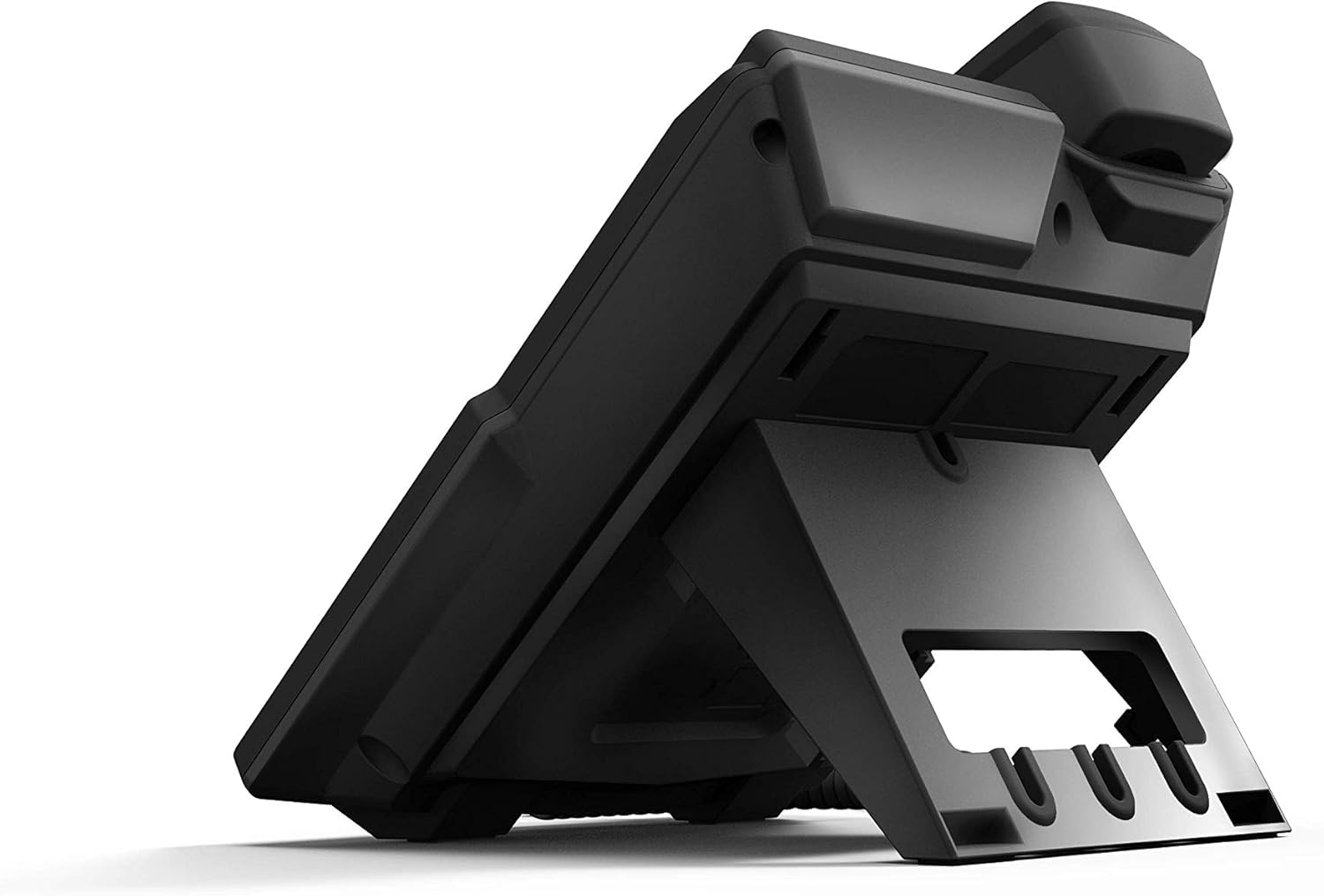
Сүрөт 3.1: Арткы view of the Fanvil X3G IP Phone with stand and connection ports.
3.2 Телефонду туташтыруу
- Тармак туташуусу: Connect one end of the Ethernet cable to the LAN port on the phone and the other end to a network switch or router. If your network supports Power over Ethernet (PoE), the phone will power on automatically.
- Электр энергиясына туташуу (эгер PoE колдонулбаса): If PoE is not available, connect a compatible power adapter (not included) to the power port on the phone and then to an electrical outlet.
- Гарнитураны туташтыруу (кошумча): For hands-free operation, connect a compatible headset to the headset port. The phone supports EHS (Electronic Hook Switch) for Plantronics headsets.
The phone will initiate its boot sequence upon receiving power. The display will show the Fanvil logo and then proceed to load the operating system.
4. Иштөө нускамалары
4.1 Чакыруунун негизги функциялары

Сүрөт 4.1: Алдыңкы view of the Fanvil X3G IP Phone, highlighting the display and keypad.
- Чакыруу:
- Pick up the handset, press the speakerphone button, or press the Headset button.
- Ариптакта аркылуу каалаган номерди териңиз.
- басыңыз Терүү жумшак ачкыч же # ачкыч.
- Чалууга жооп берүү:
- Pick up the handset, press the speakerphone button, or press the Headset button.
- Же болбосо, басыңыз Жооп жумшак ачкыч.
- Чалууну аяктоо:
- Hang up the handset, press the speakerphone button again, or press the Headset button again.
- Же болбосо, басыңыз Чакырууну аяктоо жумшак ачкыч.
4.2 Чалуу өзгөчөлүктөрү
- HD үн: The Fanvil X3G supports HD Voice for superior audio clarity during calls.
- Динамик: басыңыз Баяндамачы динамик режимин которуштуруу үчүн баскыч.
- Headset Mode: басыңыз Гарнитура button to use a connected headset.
- Үнсүз: басыңыз Үнсүз чалуу учурунда микрофонуңуздун үнүн басуу үчүн баскыч. Үнүн ачуу үчүн кайра басыңыз.
- Үндү тууралоо: колдонуу Көлөм buttons to adjust the handset, speaker, or headset volume during a call, or the ringer volume when idle.
- 2 SIP линиясы: The phone supports two independent SIP lines, allowing you to manage multiple calls simultaneously. Use the line keys (L1, L2) to switch between lines.
- 3 тараптуу конференциялык чалуу:
- Биринчи тарап менен чалуу түзүңүз.
- басыңыз Conf soft key. The first party is put on hold.
- Dial the second party's number and press Терүү.
- Экинчи тарапка туташкандан кийин, басыңыз Conf soft key again to join all three parties in a conference call.
5. Техникалык тейлөө
Proper maintenance ensures the longevity and optimal performance of your Fanvil X3G IP Phone.
- Тазалоо: Телефондун бетин тазалоо үчүн жумшак, кургак чүпүрөктү колдонуңуз. Өжөр тактар үчүн бир аз сүртүңүзampкездемени суу менен сүртүңүз. Катуу химиялык заттарды, абразивдүү тазалоочу каражаттарды же эриткичтерди колдонуудан алыс болуңуз, анткени алар капталга зыян келтириши мүмкүн.
- Курчап турган чөйрө: Телефонду кургак жерде, түз күн нурунан, ашыкча ысыктан жана нымдуулуктан алыс кармаңыз.
- Кабелдер: Ensure all cables are securely connected and not strained or kinked.
6. Кыйынчылыктарды
If you encounter issues with your Fanvil X3G IP Phone, refer to the following common troubleshooting steps:
- Электр кубаты жок/Телефон күйбөйт:
- Check if the Ethernet cable is securely connected to the LAN port and the network switch/router.
- If not using PoE, ensure the power adapter (if applicable) is correctly connected to the phone and a working electrical outlet.
- Verify that the network switch/router is powered on and functioning.
- Терүү үнү жок:
- Ensure the phone is properly registered with your VoIP service provider. Check the display for registration status.
- Тармак туташуусун текшерүү.
- Restart the phone by disconnecting and reconnecting the power/Ethernet cable.
- Poor Call Quality (Echo, Static):
- Тармак туташууңуздун туруктуулугун жана өткөрүү жөндөмдүүлүгүн текшериңиз.
- Телефондун шнуру бекем туташтырылганын текшериңиз.
- If using a headset, try using the handset to determine if the issue is headset-related.
- Чалууларды кабыл алуу/кабыл алуу мүмкүн эмес:
- Confirm that the phone is registered with your SIP server.
- Check network settings and ensure the phone has an IP address.
- Contact your VoIP service provider or network administrator for assistance with SIP registration or network configuration.
7. Техникалык шарттар
Technical specifications for the Fanvil X3G Enterprise IP Phone:
| Өзгөчөлүк | Деталь |
|---|---|
| Бренд | Fanvil |
| Модель номери | H3 PHONE (also known as X3G) |
| Продукциянын өлчөмдөрү | 1 x 1 x 1 дюйм (2.54 x 2.54 x 2.54 см) |
| Элемент Салмагы | 1.95 фунт (0.88 кг) |
| ASIN | B06VX2V8B2 |
| Телефон түрү | жоон |
| Power Source | Электр зымдары (PoE жөндөмдүү) |
| Терүүчү түрү | Жалгыз баскычтоп |
| Жооп берүү системасынын түрү | Санарип |
| Конференция чалуу мүмкүнчүлүгү | 3-жол |
| Чалуучунун идентификациясы | Жок |
| UPC | 756676089350 |
| SIP линиялары | 2 |
| HD үн | Ооба |
| Гарнитураны колдоо | EHS support for Plantronics headsets |
| Орнотуу параметрлери | Desktop / Wall-mount |
8. Кепилдик жана колдоо
For warranty information, please refer to the documentation provided at the time of purchase or contact your reseller. For technical support, please reach out to your service provider or the Fanvil customer support team through their official webсайт.