Продукт бүттүview
The NEC ST-401 is a versatile tabletop stand designed for use with NEC Pxx4 and Vxx4 series monitors. It provides a stable base and allows for height adjustment to optimize viewбурчтар.
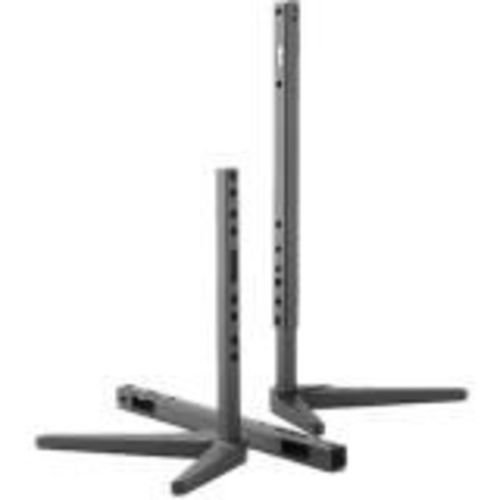
Image: The NEC ST-401 Tabletop Stand, showing its adjustable vertical posts and stable base. The stand is designed to connect to the VESA hole pattern on the back of compatible monitors.
This stand connects directly to the VESA hole pattern on the back of your monitor, offering two distinct height adjustments: 30mm or 50mm from the table surface to the bottom of the monitor.
Орнотуу нускамалары
- Компоненттерди таңгактан чыгаруу: Бардык компоненттерди таңгактан этияттык менен алып салыңыз. Бардык бөлүктөр бар экенин текшериңиз.
- Identify VESA Mounting Points: Locate the VESA mounting holes on the back of your compatible NEC Pxx4 or Vxx4 series monitor.
- Attach Stand to Monitor: Align the stand's mounting plate with the VESA holes on the monitor. Secure the stand using the provided screws. Ensure a firm connection.
- Бийиктигин тууралоо: The stand allows for 30mm or 50mm adjustment from the table to the bottom of the monitor. Select the desired height by adjusting the vertical posts and securing them in place. Refer to the stand's design for specific locking mechanisms.
- Position Monitor: Place the assembled monitor and stand on a stable, flat tabletop surface.
Эскертүү: Always ensure the monitor is securely attached to the stand before placing it on a surface. Refer to your monitor's manual for specific VESA mounting instructions if needed.
Стендди иштетүү
The NEC ST-401 stand is primarily a static support and height adjustment accessory. Once set up, its operation involves maintaining its position and ensuring stability.
- Бийиктигин тууралоо: To change the height (between 30mm and 50mm), carefully lift the monitor slightly, disengage the locking mechanism on the vertical posts, adjust to the desired height, and re-engage the lock. Always support the monitor during adjustment.
- Туруктуулукту текшерүү: Periodically check that the monitor is stable on the stand and that all connections remain secure.
Техникалык тейлөө
Proper maintenance ensures the longevity and continued stability of your NEC ST-401 tabletop stand.
- Тазалоо: Трибунаны жумшак, кургак чүпүрөк менен сүртүңүз. Өжөр тактар үчүн бир аз сүртүңүз.amp жумшак самын менен чүпүрөктү колдонсо болот, андан кийин кылдат кургатуу. Абразивдүү тазалагычтардан же эриткичтерден качыңыз.
- Текшерүү: Regularly inspect the stand for any signs of wear, damage, or loose connections. Ensure all screws are tight.
- Сактагыч: If storing the stand separately, keep it in a dry, cool place away from direct sunlight and extreme temperatures.
Проблемаларды чечүү
This section addresses common issues you might encounter with the NEC ST-401 tabletop stand.
- Стенд солкулдайт:
- Стенддин тегиз, туруктуу бетке коюлганын текшериңиз.
- Check that all screws connecting the stand to the monitor and any internal components of the stand are securely tightened.
- Verify that the monitor's weight does not exceed the stand's capacity (though this stand is designed for specific NEC monitors, always ensure compatibility).
- Бийиктигин тууралоо кыйынчылыгы:
- Ensure the locking mechanism for height adjustment is fully disengaged before attempting to move the posts.
- Do not force the adjustment. If resistance is met, re-check the mechanism.
If issues persist, contact NEC customer support for further assistance.
Техникалык шарттар
| Атрибут | Деталь |
|---|---|
| Модель номери | СТ-401 |
| Бренд | NEC |
| Шайкеш түзмөктөр | NEC Pxx4 and Vxx4 Series Monitors |
| Монтаж түрү | Tabletop, VESA Hole Pattern |
| Бийиктигин тууралоо | 30mm or 50mm from table to bottom of monitor |
| Материал | Пластик |
| Түс | Кара |
| Продукциянын өлчөмдөрү | 18.5 x 12.7 x 5.2 дюйм (болжолдуу, чогулган) |
| Элемент Салмагы | 1 фунт (болжол менен) |
| Келип чыккан өлкө | Кытай |
Кепилдик жана колдоо
For warranty information and technical support regarding your NEC ST-401 Tabletop Stand, please refer to the official NEC website or contact NEC customer service directly.
Өндүрүүчү: Нек
Биринчи жеткиликтүү болгон күнү: 4-март, 2017-жыл
Эң акыркы колдоо ресурстары үчүн төмөнкү дарекке кириңиз: www.necdisplay.com


