Продукт бүттүview
The Fanvil X3S is a 2-line color screen SIP phone designed for efficient communication in office environments. It features an extra-large 320 x 240 2.4-inch color LCD for enhanced visual information and user experience. This model supports HD Voice and offers dual 10/100 Mbps network ports. It is suitable for various network setups and supports secure communication protocols.
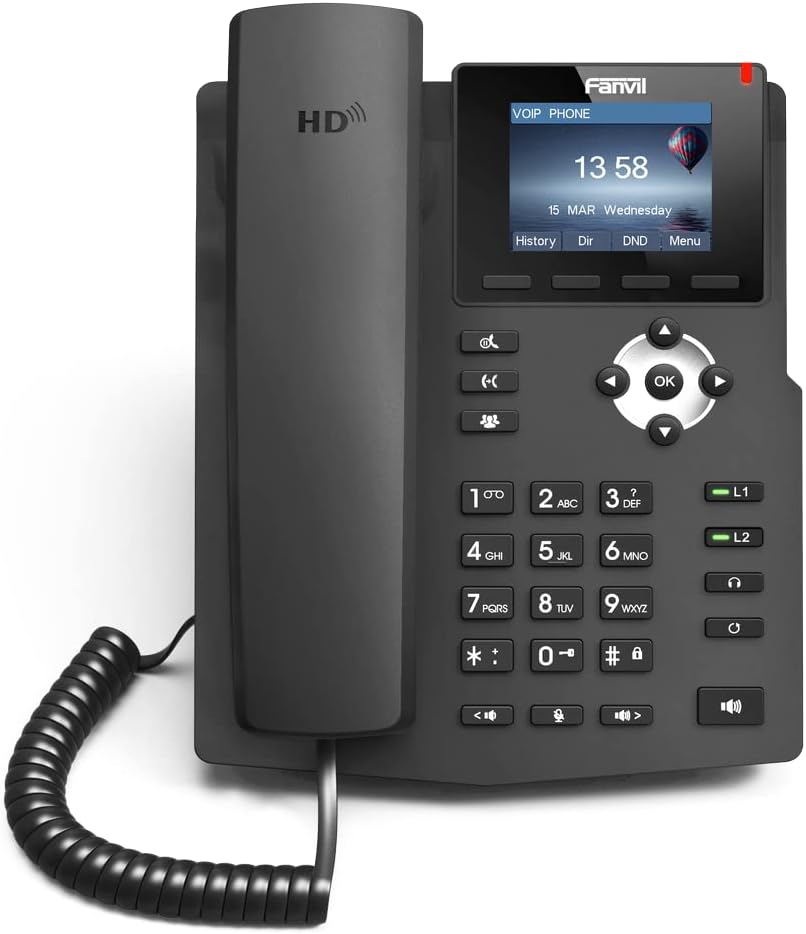
Сүрөт: алдыңкы view of the Fanvil X3S SIP Phone, showing the handset, keypad, navigation buttons, and color display screen. The screen displays time and date, with menu options below.
Пакеттин мазмуну
Орнотууну улантуудан мурун, таңгактагы бардык буюмдардын бар экендигин текшериңиз:
- Fanvil X3S SIP Phone Unit
- Телефон
- Телефон шнур
- Ethernet кабели
- Power Adapter (for non-PoE models)
- Үстөл столу
- Ыкчам орнотуу колдонмосу
Орнотуу жана орнотуу
1. Телефонду чогултуу
- Attach the desk stand to the main unit by aligning the tabs and sliding it into place until it clicks.
- Уюлдук аппараттын шнурун телефон базасына жана атайын телефон портуна туташтырыңыз.
2. Connecting to Network and Power
- Тармак туташуусу: Ethernet кабелинин бир учун телефондогу LAN портуна, экинчи учун тармак коммутаторуна же роутерге туташтырыңыз.
- Кубат туташуу:
- If using the included power adapter: Connect the power adapter to the power port on the phone and then plug it into an electrical outlet.
- Note: This model (X3S) does not support Power over Ethernet (PoE). A power adapter is required.
3. Баштапкы конфигурация
Upon first boot, the phone will attempt to obtain an IP address via DHCP. You may need to access the phone's web interface or use the phone's menu for SIP account registration and further network settings. Refer to your VoIP service provider's instructions for specific SIP account details.
Иштөө нускамалары
Негизги чалуу функциялары
- Чакыруу: Lift the handset, dial the number, and press the Терүү жумшак ачкыч же # key. Alternatively, dial the number and then lift the handset.
- Чалууга жооп берүү: Телефонду көтөрүңүз же басыңыз Баяндамачы баскычы.
- Чалууну аяктоо: Телефонду алмаштырыңыз же басыңыз Чакырууну аяктоо жумшак ачкыч.
- Кайра терүү: басыңыз Кайра терүү акыркы терилген номерге чалуу үчүн жумшак баскыч.
Advanced Features
- Кармап туруу: Чалуу учурунда, басыңыз кармап туруңуз soft key. Press it again to resume the call.
- өткөрүүсү: Чалуу учурунда, басыңыз Transfer жумшак баскычын, жаңы номерди терип, анан басыңыз Transfer again (blind transfer) or wait for the party to answer before pressing Transfer (көчүрүүгө катышкан).
- Үнсүз: басыңыз Үнсүз чалуу учурунда микрофонуңуздун үнүн басуу үчүн баскыч. Үнүн ачуу үчүн кайра басыңыз.
- Динамик: басыңыз Баяндамачы динамик режимин которуштуруу үчүн баскыч.
- Үндү тууралоо: колдонуу Көлөм buttons during a call to adjust handset, headset, or speaker volume.
- BLF (Busy Lamp Field) Buttons: The X3S features 2 BLF buttons. These can be configured to monitor the status of other extensions (busy, ringing, available) and allow for quick dialing or call pickup. Configuration is typically done via the phone's web интерфейс.
Техникалык тейлөө
Proper maintenance ensures the longevity and optimal performance of your Fanvil X3S SIP Phone.
- Тазалоо: Телефондун бетин тазалоо үчүн жумшак, кургак чүпүрөктү колдонуңуз. Өжөр тактар үчүн бир аз сүртүңүзamp cloth with mild, non-abrasive cleaner can be used. Avoid using harsh chemicals, solvents, or abrasive materials.
- Курчап турган чөйрө: Телефонду кургак жерде, түз күн нурунан, ашыкча ысыктан жана нымдуулуктан алыс кармаңыз. Түзмөктүн айланасында жакшы желдетүүнү камсыз кылыңыз.
- Кабелдер: Periodically check all connected cables (handset cord, Ethernet, power) for any signs of damage or loose connections.
- Программалык камсыздоо жаңыртуулары: Regularly check the Fanvil official website for firmware updates. Keeping the firmware updated can improve performance, add new features, and address security vulnerabilities. Firmware updates are typically performed via the phone's web интерфейс.
Проблемаларды чечүү
| Көйгөй | Мүмкүн себеп | Чечим |
|---|---|---|
| Телефон күйбөйт. | No power connection; faulty power adapter. | Ensure power adapter is securely connected to the phone and a working electrical outlet. Test outlet with another device. |
| Терүү үнү жок. | Network connection issue; SIP account not registered. | Check Ethernet cable connection. Verify network connectivity. Ensure SIP account is correctly configured and registered (check phone display for registration status). Restart the phone. |
| Чалууларды кабыл алуу же жасоо мүмкүн эмес. | SIP account not registered; network firewall issues; incorrect dial plan. | Confirm SIP account registration. Check network firewall settings (ports 5060 UDP/TCP, RTP ports). Consult your VoIP service provider for dial plan or network specific issues. |
| Үн сапатынын начардыгы (жаңылык, статикалык). | Network congestion; faulty handset/headset; environmental interference. | Check network bandwidth. Try a different handset or headset. Ensure phone is not near strong electromagnetic interference sources. |
| Дисплей бош же тоңуп калган. | Software error; power issue. | Unplug the power adapter, wait 10 seconds, then plug it back in to restart the phone. If issue persists, contact support. |
Техникалык шарттар
| Өзгөчөлүк | Деталь |
|---|---|
| Модел | Fanvil X3S |
| SIP линиялары | 2 |
| Дисплей | 2.4 дюймдук (320x240) түстүү LCD |
| HD үн | Колдоого алынган |
| BLF Buttons | 2 |
| Тармак порттору | Кош 10/100 Мбит/сек Ethernet |
| PoE колдоосу | No (External Power Adapter Required) |
| Орнотуу параметрлери | Desktop / Wall-mount |
| Өлчөмдөрү (L x W x Y) | 2.52 x 8.82 x 10.98 дюйм (6.4 x 22.4 x 27.9 см) |
| Элемент Салмагы | 1.65 фунт (0.75 кг) |
| Өндүрүүчү | Fanvil |
Кепилдик жана колдоо
For warranty information, please refer to the warranty card included with your product or visit the official Fanvil webсайт. Кепилдиктин шарттары жана шарттары аймакка жараша өзгөрүшү мүмкүн.
For technical support, firmware updates, and additional resources, please visit the Fanvil support portal:
Fanvil Official Support Webсайт
When contacting support, please have your product model (X3S) and serial number ready.