1. Киришүү
Thank you for choosing the Coolgear USB C Hub. This device is designed to expand your computer's connectivity by providing four additional USB 3.1 Gen1 SuperSpeed ports (one USB-C and three USB-A) from a single USB Type-B upstream connection. It is ideal for connecting multiple USB peripherals such as external hard drives, keyboards, mice, printers, and more, all while maintaining high-speed data transfer capabilities.
2. Өзгөчөлүктөрү
- Compliant with USB 3.1 Gen 1 Specifications.
- Provides 4 (1 USB-C and 3 USB-A) downstream facing USB 3.1 ports.
- Supports 5Gbps (SuperSpeed), 480Mbps (High-Speed), 12Mbps (Full-Speed), and 1.5Mbps (Low-Speed) speeds.
- Supports 15KV ESD Surge Protection for enhanced durability.
- Supports USB battery charging: CDP (Charging Downstream Port) and DCP (Dedicated Charging Port) modes.
- Industrial-grade metal housing with mounting flanges for secure installation.
- Wide range 7-48V DC power input via terminal block.
3. Пакеттин мазмуну
Пакетиңизде бардык буюмдар бар экенин текшериңиз:
- Coolgear USB C Hub (Model CG-4PU31C1B1)
- USB 3.1 Type-B to Type-A Cable
- Mounting Hardware (screws and clip)

Image: All components included in the Coolgear USB C Hub package.
4. Орнотуу
Follow these steps to set up your Coolgear USB C Hub:
- Connect to Host Computer: Locate the USB 3.1 Type-B port on the hub (labeled '0' with a USB-B icon). Connect one end of the provided USB 3.1 Type-B to Type-A cable to this port. Connect the other end (Type-A) to an available USB 3.1 (or compatible) port on your host computer.
- Перифериялык түзүлүштөрдү туташтыруу: Connect your USB devices (e.g., flash drives, external hard drives, keyboards, mice) to the available downstream USB-A ports (labeled '2', '3', '4') or the USB-C port (labeled '1').
- Power Connection (Optional/Required for high-power devices): For stable operation, especially with multiple high-power devices, connect a 7-48V DC power supply to the terminal block on the hub. Ensure correct polarity (+ and -). The 'PWR' LED indicator will illuminate when power is supplied.
- Монтаждоо (кошумча): The hub features integrated mounting flanges. Use appropriate screws to secure the hub to a surface if permanent installation is desired.

Image: The USB 3.1 Type-B upstream cable connected to the hub.
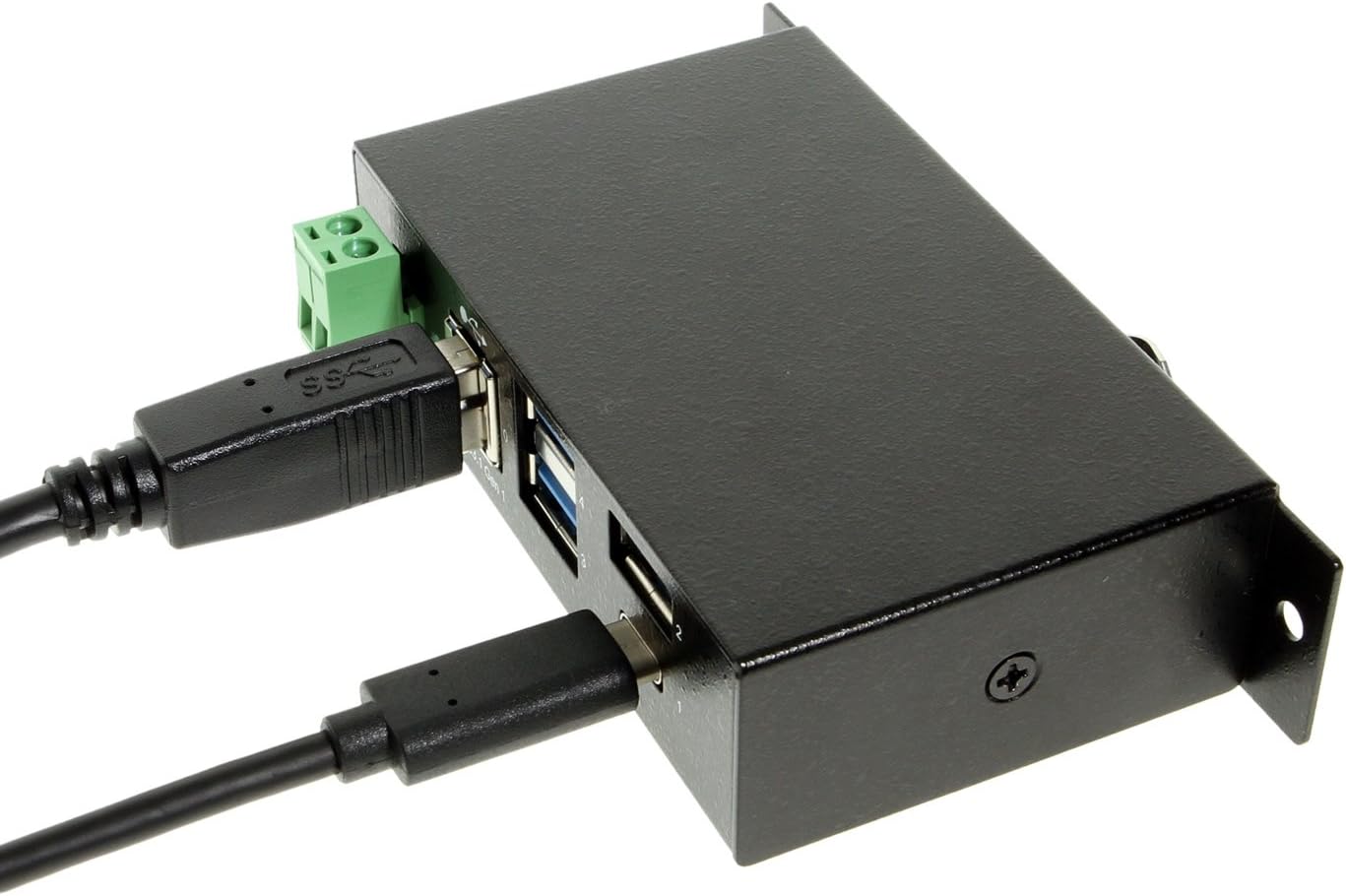
Image: The hub with both upstream (Type-B) and a downstream (Type-C) device connected.

Сүрөт: алдыңкы view of the hub, highlighting the power input terminal block and various USB ports.

Сүрөт: каптал view of the hub demonstrating the integrated mounting bracket.
5. Операция
The Coolgear USB C Hub is a plug-and-play device, requiring no special drivers for most operating systems. Once connected, your computer should automatically detect the hub and any connected devices.
- Маалыматтарды өткөрүү: Enjoy SuperSpeed data transfer rates of up to 5Gbps with compatible USB 3.1 Gen1 devices. The hub is also backward compatible with USB 2.0 and USB 1.1 devices, operating at their respective speeds.
- Заряддоо: The hub supports USB battery charging (CDP and DCP modes), allowing you to charge compatible devices connected to its downstream ports.
- LED көрсөткүчү: The 'PWR' LED indicates that the hub is receiving power.
6. Техникалык шарттар
| Өзгөчөлүк | Спецификация |
|---|---|
| Модель номери | CG-4PU31C1B1 |
| Продукциянын өлчөмдөрү | 3.74 x 2.23 x 1.03 дюйм |
| Элемент Салмагы | 15 унция |
| Бренд | Coolgear |
| Түс | Кара |
| Аппараттык интерфейс | USB, USB Type C |
| Маалыматтарды өткөрүү ылдамдыгы | Up to 5Gbps (USB 3.1 Gen1 SuperSpeed) |
| ESD коргоо | 15КВ |
| Power Input | +7~48V DC via Terminal Block |
| Шайкеш түзмөктөр | Laptops, Desktops, Keyboards, Mouse, Printers, Tablets |
7. Кыйынчылыктарды
If you encounter issues with your Coolgear USB C Hub, please refer to the following common problems and solutions:
- Түзмөк таанылган жок:
- Ensure all cables are securely connected to both the hub and the host computer.
- Компьютердеги борборду башка USB портуна туташтырып көрүңүз.
- If using an external power supply, ensure it is correctly connected and providing the specified voltage.
- Компьютериңизди өчүрүп күйгүзүңүз.
- Жай берилиштерди өткөрүү ылдамдыгы:
- Verify that both your host computer's USB port and the connected device support USB 3.1 Gen1 (SuperSpeed).
- Ensure you are using a high-quality USB 3.1 cable.
- Avoid connecting too many high-bandwidth devices simultaneously.
- Power Issues / Devices Not Charging:
- Ensure an external power supply is connected if you are using high-power devices or charging.
- Электр менен жабдууну текшериңизtage and current to ensure it meets the hub's requirements.
- Some devices may require more power than the hub can provide, even with an external power supply.
8. Техникалык тейлөө
To ensure the longevity and optimal performance of your Coolgear USB C Hub, follow these maintenance guidelines:
- Тазалоо: Use a soft, dry cloth to clean the exterior of the hub. Do not use liquid cleaners or aerosols.
- Сактагыч: Store the hub in a cool, dry place away from direct sunlight and extreme temperatures when not in use.
- Колдонуу: Avoid dropping the hub or subjecting it to strong impacts. Do not attempt to disassemble the unit.
- Курчап турган чөйрө: Keep the hub away from water, moisture, and excessive dust.
9. Кепилдик жана колдоо
Coolgear products are designed for reliability and performance. For specific warranty information, please refer to the documentation included with your purchase or visit the official Coolgear website. If you require technical assistance or have questions about your product, please contact Coolgear customer support through their official channels.
Көбүрөөк маалымат жана колдоо үчүн, баш багыңыз Coolgear Store on Amazon.


