Introduction
Сатып алганыңыз үчүн рахматasing the EtoBesy Mini Portable Wireless Cube Speaker. This device combines Bluetooth audio streaming, TF card playback, AUX input, FM radio, and hands-free calling in a compact design with colorful LED lighting. Please read this manual carefully to ensure proper use and optimal performance.
Кутуда эмне бар
- 1 x Wireless Bluetooth 4.0 Radio Speaker
- 1 x Аудио кабели
- 1 x USB заряддоо кабели
- 1 х Колдонуучунун колдонмосу (бул документ)
Продукт бүттүview
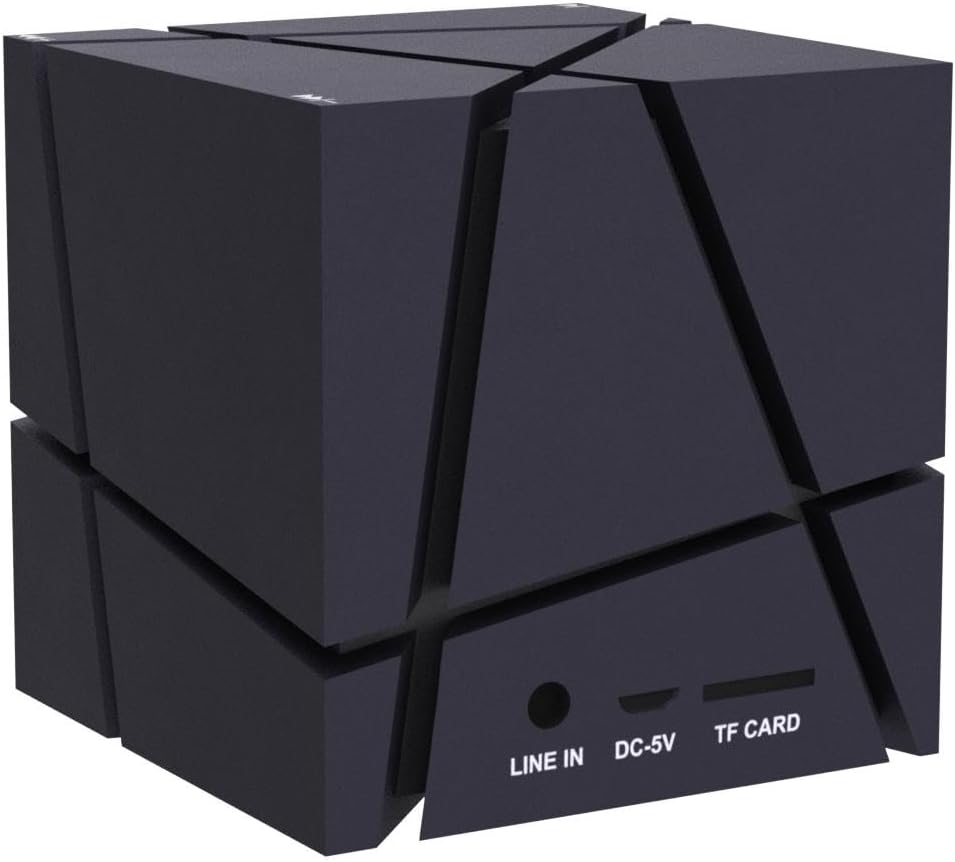
The EtoBesy Mini Portable Wireless Cube Speaker features a unique cube design with integrated controls and ports. Understanding these components is essential for operation.
Порттор жана байланыштар
The speaker includes several ports for various connectivity options:
- САПАР: 3.5mm audio input for connecting external devices via AUX cable.
- DC-5V: Динамикти кубаттоо үчүн Micro USB порту.
- TF CARD: Slot for inserting a TF (Micro SD) memory card to play MP3 fileтүздөн-түз с.
Башкаруу баскычтары
The speaker's control buttons are integrated into its design, specifically located on the feet of the device. These are pressure-sensitive buttons.
- Минус баскычы (-): Used to decrease volume or navigate tracks. Double-pressing this button turns off the LED lights.
- Плюс баскычы (+): Used to increase volume or navigate tracks.
- Ойнотуу/тындыруу баскычы: Controls media playback and answers/ends calls.

Жайгашуу
Баштапкы заряддоо
Before first use, fully charge the speaker. Connect the supplied USB charging cable to the DC-5V port on the speaker and the other end to a USB power source (e.g., computer USB port, USB wall adapter). The charging indicator light will show the charging status.
Күйгүзүү/өчүрүү
Locate the power switch on the underside of the speaker (refer to the "Control Buttons" image). Slide the switch to the "ON" position to power on the speaker. Slide it to the "OFF" position to power off.
Иштөө нускамалары
Bluetooth Жупташтыруу
- Ensure the speaker is powered on and in Bluetooth mode (it usually defaults to this mode upon power-on). A voice prompt or indicator light will confirm.
- Түзмөгүңүздө (смартфон, планшет, ноутбук) Bluetooth иштетиңиз жана жеткиликтүү түзмөктөрдү издеңиз.
- Select "EtoBesy Speaker" or a similar name from the list of devices.
- Жупташтырылгандан кийин, динамик ийгиликтүү туташууну көрсөтөт жана сиз аудиону зымсыз ойнотууну баштасаңыз болот.
The speaker supports Bluetooth 4.0 technology with a transmission distance of up to 10 meters (32.8 feet).

TF Micro SD Card Playback
To play music directly from a memory card:
- Insert a TF (Micro SD) card containing MP3 audio fileTF CARD уячасына.
- The speaker will automatically detect the card and begin playing the audio files.
- Use the Plus (+) and Minus (-) buttons to skip tracks and the Play/Pause button to control playback.
AUX киргизүү
For wired audio connection:
- Connect one end of the supplied audio cable to the LINE IN port on the speaker.
- Connect the other end of the audio cable to the 3.5mm audio output jack of your external device.
- Динамик автоматтык түрдө AUX режимине өтөт.
FM радиосу
To use the built-in FM radio function:
- Динамик күйгүзүлгөнүн текшериңиз.
- Press the Mode button (if available, or cycle through modes using the Play/Pause button if it has multiple functions) until you hear the FM radio.
- Use the Plus (+) and Minus (-) buttons to scan for radio stations.
Түстүү LED жарыктары
The speaker features dynamic colorful LED lights. To turn off the lights, press the Minus (-) button twice in quick succession.

Hands Free Чалуу
When connected via Bluetooth to your smartphone, the built-in microphone allows for hands-free phone calls. Press the Play/Pause button to answer or end a call.
Заряддоо
To charge the speaker, connect the provided USB charging cable to the DC-5V port on the speaker and to a standard USB power source. The charging indicator will illuminate during charging and turn off or change color when fully charged. A full charge typically takes a few hours.
Техникалык тейлөө
- Keep the speaker away from water and excessive moisture. The product is not waterproof.
- Динамикти жумшак, кургак чүпүрөк менен тазалаңыз. Абразивдүү тазалагычтарды же эриткичтерди колдонбоңуз.
- Динамикти экстремалдуу температурага дуушар кылуудан алыс болуңуз.
- Узак мөөнөткө колдонулбаганда, динамикти салкын, кургак жерде сактаңыз жана батареянын ден соолугун сактоо үчүн аны мезгил-мезгили менен заряддап туруңуз.
Проблемаларды чечүү
| Көйгөй | Чечим |
|---|---|
| Динамик күйбөйт. | Ensure the battery is charged. Connect the speaker to a power source using the USB charging cable. Verify the power switch is in the "ON" position. |
| Bluetooth аркылуу жупташтыруу мүмкүн эмес. | Make sure the speaker is in Bluetooth pairing mode. Ensure Bluetooth is enabled on your device and it is within 10 meters of the speaker. Try restarting both the speaker and your device. |
| Үн жок же үнү төмөн. | Check the volume levels on both the speaker and your connected device. Ensure the correct input mode (Bluetooth, TF, AUX) is selected. |
| LED lights are not working or stuck. | Double-press the Minus (-) button to cycle the lights or turn them off and on again. |
| Speaker "jumps" due to bass. | Remove any plastic film from the feet of the speaker to ensure stable placement. |
Техникалык шарттар
| Бренд | EtoBesy |
| Модель аты | Mini Portable Wireless Cube Speaker |
| Модель номери | B06XY917BF |
| Байланыш технологиясы | Көмөкчү, Bluetooth, USB |
| Зымсыз байланыш технологиясы | Bluetooth 4.0 |
| Bluetooth диапазону | 10 метрге чейин (32.8 фут) |
| Динамик түрү | 3D стерео |
| Өзгөчө өзгөчөлүк | Colorful LED Light, Hands-free Calling, FM Radio, TF Card Playback |
| Power Source | Батарея менен иштейт (орнотулган литий батареясы) |
| Батарея сыйымдуулугу | 500 миллионamp Саат |
| Киргизүү көлөмүtage | 5 вольт |
| Динамиктин максималдуу чыгаруу күчү | 3 Ватт |
| Frequency Response | 150 KHz |
| Продукциянын өлчөмдөрү | 2.75"D x 2.75"W x 2.75"H |
| Элемент Салмагы | 8.5 унция |
| Суу өткөрбөйт | Жок |

Кепилдик жана колдоо
This product comes with a limited warranty. For warranty claims or technical support, please refer to the contact information provided at the point of purchase or visit the official EtoBesy webсайт.