1. Киришүү
This manual provides instructions for the ZdalaMit SE-R0429 replacement remote control, designed for use with various Toshiba Soundbar models. This remote control offers direct functionality without the need for programming or pairing. Simply install batteries, and it is ready for use.
2. Пакеттин мазмуну
- 1x ZdalaMit SE-R0429 Replacement Remote Control
Эскертүү: Батареялар жана колдонуучунун колдонмосу пакетке кирбейт.
3. Орнотуу жана Батареяны орнотуу
The ZdalaMit SE-R0429 remote control requires two (2) AAA alkaline batteries for operation. Follow these steps to install the batteries:
- Пульттун артындагы батарея отсегин табыңыз.
- Батарея бөлүкчөсүнүн капкагын ачуу үчүн ылдый жылдырыңыз.
- Insert two (2) AAA 1.5V alkaline batteries, ensuring the positive (+) and negative (-) terminals align correctly with the markings inside the compartment.
- Батарея бөлүкчөсүнүн капкагын бекем чыккыча ордуна жылдырыңыз.

3.1-сүрөт: Battery compartment with AAA batteries installed. Ensure correct polarity.
Once batteries are installed, the remote control is ready for immediate use with compatible Toshiba Soundbar models. No programming or pairing is required.
4. Алыстан башкаруу функциялары
The ZdalaMit SE-R0429 remote control features standard buttons for operating your Toshiba Soundbar. Refer to the image below for button layout and descriptions.
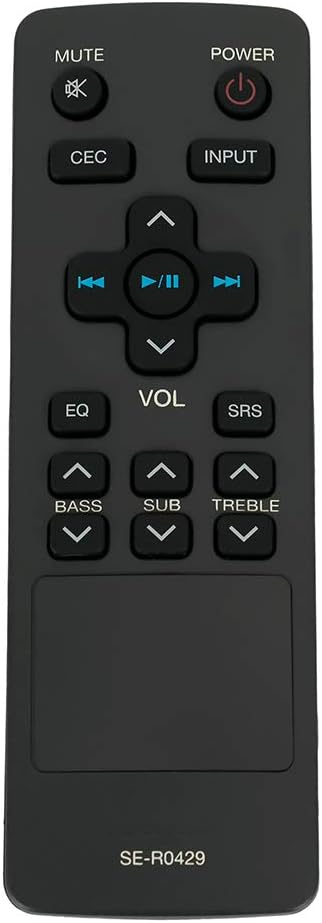
4.1-сүрөт: Фронт view of the ZdalaMit SE-R0429 remote control.

4.2-сүрөт: Бурчтуу view of the ZdalaMit SE-R0429 remote control, highlighting its ergonomic design.
Баскычтын сүрөттөмөсү:
| баскыч | Функция |
|---|---|
| КҮЧ | Саундбарды күйгүзөт же өчүрөт. |
| БАСУУ | Саундбардын аудиосун өчүрөт же ачат. |
| БШК | Activates or deactivates Consumer Electronics Control (CEC) functions, if supported by your soundbar and connected devices. |
| INPUT | Жеткиликтүү киргизүү булактары (мисалы, HDMI, оптикалык, Bluetooth) аркылуу циклдерди өткөрөт. |
| VOL +/- | Негизги үн деңгээлин тууралайт. |
| EQ | Cycles through preset equalizer modes (e.g., Movie, Music, News). |
| SRS | Activates or deactivates SRS (Sound Retrieval System) audio enhancement, if available. |
| BASS +/- | Басс деңгээлин тууралайт. |
| SUB +/- | Сабвуфердин үн деңгээлин тууралайт. |
| ҮЧКӨ +/- | Үчтүк деңгээлди тууралайт. |
| Ойнотуу башкаруулары (Rewind, Play/Pause, Fast Forward, Up/Down Navigation) | Controls media playback and menu navigation, depending on the soundbar's current mode and capabilities. |
5. Шайкештик
This ZdalaMit SE-R0429 replacement remote control is compatible with the following Toshiba Soundbar models:
- Toshiba SBX4250
- Toshiba SBX4250KN
- Toshiba SBX5065KU
- Toshiba SBX1250
- Toshiba AH701014
- Toshiba SBX5065KC
- Toshiba SBX5065
- Toshiba SBX4250KB
If your soundbar model is not listed, functionality may vary or not be supported. Please verify your soundbar model before use.
6. Техникалык шарттар
- Модел: SE-R0429
- Электр камсыздоо: 2 x 1.5V AAA щелочтуу батарейкалар (кошулган эмес)
- Өлчөмдөрү: 5.56 x 1.79 x 0.55 дюйм (болжол менен)
- Элемент Салмагы: 1.41 унция (болжол менен)
- Түсү: Кара
- Өзгөчө өзгөчөлүгү: Pre-programmed (no setup required)
7. Кыйынчылыктарды
- Пульт жооп бербей жатат:
- Батареялардын туура полярдуулукта (+/-) орнотулганын текшериңиз.
- Эски батарейкаларды жаңы AAA щелочтуу батарейкаларына алмаштырыңыз.
- Check for any obstructions between the remote control and the soundbar's infrared (IR) receiver.
- Confirm that your soundbar model is listed in the compatibility section (Section 5).
- Атайын баскычтар иштебейт:
- Some advanced functions may be specific to the original remote or soundbar model. Refer to your soundbar's original manual for specific feature support.
8. Техникалык тейлөө
To ensure the longevity and proper functioning of your remote control:
- Avoid exposing the remote to extreme temperatures, direct sunlight, or moisture.
- Clean the remote control with a soft, dry cloth. Do not use liquid cleaners or abrasive materials.
- Эгерде пульт көпкө чейин колдонулбаса, агып кетпеши үчүн батарейкаларды алып салыңыз.
9. Кепилдик жана колдоо
Information regarding specific warranty terms or direct manufacturer support for this replacement remote control is not provided in this manual. For any queries or issues, please refer to the retailer where the product was purchased.


