1. Киришүү
Сатып алганыңыз үчүн рахматasing the AUNA KCD-20 Under-Cabinet Kitchen Radio System. This manual provides essential information for the safe and efficient operation of your device. Please read these instructions carefully before use and retain them for future reference.
2. Коопсуздук нускамалары
- кубат менен камсыз кылуу Voltagбирдикте көрсөтүлгөн.
- Өрт же электр тогуна урунуп калбаш үчүн аппаратты жамгырга же нымга тийгизбеңиз.
- в ачпагылаasinг. Бардык тейлөөлөрдү квалификациялуу кызматкерлерге тапшырыңыз.
- Аппаратты жылуулук булактарынын жанына же тике күн нуруна коюудан алыс болуңуз.
- Агрегаттын айланасында жетиштүү желдетүүнү камсыз кылыңыз.
- Агрегатты күчтүү магнит талаасынан алыс кармаңыз.
- Агрегатты жумшак, кургак чүпүрөк менен гана тазалаңыз.
3. Пакеттин мазмуну
Сураныч, бардык буюмдар бар экенин жана жакшы абалда экендигин текшериңиз:
- AUNA KCD-20 Main Unit
- Алыстан башкаруу
- Зым антенна
- Бургулоо көрсөтмөсү
- Mounting Kit (screws, spacers)
- User Manual (English and German)
4. Продукт бүтүп калдыview
The AUNA KCD-20 is a versatile under-cabinet kitchen radio system designed for space-saving installation. It features an FM radio with RDS, a CD/MP3 player, USB port, and AUX input, along with an alarm and timer functions.

Сүрөт 4.1: Фронт view of the AUNA KCD-20 unit, showing the CD tray, display, control buttons, and volume knobs.

Сүрөт 4.2: Деталдаштырылган view of the front panel, highlighting the CD compartment, USB port, AUX input, and various function buttons.

Сүрөт 4.3: Close-up of the USB port with a USB drive inserted, demonstrating its accessibility for media playback.
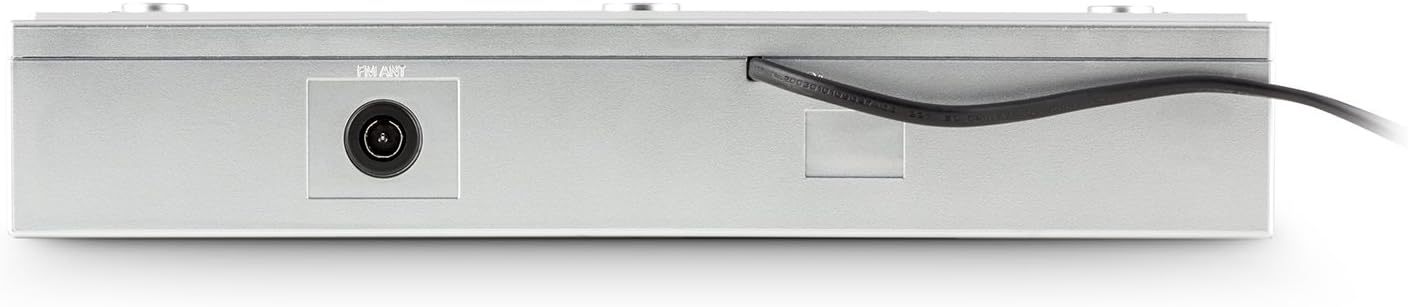
Сүрөт 4.4: Арткы view of the unit, showing the power cable and antenna input for FM reception.

Сүрөт 4.5: Diagram illustrating the dimensions of the AUNA KCD-20 unit: 32cm (width) x 6cm (height) x 28.5cm (depth).
5. Орнотуу жана орнотуу
The AUNA KCD-20 is designed for under-cabinet mounting to save space. Follow these steps for installation:
- Жайгашкан жерди тандоо: Select a suitable flat surface under a kitchen cabinet, ensuring enough space for the unit and access to power.
- Бургулоо пункттарын белгилөө: Use the provided drilling guide to mark the screw positions on the underside of the cabinet.
- Бургулоо тешиктери: Carefully drill pilot holes at the marked positions.
- Монтаждоо кронштейндерин бекитүү: Secure the mounting brackets (if separate) or the unit directly using the supplied screws and spacers. Ensure the unit is level and securely fastened.
- Антеннаны туташтыруу: Connect the wire antenna to the FM antenna input on the rear of the unit. Position the antenna for optimal reception.
- Кубат туташуу: Электр кабелин розеткага сайыңыз.

Сүрөт 5.1: The AUNA KCD-20 unit installed neatly under a kitchen cabinet, demonstrating its space-saving design.
6. Иштөө нускамалары
6.1 Негизги операция
- Күйгүзүү/өчүрүү: басыңыз КҮЧ баскычы () аппаратты күйгүзүү же өчүрүү.
- Үндү көзөмөлдөө: колдонуу VOL - жана VOL+ үнүн тууралоо үчүн баскычтар.
- Функция тандоо: басыңыз ФУНКЦИЯ button to cycle through modes: FM Radio, CD, USB, AUX.
6.2 FM радиосунун иштеши
- колдонуп FM режимине которулуңуз ФУНКЦИЯ баскычы.
- Автоматтык сканерлөө: басып, кармап туруңуз PLAY MODE/RDS SEARCH button to automatically scan and store available FM stations. The unit can store up to 20 stations.
- Кол менен жөндөө: колдонуу SKIP/TUNE баскычтар (|< / >> |) to manually tune to frequencies.
- Алдын ала коюлган станциялар: колдонуу FOLDER/PRE баскычтар (^ / v) to navigate through stored preset stations.
- RDS функциясы: When available, RDS (Radio Data System) will display station information such as program type, song title, or artist. Press DISPLAY/ID3/RDS MODE to cycle through RDS information.
6.3 CD/MP3 ойнотуу
- Switch to CD mode using the ФУНКЦИЯ баскычы.
- Gently insert a CD into the CD slot with the label side facing up. The unit will automatically load the disc and begin playback.
- Ойнотуу/тындыруу: басыңыз ОЙНОО/ТЫНЫТТЫРУ баскычы (II) ойнотууну тындыруу же улантуу үчүн.
- Тректерди өткөрүп жиберүү: колдонуу SKIP/TUNE баскычтар (|< / >> |) мурунку же кийинки трекке өтүү үчүн.
- Тез алдыга/артка түрдүрүү: басып, кармап туруңуз SKIP/TUNE тректин ичинде алдыга же артка түрүү баскычтары.
- MP3 Folder Navigation: MP3 CDлери үчүн, төмөнкүнү колдонуңуз FOLDER/PRE buttons to navigate between folders.
- Кайталоо функциясы: басыңыз КАЙТАЛОО button to repeat the current track, current folder (for MP3), or all tracks.
6.4 USB ойнотуу
- USB флеш-дискти түзмөктүн алдыңкы жагындагы USB портуна салыңыз.
- Switch to USB mode using the ФУНКЦИЯ button. The unit will automatically detect the USB drive and begin playing MP3 files.
- Playback controls (Play/Pause, Skip Tracks, Fast Forward/Rewind, Folder Navigation, Repeat) are similar to CD/MP3 playback.
6.5 AUX киргизүү
- Connect an external audio device (e.g., smartphone, MP3 player, tablet) to the 3.5mm AUX input jack on the front of the unit using an audio cable (not supplied).
- Switch to AUX mode using the ФУНКЦИЯ баскычы.
- Audio will now be played through the unit's speakers. Control playback from your external device.
6.6 Clock, Alarm, and Timer Functions
- Саатты орнотуу: Күтүү режиминде басып, кармап туруңуз MEM/CLK-ADJ to enter clock setting mode. Use the SKIP/TUNE сааттарды жана мүнөттөрдү жөндөө үчүн баскычтарды жана MEM/CLK-ADJ ырастоо үчүн.
- Ойготкучту орнотуу: басыңыз АЛАРМ баскычы. Колдонуу SKIP/TUNE to set the alarm time and АЛАРМ to confirm. You can choose to wake up to FM radio or a buzzer.
- Уйку таймери: басыңыз УЙКУ button repeatedly to set a sleep timer (e.g., 15, 30, 60, 90 minutes). The unit will automatically turn off after the set time.
- Kitchen Timer (Egg Timer): басыңыз ТАЙМЕР button to set a countdown timer for cooking. Use SKIP/TUNE убакытты тууралоо үчүн.
6.7 Эквалайзердин жөндөөлөрү
басыңыз PRESET EQ button repeatedly to cycle through preset equalizer modes: Neutral, Classic, Rock, Pop, Jazz, or Off.
6.8 Алыстан башкаруу
The included remote control allows for convenient operation of all functions from a distance. Ensure the remote has working batteries and is pointed towards the unit's front panel.
7. Техникалык тейлөө
- Тазалоо: Агрегатты жумшак, кургак чүпүрөк менен сүртүңүз. Абразивдүү тазалагычтарды же эриткичтерди колдонбоңуз.
- CD линзасына кам көрүү: CD ойнотууда көйгөйлөр пайда болсо, коммерциялык жактан жеткиликтүү CD линза тазалоочу дискти колдонуңуз.
- Сактагыч: Эгерде түзмөктү узак убакытка сактап койсоңуз, аны электр тармагынан сууруп, салкын, кургак жерде сактаңыз.
8. Кыйынчылыктарды
| Көйгөй | Мүмкүн себеп | Чечим |
|---|---|---|
| Күч жок | Электр кабели туташкан эмес; розетка туура эмес. | Электр кабелинин туташуусун текшерүү; башка розеткага аракет кылып көрүңүз. |
| Үн жок | Volume too low; incorrect function selected. | Increase volume; press ФУНКЦИЯ to select correct mode. |
| FM кабыл алуу начар | Антенна туура эмес жайгаштырылган же туташтырылган. | Adjust the wire antenna position; ensure it is fully connected. |
| CD ойнотулбай жатат / Диск катасы | Disc inserted incorrectly; disc dirty or scratched; incompatible disc format. | Re-insert disc correctly; clean disc; ensure it is an audio CD or MP3 CD. |
| USB таанылган жок | USB drive not formatted correctly; incompatible file types; drive too large. | Ensure USB is FAT32 formatted; only MP3 files are supported; try a different USB drive. |
| Пульт иштебей жатат | Батареялары түгөнгөн; пульт менен аппараттын ортосундагы тоскоолдук. | Replace remote control batteries; remove any obstructions. |
9. Техникалык шарттар
- Бренд: AUNA
- Модел: KCD-20
- Продукциянын өлчөмдөрү: 32 см (W) x 6 см (H) x 28.5 см (D)
- Салмагы: Болжол менен 2.62 кг
- Кубат булагы: Электр зымдары
- Тюнер технологиясы: FM with RDS support
- Радионун алдын ала орнотуулары: 20 станция
- Ойнотуу форматтары: CD, MP3 (from CD and USB)
- Байланыш: USB (MP3 compatible), 3.5mm AUX input, FM antenna input
- Өзгөчөлүктөр: Programmable alarm, sleep timer, kitchen timer, preset equalizer, illuminated volume buttons, remote control.
10. Кепилдик жана колдоо
AUNA products are manufactured to high-quality standards. In the unlikely event of a defect or issue, please refer to your purchase documentation for warranty details. For technical support or service inquiries, please contact your retailer or the AUNA customer service department.
Сураныч, кепилдик дооматтар үчүн сатып алуу далилиңизди сактап коюңуз.


