1. Киришүү
This manual provides detailed instructions for the operation, setup, and maintenance of your Flysky FS-i6X 10-channel 2.4GHz AFHDS 2A RC Transmitter and FS-iA10B Receiver. This system is designed for use with fixed-wing aircraft, gliders, and helicopters, offering reliable and precise control.
The FS-i6X transmitter and FS-iA10B receiver are pre-bound at the factory. Therefore, re-binding is generally not required upon initial receipt. Please read this manual thoroughly before operating the device to ensure safe and correct usage.
2. Пакеттин мазмуну
Төмөндө тизмеленген нерселердин баары пакетиңизге камтылганын текшериңиз:
- 1x Flysky FS-i6X Transmitter
- 1x FS-iA10B Receiver
- 1x Байлоочу сайгыч
- 1x Upgrade Cable
Эскертүү: Батареялар камтылган эмес жана өзүнчө сатып алынышы керек.
3. Продукт бүтүп калдыview
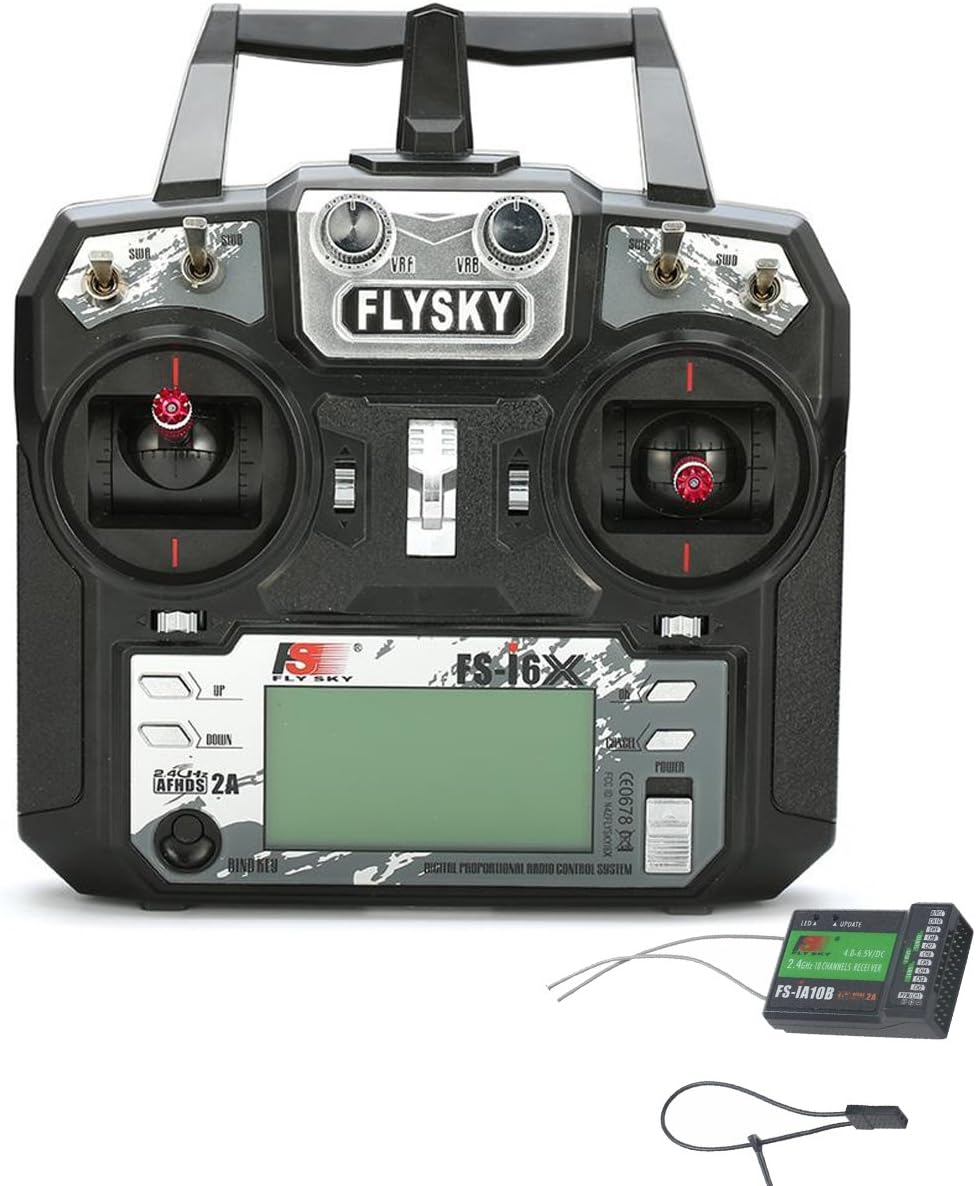
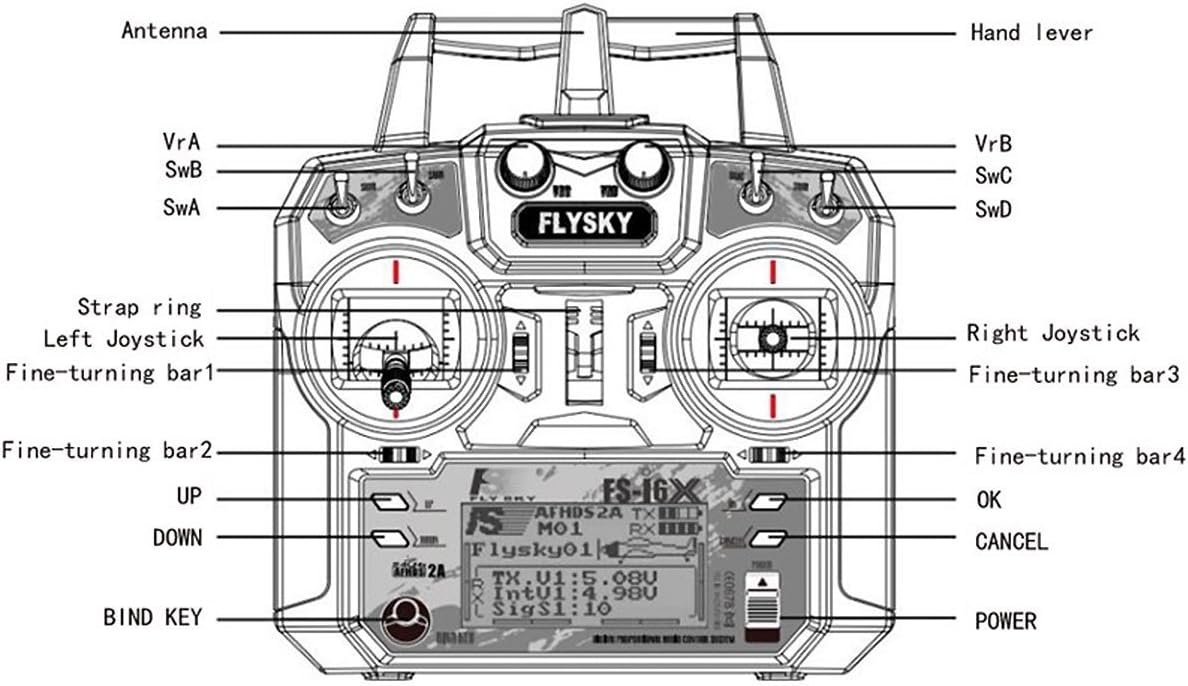
3.1 FS-i6X Transmitter Components
3.2 FS-iA10B Receiver Components

4. Орнотуу
4.1 Батареяны орнотуу (өткөргүч)
The FS-i6X Transmitter requires four (4) AA batteries (1.5V each) for a total of 6V DC power. Ensure correct polarity when inserting batteries.
- Өткөргүчтүн артындагы батарея бөлүкчөсүнүн капкагын ачыңыз.
- Insert four AA batteries according to the polarity markings (+/-) inside the compartment.
- Батарея уясынын капкагын бекем жабыңыз.

4.2 Кабылдагычтын туташуусу
Connect your servos and other control devices to the appropriate channels on the FS-iA10B receiver. Ensure that the power supply for the receiver is within the specified range of 4.0-6.5V DC.
4.3 Милдеттүү жол-жобосу
The FS-i6X transmitter and FS-iA10B receiver are pre-bound from the factory. You do not need to bind them again upon receipt. However, if you need to re-bind or bind to a new receiver, follow these steps:
- Өчүргүч өчүрүлгөнүн текшериңиз.
- Insert the bind plug into the B/VCC port on the FS-iA10B receiver.
- Connect power to the receiver. The receiver's LED should flash rapidly, indicating it is in binding mode.
- While holding down the BIND KEY on the transmitter, turn on the transmitter.
- Release the BIND KEY once the transmitter display shows "RX Binding" or similar.
- The receiver's LED should turn solid, indicating successful binding.
- Кабылдагычты да, өткөргүчтү да өчүрүңүз.
- Кабылдагычтан туташтыргыч сайгычты алып салыңыз.
- Turn on the transmitter first, then the receiver. The system should now be bound and operational.
5. Иштөө нускамалары
5.1 Күйгүзүү/өчүрүү
- Күйгүзүү үчүн: Press and hold the POWER button on the transmitter until the display illuminates.
- Өчүрүү үчүн: Press and hold the POWER button until the display turns off.
5.2 Channel Setup (Enabling 10 Channels)
The FS-i6X transmitter defaults to 6 channels. To enable all 10 channels, follow these steps:
- көпкө басыңыз OK button for 2 seconds to enter the main menu setting.
- Барып, тандаңыз Системаны орнотуу.
- Scroll down to the last item, Aux SWitches (auxiliary switch setting), and select it to enter.
- For switches SwA, SwB, SwC, SwD, set their selection to On аларды активдештируу.
- Change the channel assignment from Ch6 чейин Ch10.
- көпкө басыңыз ЖОК КЫЛУУ button to automatically save the settings and exit the menu.
5.3 Low Voltage Эскертүү
Өткөргүч төмөнкү вольтко ээtage warning system. If the battery voltage drops below 4.2V, an alert will be displayed on the LCD screen, indicating that the batteries need to be replaced or recharged (if using rechargeable batteries).
6. Техникалык шарттар
6.1 FS-i6X RC Transmitter Specifications
| Өзгөчөлүк | Деталь |
|---|---|
| Канал | 6-10 (Демейки 6) |
| Модель түрү | Туруктуу канат/планер/вертолет |
| RF диапазону | 2.408-2.475 ГГц |
| RF күчү | <20дБм |
| RF каналы | 135 |
| өткөрүү жөндөмдүүлүгү | 500KHz |
| 2.4 ГГц системасы | AFHDS 2A/AFDHS |
| Модуляция түрү | GFSK |
| Stick Resolution | 4096 |
| Low Voltage Эскертүү | <4.2V |
| DSC port | PS/2 Port PPM |
| Акы төлөнүүчү | Жок |
| Антеннанын узундугу | 26 мм (кош антенна) |
| Салмагы | 392г |
| Күч | 6V DC 1.5AA*4 |
| Дисплей | STNTransflective Display, LCD 128x64 Lattice, VA 73x39mm, LCD with white backlight |
| Өлчөмү | 174x89x190мм |
| On-line Update | Ооба |
| Түс | Кара |
| Сертификат | CE0678, FCC ID: N4ZFLYSKYI6X |
| Модел | Model 2 (left hand throttle) |
6.2 FS-iA10B Receiver Specifications
| Өзгөчөлүк | Деталь |
|---|---|
| Каналдар | 10 |
| Модель түрү | Туруктуу канат/планер/вертолет |
| RF диапазону | 2.4055-2.475 ГГц |
| RF каналы | 140 |
| RF кабылдагычтын сезгичтиги | -105дБм |
| өткөрүү жөндөмдүүлүгү | 500KHz |
| 2.4 ГГц системасы | AFHDS 2A |
| Модуляция түрү | GFSK |
| Күч | 4.0-6.5В DC |
| Антеннанын узундугу | 26 мм (кош антенна) |
| Салмагы | 17.6г |
| Өлчөмү | 50.6*34.9*14.9мм |
| i-BUS порту | Ооба |
| Маалыматтарды алуу порту | Ооба |
| Түс | Кара |
| Сертификат | CE0678, FCC |
7. Техникалык тейлөө
- Keep the transmitter and receiver clean and free from dust and moisture. Use a soft, dry cloth for cleaning.
- Avoid exposing the devices to extreme temperatures, direct sunlight, or corrosive materials.
- Агып кетүүнүн алдын алуу үчүн өткөргүч узак убакыт бою колдонулбаса, батареяларды алып салыңыз.
- Бардык туташуулардын бекем орнотулгандыгын үзгүлтүксүз текшерип туруңуз.
8. Кыйынчылыктарды
| Көйгөй | Чечим |
|---|---|
| Өткөргүч күйбөйт. | Check battery installation and ensure batteries are fresh or fully charged. Verify correct polarity. |
| Receiver LED flashes rapidly, not binding. | Ensure the bind plug is correctly inserted into the B/VCC port. Confirm the transmitter is in binding mode (holding BIND KEY while powering on). Ensure the receiver is powered. |
| No control response after binding. | Verify that the receiver is receiving power and its LED is solid. Check all servo connections to the receiver. Ensure the transmitter and receiver are within range and not experiencing interference. Re-bind the system if necessary. |
| Only 6 channels are active. | Follow the "Channel Setup (Enabling 10 Channels)" instructions in Section 5.2 to activate all 10 channels. |
| Төмөн үнtage warning on display. | Replace the transmitter batteries immediately. |
9. Support and Online Resources
For further assistance, firmware updates, or additional product information, please visit the official Flysky website. Online communities and forums dedicated to RC hobbies can also provide valuable support and tips.
The FS-i6X supports online updates. Refer to the official Flysky website for instructions on how to perform firmware updates using the provided upgrade cable.


