1. Продукт бүтүп калдыview
The Yaskawa V1000 is a compact, high-performance AC microdrive designed for a wide range of industrial applications. It offers precise motor control, energy efficiency, and ease of use. This manual provides essential information for the safe and effective operation of your V1000 AC Drive.
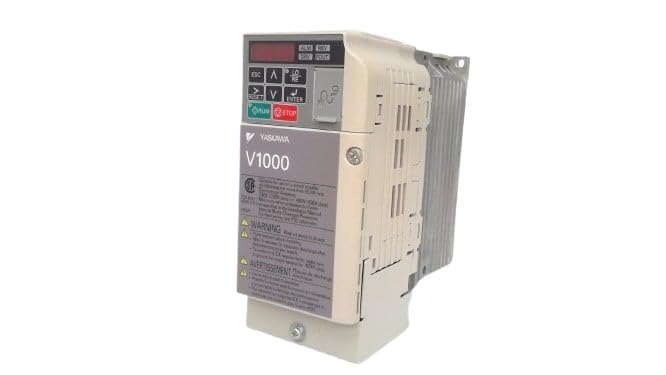
Сүрөт 1: Алдыңкы view of the Yaskawa V1000 AC Drive (Model CIMR-VU2A0006FAA). This image shows the drive's compact design, control panel with display and buttons, and ventilation fins on the side.
2. Коопсуздук маалыматы
WARNING: Risk of electric shock. Ensure power is disconnected before installation or maintenance.
Read this manual thoroughly before installing, operating, or performing maintenance on the V1000 AC Drive. Failure to follow these instructions may result in serious injury or equipment damage.
2.1 Жалпы коопсуздук чаралары
- Бул жабдууларды квалификациялуу персонал гана орнотуп, иштетип жана тейлөөсү керек.
- Do not operate the drive with damaged cables or if the enclosure is open.
- Жергиликтүү электрдик коддорго ылайык туура жерге туташтырууну камсыз кылыңыз.
- Киргизилген томду ырастооtage дисктин мүнөздөмөлөрүнө дал келет.
- Электр энергиясын өчүргөндөн кийин ички компоненттерге дароо тийбеңиз, анткени калдык көлөмtage may be present. Wait for the charge lamp to extinguish.
2.2 Айлана-чөйрөнү коргоо
- Install the drive in a clean, dry, and well-ventilated area.
- Avoid direct sunlight, excessive dust, corrosive gases, and vibrations.
- Иштөө температурасынын диапазону: 0°Cден 50°Cге чейин (32°Fден 122°Fге чейин).
3. Орнотуу
Proper installation and wiring are crucial for the safe and reliable operation of the V1000 AC Drive.
3.1 Монтаждоо
Mount the drive vertically on a flat, stable surface. Ensure adequate clearance for ventilation around the drive (minimum 50mm above and below, 25mm on sides).
3.2 Электр зымдары
Refer to the wiring diagram provided in the full product manual for detailed connections. Key connections include:
- Кубат киргизүү (R/L1, S/L2, T/L3): 3 фазалуу 200-240V AC кубат булагын туташтырыңыз.
- Мотордун чыгышы (U, V, W): Мотордун терминалдарына туташтырыңыз.
- Жер (PE): Connect to a reliable earth ground.
- Башкаруу терминалдары: For external control signals (e.g., run/stop, speed reference, fault output).
Always use appropriate wire gauges and circuit protection devices as specified in local electrical codes and the drive's technical specifications.
4. Operating the V1000 AC Drive
The V1000 drive can be operated via its integrated control panel or external control signals.
4.1 Башкаруу панелинин үстүнөview
The control panel features a digital display and several buttons:
- ESC: Escape/Back button.
- ӨЙДӨ/ТӨМӨН жебелери: Navigate menus, adjust parameters.
- LEFT/RIGHT Arrows: Shift cursor, change digits.
- КИРҮҮ: Confirm selection, enter parameter edit mode.
- ЖҮГҮРҮҮ: Start motor operation.
- ТОКТОТУУ: Stop motor operation.
4.2 Негизги операция кадамдары
- Күйгүзүү: Apply power to the drive. The display will illuminate.
- Параметр орнотуу: Configure essential parameters such as motor data (voltage, current, frequency), acceleration/deceleration times, and control mode (V/f, vector control). Refer to the parameter list in the detailed manual.
- Start Command: басыңыз RUN button on the control panel or activate the external run command.
- Ылдамдыкты жөндөө: Adjust the motor speed using the UP/DOWN arrows (if in local control mode) or via external speed reference.
- Stop Command: басыңыз ТОКТОТ button or deactivate the external stop command.
5. Техникалык тейлөө
Regular maintenance ensures the longevity and optimal performance of your V1000 AC Drive.
5.1 Күнүмдүк текшерүүлөр
- Күнүмдүк: Check for unusual noises, vibrations, or odors. Verify display for error codes.
- Ай сайын: Inspect cooling fans for proper operation and cleanliness. Clean dust from ventilation openings.
- Жыл сайын: Check terminal connections for tightness. Inspect wiring for signs of wear or damage. Measure input/output voltages жана агымдар.
5.2 Тазалоо
Use a soft, dry cloth to clean the exterior of the drive. For internal cleaning (only by qualified personnel with power disconnected), use compressed air to remove dust from heat sinks and circuit boards.
Always disconnect power and wait for the charge lamp to extinguish before performing any maintenance.
6. Кыйынчылыктарды
This section provides common issues and their potential solutions. For complex problems, consult a qualified technician or Yaskawa support.
| Көйгөй | Мүмкүн себеп | Чечим |
|---|---|---|
| Драйвер күйбөйт. | No input power; Blown fuse. | Check power supply; Replace fuse (after identifying cause). |
| Мотор иштебейт. | No run command; Incorrect wiring; Motor fault. | Verify run command; Check motor and drive wiring; Inspect motor. |
| Overcurrent fault (OC). | Motor overload; Short circuit; Rapid acceleration. | Reduce load; Check motor/cables for shorts; Increase acceleration time. |
| Overvoltage fault (OV). | Жогорку кирүү көлөмүtagд) Тез басаңдоо. | Киргизүүнү текшерүү томtage; Increase deceleration time; Install braking resistor if needed. |
7. Техникалык шарттар
Key technical specifications for the Yaskawa V1000 AC Drive (CIMR-VU2A0006FAA):
- Модел: CIMR-VU2A0006FAA
- Сериялар: V1000 AC Drive
- Киргизүү көлөмүtage: 200-240V AC, 3 фазалуу
- Output Voltage: 240V AC
- Номиналдуу чыгаруу ток: 6.0A (Heavy Duty) / 5.0A (Normal Duty)
- Номиналдуу мотор күчү: 1 HP (0.75 кВт)
- Өндүрүүчү: YASKAWA ELECTRIC
- Биринчи жеткиликтүү болгон күнү: 14-февраль, 2025-жыл
8. Кепилдик жана колдоо
For detailed warranty information, please refer to the official Yaskawa warranty statement or contact your authorized Yaskawa distributor.
For technical support, service, or to obtain a full copy of the V1000 technical manual, please visit the official Yaskawa webсайтка же кардарларды тейлөө бөлүмүнө кайрылыңыз.
Yaskawa Electric Corporation
Webсайт: www.yaskawa.com


